
Saitake BT 7002
Saitake BT 7002 スマートフォンジョイスティック ユーザーマニュアル
Model: BT 7002 | Brand: Saitake
1. はじめに
Thank you for choosing the Saitake BT 7002 Smartphone Joystick. This device is designed to enhance your mobile gaming experience by providing precise control and comfortable ergonomics. It connects wirelessly via Bluetooth to your Android smartphone or tablet, offering a seamless gaming experience.
2. セットアップと接続
2.1 初回接続
- ジョイスティックの電源がオフになっていることを確認します。
- を押し続けます 家 button for 5 seconds until the gamepad indicator light begins to flash rapidly (approximately 4 flashes per second). This indicates pairing mode.
- On your Android device, activate Bluetooth and search for available devices.
- Select the gamepad when it appears in your device list to connect.
2.2 後続の接続
- ジョイスティックの電源がオフになっていることを確認します。
- を押し続けます 家 button for 3 seconds until the gamepad indicator light flashes slowly (approximately 2 flashes per second).
- The device will automatically connect to the last paired Android device.

注記: The Saitake BT 7002 requires Bluetooth 2.0 or higher on your Android device. It does not require a driver for installation when connecting and playing. This controller is designed exclusively for Android devices and is not compatible with iOS or PC systems.
3。 動作モード
The Saitake BT 7002 features different operating modes to optimize compatibility with various applications:
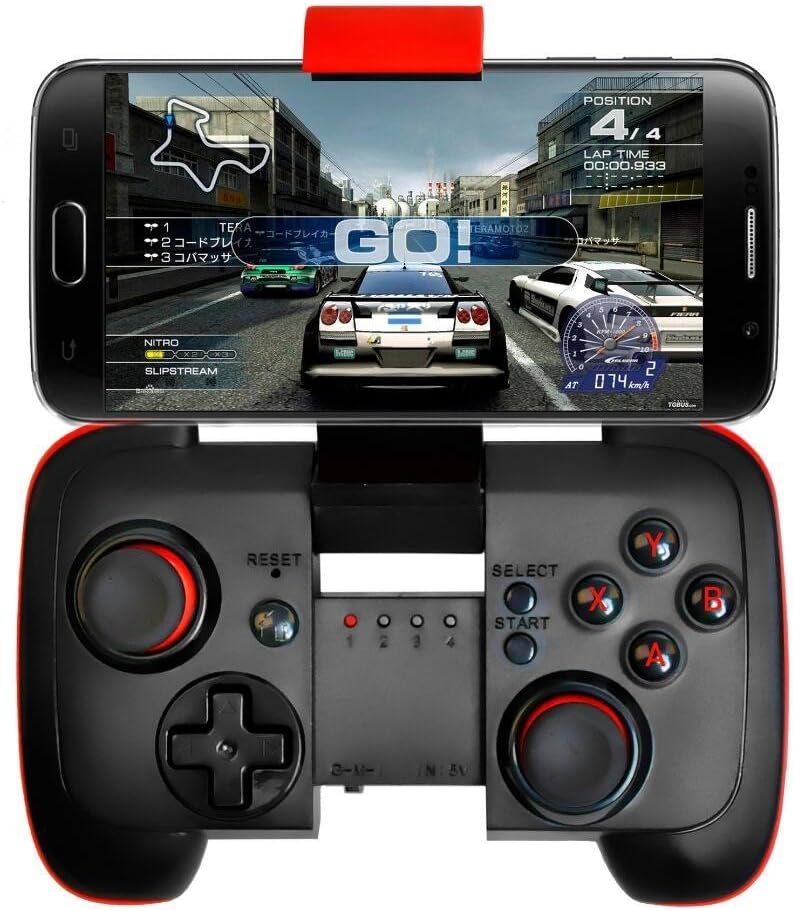
- Gモード: Designed for general Android gaming.
- Mモード: Optimized for Multimedia control.
- I Mode: Intended for specific iOS compatibility (though general product description states no iOS support, this mode might be for specific, limited scenarios or older models. For best results, use with Android as specified).
The controller supports wireless transmission via Bluetooth 2.1, allowing for an operating range of 6-8 meters.
3.1 自動電源オフ
To conserve battery life, the controller will automatically power off if it is not used for 5 minutes.
4. 主な特徴
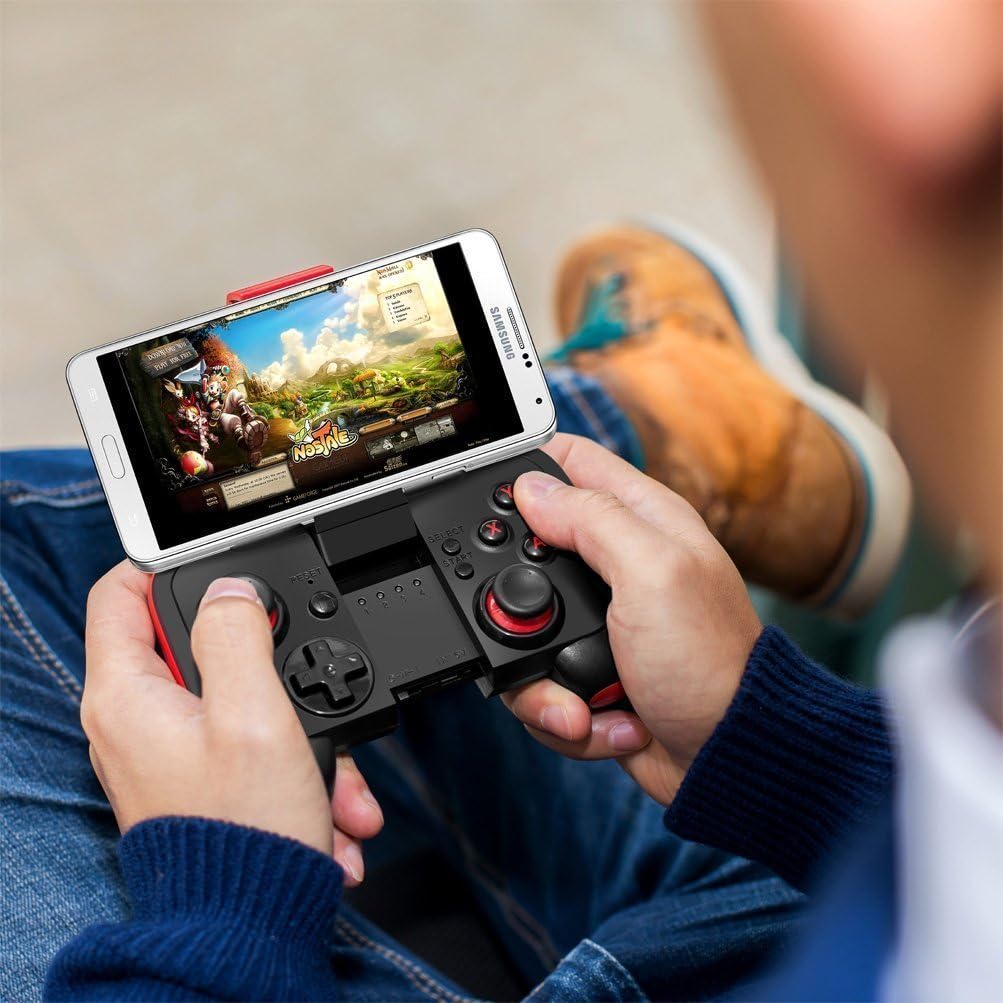
- ポータブルデザイン: Pocket-sized for easy transport during travel.
- 内蔵バッテリー: Features a 300mA built-in lithium battery, providing approximately 5-8 hours of continuous play.
- Adjustable Phone Mount: Accommodates smartphones up to 3.0 inches (7.5 cm) wide, supporting phones with screens smaller than 5.9 inches (15 cm).
- 幅広い互換性: Connects wirelessly to any Android mobile phone, tablet, or VR headset running Android 3.2 or above with Bluetooth 2.0 or higher.
- ドライバー不要: No additional drivers are needed for installation.
- 無線範囲: Offers a wireless transmission range of 6-8 meters.
5. メンテナンス
5.1 バッテリーの充電
When the battery is low, the indicator light may flash or the controller may stop responding. Connect the joystick to a USB power source using a compatible charging cable (not specified if included, typically micro-USB). The indicator light will show charging status and turn off when fully charged.
5.2 清掃と保管
- コントローラーは柔らかく乾いた布で拭いてください。刺激の強い化学薬品や研磨剤入りの洗剤は使用しないでください。
- コントローラーを極端な温度、直射日光、高湿度にさらさないでください。
- コントローラーを使用しないときは、涼しく乾燥した場所に保管してください。
6。 トラブルシューティング
6.1 Controller Not Turning On or Responding
- Ensure the battery is charged. Connect the controller to a power source and allow it to charge for at least 30 minutes before attempting to power it on again.
- If the controller still does not respond, try pressing the リセット button (usually a small pinhole button, refer to diagram if available on product).
6.2 接続の問題
- Android デバイスで Bluetooth が有効になっていることを確認してください。
- Ensure the controller is in pairing mode (rapid flashing for first-time connection, slow flashing for subsequent connections).
- 携帯電話の Bluetooth 設定でデバイスを削除し、再度ペアリングを試みてください。
- Ensure your Android device's operating system is Android 3.2 or above and has Bluetooth 2.0 or higher.
- Remember, this controller is not compatible with iOS or PC systems.
6.3 Games Not Recognizing Controller
- Verify that the game you are playing supports external game controllers. Not all mobile games have controller support.
- コントローラーの設定オプションについては、ゲームの設定を確認してください。
- Ensure the controller is in the correct operating mode (G Mode for most games).
7. 仕様
| モデル | BT7002 |
| 接続性 | ブルートゥース2.1 |
| 電池のタイプ | 1 Lithium Ion (Built-in 300mA) |
| バッテリー寿命 | Approx. 5-8 hours (continuous play) |
| 動作範囲 | 6〜8メートル |
| 互換性のある電話の幅 | 最大3.0インチ(7.5 cm) |
| Supported Phone Screen Size | Below 5.9 inches (15 cm) |
| パッケージ寸法 | 16.6 x 13.4 x 7 cm |
| 重さ | 125グラム |
8. 保証情報
メーカーの公式 website or the product packaging for detailed warranty information. Keep your purchase receipt as proof of purchase for any warranty claims.
9. カスタマーサポート
For technical assistance, troubleshooting, or product inquiries, please contact Saitake customer support through their official webサイトまたは製品パッケージに記載されている連絡先情報をご覧ください。
Ask a question about this manual
Ask about setup, troubleshooting, compatibility, parts, safety, or missing instructions. Manuals+ will review the question and use this page’s manual context to help answer it.