
アバイア 1603-I
Avaya IP Office 500 1603-I IP VOIP 3 Button Display Telephone User Manual
Model: 1603-I | Brand: Avaya
1. はじめに
This manual provides essential information for the setup, operation, maintenance, and troubleshooting of your Avaya IP Office 500 1603-I IP VOIP 3 Button Display Telephone. The Avaya 1603-I is an entry-level IP telephone designed for basic users and is ideal for common areas, stockrooms, lobbies, or drop-in desks.

図1: 前面 view of the Avaya 1603-I IP Phone, showing the display, three programmable buttons, navigation keys, and numeric keypad.
2. セットアップ
Follow these steps to properly set up your Avaya 1603-I IP telephone:
- デバイスを開梱します。 Carefully remove all components from the packaging, including the telephone unit, handset, handset cord, and desk stand.
- デスクスタンドを取り付けます。 Align the desk stand with the slots on the back of the telephone unit and snap it into place. Ensure it is securely attached for stable placement.
- ハンドセットを接続します: Plug one end of the coiled handset cord into the handset and the other end into the designated handset port on the telephone unit.
- ネットワークに接続する: Connect an Ethernet cable from your network switch or router to the LAN port on the back of the telephone. If your network supports Power over Ethernet (PoE), the phone will power on automatically. If PoE is not available, connect an appropriate power adapter (sold separately) to the power port.
- 接続を確認します。 Ensure all cables are securely connected. The phone display should illuminate, indicating it is receiving power and attempting to connect to the network.
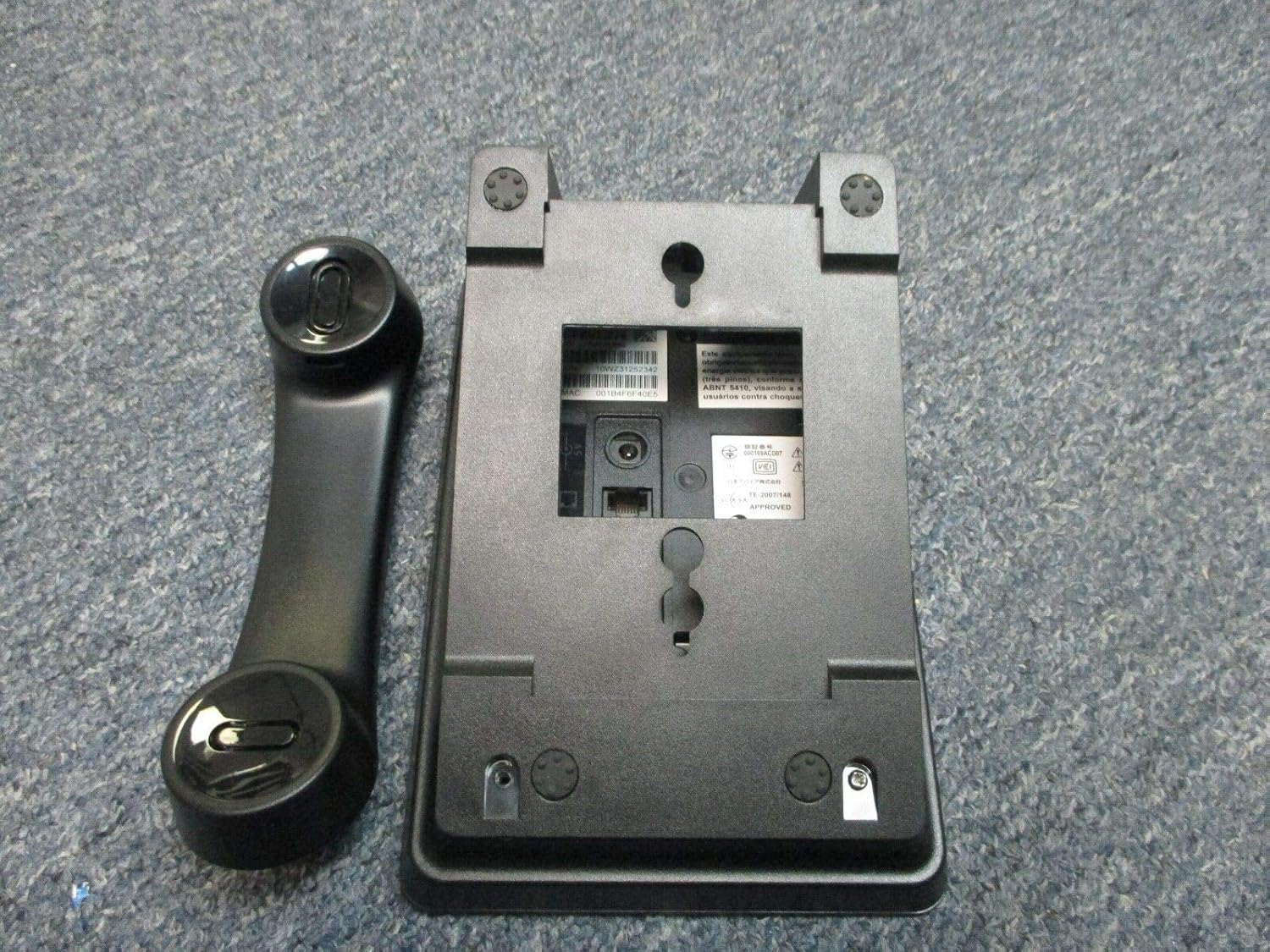
図2:背面 view of the Avaya 1603-I IP Phone, showing the ports for connections and the attachment points for the desk stand.

Figure 3: Close-up of the product label, displaying model number, Avaya ID, serial number, and MAC address, located on the underside of the phone.
3. 操作手順
This section outlines the basic functions and operations of your Avaya 1603-I IP telephone.
3.1 基本的な呼び出し関数
- 電話をかける:
- 受話器を持ち上げるか、を押します スピーカー ボタン。
- 数字キーパッドを使用して希望の番号をダイヤルします。
- を押す # key or wait for the call to connect automatically.
- 電話に出る:
- When the phone rings, pick up the handset or press the flashing line button.
- または、 スピーカー スピーカーフォンモードで応答するためのボタン。
- 通話を終了する:
- 受話器を切るか、 スピーカー スピーカーフォンを使用している場合は、もう一度ボタンを押します。
3.2 Keypad and Button Functions
The Avaya 1603-I features a standard numeric keypad and several dedicated function buttons:
- 画面: 通話情報、メニュー オプション、ステータスを表示します。
- Programmable Buttons (3): Located below the display, these buttons can be configured for line appearances, speed dials, or feature access. Their function is indicated by the display.
- ナビゲーションキー: Used to scroll through menus and options on the display.
- ホールド: 現在の通話を保留にします。
- 会議: 電話会議を開始します。
- 移行: Transfers an active call to another extension or external number.
- リダイヤル: 最後にかけた番号をダイヤルします。
- メニュー: Accesses the phone's menu options for settings and features.
- スピーカー: スピーカーフォン モードのオン/オフを切り替えます。
- ボリューム: Adjusts the volume for the handset, speakerphone, or ringer.
- ミュート: 通話中にマイクをミュートします。
4. メンテナンス
Proper maintenance ensures the longevity and optimal performance of your Avaya 1603-I IP telephone.
- クリーニング: 柔らかく、少し硬めのamp cloth to clean the phone's surface. Avoid using abrasive cleaners, solvents, or strong chemicals, as these can damage the plastic and electronic components.
- ほこりの除去: Regularly wipe down the phone to prevent dust buildup, especially around the keypad and display.
- 環境条件: Keep the phone in a dry environment, away from direct sunlight, excessive heat, and moisture. Do not expose the phone to extreme temperatures.
- ケーブル管理 Ensure all cables are not kinked or strained, which can lead to damage over time.
5。 トラブルシューティング
If you encounter issues with your Avaya 1603-I IP telephone, refer to the following common problems and solutions:
| 問題 | 考えられる原因 | 解決 |
|---|---|---|
| No dial tone or phone not powering on. | No power (PoE or power adapter), loose network cable. | Check Ethernet cable connection to the LAN port. Ensure PoE is active on the network port or connect a compatible power adapter. |
| ディスプレイが空白または判読不能です。 | Power issue, phone frozen, display settings. | Perform a power cycle (unplug and re-plug the Ethernet cable/power adapter). Check if the phone is receiving power. |
| 電話をかけることも受けることもできません。 | Network connectivity issue, incorrect configuration. | Verify network cable connection. Contact your IT administrator or service provider to check network settings and phone registration. |
| Poor audio quality (static, echo). | Faulty handset cord, network congestion, environmental interference. | Ensure handset cord is securely connected. Try adjusting volume. If issue persists, contact IT support. |
For more complex issues, please contact your system administrator or Avaya support.
6. 仕様
The following are the technical specifications for the Avaya IP Office 500 1603-I IP VOIP 3 Button Display Telephone:
- モデル: 1603-I
- ブランド: アバイア
- 製品寸法: 10 x 10 x 6インチ
- 色: 黒
- 電話の種類: 有線
- 電源: コード式電気(PoE対応)
- ダイヤラーのタイプ: シングルキーパッド
- 複数行の操作: 複数回線操作
- 発信者の識別: いいえ
- 応答システムのタイプ: デジタル (Note: This feature typically refers to network-based voicemail services rather than an integrated answering machine for this IP phone model.)
- 記録容量: 22 minutes (Note: This capacity is typically for network-based voicemail recordings.)
- メーカー: アバイア株式会社
- ASIN: B078HP75RY
7. 保証とサポート
For information regarding the warranty of your Avaya IP Office 500 1603-I IP VOIP 3 Button Display Telephone, please refer to the documentation provided at the time of purchase or contact your vendor. Warranty terms and conditions are typically provided by the manufacturer, Avaya Inc., or the authorized reseller.
For technical support, configuration assistance, or advanced troubleshooting, please contact your organization's IT department or your Avaya authorized service provider. Ensure you have your product's model number (1603-I) and serial number (found on the product label, see Figure 3) ready when seeking support.
Ask a question about this manual
Ask about setup, troubleshooting, compatibility, parts, safety, or missing instructions. Manuals+ will review the question and use this page’s manual context to help answer it.