
1. はじめに
This manual provides detailed instructions for the assembly, installation, operation, and maintenance of your Five Star Outdoor 4K HDTV Antenna. This antenna is designed to receive digital television (DTV), VHF, UHF, and FM radio signals, offering high-definition reception with a motorized 360-degree rotation feature and an infrared remote control. It includes an Auto Gain Control amplifier and an LTE filter for enhanced signal quality.
2. 安全情報
- 電気安全: Always exercise caution when working with electrical components. Ensure all power is disconnected before making any connections.
- 屋外設置: When installing the antenna outdoors, avoid contact with power lines, utility wires, or other electrical hazards. Use a sturdy ladder and ensure stable footing.
- 取付安定性: Securely mount the antenna to prevent it from falling due to wind or other environmental factors. Use appropriate mounting hardware for your chosen surface.
- 気象条件: Avoid installation during adverse weather conditions such as strong winds, rain, or lightning.
- ケーブル管理 Route coaxial cables safely to prevent tripping hazards and protect them from damage.
3. パッケージ内容
組み立てを始める前に、すべてのコンポーネントが揃っていることを確認してください。
- Five Star Outdoor HDTV Antenna Unit
- Motorized Rotator Base
- 赤外線リモートコントロール
- Control Box (Power Supply/Signal Amplifier)
- J-Pole Mounting Kit
- 40フィート同軸ケーブル
- 4-way Coaxial Splitter
- 15pcs Cable Clips
- コントロールボックス用電源アダプター

Image 3.1: Main components including the antenna, control box, and remote control.
4. 組み立て手順
Follow these steps to assemble your Five Star Outdoor HDTV Antenna:
- コンポーネントを解凍します: パッケージからすべての部品を慎重に取り出します。
- Assemble Antenna Elements: Attach the various antenna elements (VHF and UHF) to the main boom of the antenna. Ensure they are securely fastened according to the diagrams. The antenna features additional UHF elements and larger VHF elements for improved reception.
- Attach Reflector Panels: Secure the reflector panels to the rear of the antenna structure. These panels enhance signal gain.
- Connect Motorized Base: Attach the motorized rotator base to the main antenna assembly. Ensure the connection is firm.
- Connect Coaxial Cable to Antenna: Connect one end of the coaxial cable to the F-connector on the motorized base of the antenna. Ensure the connection is finger-tight, but do not overtighten. Leave enough slack in the cable near the rotator to allow for 360-degree rotation without strain.

画像4.1: View of the antenna elements and their assembly onto the main boom.
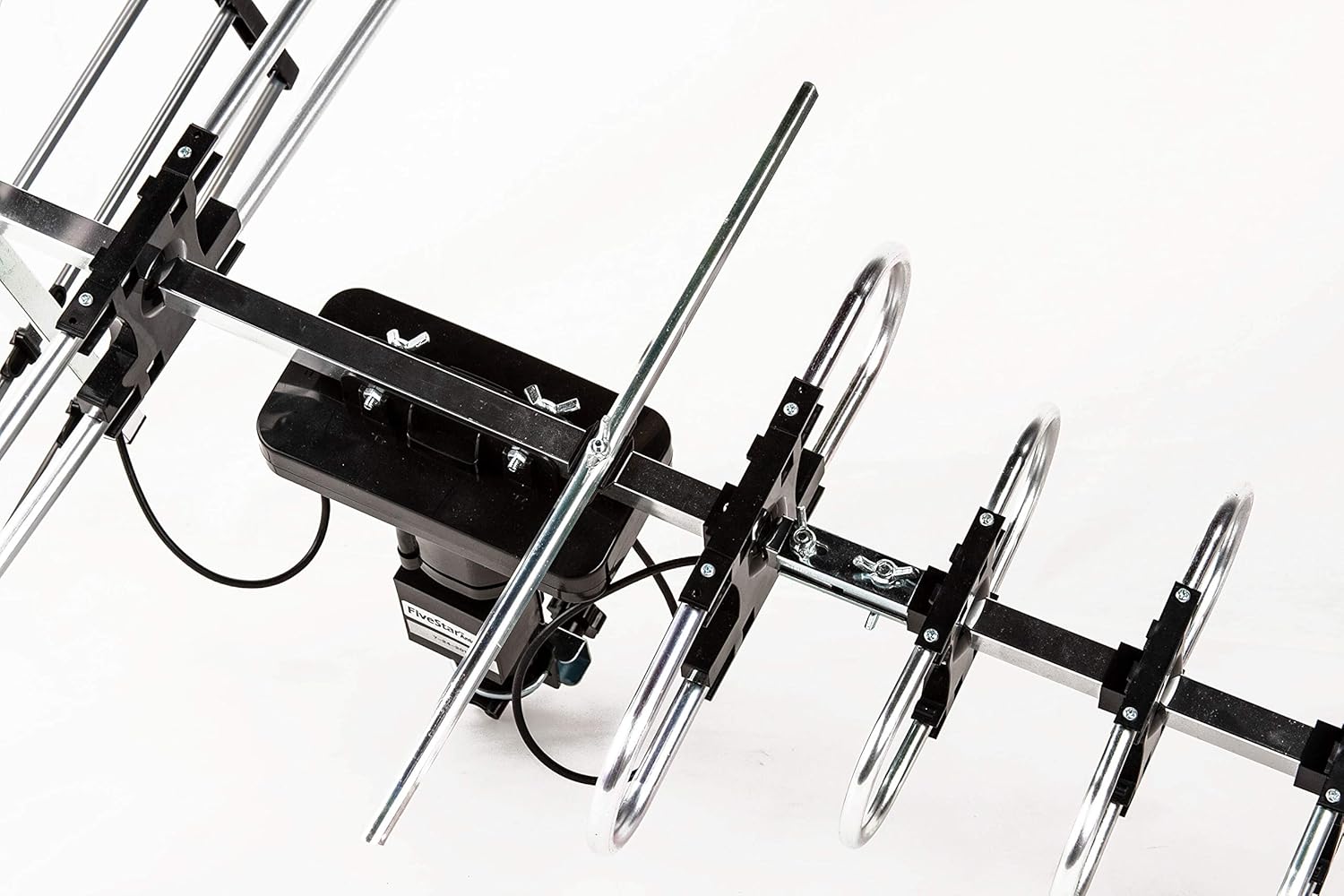
画像4.2: 詳細 view of how antenna elements are secured.

Image 4.3: The F-connector on the antenna base where the coaxial cable connects.

Image 4.4: The motorized base of the antenna, illustrating the 360-degree rotation capability. Note the caution regarding cable slack for rotation.
5.インストールガイド
最適な信号受信には適切な設置が不可欠です。
- Mount the J-Pole: Secure the J-Pole to a stable outdoor surface, such as a roof, wall, or mast, ensuring it is vertical and robust enough to support the antenna in all weather conditions.
- Attach Antenna to J-Pole: Mount the assembled antenna onto the J-Pole using the provided clamps and hardware. Ensure it is tightly secured.
- Route Coaxial Cable: Carefully route the 40ft coaxial cable from the antenna to the location of your TV(s) and the control box. Use the provided cable clips to secure the cable and prevent damage.
- コントロールボックスに接続します: Connect the coaxial cable from the antenna to the 'ANT IN' port on the control box.
- Connect to TV(s):
- For one TV: Connect a coaxial cable from the 'TV1' or 'RF IN/TV2' port on the control box directly to the 'Antenna In' or 'RF In' port on your television.
- For two TVs: Use the provided 4-way coaxial splitter. Connect a short coaxial cable from the 'TV1' or 'RF IN/TV2' port on the control box to the input of the splitter. Then, connect two separate coaxial cables from the splitter's outputs to the 'Antenna In' or 'RF In' ports on each of your two televisions.
- Power the Control Box: Plug the power adapter into the 'AC IN' port on the control box, then plug the adapter into a standard electrical outlet. The power indicator light on the control box should illuminate.

Image 5.1: Diagram illustrating how to connect the antenna to the control box and then to one or two televisions.
6. 操作手順
Once installed, follow these steps to operate your antenna:
- 電源オン: Ensure the control box is powered on. The power LED should be lit.
- テレビ入力を選択: On your television, select the correct input source (e.g., 'Antenna', 'TV', 'Air') to receive over-the-air broadcasts.
- チャンネルをスキャン: Access your TV's menu and navigate to the 'Channel Scan' or 'Auto Program' function. Initiate a full channel scan. This process may take several minutes.
- アンテナの方向を調整します: Use the infrared remote control to rotate the antenna. Point the remote at the control box and press the 'Control' button. The antenna will rotate 360 degrees. Observe your TV screen for signal strength and picture quality as the antenna rotates. Stop rotation when you achieve the best possible reception for your desired channels. You may need to perform multiple scans at different antenna orientations to find all available channels.
- 自動ゲイン制御: The built-in Auto Gain Control (AGC) automatically adjusts the signal amplification (15-35db) to optimize reception, preventing signal overload in strong signal areas and boosting weak signals in distant areas.
- LTE Filter: The integrated LTE filter helps to reduce interference from 4G/5G cellular signals, ensuring clearer digital TV reception.

Image 6.1: The control box and its infrared remote control, used for rotating the antenna and managing signal.

画像6.2: 内部 view of the control box highlighting the smart chip, AGC, LTE filter, and support for 4K DTV/VHF/UHF signals.
7. メンテナンス
To ensure long-term performance of your outdoor antenna:
- 定期点検: Annually inspect the antenna, mounting hardware, and coaxial cables for any signs of wear, corrosion, or damage.
- 清潔さ: Gently clean the antenna elements if they accumulate excessive dirt, dust, or debris, which can affect signal reception. Use a soft cloth and mild detergent if necessary.
- ケーブルの完全性: Check coaxial cable connections for tightness and ensure the cable jacket is intact to prevent water ingress.
- 風の抵抗: The antenna is designed with special wind-proof features, but ensure it remains securely mounted after severe weather.
8。 トラブルシューティング
アンテナに問題が発生した場合は、次の一般的な問題と解決策を参照してください。
| 問題 | 考えられる原因 | 解決 |
|---|---|---|
| 信号がない、または画質が悪い | Incorrect TV input, loose cable connections, antenna not aimed correctly, interference, TV not scanned for channels. | Ensure TV input is 'Antenna/Air'. Check all coaxial cable connections. Use the remote to rotate the antenna and rescan for channels at different orientations. Check for local interference sources. |
| Antenna rotation not working | Control box not powered, remote control battery low, remote not aimed at control box, cable snag. | Verify control box power. Replace remote batteries. Ensure direct line of sight between remote and control box. Check for any obstructions or tight cables preventing rotation. |
| Fewer channels than expected | Antenna not optimally aimed, incomplete channel scan, geographical limitations. | Perform multiple channel scans after rotating the antenna to different directions. Consult online resources for local broadcast tower locations to aid in aiming. |
| 断続的な信号損失 | Weather conditions, nearby obstructions (e.g., trees, buildings), loose connections. | Check all connections. Consider antenna relocation if obstructions are significant. Signal can be affected by severe weather. |
9. 仕様
| 特徴 | 詳細 |
|---|---|
| モデル番号 | FSA-1806NK |
| 製品寸法 | 17 x 8 x 7インチ |
| アイテム重量 | 4.97ポンド |
| アンテナタイプ | Outdoor, Directional, Motorized |
| 周波数範囲 | 45-860MHz (UHF/VHF/FM) |
| 得 | 15-35dB (Auto Gain Control) |
| インピーダンス | 75オーム |
| 回転 | 360 Degree Motorized with Infrared Remote Control |
| サポートされている解像度 | 4K HD TV, 1080p, 1080i, 720p |
| チャンネル数 | Up to 100+ local channels (dependent on location) |
| 欧州連合 | 840449111000 |
10. 保証とサポート
For warranty information, technical support, or customer service inquiries, please refer to the manufacturer's official web購入サイトから購入するか、カスタマーサポートに直接お問い合わせください。購入証明書としてレシートを保管してください。