
導入
Thank you for choosing the Capello Extra Large Display Digital Alarm Clock. This manual provides detailed instructions to help you set up, operate, and maintain your new alarm clock. Designed for clarity and ease of use, this clock features a large digital display and a stylish wood-grain finish, making it a perfect addition to any bedroom or living space.
製品終了view
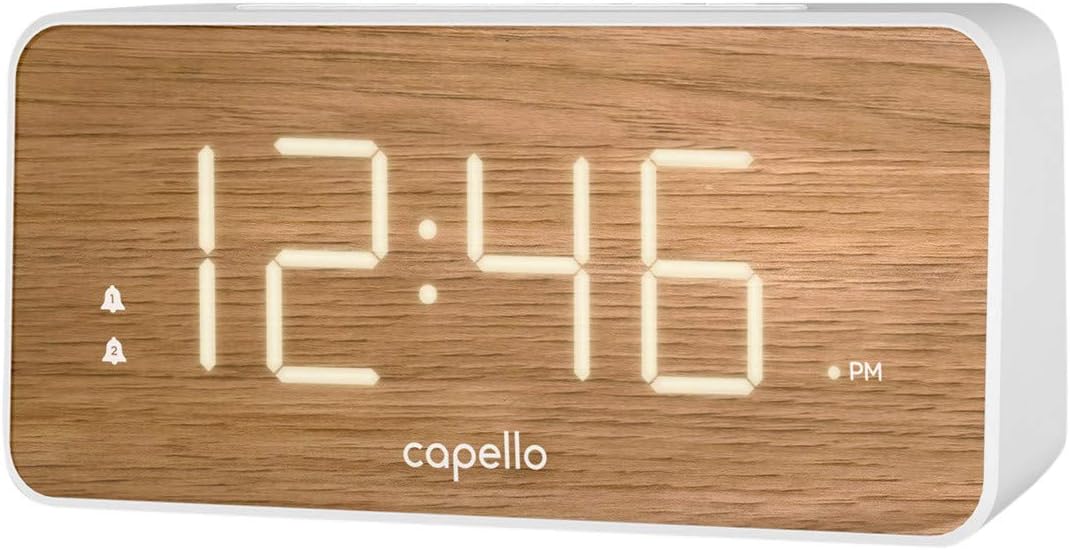
The Capello Digital Alarm Clock (Model: 43213-14795) features an extra-large digital display for easy readability from across the room. Its elegant white and pine D-frame design with a wood-grain finish complements various interior styles. The clock is equipped with intuitive controls for setting time and alarms, ensuring a user-friendly experience.
設定
電源接続
The alarm clock requires a continuous power supply via its included AC adapter for full functionality. Insert the adapter into a standard wall outlet and connect it to the clock's power input port. For backup during power outages, install 2 AAA batteries (not included) into the battery compartment located on the underside of the unit. These batteries will preserve time and alarm settings but will not power the display or alarm functions during an outage.
時間の設定
- を押し続けます 時間設定 button (or similar button, refer to specific button labels on your unit) until the hour digits begin to flash.
- 使用 時間 ボタンを押して時間を調整します。AM/PMインジケーターにご注意ください。
- を押す 時間設定 もう一度ボタンを押すと、分の数字に移動します。
- 使用 分 議事録を調整するボタン。
- プレス 時間設定 もう一度押して確認し、時間設定モードを終了します。
アラームを設定する
This clock supports dual alarms.
- を押し続けます アラーム1 アラームの時間の数字が点滅するまでボタンを押します。
- 使用 時間 そして 分 ボタンを押して、アラーム 1 の希望のアラーム時刻を設定します。
- プレス アラーム1 again to confirm. The alarm indicator for Alarm 1 will illuminate.
- 手順1~3を繰り返します アラーム2 if a second alarm is desired.
- To activate/deactivate an alarm, simply press the corresponding アラーム1 or アラーム2 button. The alarm indicator will show its status.
操作手順
スヌーズ機能
アラームが鳴ったら、大きな スヌーズ button located on the top of the clock. This will temporarily silence the alarm for approximately 9 minutes, allowing for extra rest. The alarm will sound again after the snooze period ends.
アラームを止める
アラームが鳴った後に完全に停止するには、対応する アラーム1 or アラーム2 button. The alarm indicator will turn off, signifying that the alarm is deactivated for the next day.
ディスプレイの明るさ
The display brightness can be adjusted to suit your preference. Locate the ライト or ディマー button (often represented by a sun icon) on the top panel. Press this button repeatedly to cycle through different brightness levels (e.g., High, Medium, Low, Off).
メンテナンス
To ensure the longevity and optimal performance of your Capello Digital Alarm Clock, follow these simple maintenance guidelines:
- クリーニング: Wipe the clock's surface with a soft, dry cloth. Do not use abrasive cleaners, waxes, or solvents as they may damage the finish.
- 配置: 時計は直射日光、熱源、過度の湿気を避け、安定した平らな場所に置いてください。
- バッテリー交換: バックアップ電池は毎年交換するか、停電時にディスプレイが暗くなる兆候が見られる場合は交換してください。tage. 新しい電池を挿入するときは、極性が正しいことを確認してください。
トラブルシューティング
目覚まし時計に問題が発生した場合は、次の一般的な問題と解決策を参照してください。
| 問題 | 考えられる解決策 |
|---|---|
| ディスプレイが空白または暗い。 | Ensure the AC adapter is securely plugged into both the clock and a working wall outlet. Check the display brightness setting using the LIGHT/DIMMER button. |
| アラームは鳴りません。 | Verify that the alarm is activated (alarm indicator is lit). Ensure the alarm time is set correctly (AM/PM). Check if the volume is set to an audible level. |
| 時間が間違っています。 | Reset the time following the 'Setting the Time' instructions. If using backup batteries, ensure they are fresh and correctly installed. |
| ボタンが反応しません。 | Unplug the AC adapter, remove backup batteries, wait for 1 minute, then reconnect power. This performs a soft reset. |
仕様
- ブランド: カペッロ
- モデル番号: 43213-14795
- 色: 白
- 表示タイプ: デジタル
- スタイル: モダンな
- 特集: Large Display, Alarm
- 製品寸法: 幅8.74インチ x 高さ5.83インチ
- 電源: AC電源(設定用のバッテリーバックアップ付き)
- 材料: プラスチック
- 商品の重量: 1.01 ポンド
公式製品ビデオ
現時点ではこの商品について販売者からの公式製品ビデオはありません。
保証とサポート
For warranty information and customer support, please refer to the manufacturer's official documentation included with your product or visit the Capello webサイト。 保証請求に備えて購入時のレシートを保管しておいてください。


