
1。 オーバーview
The TENKER 9.5" Portable DVD Player is designed for on-the-go entertainment, featuring a swivel screen, long-lasting rechargeable battery, and support for various media formats. Its compact design and versatile features make it suitable for diverse environments.
- Up to 5 hours of playback with the built-in rechargeable battery.
- Supports CD, DVD, CD-R/RW, DVD -R/+R, DVD+RW/-RW, VCD, SVCD, MP3/WMA/WAV, JPEG, MPEG2/AVI/DIVX, and TXT formats.
- 270-degree rotating and 180-degree flipping screen for flexible view角度を変える。
- USB port and SD card slot for digital media playback.
- Break-point memory function to resume playback from where you left off.
2. パッケージ内容
Please verify that all items are present in the package upon unboxing.
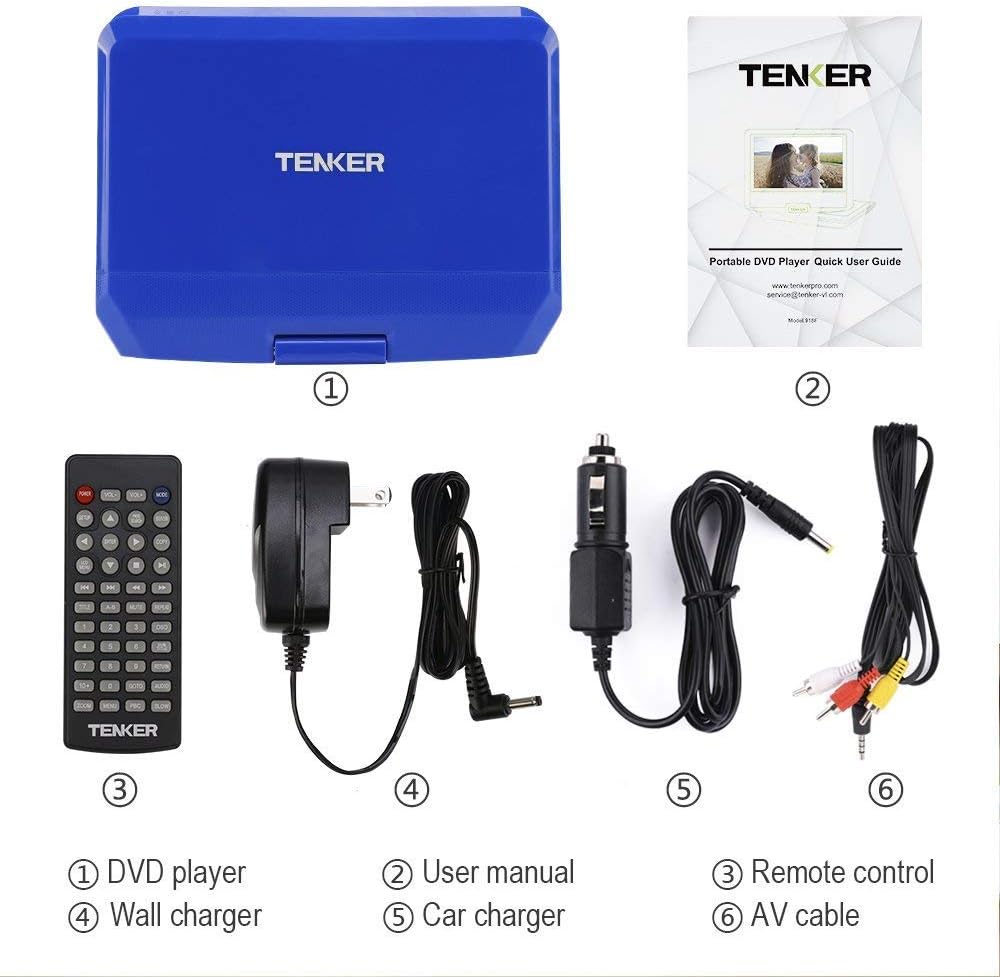
Image showing the TENKER Portable DVD Player, remote control, power adapters, and cables.
- TENKER 9.5" Portable DVD Player
- リモートコントロール
- AC Power Adapter (Wall Charger)
- カーチャージャー
- AVケーブル
- ユーザーマニュアル(クイックユーザーガイド)
3 製品の特徴
3.1. Swivel Screen
The 9.5-inch LCD screen can rotate 270 degrees and flip 180 degrees, allowing for multiple viewing positions. This feature is useful for sharing the screen or mounting the player in a vehicle.

Image illustrating the 270-degree rotation and 180-degree flip capabilities of the screen.
3.2. マルチフォーマットサポート
The player supports a wide range of disc formats including CD, DVD, CD-R/RW, DVD -R/+R, DVD+RW/-RW, VCD, and SVCD. It also supports digital media files such as MP3/WMA/WAV (audio), JPEG (images), MPEG2/AVI/DIVX (video), and TXT (text) via USB and SD card.

Image detailing the various ports and supported media formats, including USB, SD card, 3.5mm audio, AV out/in, and charging port.
3.3. ラストメモリー機能
The break-point memory function automatically saves your playback position, allowing you to resume watching a movie or listening to audio from where you left off, even after powering off the device.
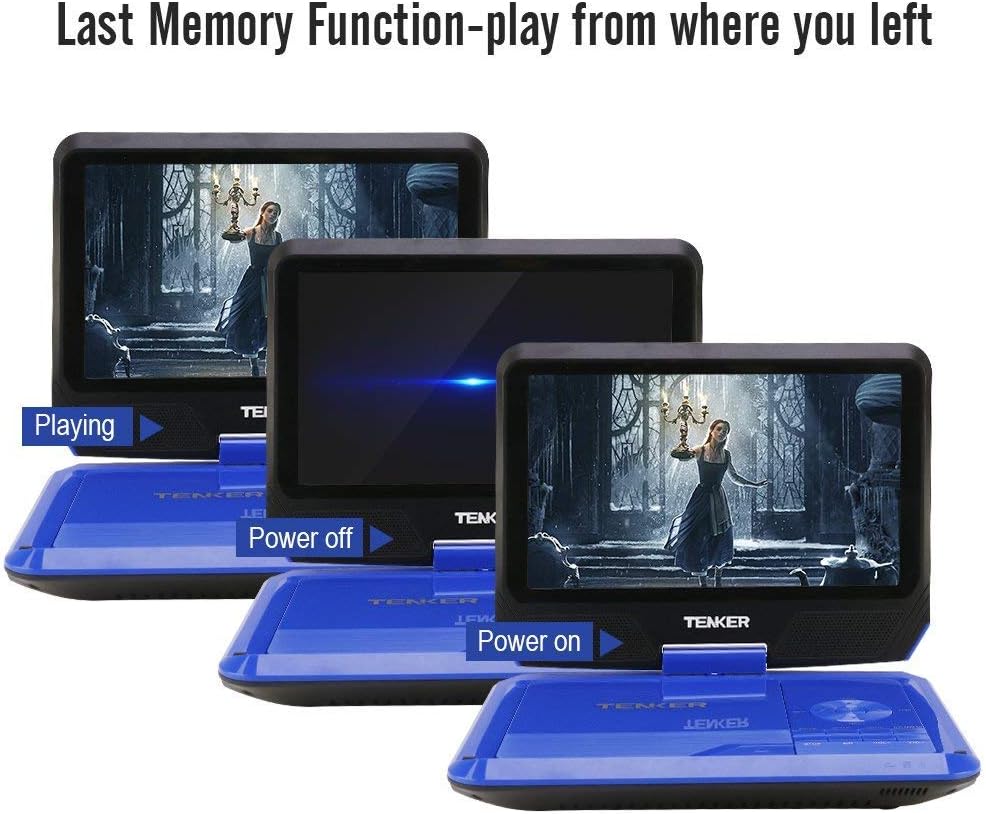
Image demonstrating the last memory function, showing the player resuming playback after being powered off and on.
4. セットアップ
4.1. 初期充電
Before first use, fully charge the portable DVD player using the provided AC power adapter or car charger. The charging indicator light is located on the side of the device and will illuminate when charging.

Image showing the power adapter and car charger connections, highlighting the rechargeable battery.
4.2. DVDの挿入
- ディスクカバーをゆっくり持ち上げて開きます。
- Gently place the DVD onto the spindle, ensuring it clicks into place.
- Close the disc cover securely until it latches.
4.3.電源のオン/オフ
Locate the power switch on the side of the device. Slide it to the "ON" position to power on. Slide it to "OFF" to power off.
5. 操作手順
5.1. 基本的な再生
After inserting a disc and powering on, the player will typically begin playback automatically. Use the control buttons on the player or the remote control for functions like Play, Pause, Stop, Next, Previous, Volume Up/Down, and Menu.
5.2. テレビに接続する
Use the supplied AV cable to connect the portable DVD player to a television. Connect the yellow, white, and red plugs from the AV cable to the corresponding input jacks on your TV. This allows you to view コンテンツをより大きな画面で表示します。

Image demonstrating how to connect the portable DVD player to a television using the AV cable.
5.3. USB and SD Card Playback
Insert a USB flash drive into the USB port or an SD card into the SD card slot. Use the "Mode" button on the player or remote to select the USB or SD card input. Navigate through your digital media files using the directional buttons and select to play.
5.4. リモコンの使用
The remote control provides full functionality for operating the DVD player from a distance. It includes buttons for playback control, menu navigation, volume adjustment, and setup options.
5.5. 画面調整
The screen's swivel and flip features allow for optimal viewing angles. Adjust the screen as needed for personal viewing or shared viewing。

Image showing the portable DVD player being used in different environments like a bedroom, kitchen, office, outdoors, and in a car.
5.6. 公式製品ビデオ
Video demonstrating the unboxing, setup, and basic operation of the TENKER Portable DVD Player.
6. メンテナンス
6.1. 清掃
プレーヤーの外装は、柔らかく乾いた布で拭いてください。画面には、電子機器の画面専用の柔らかく糸くずの出ない布を使用してください。液体クリーナーや研磨剤は使用しないでください。
6.2. バッテリーのお手入れ
To prolong battery life, avoid fully discharging the battery frequently. Charge the device regularly, even if not in use for extended periods. Store the player in a cool, dry place.
7。 トラブルシューティング
7.1.ノーパワー
- Ensure the power adapter is securely connected and the power switch is in the "ON" position.
- Check if the battery is charged. Connect to power and observe the charging indicator light.
7.2. Disc Not Playing
- ディスクがラベル面を上にして正しく挿入されていることを確認します。
- ディスクがきれいで、傷や汚れがないかどうかを確認します。
- Ensure the disc format is supported by the player (CD, DVD, etc.).
7.3. テレビに画像が映らない
- Confirm the AV cable is correctly connected to both the player and the TV.
- Select the correct input source (AV, Video 1, etc.) on your television.
7.4.音が出ない
- プレーヤーの音量を調整し、ミュートされていないことを確認します。
- 外部スピーカーまたはヘッドフォンを使用する場合は、それらが正しく接続され、機能していることを確認してください。
8. 仕様
| 特徴 | 詳細 |
|---|---|
| ブランド | テンカー |
| モデル番号 | MP0746 |
| 画面サイズ | 9.5インチ |
| 表示タイプ | 液晶 |
| メディアタイプ | CD、DVD、SVCD、VCD |
| アイテム重量 | 2.9ポンド |
| 製品寸法 | 36.2 x 22.3 x 7.5インチ |
| 色 | 青 |
9. 保証とサポート
For warranty information or technical support, please refer to the contact details provided in the Quick User Guide included with your product or visit the official TENKER webサイト。