
1.製品オーバーview
The KWANWA KW715S is a versatile 2-in-1 device functioning as both a digital alarm clock and an indoor thermometer. Designed for portability and ease of use, it features a clear digital display, adjustable brightness, and long-lasting battery operation. Simply flip the device to switch between time and temperature display modes.

2. セットアップ
2.1 バッテリーの取り付け
The KWANWA KW715S operates on 単2アルカリ電池XNUMX本 (not included). Ensure correct polarity when inserting the batteries into the compartment located on the back of the device.

2.2 初期時間設定
- を押し続けます 時間設定 button (located on the back) for 2 seconds until the hour digits begin to flash.
- 使用 時間 そして 分 時間を調整するボタン。
- プレス 時間設定 もう一度押して確認し、時間設定モードを終了します。
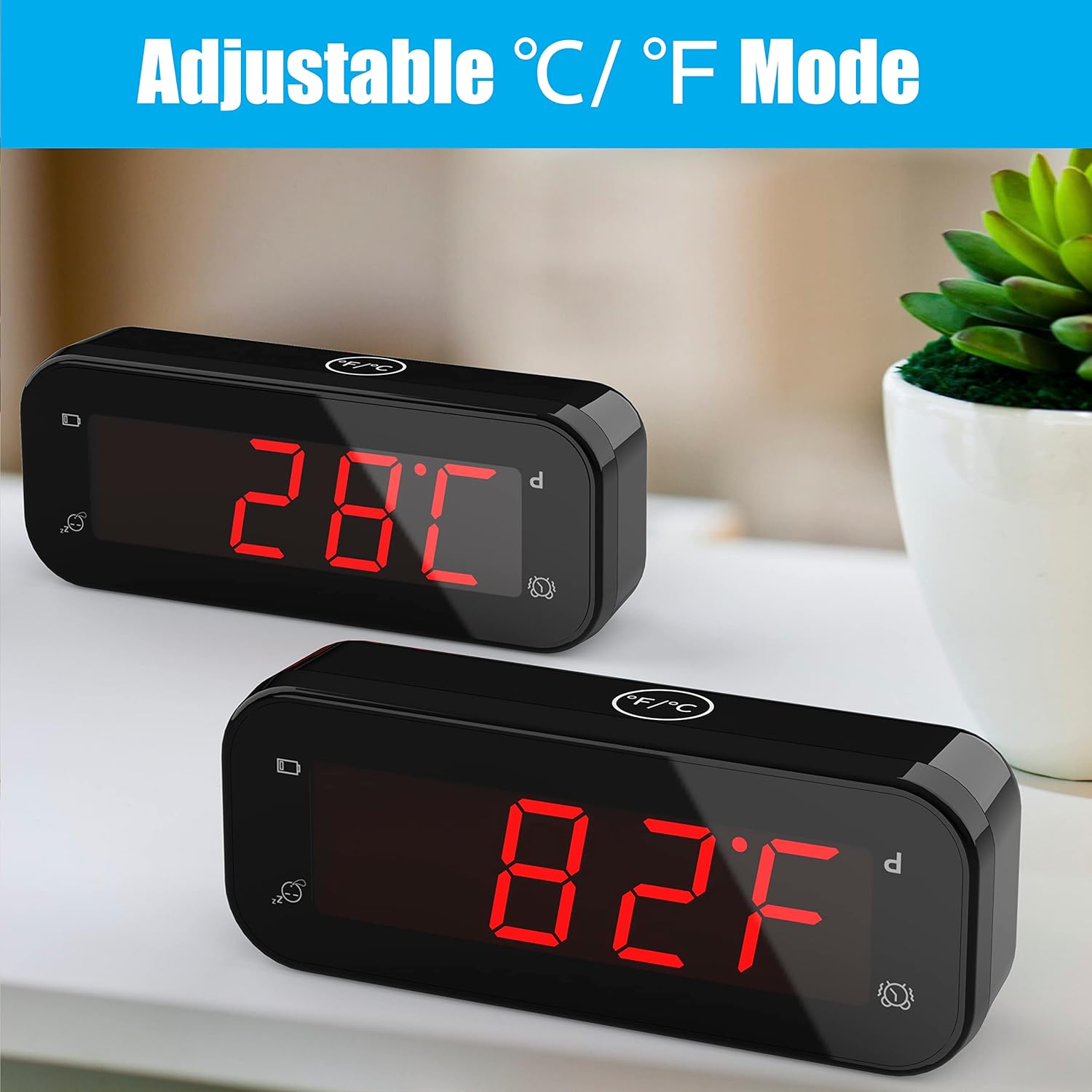
2.3 温度単位の選択(°C/°F)
The device allows you to switch between Celsius (°C) and Fahrenheit (°F) display modes. This can be done by flipping the clock over to display temperature, then using the dedicated °C/°F button if available, or by following specific instructions in the operating section.
3. 操作手順
3.1アラームの設定
- を押し続けます ALセット button (on the back) for 2 seconds until the alarm hour digits flash.
- 使用 時間 そして 分 ボタンを押して希望のアラーム時間を設定します。
- プレス ALセット もう一度押して確定し、アラーム設定モードを終了します。
3.2アラームのオン/オフ
使用 ALオン/オフ switch (on the back) to activate or deactivate the alarm. When the alarm is active, an alarm icon will appear on the display.
3.3スヌーズ機能
When the alarm sounds, gently touch the large スヌーズ button on the top of the clock. This will temporarily silence the alarm for 7 minutes. The snooze function can be repeated up to 3 times.

3.4 明るさ調整可能
を押す 時間設定 button for 2 seconds to cycle through 3 levels of brightness: low, middle, and high. The clock also features an automatic night mode, which dims the display between 8:00 PM and 6:00 AM to create a peaceful sleeping environment.

3.5 Switching Between Time and Temperature
To switch between displaying the time and the indoor temperature, simply flip the alarm clock upside down. The display will automatically change to show the current indoor temperature.

3.6 12-Hour / 24-Hour Mode
The clock supports both 12-hour and 24-hour time formats. Refer to the buttons on the back for the specific button to toggle between these modes (e.g., a dedicated 12/24時間 ボタン)。
4. メンテナンス
4.1 電池の交換
The device features a low battery indicator. When this indicator appears, it is time to replace the 2x AA alkaline batteries to ensure continuous operation and accurate readings. The improved design allows batteries to last over 1 year.
4.2 クリーニング
To clean the clock, use a soft, dry cloth. Avoid using abrasive cleaners or solvents, as these may damage the display or casing.
5。 トラブルシューティング
- ディスプレイのちらつき: If you observe flickering in videos of the product, please note that this is often an artifact of video recording and not indicative of actual product performance. The display is stable in real-life use.
- アラームが鳴らない: 確実に ALオン/オフ switch is in the 'ON' position. Verify that the alarm time is correctly set. Check the battery level and replace batteries if the low battery indicator is active.
- Incorrect Time/Temperature: Re-set the time following the instructions in Section 2.2. For temperature, ensure the device is placed in a stable indoor environment away from direct heat sources or drafts for accurate readings.
- 低バッテリーインジケーター: This icon signals that the batteries are running low and should be replaced soon.
6. 仕様
| 特徴 | 詳細 |
|---|---|
| ブランド | クワンワ |
| モデル番号 | KW715S |
| 表示タイプ | デジタル |
| 色 | 黒 |
| 製品寸法 | 幅4.7インチ x 高さ1.9インチ |
| アイテム重量 | 3.17 オンス (0.09 キログラム) |
| 電源 | 電池式(単三電池2本必要、別売) |
| 特集 | Battery Indicator, Indoor Thermometer, Adjustable Brightness, Snooze |
| 温度精度 | ± 0.1°C (Sensor made in USA, updates every 20s) |
| 時間の精度 | ± 30秒/月 |
| 部屋タイプ | Bedroom, Kid's Room, Schoolroom, Dining Room, Living Room, Guest room, Bathroom, Kitchen, RV, Holiday House, Home Office |
7. 保証とサポート
For warranty information or product support, please contact KWANWA customer service at: support@odokeeshop.com.