
1. はじめに
ご購入ありがとうございますasing the SABAJ Da3 Portable USB DAC Headphone Amplifier. This device is designed to deliver high-fidelity audio from your digital sources to your headphones. Please read this manual carefully to ensure proper setup, operation, and maintenance of your Da3 unit.

Figure 1: SABAJ Da3 Portable USB DAC Headphone Ampリファイアー
2.製品オーバーview
The SABAJ Da3 is a compact and powerful Digital-to-Analog Converter (DAC) and headphone amplifier. It features a fully balanced design utilizing dual ESS SABRE9018Q2C decoding chips, an XMOS USB audio solution for high-resolution audio playback, and an OLED display for easy operation. It supports both 3.5mm unbalanced and 2.5mm balanced headphone outputs.
3. 主な特徴
- Dual SABRE9018Q2C DAC Chips: Fully balanced design with two high-performance ESS SABRE9018Q2C decoding chips for superior audio quality, high dynamic range, and ultra-low distortion.
- Advanced USB Audio Solution: Utilizes the second-generation XMOS USB audio solution (XCore200XU208), supporting PCM up to 32-bit/768kHz and native DSD512.
- Asynchronous Clock System: Features two ultra-low phase noise crystal oscillators for precise timing, resulting in more accurate sound reproduction and higher resolution.
- Independent Power Supplies: Two ultra-low noise LDO power supplies independently power the left and right amplifier channels, ensuring stable voltage and a purer sound free from interference.
- OLEDディスプレイ: A 0.96-inch OLED screen provides clear information and a simple, intuitive user interface.
- デュアルヘッドフォン出力: Equipped with both 3.5mm unbalanced and 2.5mm balanced headphone jacks to accommodate various headphone types.
4. パッケージ内容
パッケージに以下の項目が含まれているか確認してください。
- SABAJ Da3 Unit
- USB-C - USB-A ケーブル
- ユーザーマニュアル(このドキュメント)

Figure 2: SABAJ Da3 Package Contents
5. セットアップ
5.1 ソースデバイスへの接続
- Connect the SABAJ Da3 to your computer (PC/Mac) or compatible smartphone/tablet using the provided USB-C to USB-A cable. The Da3 draws power directly from the USB source.
- For optimal performance on Windows systems, you may need to install a specific driver for the XMOS USB audio solution. This driver can typically be found on the SABAJ official website. Mac and Linux systems are generally plug-and-play.
5.2 ヘッドフォンの接続
The SABAJ Da3 offers two headphone output options:
- 3.5mmアンバランス出力: For standard headphones with a 3.5mm stereo jack.
- 2.5mmバランス出力: For headphones equipped with a 2.5mm TRRS balanced cable. This output can provide more power and better channel separation for compatible headphones.
Insert your headphone connector firmly into the desired output jack on the Da3 unit.

Figure 3: Headphone Output Jacks (BAL and UNBAL)
6. 操作手順
6.1 電源オン/オフ
The Da3 powers on automatically when connected to a powered USB source. Disconnect the USB cable to power off the device.
6.2 OLEDディスプレイ
The 0.96-inch OLED display shows important information such as:
- Current audio format (e.g., PCM, DSD)
- Sampling rate (e.g., 44.1kHz, 192kHz, DSD256)
- 音量レベル
- Selected output mode (3.5mm or 2.5mm)
6.3 ボリュームコントロール
Use the '+' and '-' buttons on the front panel to adjust the volume. The volume level will be displayed on the OLED screen.
6.4 Audio Modes / Filters
The Da3 may offer different audio filter modes to subtly alter the sound characteristics. Refer to the device's on-screen menu (accessed via the central button, if available) to cycle through these modes and select your preferred sound profile. The device typically remembers your last selected settings.
6.5 出力選択
The Da3 automatically detects which headphone output (3.5mm or 2.5mm) is in use. Ensure your headphones are connected to the correct jack for your cable type.
7. メンテナンス
- クリーニング: Use a soft, dry cloth to clean the exterior of the Da3. Avoid using liquid cleaners or solvents.
- ストレージ: 使用しないときは、デバイスを直射日光や極端な温度を避け、涼しく乾燥した場所に保管してください。
- 取り扱い: 物理的な損傷を防ぐため、デバイスを丁寧に取り扱ってください。落としたり、強い衝撃を与えたりしないでください。
8。 トラブルシューティング
| 問題 | 考えられる原因 | 解決 |
|---|---|---|
| デバイスの電源が入りません。 | Insufficient power from USB source or faulty USB cable. | Ensure the USB source provides adequate power. Try a different USB port or cable. Some smartphones may not provide enough power; try connecting to a computer. |
| ヘッドホンから音が出ません。 |
|
|
| 音質が悪い、または歪んでいる。 |
|
|
9. 仕様
| 特徴 | 詳細 |
|---|---|
| モデル番号 | ダ3 |
| DACチップ | Dual ESS SABRE9018Q2C |
| USBオーディオソリューション | XMOS XCore200XU208 |
| PCMサポート | 最大32ビット/768kHz |
| DSDサポート | ネイティブDSD512 |
| ヘッドフォン出力 | 3.5mm Unbalanced, 2.5mm Balanced |
| 画面 | 0.96インチOLED |
| 寸法(長さ×幅×高さ) | 13.41 x 1.85 x 2.59 cm(約94mm x 40mm x 12mm) |
| 重さ | 50 g (approx. 64g net weight) |
| 色 | 銀 |
| 電源 | USBバス電源 |
9.1 Technical Measurements

Figure 4: Dynamic Range (125.219 dB)

図5: 周波数応答
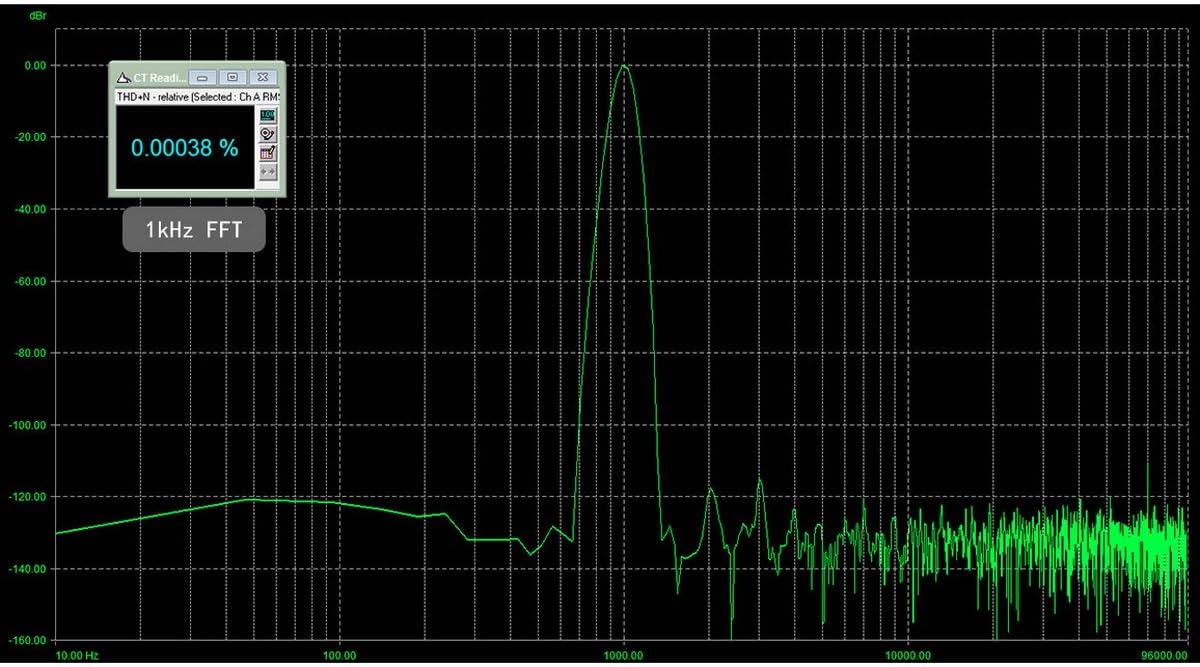
Figure 6: 1kHz FFT (THD+N 0.00038%)
10. 保証とサポート
SABAJ products typically come with a limited warranty. For specific warranty terms and conditions, please refer to the warranty card included with your product or visit the official SABAJ website. For technical support, driver downloads, or service inquiries, please contact SABAJ customer support directly through their official channels.