
1. はじめに
The eSynic ZT102 is a 6000-count auto-ranging digital multimeter designed for accurate electrical measurements. It utilizes a double-integral style A/D transform as its core, providing stable and reliable performance with overload protection and a clear LCD display. This device is suitable for use in laboratories, factories, and for general household electrical troubleshooting.
2. 安全情報
Always observe basic safety precautions when using this multimeter to prevent electric shock, injury, or damage to the meter or equipment under test. Read and understand all safety information before operation.
- どの関数でも最大入力値を超えないようにしてください。
- ボリュームを扱うときは注意してくださいtag30V AC RMS、42Vピーク、または60V DCを超える電圧。これらの電圧はtag感電の危険があります。
- Ensure the test leads are in good condition and properly seated in the input terminals.
- メーターが損傷しているように見える場合、または電池カバーがきちんと閉まっていない場合は、メーターを操作しないでください。
- 機能を変更する前に、テストリード線を回路から取り外します。
- 正確な測定を行うために、電池残量低下インジケーターが表示されたら電池を交換してください。
- 必ず回路の電源を切り、高電圧の電気をすべて放電してください。tag抵抗、導通、ダイオード、または静電容量をテストする前にコンデンサを使用します。
3. パッケージ内容
パッケージにすべてのアイテムが揃っていることを確認します。
- 1 x ZT102 Digital Multimeter
- テストプローブ(赤と黒)1組
- 1 x温度プローブ
- 収納バッグ x 1
- 2V AAA電池1.5本
- ユーザーマニュアル x 1

4 製品の特徴
- 6000 Counts True RMS: 非正弦波形の正確な読み取りを提供します。
- 自動レンジング: 正しい測定範囲を自動的に選択します。
- 測定機能: AC / DC Voltage, AC/DC Current, Resistance, Capacitance, Diode, Continuity, Temperature, Frequency, and Duty Cycle.
- 過負荷保護: Protection on all ranges, including restorable fuse protection and short-circuit protection.
- バックライト付きLCDディスプレイ: Large digits for clear visibility in various lighting conditions.
- データ保持: 表示された読み取り値を固定して簡単に記録できます。
- Sampルレート: 3 times per second for quick measurements.
- 低ボリュームtage 適応症: バッテリー電力が少なくなると警告します。
- 自動電源オフ: 一定時間操作しないと自動的にシャットダウンし、バッテリー寿命を節約します。
- コンパクトなデザイン: Product size of 130 x 65 x 30 mm and net weight of 190g for portability.
5.製品図

- LEDスクリーン: 測定値とインジケーターを表示します。
- HOLD/Backlit Button: Press to hold the current reading; long press to activate/deactivate backlight.
- 選択ボタン: Toggles between different functions within a rotary switch position (e.g., AC/DC voltage、ダイオード/導通)。
- ロータリースイッチ: 主な測定機能を選択します。
- 10A入力端子: 最大10Aの電流を測定します。
- COM入力端子: すべての測定の共通(マイナス)端子。
- VΩHz-||-+ Input Terminal: 体積測定用tage, resistance, frequency, capacitance, diode, and temperature.
6. セットアップ
6.1 バッテリーの取り付け
- マルチメーターの電源がオフになっており、すべてのテストリードが取り外されていることを確認します。
- メーターの背面にある電池ボックスを見つけます。
- ドライバーを使用して電池ボックスのカバーを開きます。
- 正しい極性 (+ と -) に注意しながら、1.5V AAA 電池を 2 本挿入します。
- 電池カバーを取り付けて、ネジで固定します。

6.2 テストプローブの接続
常に黒色のテストリードを コム 端子。測定機能に応じて、赤いテストリードを適切な入力端子に接続します。
- ボリューム用tage, Resistance, Capacitance, Diode, Continuity, Frequency, and Temperature measurements, connect the red lead to the VΩHz-||-+ ターミナル。
- For Current measurements (mA/A), connect the red lead to the 10A terminal for high current or the mA terminal for low current (if available, this model uses 10A for both).
7. 操作手順
7.1 一般的な操作
- ロータリースイッチを回して希望の測定機能を選択します。
- If multiple functions are available at one switch position (e.g., AC/DC Voltage)を押します 選択 ボタンをクリックすると、それらの間を切り替えられます。
- テスト リード線をテスト対象の回路またはコンポーネントに接続します。
- LCD画面で測定値を読み取ります。
- 読み取り値を固定するには、 所有 ボタン。もう一度押すと解除されます。
- To activate the backlight, long press the 所有 button. Long press again to turn off.
- When finished, turn the rotary switch to the OFF position.
7.2 特定の測定モード
7.2.1巻tage測定(AC/DC)
- ロータリースイッチを ~V (AC巻tage) または V (DC ボリュームtage). The meter will auto-range.
- 赤いテストリードをに接続します VΩHz-||-+ terminal and the black lead to the コム ターミナル。
- Place the test probes across the component or circuit points where voltage を測定する必要があります。

7.2.2抵抗測定
- ロータリースイッチを Ω.
- 赤いテストリードをに接続します VΩHz-||-+ terminal and the black lead to the コム ターミナル。
- 抵抗を測定する前に、回路の電源が切れていることを確認してください。
- Place the test probes across the component to measure its resistance.

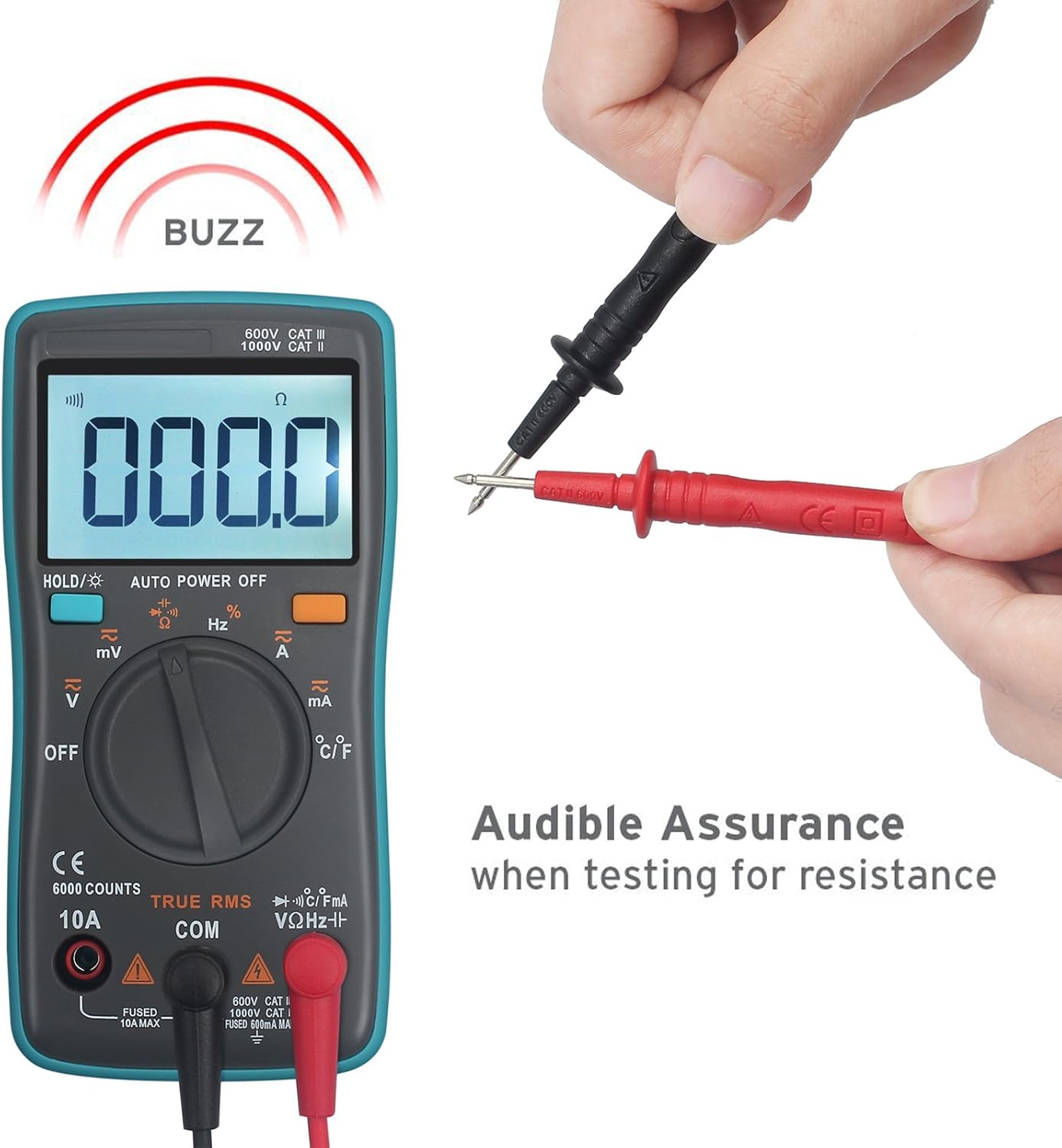
7.2.3導通テスト
- ロータリースイッチを Ω。 プレス 選択 連続記号())))が表示されます。
- 赤いテストリードをに接続します VΩHz-||-+ terminal and the black lead to the コム ターミナル。
- 回路の電源が切れていることを確認してください。
- Place the test probes across the points to be tested. If continuity exists (resistance below approximately 50Ω), the buzzer will sound.
7.2.4 電流測定(AC/DC)
- ロータリースイッチを ~A (交流電流)または A (直流電流)。
- 赤いテストリードをに接続します 10A terminal and the black lead to the コム ターミナル。
- 重要: To measure current, the meter must be connected in series with the circuit. Disconnect power to the circuit, open the circuit, and insert the meter in series.
- Apply power to the circuit and read the current.

7.2.5温度測定
- ロータリースイッチを °C /°F.
- 温度プローブを VΩHz-||-+ そして コム terminals, observing polarity.
- 温度プローブの先端を、温度を測定する物体の上または中に置きます。
- Read the temperature on the display. Press 選択 摂氏と華氏を切り替えます。

7.2.6 Capacitance, Diode, and Frequency/Duty Cycle
- For Capacitance, Diode, and Frequency/Duty Cycle, set the rotary switch to the corresponding position and use the 選択 button to cycle through the functions.
- 赤いテストリードをに接続します VΩHz-||-+ terminal and the black lead to the コム ターミナル。
- For capacitance and diode tests, ensure the component is de-energized and discharged before testing.
8. メンテナンス
8.1 クリーニング
広告でメーターを拭くamp 布と中性洗剤を使用してください。研磨剤や溶剤は使用しないでください。端子を汚れや湿気から守ってください。
8.2 電池の交換
ディスプレイに電池残量低下のインジケーターが表示された場合は、セクション6.1の説明に従って電池を交換してください。電池残量が少ない状態でメーターを使用すると、正確な測定値が得られない可能性があります。
8.3 ヒューズの交換
If the current measurement function stops working, the fuse may need replacement. Refer to the safety warnings on the back of the meter for fuse specifications. Only replace with a fuse of the same type and rating.
警告: 感電を避けるため、電池を交換する前やケースを開ける前にテストリードを取り外してください。
9。 トラブルシューティング
| 問題 | 考えられる原因 | 解決 |
|---|---|---|
| 画面が表示されない、または画面が暗い | 電池切れまたは電池残量不足 | 電池を交換する(セクション6.1) |
| 誤った測定値 | Low batteries, incorrect function selected, poor lead connection | Replace batteries, select correct function, ensure leads are properly connected |
| 電流測定が機能しない | ヒューズが切れた | Replace fuse (refer to Section 8.3) |
| 「OL」(オーバーロード)表示 | Input value exceeds selected range or meter's maximum capacity | Select a higher range (if not auto-ranging) or verify the circuit's value is within meter limits. |
10. 仕様
| 測定 | 範囲 | 正確さ |
|---|---|---|
| DCVol。tage | 60mV/6V/60V/600V/1000V | ±(0.5%+3) |
| ACVol。tage | 60mV/6V/60V/600V/750V | ±(1%+3) |
| DC / AC電流 | 60mA/600mA/6A/10A | ±(1.5%+3) |
| 抵抗 | 600Ω/6KΩ/60KΩ/600KΩ/6MΩ/60MΩ | ±(0.5%+3) for most, ±(1.5%+3) for 60MΩ |
| キャパシタンス | 10nF/100nF/1uF/10uF/100uF/1000uF/10000uF | ±(2.0%+5) for most, ±(5.0%+5) for 1000uF/10000uF |
| 温度 | -20℃ ~ 1000℃ / -4℉ ~ 1832℉ | ±(2.5%+5) |
| 頻度 | 5/50/500/5k/50k/500k/5M/10M Hz | ±(0.1%+3) |
| デューティサイクル | 1%から99% | ±(1%) |
一般仕様:
- 画面: 6000カウント
- 測定方法: Double integral A/D converter
- 自動レンジと真のRMS: はい
- ダイオードテスト: はい
- Out of Range Display: OL
- 低バッテリー表示: はい
- 自動電源オフ: はい
- 短絡保護: はい
- 労働環境: 0~40°C, relative humidity <80%
- 電源: 2V AAA電池1.5本
- 製品サイズ: 130 x 65 x 30 ミリメートル
- 製品の正味重量: 190グラム
11. 保証
All eSynic products come with an 18-month warranty from the date of purchase. This warranty covers manufacturing defects and material faults under normal use. It does not cover damage caused by misuse, unauthorized modification, accident, or neglect.
12. サポート
For technical assistance, warranty claims, or further inquiries, please contact eSynic customer support through your purchase platform or the official eSynic website. Please have your model number (ZT102) and purchase details ready when contacting support.