
導入
The eSynic 192KHz Optical to 3.5mm/Aux DAC Converter is designed to convert digital optical audio signals to analog 3.5mm audio output. This device is ideal for connecting modern digital audio sources like HDTVs, Blu-ray players, and gaming consoles to analog headphones or speakers. It features a built-in amplifier chip and volume control for enhanced audio experience.

Image: The eSynic DAC converter illustrating its function of converting optical input from devices like TVs, DVD/Blu-ray players, set-top boxes, HDTVs, and game consoles to 3.5mm output for headphones and speakers.
パッケージ内容
以下にリストされているすべてのアイテムがパッケージに含まれていることを確認してください。
- 1 x eSynic Optical to 3.5mm Audio Converter (Model ESY237)
- 1 x USB電源ケーブル
- ユーザーマニュアル x 1

Image: Contents of the eSynic DAC Converter package, showing the main unit with integrated optical and 3.5mm cables, a separate USB power cable, and the user manual.
セットアップ手順
- Connect the Optical Cable: Plug the optical cable from your source device (e.g., TV, Blu-ray player, gaming console) into the optical input port of the eSynic DAC converter.
- Connect the 3.5mm Audio Cable: Connect the 3.5mm audio output from the converter to your headphones or speakers.
- 電力供給: Connect the USB power cable to the converter and then to a 5V/1A USB power adapter (not included) or a USB port on your TV/device.
- ソースデバイスのオーディオ出力を構成する: This converter supports PCM 2.0 audio format ONLY. It is not compatible with Dolby/DTS 5.1/7.1 channel signals. You must set your source device's digital audio output to PCM mode. For most TVs (Samsung/LG/Sony), navigate to: Settings → Sound → Digital Audio Output → PCM. This step is crucial for proper functionality and to avoid 'no sound' issues.
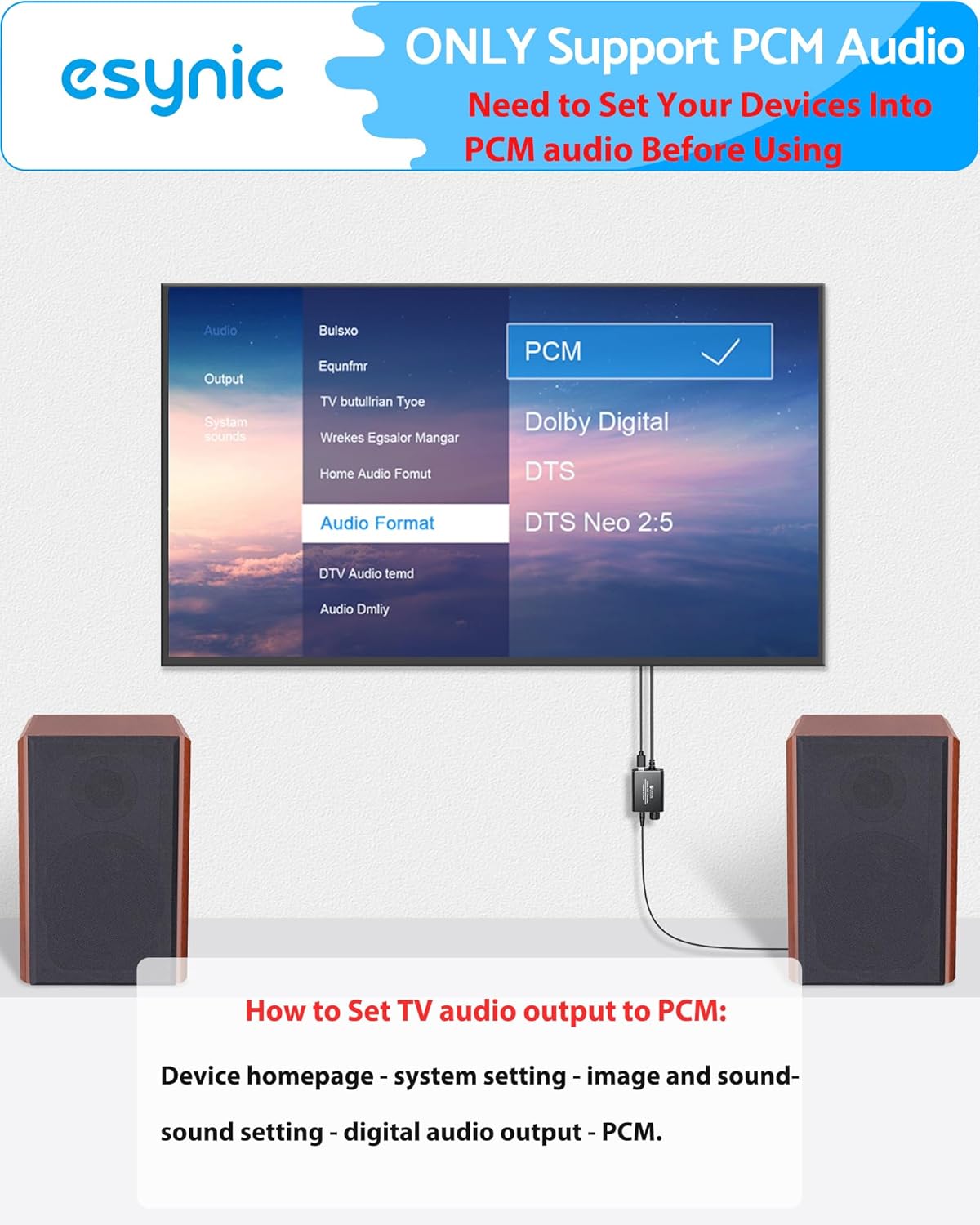
Image: A television screen displaying the audio output settings, with the 'PCM' option highlighted, indicating the necessary configuration for the DAC converter.
For a visual guide on setting up the converter, please refer to the official product video below:
Video: Official eSynic product video demonstrating the setup and functionality of the Professional Optical to 3.5mm Adapter.
操作手順
- 電源オン: Once all connections are secure and the source device is playing audio, the converter will automatically power on if connected to a TV USB port.
- 音量を調整: Use the built-in volume control knob on the converter to adjust the output volume to your headphones or speakers. Note that the TV remote will not control the volume of the output from the converter.
- オーディオをお楽しみください: Experience clear, amplified 192KHz/24bit audio from your connected analog devices.

Image: A user enjoying audio through headphones connected to the eSynic DAC converter, which is linked to a television, demonstrating the product in use.
トラブルシューティング
- 音が出ない:
- すべてのケーブルがしっかりと接続されていることを確認してください。
- Verify that your TV's digital audio output is set to PCM mode (not Dolby/DTS). Refer to your TV's sound settings.
- Check if the converter is receiving power from the USB cable.
- Noise/Crackling Sound:
- すべての接続がしっかりしていることを確認してください。
- Try a different USB power source (e.g., a dedicated 5V/1A wall adapter instead of a TV USB port).
- 低音:
- Adjust the volume knob on the converter.
- If using high-impedance headphones, an additional headphone amplifierが必要な場合があります。
- Not working with streaming apps (YouTube, Netflix, etc.):
- Many streaming services output Dolby Digital 5.1 audio, which this converter does not support. Ensure your TV's audio output is set to PCM 2.0.
仕様
| ブランド | eSynic |
| モデル | ESY237 |
| 入力 | 光学式 (トスリンク) |
| 出力 | 3.5mm補助 |
| Sampリンレート | Up to 192KHz/24bit |
| オーディオ形式のサポート | PCM 2.0 (Stereo) ONLY |
| 電源 | 5V/1A USB (adapter not included) |
| 材料 | アルミニウム合金 |
| Dimensions (Converter Body) | Approx. 4.3cm / 1.691in (length) |
| 重さ | 約0.14ポンド(65g) |
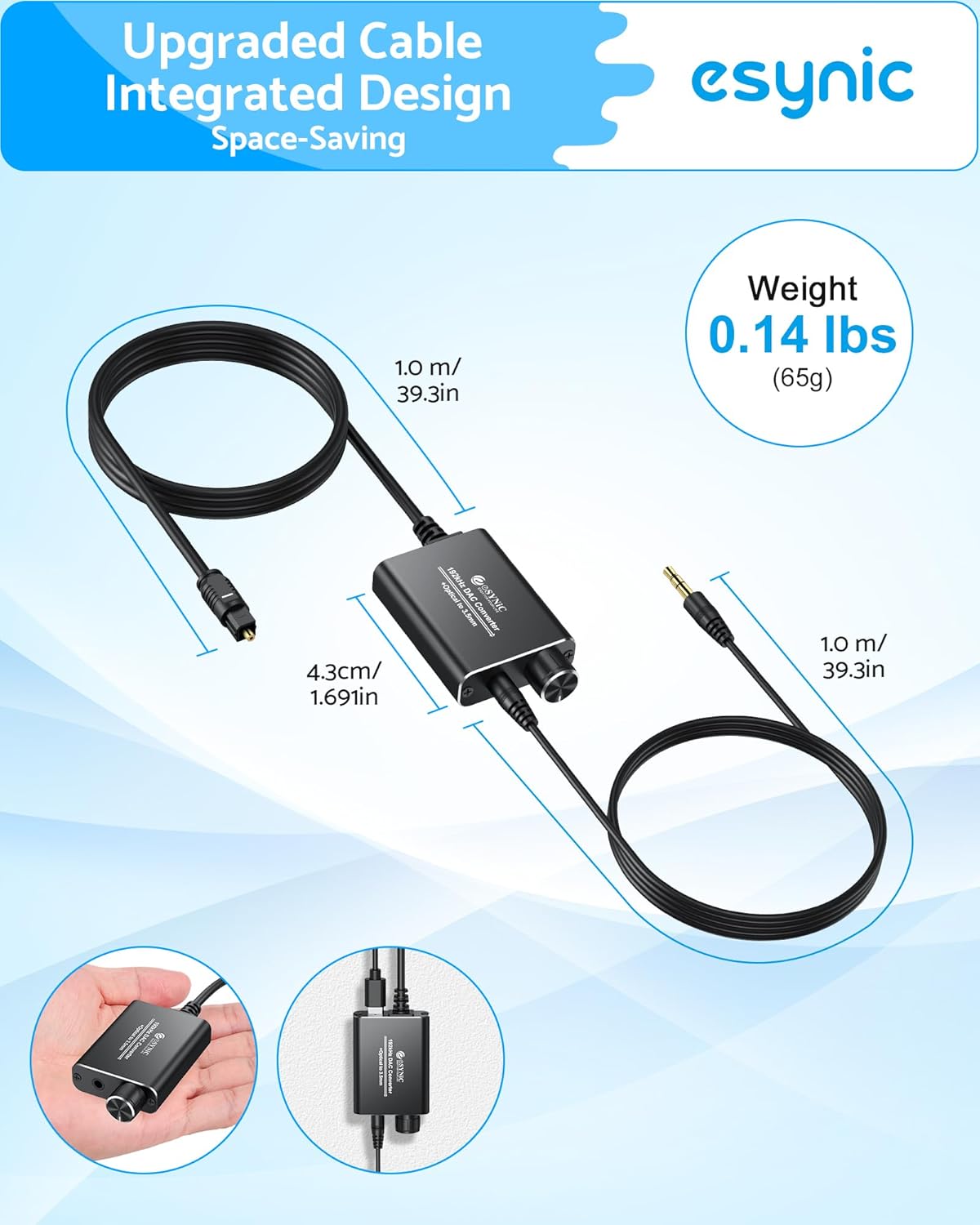
Image: The eSynic DAC converter displaying its compact dimensions and lightweight design, highlighting its portability.
メンテナンス
To ensure the longevity and optimal performance of your eSynic DAC Converter, follow these maintenance guidelines:
- デバイスは湿気や極端な温度を避け、乾燥した環境に保管してください。
- 外装は柔らかく乾いた布で拭いてください。液体クリーナーやエアゾールは使用しないでください。
- 落としたり、強い衝撃を与えないでください。
- Ensure proper ventilation to prevent overheating. The aluminum alloy shell is designed for good heat dissipation.
保証とサポート
All eSynic products come with an 18-month warranty from the date of purchase. If you encounter any issues or require technical assistance, please contact eSynic customer support through the retailer where you purchased the product or visit the official eSynic webサポート リソースのサイト。
詳細情報および製品登録については、次の Web サイトをご覧ください。 eSynic Official Store