
1. はじめにview
The AULA Excalibur 109R is a one-handed mechanical gaming keyboard designed for enhanced gaming performance. It features customizable RGB LED backlighting, blue mechanical switches for tactile feedback, and programmable macro keys. The ergonomic design includes a removable wrist rest for comfort during extended use.
主な機能は次のとおりです。
- Customizable RGB LED Backlight with 5 pre-programmed modes and user-defined profiles.
- 8 programmable keys for macros and hotkeys.
- Durable Blue Mechanical Switches with an ultra-long lifetime of up to 50 million clicks.
- Ergonomic design with a removable wrist rest to reduce fatigue.
- 100% Anti-Ghosting with all Key Roll-over on USB.
- Compatibility with Windows XP, Vista, 7, 8, 10, and MAC OS X.
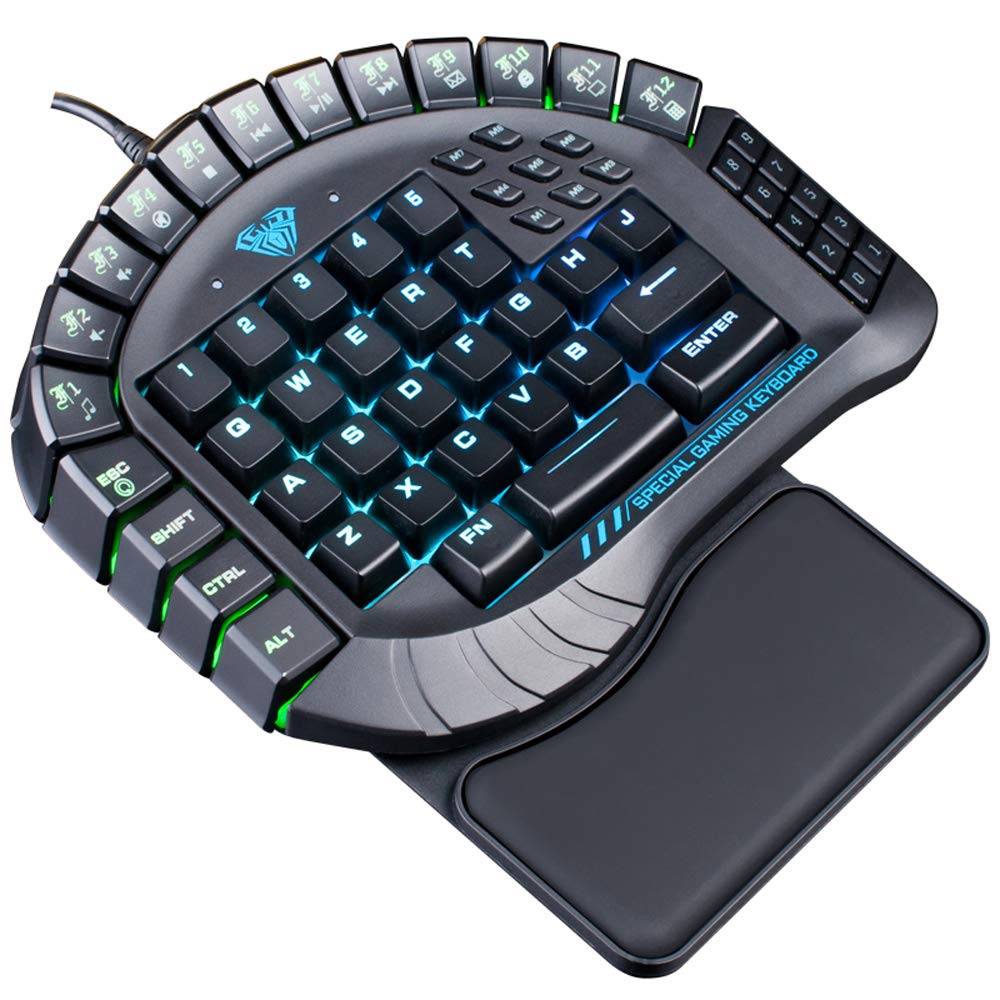
図1: トップダウン view of the AULA Excalibur 109R keyboard with RGB backlighting active.
2. セットアップ手順
2.1 キーボードの接続
The AULA Excalibur 109R keyboard is a plug-and-play device. Connect the USB connector from the keyboard directly to an available USB port on your computer. No additional drivers are typically required for basic functionality on supported operating systems.
2.2 リストレストの取り付け
For enhanced ergonomic comfort, attach the removable wrist rest to the keyboard. Align the wrist rest with the bottom edge of the keyboard and secure it into place. The wrist rest is designed to provide support during long gaming sessions.

図 2: 拡大図 view of the ergonomic, removable wrist rest.
3. 操作手順
3.1 RGBバックライトのカスタマイズ
The keyboard features customizable RGB backlighting. It comes with 5 pre-programmed lighting modes. You can also create and save 5 customized backlighting profiles. Refer to the included software or the manufacturer's website for detailed instructions on customizing lighting effects and profiles.

図3: キーボードの表示asing dynamic RGB backlighting.
3.2 マクロキープログラミング
The AULA Excalibur 109R includes 8 independent macro keys and 10 hotkeys accessible via the Fn key. These keys can be programmed to execute complex commands or sequences with a single press. Programming is typically done through the dedicated software provided with the keyboard or available for download from the manufacturer's official website. Consult the software's user interface for specific programming steps.
3.3 スリープモード
To conserve power, the keyboard will automatically enter sleep mode after 10 minutes of inactivity. To reactivate the keyboard, simply press any key.
Video 1: Demonstration of the AULA Excalibur 109R keyboard's RGB backlighting and key responsiveness. This video illustrates the dynamic lighting effects and the tactile feedback of the mechanical keys.
4. メンテナンス
4.1 クリーニング
キーボードを清掃するには、柔らかく乾いた布を使用してください。頑固な汚れには、軽く湿らせた布で拭いてください。amp cloth with mild soap can be used, ensuring no liquid enters the key switches or internal components. Avoid using harsh chemicals or abrasive cleaners.
4.2 Liquid Spill Precaution
Keep the device away from liquids and chemicals. In the event of a liquid spill, immediately unplug the keyboard. The keyboard is designed with drainage holes at the bottom. Deploy the keyboard feet to allow any liquid to drain out. Allow the keyboard to dry completely before reconnecting it.

図4: 下面 view of the keyboard, highlighting the drainage holes for liquid spills.
5。 トラブルシューティング
5.1 キーボードが反応しない
- USB ケーブルがキーボードとコンピュータの両方にしっかりと接続されていることを確認します。
- キーボードをコンピューターの別の USB ポートに接続してみてください。
- If the keyboard is in sleep mode, press any key to reactivate it.
- 別のコンピューターでキーボードをテストして、問題がキーボードにあるのか、コンピューターの設定にあるのかを判断します。
5.2 バックライトの問題
- Verify that the keyboard's lighting functions are enabled. Refer to the operating instructions for backlight customization.
- カスタムプロを使用する場合files, ensure they are correctly loaded via the software.
- Ensure the keyboard's software/drivers are up to date, if applicable, as they control advanced lighting features.
5.3 Macro Key Malfunction
- Confirm that the macro keys have been programmed correctly using the dedicated software.
- Check for any conflicts with other software or system settings that might interfere with macro execution.
- Ensure the software is running in the background if required for macro functionality.
6. 仕様
| 特徴 | 詳細 |
|---|---|
| ブランド | アウラ |
| モデル番号 | 109R |
| 接続技術 | 有線(USB) |
| キーボードの説明 | ゲーム、メカニカル |
| スイッチタイプ | ブルースイッチ |
| キーの数 | 60 |
| キーフォース | 60±10g |
| 主要ルート | 4.0mm |
| 定格巻tage / Current | DC5V |
| Product Dimensions (without wrist rest) | 8.4"(L) x 7.28"(W) x 1.89"(H) ± 0.02 inch |
| Product Dimensions (with wrist rest) | 8.4"(L) x 9.69"(W) x 1.89"(H) ± 0.02 inch |
| キーボードの重量 | 1.1ポンド(約0.5kg) |
| 材料 | プラスチック |
| オペレーティングシステムの互換性 | Windows Vista/7/8/10, MAC OS X |
| 特集 | Macro, Customizable RGB Backlight, Anti-Ghosting |
7. 保証情報
This AULA Excalibur 109R keyboard comes with a 30日間の保証 ご購入日から1年間有効です。本保証は、通常の使用における製造上の欠陥および故障を対象としています。誤用、事故、不正な改造、または不適切なメンテナンスによる損傷は保証の対象外となります。保証請求の際は、購入証明書を保管してください。
8. サポート
For further assistance, technical support, or warranty inquiries, please contact AULA customer service. Refer to the product packaging or the official AULA website for contact details and additional support resources.