
1. はじめに
This manual provides essential information for setting up, operating, maintaining, and troubleshooting your Microsoft Surface Pro Model 1796. The Surface Pro is a versatile 2-in-1 device designed to function as both a high-performance laptop and a portable tablet. Please read these instructions carefully to ensure optimal use and longevity of your device.
2.製品オーバーview
The Microsoft Surface Pro Model 1796 features a 12.3-inch PixelSense multi-touch display, an Intel Core i5 processor, 4GB of RAM, and a 128GB SSD. It operates on Windows 10 Pro, offering a full desktop experience in a portable form factor. The device supports a detachable keyboard (Surface Pro Signature Type Cover) and a digital pen (Surface Pen), both sold separately, to enhance its functionality.

Figure 2.1: Microsoft Surface Pro in tablet mode, displaying the lock screen.
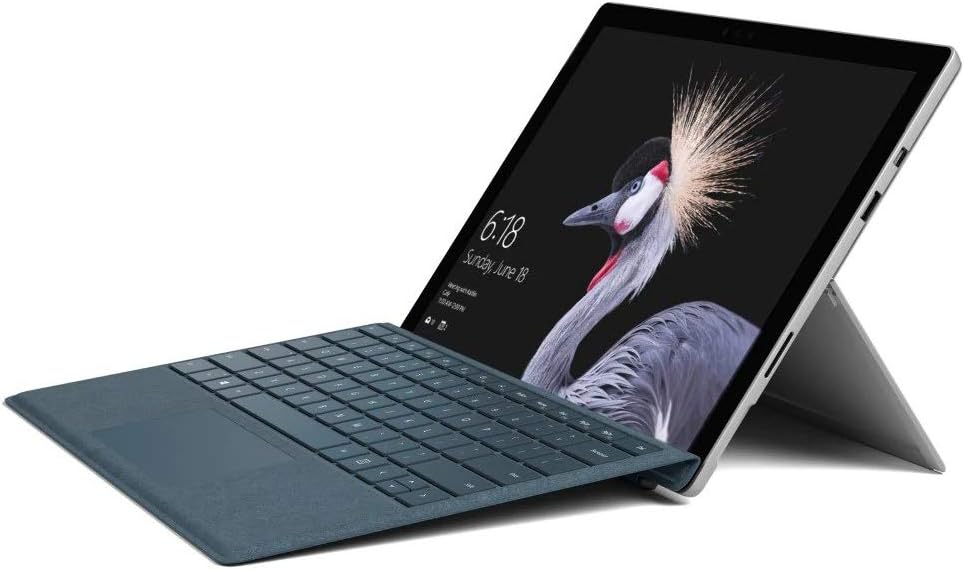
Figure 2.2: Microsoft Surface Pro with Signature Type Cover attached, configured as a laptop.

Figure 2.3: Microsoft Surface Pro tablet and detached Signature Type Cover.
3. セットアップ
3.1初期電源オン
- Connect the power supply to the Surface Pro and a power outlet.
- Press the power button located on the top edge of the device.
- 画面上の指示に従って、言語の選択、ネットワーク接続、ユーザー アカウントの作成などの Windows 10 Pro の初期セットアップを完了します。
3.2 アクセサリの接続
- Surface Pro Signature Type Cover: Align the Type Cover with the magnetic connector along the bottom edge of the Surface Pro until it clicks into place.
- Surface ペン: The Surface Pen connects via Bluetooth. Go to 設定 > デバイス > Bluetoothとその他のデバイス to pair the pen.
3.3デバイスの充電
Use the provided power adapter to charge your Surface Pro. The charging port is located on the right side of the device. A full charge provides approximately 13 hours of typical device usage.
4. 操作手順
4.1 基本的なナビゲーション
- 触る: Use multi-touch gestures on the PixelSense display for navigation, zooming, and scrolling.
- タイプカバー: Utilize the keyboard and trackpad for traditional laptop input.
- Surface ペン: Write, draw, and annotate directly on the screen.
4.2 Windows 10 Proの機能
Your Surface Pro comes with Windows 10 Pro, offering features such as:
- Windows Hello: For fast, secure, password-free sign-in using facial recognition.
- コルタナ: Your personal digital assistant.
- マイクロソフトエッジ: デフォルト web ブラウザ。
- タブレットモード: Automatically or manually switch to a touch-optimized interface when the Type Cover is detached.
4.3 表示設定
The 12.3-inch PixelSense display has a resolution of 2736 x 1824 pixels. You can adjust display settings such as brightness, resolution, and scaling through 設定 > システム > ディスプレイ.
5. メンテナンス
5.1デバイスのクリーニング
- 柔らかく糸くずの出ない布を使用してください。ampened with water or an approved screen cleaner to clean the display.
- For the device body, use a soft, dry cloth. Avoid harsh chemicals or abrasive materials.
5.2ソフトウェアアップデート
Regularly check for and install Windows updates to ensure your device has the latest security patches and features. Go to 設定 > 更新とセキュリティ > Windows Update.
5.3バッテリーケア
- 極端な温度はバッテリー寿命を縮める可能性があるため、避けてください。
- バッテリーの状態を最適に保つには、バッテリーを継続的に完全に放電したり、長期間にわたって 100% 充電状態に保ったりしないようにしてください。
6。 トラブルシューティング
6.1 よくある問題
- デバイスの電源が入らない: Ensure the device is charged. Try holding the power button for 10-15 seconds to perform a force restart.
- 画面が応答しません: Restart the device. If the issue persists, check for driver updates.
- パフォーマンスの問題: Close unnecessary applications, check for Windows updates, or run a disk cleanup.
6.2 サポートへの連絡
For more complex issues or technical assistance, please visit the official Microsoft Support website or contact their customer service. Have your device's model number (FJU-00001) and serial number ready.
7. 仕様
| 特徴 | 仕様 |
|---|---|
| モデル名 | FJU-00001 |
| 表示サイズ | 12.3インチ |
| 画面解像度 | 2736 x 1824 ピクセル |
| プロセッサ | インテル Core i5 (2.6 GHz) |
| ラム | 4GB DDR3 |
| ストレージ | 128GB SSD |
| グラフィックスコプロセッサ | インテル HD グラフィックス 620 |
| オペレーティング·システム | ウィンドウズ10プロ |
| ワイヤレスタイプ | 802.11b、802.11g、802.11n |
| 平均バッテリー寿命 | 13時間 |
| アイテム重量 | 1.7ポンド |
| 製品寸法 | 11.5 x 0.33 x 7.93インチ |
| 後方 Webカム解像度 | 5 MP |
8. 保証とサポート
Your Microsoft Surface Pro Model 1796 is covered by a limited hardware warranty provided by Microsoft. For detailed warranty terms and conditions, please refer to the documentation included with your purchase or visit the official Microsoft support webサイトでご確認ください。保証請求に備えて購入証明書を保管してください。
For technical support, driver downloads, and service information, please visit support.microsoft.com. You may need to provide your device's serial number and model information.