
1. はじめに
The Duronic DMUSB5X1 is a desk-mounted monitor arm designed to optimize your workspace. It features a gas spring mechanism for smooth, effortless adjustments, allowing you to position your monitor for optimal viewing comfort. This model also integrates a USB hub and audio ports for convenient connectivity directly at your desk.
This manual provides detailed instructions for the safe and efficient installation, operation, and maintenance of your Duronic DMUSB5X1 monitor arm.
2. 安全に関する注意事項
- 組み立てて使用する前に、すべての説明書をよくお読みください。
- Ensure your desk surface is strong enough to support the monitor arm and attached monitor(s).
- 片腕あたりの最大重量容量 8 kg (17.6 ポンド) を超えないようにしてください。
- Ensure all screws and connections are securely tightened before use. Periodically check for tightness.
- 子供やペットを組み立てエリアに近づけないでください。
- Use only the provided hardware. If any parts are missing or damaged, contact Duronic customer support.
- Adjust the gas spring tension carefully to match your monitor's weight. Improper tension can cause the monitor to drop or spring up unexpectedly.
3. パッケージ内容
組み立てを始める前に、すべてのコンポーネントが揃っていることを確認してください。
- Monitor Arm Assembly (Gas Spring Arm, Pole)
- デスクClamp ベース
- VESAマウントプレート
- USB and Audio Extension Cables
- Mounting Hardware (various screws, washers, spacers)
- Allen Keys for assembly and adjustment
4. セットアップとインストール
Follow these steps to install your Duronic DMUSB5X1 monitor arm:
- デスクClを取り付けるamp: デスクの位置を調整しますamp base on your desk edge. Ensure the desk clamp is securely fastened to a stable surface. The clamp can accommodate desk thicknesses up to 68mm. Tighten the clamp しっかりとねじ込みます。

図4.1: デスクclamp インストール。
- Assemble Arm to Pole: Insert the monitor arm onto the pole of the desk clamp. Secure it with the provided screws and Allen key.
- VESA プレートをモニターに取り付けます。 Carefully place your monitor face down on a soft, clean surface. Attach the VESA mounting plate to the back of your monitor using the appropriate screws and spacers (if needed). The arm supports VESA 75x75mm and 100x100mm patterns.
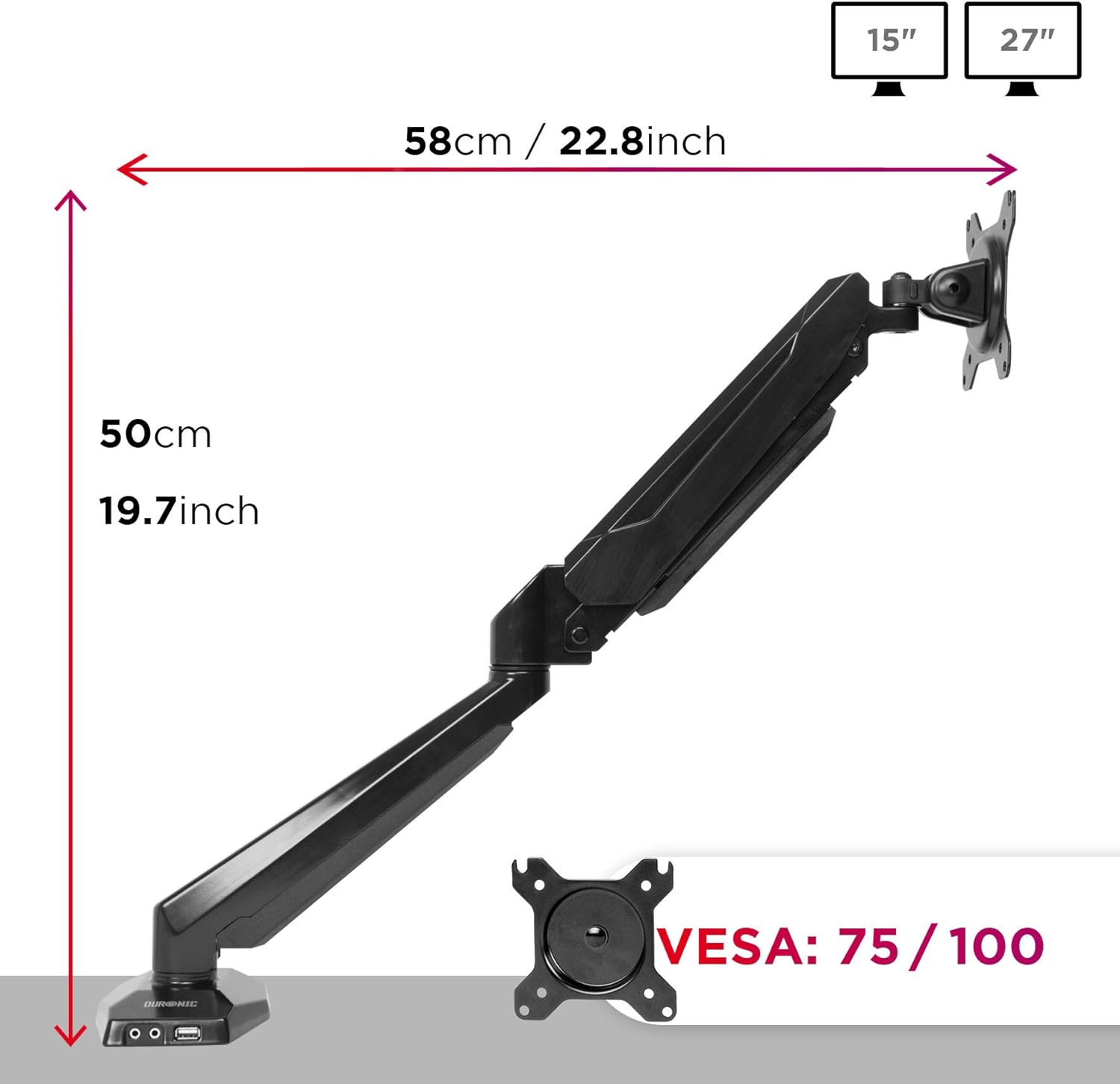
Figure 4.2: VESA plate and arm dimensions.
- モニターをアームに取り付ける: Slide the monitor (with VESA plate attached) onto the arm's VESA head. Secure it with the locking mechanism or screws as per the specific design.
- Connect USB and Audio Cables: Connect the integrated USB and audio extension cables from the monitor arm base to the corresponding ports on your computer. This enables the convenient USB and audio ports on the arm's base.

Figure 4.3: Integrated USB and audio ports.
- ガススプリングの張力を調整する: The gas spring comes pre-tensioned. You may need to adjust it to match your monitor's weight. Use the provided Allen key to turn the adjustment screw on the arm. Turn clockwise to increase tension for heavier monitors, and counter-clockwise to decrease tension for lighter monitors. Adjust until the monitor stays in position when moved.
5. 運営と調整
The Duronic DMUSB5X1 offers a wide range of adjustments for optimal viewing:
- 高さ調整: The gas spring arm allows for smooth vertical movement. Gently push or pull the monitor to the desired height.
- The VESA head allows tilting the monitor -90° (downwards) to +85° (upwards) to reduce glare and improve view角度を変える。
- スイベル: The arm can swivel 180° left or right at the pole and at the arm joints, allowing you to share your screen or adjust its position.
- 回転: VESA プレートは 360 度回転が可能で、横向きと縦向きを切り替えることができます。
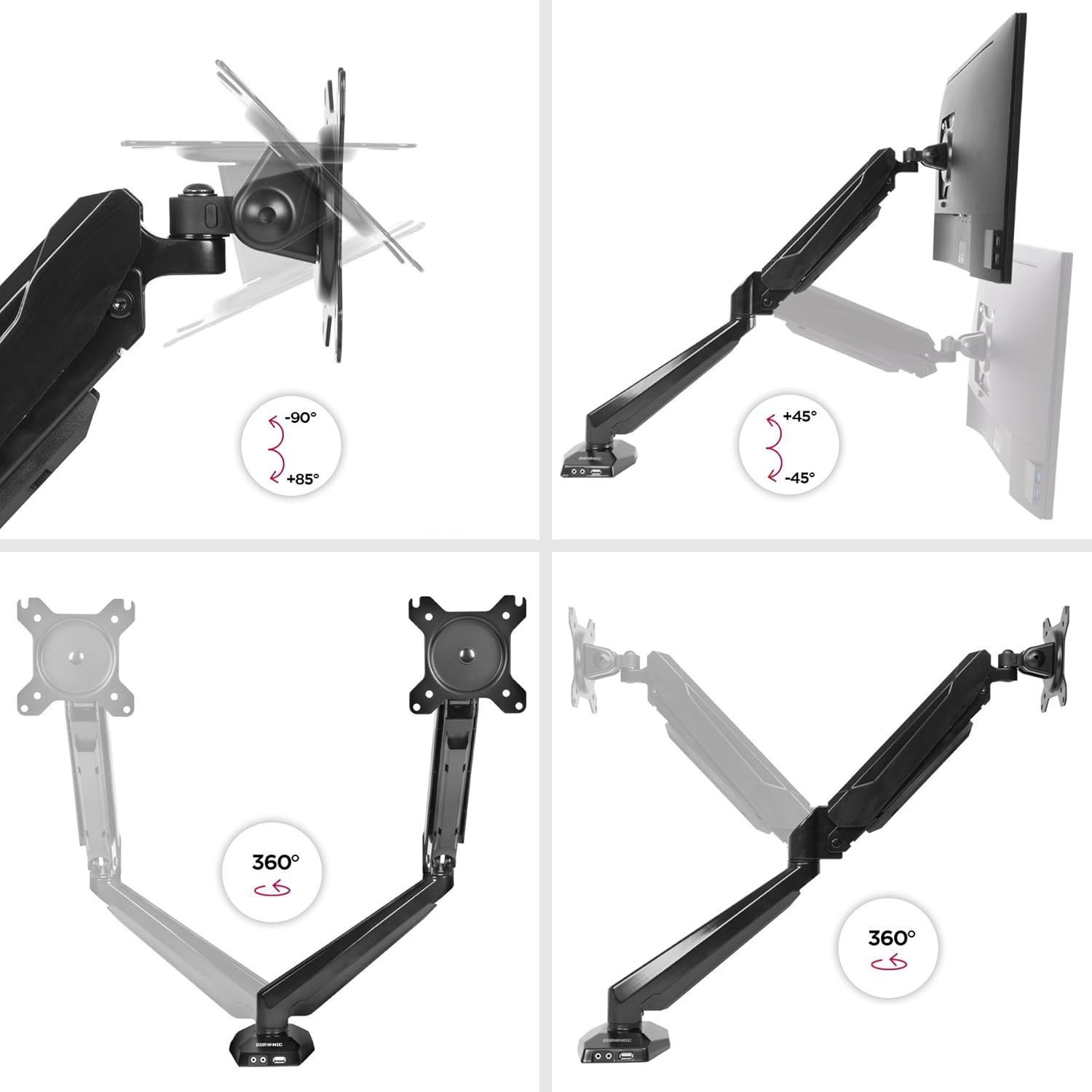
Figure 5.1: Monitor arm adjustment ranges.
- Integrated USB and Audio Ports: Use the two USB 2.0 ports for connecting peripherals like keyboards, mice, or USB drives. The headphone and microphone jacks provide convenient access for audio devices.
6. メンテナンス
- クリーニング: モニターアームを柔らかくて乾いた布で拭きますamp 布で拭いてください。仕上げを傷める可能性のある研磨剤入りの洗剤や溶剤は使用しないでください。
- 定期点検: すべてのネジと接続部がしっかりと締められているか、定期的に点検してください。必要に応じて締め直してください。
- ガススプリング調整: If your monitor's weight changes, or if the arm no longer holds its position correctly, re-adjust the gas spring tension as described in the setup section.
7。 トラブルシューティング
| 問題 | 考えられる原因 | 解決 |
|---|---|---|
| Monitor does not stay in desired position (sags or springs up). | Incorrect gas spring tension. | Adjust the gas spring tension using the provided Allen key. Turn clockwise for heavier monitors, counter-clockwise for lighter monitors. |
| Monitor cannot be attached to the VESA plate. | Monitor VESA pattern is not compatible (not 75x75mm or 100x100mm). | Verify your monitor's VESA compatibility. An adapter may be required for non-standard patterns. |
| USB or audio ports on the arm base are not working. | Extension cables are not properly connected to the computer. | Ensure the USB and audio extension cables from the monitor arm base are securely plugged into the corresponding ports on your computer. |
| Arm feels loose or unstable. | デスクclamp is not tightened sufficiently or desk surface is unstable. | デスククランプを締め直すamp. Ensure the desk surface is stable and within the recommended thickness. |
8. 仕様
- モデル: DMUSB5X1
- ブランド: デュロニック
- 材料: アルミニウム
- モニターサイズの互換性: 15~27インチ(38~68cm)
- 重量容量: Up to 8 kg (17.6 lbs) per arm
- VESAの互換性: 75x75mm、100x100mm
- 調整:
- 傾き:-90°から+ 85°
- 回転: 180°
- 回転: 360°
- デスクClamp 厚さ: 最大68mm
- 統合ポート: 2 x USB 2.0, 1 x Headphone Jack, 1 x Microphone Jack
9. 保証とサポート
保証情報: For detailed warranty terms and conditions, please refer to the manufacturer's official webサイトまたは製品パッケージに同梱されている保証カードをご覧ください。
カスタマーサポート: If you encounter any issues or have questions regarding your Duronic DMUSB5X1 monitor arm, please visit the official Duronic website for support resources, FAQs, and contact information for their customer service team.


