
導入
This manual provides essential information for the safe and efficient use of your SANSUI SCM39-B11 39V High-Vision LCD TV. Please read these instructions thoroughly before operating the television and retain them for future reference. This television features a reliable Japanese design, incorporating a main board developed by Toshiba Visual Solutions Corporation, with evaluation and production management handled by a specialized team in Echizen City, Fukui Prefecture.
The SCM39-B11 model is a 2017 release, designed for terrestrial digital broadcasting, and supports external HDD recording via USB connection.
安全情報
火災、感電、けがのリスクを軽減するために、このテレビを使用するときは常に基本的な安全上の注意事項に従ってください。
- テレビを雨や湿気にさらさないでください。
- Do not block ventilation openings. Ensure adequate space around the television for proper airflow.
- テレビを不安定なカート、スタンド、三脚、ブラケット、またはテーブルの上に置かないでください。
- 雷雨のときや長期間使用しない場合はテレビの電源プラグを抜いてください。
- すべてのメンテナンスは資格のあるサービス担当者に依頼してください。
パッケージ内容
パッケージにすべてのアイテムが揃っていることを確認します。
- SANSUI SCM39-B11 39V LCD TV
- リモートコントロール
- 電池(リモコン用)
- MiniB-CAS Card
- B-CAS Card Cover (with screws)
- スタンド(ネジ付き)
- 取扱説明書(本書)
- 保証書
セットアップガイド
1. スタンドの取り付け
Carefully place the television screen-down on a soft, flat surface. Attach the included stand to the bottom of the television using the provided screws. Ensure the stand is securely fastened before placing the television upright.

画像: 正面 view of the SANSUI SCM39-B11 TV with its stand, showing the display and the two silver-colored feet.
2. ケーブルの接続
Refer to the back panel of the television for connection ports.

画像: 背面 view of the SANSUI SCM39-B11 TV, displaying the back panel with various input ports including HDMI, USB, and antenna connections.
- アンテナ接続: Connect your terrestrial digital antenna cable to the ANTENNA IN port.
- HDMIデバイス: Connect DVD players, Blu-ray players, game consoles, or other HDMI-compatible devices to the HDMI 1 or HDMI 2 ports. This model has 2 HDMI ports.
- USB外付けHDD: For recording, connect a compatible external USB Hard Disk Drive (HDD) to the USB port.
- 力: Connect the power cord to the AC inlet on the television and then to a wall outlet.
3. 初期設定
After connecting all cables and powering on the TV, the initial setup wizard will guide you through the process. This typically includes:
- 言語選択。
- 地域選択。
- Automatic channel scan for terrestrial digital broadcasts. Ensure your antenna is properly connected for this step.
操作手順
基本操作
- 電源オン/オフ: を押す 力 リモコンのボタン。
- チャンネル選択: 使用 チャンネル +/- buttons or the number buttons on the remote.
- 音量調整: 使用 ボリューム +/- ボタン。
- 入力ソース: を押す 入力 button to cycle through connected devices (TV, HDMI 1, HDMI 2, etc.).
Recording with External HDD
This TV supports recording terrestrial digital broadcasts to an external USB HDD. Ensure your HDD is connected to the USB port.
- 録画のスケジュール設定: Use the Electronic Program Guide (EPG) to select programs for recording. The EPG supports a 1-week display.
- Automatic Chapter Marking: The TV can detect commercials during recording and automatically set chapter marks, allowing for easier navigation during playback.
再生機能
When playing back recorded content from an external HDD, the following functions are available:
- 再生を繰り返す: Replay a section or the entire program.
- チェイス再生: Watch a program from the beginning while it is still being recorded.
- 1.5x Speed Playback: Watch recorded content at an accelerated speed.
画像とサウンドの強化
- Blue Light Guard: Activate this function via the remote control to reduce blue light emission by up to approximately 50%, which may help reduce eye strain.
- Picture Enhancer: This feature automatically adjusts the super-resolution processing level according to the input content, ensuring optimal image display at all times.
- Japanese Paper Speakers: The integrated speakers utilize Japanese paper for clear sound reproduction across high to low frequencies.
追加機能
- Screen Freeze Function: Pause the live broadcast or current display.
- HDMI Connected Device Linkage: Control compatible HDMI-connected devices using the TV remote.
- Bi-directional Data Communication: Supports two-way data communication.
メンテナンス
テレビの掃除
- 画面: 柔らかく乾いた、糸くずの出ない布で画面を優しく拭いてください。頑固な汚れには、軽くampen the cloth with water or a specialized screen cleaner (ensure it is safe for LCD screens) and wipe carefully. Do not spray liquid directly onto the screen.
- 体: Wipe the television body with a soft, dry cloth. Avoid using abrasive cleaners, waxes, or solvents as they can damage the finish.
リモコンのお手入れ
- Replace batteries when the remote control's response becomes slow or inconsistent.
- 古い電池と新しい電池、または異なる種類の電池を混ぜないでください。
- Keep the remote control away from moisture and direct sunlight.
トラブルシューティング
テレビで問題が発生した場合は、サポートに連絡する前に、次の一般的な問題と解決策を参照してください。
| 問題 | 考えられる原因 / 解決策 |
|---|---|
| 電源なし | Ensure the power cord is securely plugged into both the TV and the wall outlet. Check if the outlet is functioning. |
| 画像なし/信号なし | Verify antenna connection. Check the input source selection (e.g., HDMI 1, HDMI 2, TV). Perform a channel scan if necessary. |
| 音が出ない | Check volume level and mute status. Ensure external audio devices are properly connected if used. |
| リモコンが動作しない | 電池を確認して交換してください。リモコンとテレビの赤外線センサーの間に障害物がないことを確認してください。 |
| External HDD recording issues | Ensure the USB HDD is properly connected and formatted for the TV. Some HDDs may have compatibility issues. Try a different USB port or HDD if available. |
| HDMI device not recognized | Ensure the HDMI cable is securely connected. Try a different HDMI port or cable. Power cycle both the TV and the HDMI device. |
製品仕様

Image: A table detailing the specifications of the SANSUI SCM39-B11 TV, including screen size, resolution, tuner type, recording capabilities, connectivity, and power consumption.
| 特徴 | 仕様 |
|---|---|
| モデル名 | SCM39-B11 |
| 画面サイズ | 39V-type (39 inches) |
| ディスプレイ技術 | 液晶 |
| 解決 | High-Vision (HD 1366 x 768) |
| チューナー | Terrestrial Digital x1, BS Digital: None, CS Digital: None |
| External HDD Recording | USB経由でサポート |
| HDMIポート | 2つのシステム |
| USBポート | 1システム |
| 壁掛け対応 | VESA 200mm x 200mm |
| 製品重量 | 6.1キロ |
| 寸法(幅×高さ×奥行き) | Approx. 88.8 cm x 57.5 cm x 21.0 cm (with stand) |
| 消費電力 | 61W |
| リリース年 | 2017 |

画像: 正面 view of the SANSUI SCM39-B11 TV with overlaid measurements for width (88.8cm), height (57.5cm), and weight (6.1kg).

画像: サイド view of the SANSUI SCM39-B11 TV, illustrating the depth of the television body (9.9cm) and the total depth including the stand (21cm).
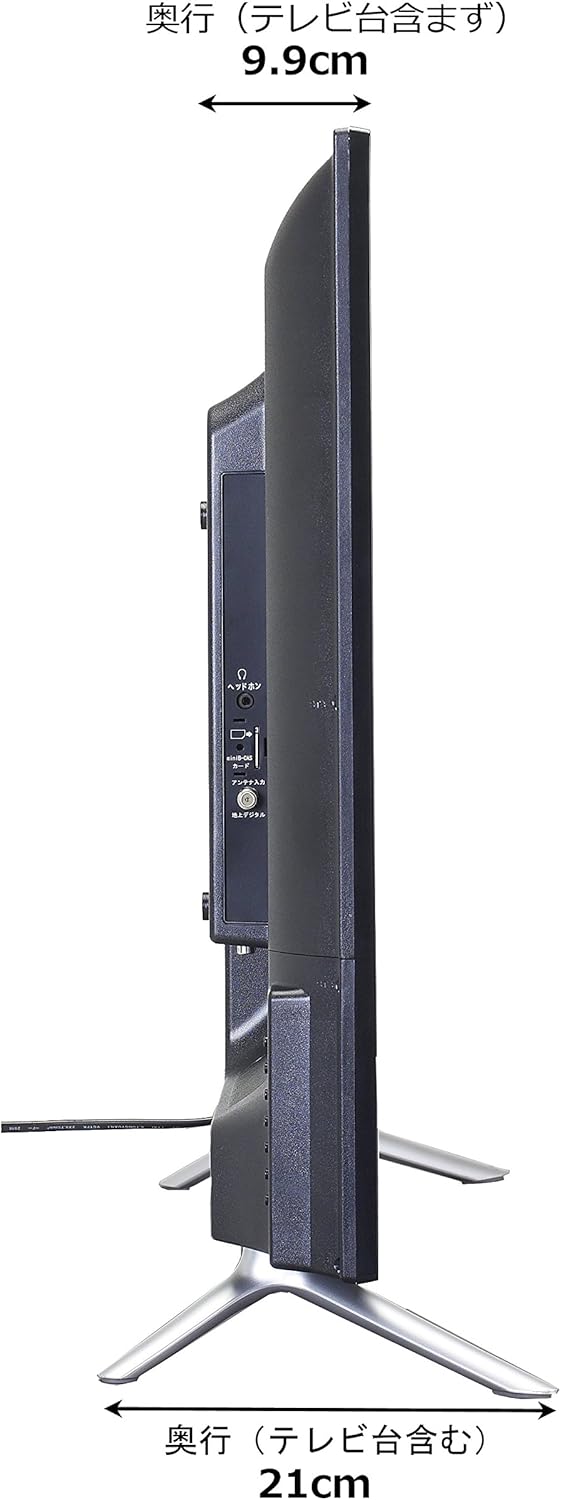
Image: Diagram showing the SANSUI SCM39-B11 TV on a stand next to a human figure (approx. 160cm tall) for visual scale, with TV dimensions indicated.
保証とサポート
Your SANSUI SCM39-B11 television comes with a warranty. Please refer to the included warranty card for details regarding coverage period and terms. Keep your purchase receipt as proof of purchase.
For technical support, service, or inquiries not covered in this manual, please contact SANSUI customer service. Contact information can typically be found on the warranty card or the official SANSUI webサイト。