
製品終了view
The AAXA Technologies M6 is a Full HD Micro LED Projector designed for both business and home theater use. It features native 1920x1080p resolution, 1200 LED lumens of brightness, and a long-lasting 30,000-hour LED light source. The M6 includes an onboard media player and operates on both AC power and its built-in rechargeable battery, offering portability and versatility.

Figure 1: The AAXA M6 Full HD Micro LED Projector, showcasinコンパクトなデザイン。
設定
1. 開梱とパッケージ内容
すべてのコンポーネントを慎重に開梱し、次のアイテムが揃っていることを確認します。
- AAXA M6 Projector
- リモートコントロール
- コンポジットAVケーブル
- 電源アダプター
- ユーザーマニュアル(このドキュメント)
2. 物理的な配置
Position the projector on a stable, flat surface. Ensure adequate ventilation around the unit. The M6 can project an image size of up to 200 inches diagonally, depending on the distance from the projection surface. For optimal image quality, project onto a flat, light-colored wall or a dedicated projector screen.
3. 電源接続
Connect the provided power adapter to the projector's DC input port and then to a standard electrical outlet. The projector can also operate on its internal battery for up to 90 minutes.
4. 初回電源投入
プロジェクターまたはリモコンの電源ボタンを押してデバイスの電源を入れます。電源インジケーターライトが点灯します。
5.フォーカス調整
Rotate the focus wheel located on the side of the projector until the projected image appears sharp and clear. This adjustment is crucial for image clarity at varying projection distances.
6.キーストーン調整
The M6 projector supports vertical and horizontal keystone correction to adjust the image shape if the projector is not perfectly perpendicular to the screen. Use the remote control or on-screen menu to access and adjust keystone settings. This feature helps correct trapezoidal distortion.

Figure 2: Keystone adjustment allows for correcting image distortion when the projector is not perfectly aligned with the screen.
操作手順
1.デバイスの接続
The M6 projector offers multiple input options for connecting various devices:
- HDMI: Connect laptops, gaming consoles (Xbox, PS4), smartphones (with adapter), Amazon Fire TV, or other HDMI-compatible devices.
- USB: For direct media playback from USB flash drives.
- microSD: For direct media playback from microSD cards.
- AV(コンポジット): Connect older devices using the included Composite AV Cable.
- VGA: Connect computers or other devices with a VGA output.

Figure 3: The AAXA M6 features various input ports for broad device compatibility.
2. メディアの再生
The M6 has an onboard media player. Insert a USB drive or microSD card containing compatible video, audio, or image files into the respective port. Use the remote control to navigate the on-screen menu and select your desired media for playback.
3. リモコンの使用
The included remote control provides full functionality for navigating menus, adjusting settings, and controlling media playback. Ensure the remote has working batteries and is pointed towards the projector's IR receiver.
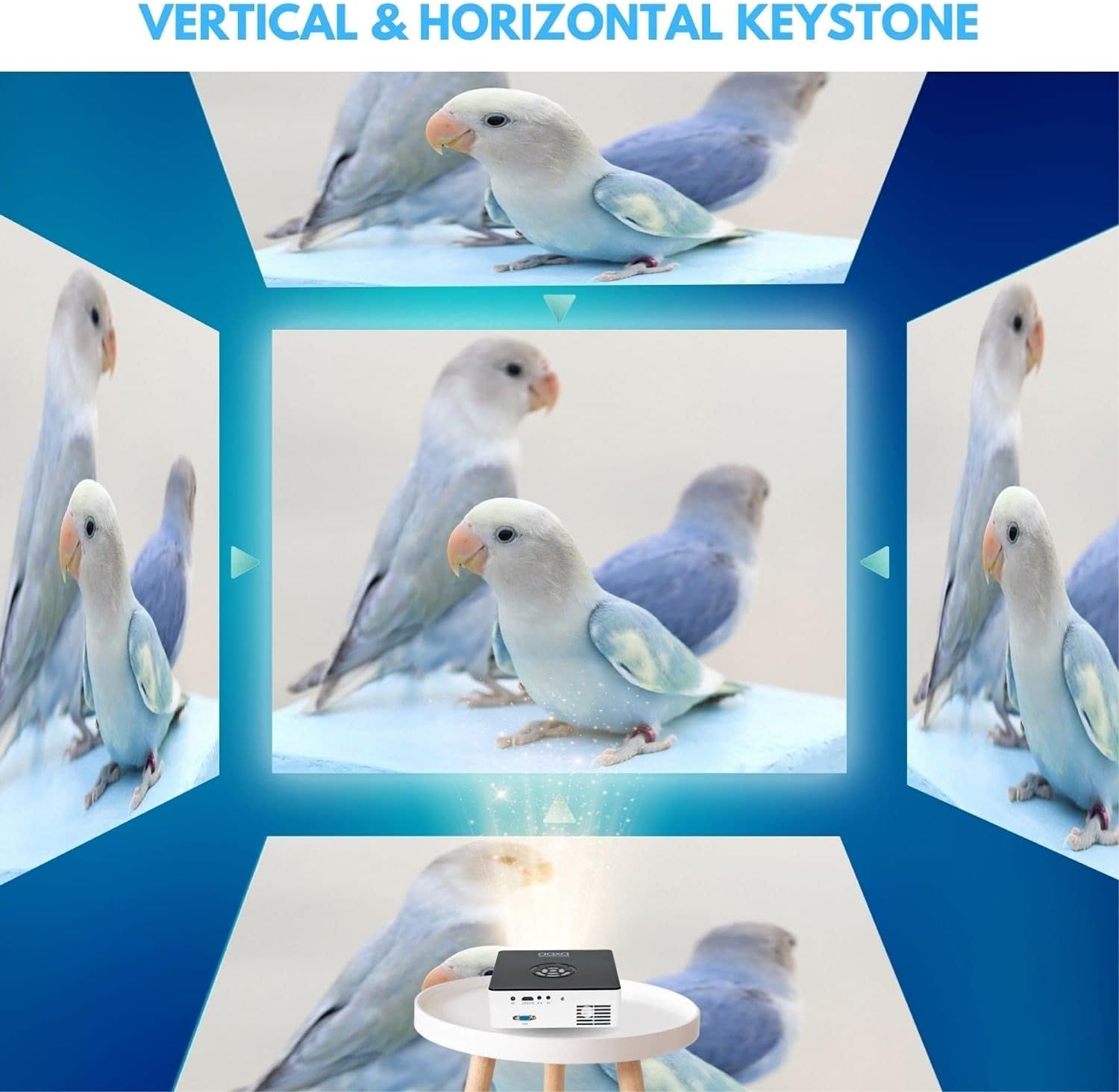
Figure 4: The remote control for the AAXA M6 projector, used for navigation and settings.
4. バッテリー操作
The M6 features a built-in rechargeable Lithium-Ion battery, providing up to 90 minutes of operation on a full charge. To charge the battery, connect the power adapter. The battery indicator will show charging status.
5.エコモード
For extended battery life and reduced fan noise, activate Eco Mode through the projector's settings menu. This mode slightly reduces brightness but can be sufficient in darker environments.
Video 1: Demonstration of the M6 projector's performance in a lower light environment, showcasing its 1080p Full HD native resolution.
メンテナンス
1. レンズのクリーニング
プロジェクターレンズを拭く際は、光学レンズ専用の柔らかく糸くずの出ない布をご使用ください。レンズコーティングを損傷する可能性のある研磨剤や強力な化学薬品の使用は避けてください。
2. 通気口の清掃
Periodically inspect and clean the projector's ventilation openings to prevent dust buildup. Use a soft brush or compressed air to remove any obstructions, ensuring proper airflow and preventing overheating.
3. ストレージ
When not in use, store the projector in a cool, dry place, away from direct sunlight and extreme temperatures. If storing for an extended period, ensure the battery is partially charged (around 50%) to maintain battery health.
4. LED光源
The M6 projector utilizes a durable LED light source with an estimated lifespan of 30,000 hours, eliminating the need for lamp 通常の使用条件下での交換。
トラブルシューティング
- 画像無し: Ensure the projector is powered on, the input source is correctly selected, and the connected device is outputting a signal. Check all cable connections.
- ぼやけた画像: Adjust the focus wheel until the image is sharp. Ensure the projection surface is flat and the projector is within the optimal throw distance.
- 音が出ない: Verify that the volume on both the projector and the connected device is turned up and not muted. Check audio cable connections if using external speakers.
- ファンの騒音: Some fan noise is normal during operation, especially in brighter modes. Activating Eco Mode can reduce fan speed and noise. Ensure vents are clear of obstructions.
- 画像の歪み(台形): Use the keystone adjustment feature to correct the image shape.
ここに記載されていない問題が発生した場合、またはさらにサポートが必要な場合は、サポート セクションを参照してください。
仕様
| 特徴 | 詳細 |
|---|---|
| モデル名 | M6 |
| ディスプレイ解像度 | ネイティブ 1920 x 1080 (フル HD) |
| 輝度 | 1200LEDルーメン |
| コントラスト比 | 2000:1 |
| 光源寿命 | 30,000時間(LED) |
| 表示タイプ | 情報漏洩防止 |
| 接続技術 | HDMI, USB, microSD, AV, VGA |
| 最大画像サイズ | 200インチ |
| 最小投射距離 | 11.5インチ |
| 商品の寸法 (長さ x 幅 x 高さ) | 7インチ x 7インチ x 2.1インチ |
| アイテム重量 | 2.5 ポンド |
| バッテリー寿命 | 最大90分 |
| コントローラータイプ | リモートコントロール |
保証情報
The AAXA Technologies M6 Projector is covered by a 1年間のメーカー限定保証 ご購入日から1年間有効です。本保証は、通常の使用における材料および製造上の欠陥を対象とします。誤用、事故、不正な改造、または外的要因による損傷は保証の対象外となります。
保証請求のために購入証明書を保管してください。
サポート
For technical support, service, or additional information regarding your AAXA Technologies M6 Projector, please visit the official AAXA Technologies webサイトまたは顧客サービス部門に連絡してください。
- Webサイト: ホームページ (元ample, please refer to actual product documentation for correct URL)
- メールアドレス: support@aaxatech.com (Example, please refer to actual product documentation for correct email)
- 電話: 1-800-XXX-XXXX (例:ample, please refer to actual product documentation for correct phone number)
サポートにお問い合わせの際は、製品モデル (M6) と購入証明をご用意ください。