
1. はじめに
The Focal Shape 50 is a versatile monitoring loudspeaker designed for professional audio environments. It offers extended low-frequency response and precise control, making it suitable for rooms up to 130 sq ft (12 sq m). This manual provides essential information for the proper setup, operation, and maintenance of your Shape 50 studio monitor.

図1.1: 前面 view of the Focal Shape 50 Studio Monitor, showcasing its dark walnut finish and speaker components.
2. パッケージ内容
Before proceeding with installation, please verify that all components are present in the packaging:
- Focal Shape 50 Studio Monitor (1 unit)
- 電源コード
- ユーザーマニュアル(このドキュメント)
3. セットアップ
3.1 配置
The Shape 50 monitor is designed to be placed near a wall due to its port-less design. For optimal listening, position the monitor at a distance of approximately 30 inches (80 cm) from your listening position. Ensure the monitors are placed symmetrically in your room to achieve a balanced stereo image.
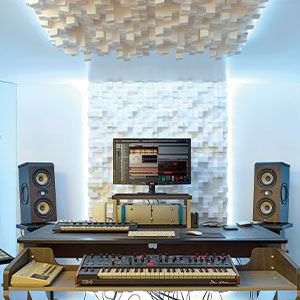
図3.1:例ample of a studio setup with two Focal Shape 50 monitors positioned for optimal sound monitoring.
3.2 接続
Connect your audio source to the Shape 50 monitor using an RCA cable. Ensure all connections are secure before powering on the unit.
- オーディオ入力: Use the RCA input for connecting your audio interface or mixer.
- 力: Connect the provided power cord to the monitor's power inlet and then to a suitable electrical outlet.

Figure 3.2: Rear panel of the Focal Shape 50, showing the RCA input, power connection, and various adjustment controls.
3.3 取り付け
The Shape 50 includes threads for ceiling and wall mount fastening. Mounting accessories are not supplied and must be purchased separately. Consult a professional for proper installation of wall or ceiling mounts.
4. 操作手順
4.1 電源のオン/オフ
To power on the monitor, ensure all audio connections are made, then connect the power cord and flip the power switch located on the rear panel. To power off, reverse this process.
4.2 設定の調整
The Shape 50 features numerous settings on its rear panel for optimal integration into various acoustic environments and for accurate control of sound reproduction. These include adjustments for high-frequency, mid-frequency, and low-frequency response, allowing you to tailor the sound to your specific room and preferences.
4.3 Flexible Listening Position
The monitor's low directivity tweeter design allows for a flexible listening position, providing consistent sound quality even when slightly off-axis from the monitor.
5. メンテナンス
To ensure the longevity and optimal performance of your Focal Shape 50 monitors, follow these maintenance guidelines:
- クリーニング: Use a soft, dry cloth to clean the exterior surfaces of the monitor. Avoid abrasive cleaners or solvents.
- 換気: Ensure adequate airflow around the monitor to prevent overheating. Do not block the ventilation openings.
- 環境: 極端な温度、湿度、直射日光を避け、安定した環境でモニターを操作してください。
6。 トラブルシューティング
If you encounter issues with your Focal Shape 50 monitor, refer to the following common troubleshooting steps:
- 音が出ない:
- モニターの電源がオンになっていて、電源コードがしっかりと接続されているかどうかを確認してください。
- Verify that the audio source is active and connected correctly to the monitor's input.
- Ensure the volume levels on both the monitor and the audio source are appropriately set.
- 歪んだ音:
- クリッピングを防ぐために、オーディオ ソースからの入力レベルを下げます。
- すべてのケーブルに損傷や接続の緩みがないか確認してください。
- Ensure the monitor's rear panel settings are not causing excessive boosting of certain frequencies.
- ハミング音またはブザー音:
- Ensure all audio cables are properly shielded.
- Try connecting the monitor to a different power outlet, preferably on a different circuit.
- 近くに干渉を引き起こしている可能性のある電子機器がないか確認してください。
If the issue persists after attempting these steps, please contact Focal customer support.
7. 仕様
| 特徴 | 仕様 |
|---|---|
| ブランド | 焦点 |
| モデル名 | 形状50 |
| モデル番号 | 3544059801524DW001 |
| スピーカータイプ | モニター |
| スピーカー最大出力 | 1000ワット |
| 周波数応答 | 35000Hz |
| 接続技術 | RCA |
| オーディオ出力モード | ステレオ、サラウンド |
| 取り付けタイプ | Wall Mount (accessories not supplied) |
| エンクロージャ材質 | クルミ |
| サブウーファーの直径 | 5インチ |
| ウーファー直径 | 5インチ |
| 色 | ダークウォルナット |
| 商品の寸法(奥行き x 幅 x 高さ) | 奥行き9.5インチ x 幅12.3インチ x 高さ7.5インチ |
| アイテム重量 | 14.33 ポンド |
| 電源 | コード式電気 |
| オーディオチャンネルの数 | 2.0 |
| 対応デバイス | スマートフォン、タブレット、MP3プレーヤー、デスクトップ、テレビ、プロジェクター、ノートパソコン |
8. 保証情報
The Focal Shape 50 Studio Monitor is covered by a 2年間のメーカー保証 ご購入日から1年間有効です。本保証は、通常の使用における材料および製造上の欠陥を対象とします。誤用、事故、不正な改造、または不適切な取り付けによる損傷は保証の対象外となります。
Please retain your proof of purchase for warranty claims. For detailed warranty terms and conditions, refer to the official Focal webサイトをご覧いただくか、カスタマー サポートにお問い合わせください。
9. サポート
For technical assistance, troubleshooting beyond this manual, or warranty inquiries, please contact Focal customer support through their official webサイトまたは製品ドキュメントに記載されている連絡先情報を参照してください。
オンラインリソース: 公式Focalをご覧ください web製品登録、FAQ、追加のサポート資料については、こちらのサイトをご覧ください。