
1. はじめに
The Mitutoyo 500-709-20 Digital Caliper is a precision measuring instrument designed for accurate dimensional measurements. Featuring IP67 protection, it is dust-tight and resistant to water immersion, making it suitable for various industrial environments. This manual provides essential information for the safe and effective operation, maintenance, and care of your digital caliper.
2. 安全情報
- Always handle the caliper with care to maintain its accuracy. Avoid dropping or subjecting the instrument to impact.
- Do not attempt to disassemble the caliper, as this may void the warranty and damage internal components.
- Keep the caliper clean and dry when not in use, especially the measuring surfaces.
- Store the caliper in its protective case to prevent damage.
- 使用済みバッテリーは、地域の規制に従って廃棄してください。
3.製品オーバーview
The Mitutoyo 500-709-20 Digital Caliper features an Absolute Digimatic system, ensuring reliable measurements. Its IP67 rating provides excellent protection against dust and water, making it suitable for use in harsh conditions.
主要コンポーネント:
- Measuring Jaws: For external and internal measurements.
- デジタルディスプレイ: 測定値を表示します。
- ORIGIN Button: Sets the origin point for absolute measurement.
- オン/オフボタン: ユニットの電源をオンまたはオフにします。
- ZERO/ABSボタン: Sets the display to zero at any position for incremental measurement, or switches between absolute and incremental modes.
- Depth Bar: For depth measurements.

The image displays the Mitutoyo 500-709-20 Digital Caliper partially submerged in water, highlighting its IP67 rating for dust and water resistance. This feature allows for reliable operation in challenging industrial conditions.

A detailed technical drawing of the Mitutoyo 500-709-20 Digital Caliper, illustrating its overall length of 233mm and jaw dimensions. This diagram is useful for understanding the physical characteristics and clearances of the instrument.
4. セットアップ
4.1 バッテリーの取り付け
- Locate the battery compartment cover on the back of the display unit.
- 小さなドライバーまたはコインを使用してカバーを開きます。
- Insert one LR44 battery with the positive (+) side facing up.
- 電池収納部のカバーをしっかりと取り付けてください。
4.2 Initial Power-On and Zero Setting
- Press the ON/OFF button to power on the caliper.
- 測定ジョーを完全に閉じます。
- Press the ORIGIN button. The display should show '0.00'. This sets the absolute origin point.
- Alternatively, press the ZERO/ABS button to set the display to zero at any desired position for incremental measurements.
5. 操作手順
5.1 外部測定
- Ensure the caliper is clean and the jaws are free of debris.
- Open the external measuring jaws wider than the object to be measured.
- Place the object between the jaws and gently close them until they make firm contact with the object.
- デジタルディスプレイから測定値を直接読み取ります。
5.2 Internal Measurement
- Insert the internal measuring jaws into the opening of the object.
- ジョーが内部の表面にしっかりと接触するまで開きます。
- Read the measurement from the digital display.
5.3 Depth Measurement
- Place the end face of the main scale on the top surface of the object.
- Extend the depth bar into the hole or recess until it touches the bottom.
- Read the measurement from the digital display.
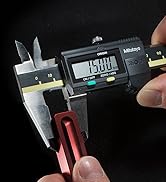
This image shows a user holding the Mitutoyo digital caliper, actively measuring the external dimension of a small component. The digital display shows a measurement reading.
6. メンテナンス
6.1 クリーニング
- Wipe the caliper clean with a soft, dry cloth after each use.
- 頑固な汚れには、布で軽く拭いてください。ampened with isopropyl alcohol. Avoid harsh chemicals or abrasive cleaners.
- ディスプレイや電池室に液体が入らないようにしてください。
6.2 電池の交換
When the display becomes dim or shows an error, replace the LR44 battery as described in Section 4.1. Always use a fresh, high-quality battery.
6.3 ストレージ
Store the caliper in its original protective case in a dry, temperature-controlled environment. Avoid exposure to direct sunlight, extreme temperatures, or high humidity.
7。 トラブルシューティング
- ディスプレイが機能しない: Check battery installation. Replace battery if necessary.
- 不正確な読み取り: Clean measuring surfaces. Ensure jaws are fully closed when setting origin. Avoid excessive force during measurement.
- Display flickering or erratic: Replace battery. Ensure the caliper is not exposed to strong electromagnetic fields.
- 顎がスムーズに動かない: Clean the sliding surfaces. Apply a very small amount of light machine oil if necessary, wiping off any excess.
8. 仕様
| 特徴 | 仕様 |
|---|---|
| モデル番号 | 500-709-20 |
| 測定範囲 | 0~150mm |
| 正確さ | +/- 0.01 ミリメートル |
| 解決 | 0.01ミリメートル |
| IP 定格 | IP67 (Dust-tight, resistant to water immersion) |
| 材料 | ステンレス鋼 |
| 電池のタイプ | LR1 44個(付属) |
| 製品寸法(長さ x 幅 x 高さ) | 23.3 x 7.3 x 1.6 cm |
| 重さ | 400グラム |
| 製造元 | 日本 |
9. 保証とサポート
For detailed warranty information, technical support, and service inquiries, please refer to the official Mitutoyo website or contact your local authorized Mitutoyo distributor. Keep your purchase receipt as proof of purchase for warranty claims.