
導入
Precision is at the core of measuring instruments and solutions, and the Mitutoyo name has come to embody reliable precision in all applications. This manual provides essential information for the proper use and care of your Mitutoyo 500-706-20 Digital Caliper.
Key features of this digital caliper include:
- Reliable measurements across various applications.
- Measurement deviation limit (E MPE): ±0.02 mm.
- Measurement error limit (S MPE): ±0.04 mm.
- 20 分間操作しないと自動的に電源がオフになり、バッテリー寿命が長くなります。

設定
1。 開梱と検査
Carefully remove the caliper from its packaging. Inspect the device for any visible damage or missing components. Ensure all included accessories, such as the protective box and battery, are present.
2. バッテリーの取り付け
The Mitutoyo 500-706-20 Digital Caliper requires one LR44 battery (included). Locate the battery compartment cover, typically on the back of the digital display unit. Slide or unclip the cover, insert the LR44 battery with the correct polarity (+ side up), and then securely close the compartment.
3. Initial Power-On and Cleaning
を押す オン/オフ button to power on the caliper. The display should illuminate and show '0.00'. Before first use, gently wipe the measuring surfaces and the main beam with a clean, lint-free cloth to remove any dust or protective oils.
操作手順
1. 電源のオン/オフ
を押す オン/オフ button to turn the caliper on or off. The caliper will automatically shut off after 20 minutes of inactivity.
2. ゼロ設定
Before taking any measurement, ensure accuracy by setting the zero point. Close the external measuring jaws completely and press the ゼロ button. The display should read '0.00'. This establishes a reference point for subsequent measurements.
3. 外部測定
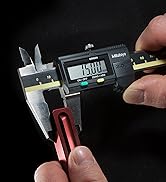
Place the object to be measured between the external jaws. Slide the movable jaw until it makes firm, but not excessive, contact with the object. Read the measurement directly from the digital display.
4. 内部測定
Use the smaller, upper jaws for internal dimensions. Insert the jaws into the opening of the object and expand them until they contact the inner surfaces. Read the measurement from the display.
5. 深度測定
Extend the depth rod from the end of the caliper into the depth of the feature you are measuring. Ensure the end of the main beam rests firmly on the top surface of the object. Read the measurement.
6. 歩数測定
Utilize the step measuring face located at the end of the main beam. Place the fixed jaw on the higher surface and extend the movable jaw to the lower surface to measure the step height. Read the measurement.
メンテナンス
1. 清掃
Regularly clean the measuring surfaces and the main beam with a dry, lint-free cloth. Avoid using solvents, abrasive cleaners, or any liquids that could damage the electronic components or measuring surfaces. Keep the digital display clean and dry.
2. バッテリーの交換
When the display indicates a low battery (e.g., a flashing battery icon) or becomes dim, it is time to replace the LR44 battery. Follow the battery installation steps outlined in the Setup section, ensuring correct polarity.
3. ストレージ
Store the caliper in its original protective case when not in use. Keep it in a dry, clean environment, away from direct sunlight, extreme temperatures, and high humidity. Ensure the measuring jaws are slightly open (approximately 0.5-1 mm) to prevent stress on the measuring surfaces and to avoid potential corrosion if moisture is present.
トラブルシューティング
1. ディスプレイが機能しない、または暗い
- 電池が正しい極性で正しく取り付けられているかどうかを確認してください。
- LR44電池を新しいものと交換してください。
- 電池ボックスのカバーがしっかりと閉まっていることを確認してください。
2. 不正確または矛盾した読み取り
- Ensure the measuring surfaces are clean and free from dust, debris, or oil.
- Always zero the caliper before each measurement by closing the jaws and pressing the ゼロ ボタン。
- Avoid applying excessive force when taking measurements, as this can lead to deflection and inaccurate results.
- Ensure the object being measured is stable and properly positioned between the jaws.
3. Jaws Not Moving Smoothly
- Clean the main beam and ensure no debris is obstructing the movement of the movable jaw.
- Do not lubricate the beam, as this can attract dust and impair accuracy.
仕様
| ブランド | ミツトヨ |
| モデル | 500-706-20 |
| 材料 | ステンレス、プラスチック |
| 製品寸法(長さ×幅) | 23.3 cm × 7.3 cm |
| 測定範囲 | 0~150mm |
| Measurement Deviation Limit (E MPE) | ±0.02mm |
| Measurement Error Limit (S MPE) | ±0.04mm |
| 電池のタイプ | LR1 44個(付属) |
| 自動シャットオフ | 20分間操作がない場合 |
| 含まれるコンポーネント | Protective Box, 1 x SR-44 battery |
| 原産国 | 日本 |

保証情報
This Mitutoyo product is covered by a standard manufacturer's warranty. For specific terms, conditions, and duration of the warranty, please refer to the warranty card or documentation included with your product. It is recommended to retain your proof of purchase for any warranty claims.
カスタマーサポート
For technical assistance, inquiries about spare parts, or service, please contact Mitutoyo customer support. You can find detailed contact information and additional resources by visiting the official Mitutoyo website. Please have your product model number (500-706-20) and purchase details ready when contacting support.