
導入
The HyperGear Marathon Sport Wireless Bluetooth Earphones are engineered to provide a high-fidelity audio experience for active individuals. Designed for comfort and durability, these earphones offer wireless connectivity, clear sound, and convenient hands-free calling, making them suitable for various activities from intense workouts to casual listening.
パッケージ内容
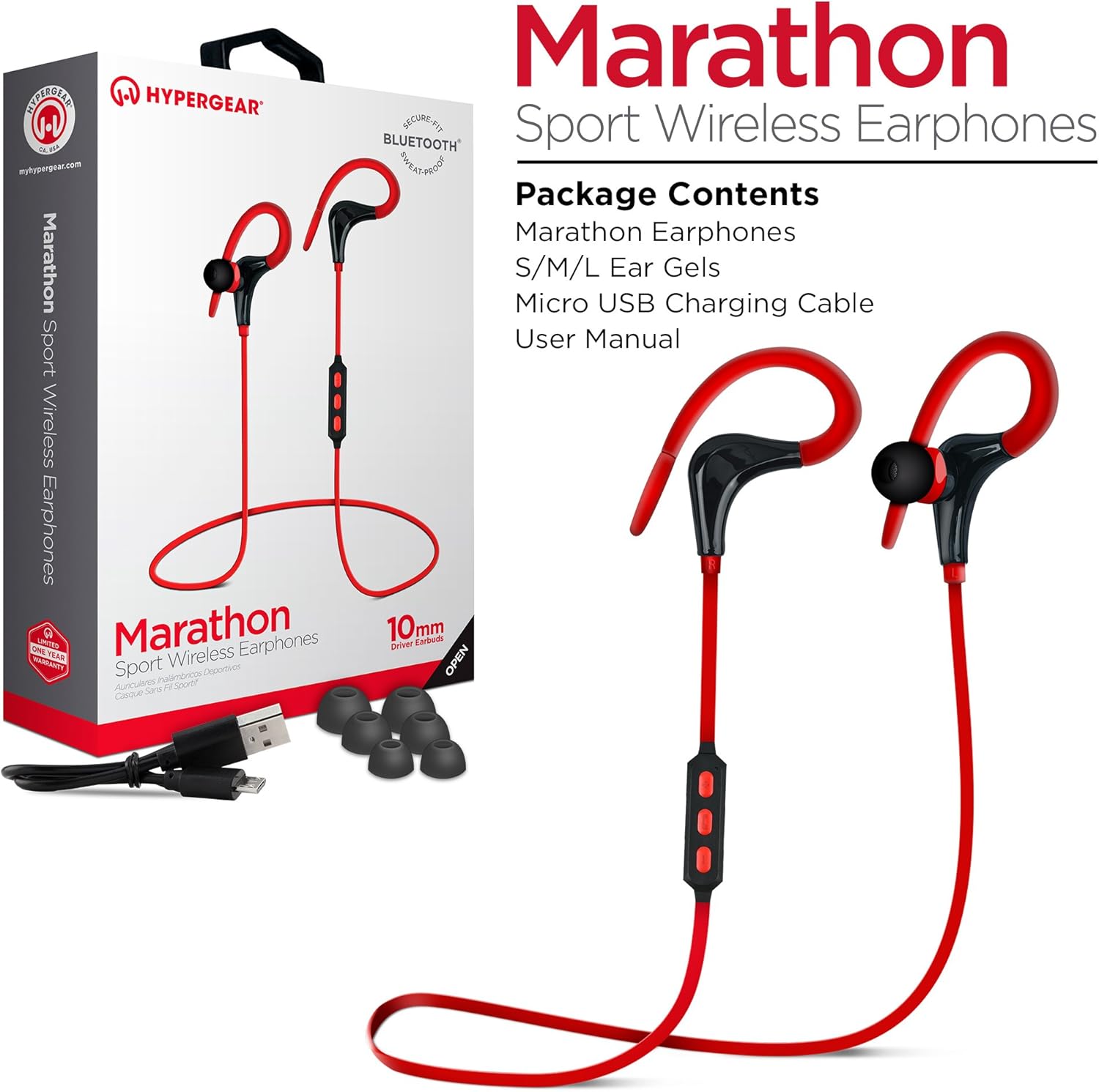
This image displays the retail packaging for the HyperGear Marathon Sport Wireless Earphones, showing the earphones themselves, a Micro USB charging cable, and various sizes of ear gels. The box highlights features such as 'Secure Fit' and 'Bluetooth'.
以下の項目のボックスにチェックを入れてください。
- HyperGear Marathon Sport Wireless Earphones
- S/M/L Ear Gels (various sizes for optimal fit)
- マイクロUSB充電ケーブル
- ユーザーマニュアル(このドキュメント)
設定
1. イヤホンの充電
Before first use, fully charge your earphones. The battery provides up to 5 hours of average life on a single charge.
- Locate the Micro USB charging port on the earphones' in-line control module.
- 付属のマイクロUSBケーブルを充電ポートに接続します。
- USB ケーブルのもう一方の端を互換性のある USB 電源 (コンピューターの USB ポート、USB 壁アダプターなど) に差し込みます。
- The LED indicator will show charging status (refer to the LED indicator section for details). Once fully charged, the LED will change color or turn off.
2. Bluetoothデバイスとのペアリング

This image illustrates the wireless freedom of the HyperGear Marathon Sport Earphones, depicting them wirelessly connected via Bluetooth to a smartphone, tablet, and desktop computer, emphasizing their universal compatibility.
The earphones use Bluetooth 4.1 technology for reliable wireless transmission up to 33 feet (10 meters).
- イヤホンが充電され、電源がオフになっていることを確認してください。
- Press and hold the Multi-function button (usually the center button on the in-line control) for approximately 5-7 seconds until the LED indicator flashes red and blue alternately, indicating pairing mode.
- Bluetooth 対応デバイス (スマートフォン、タブレットなど) で、Bluetooth 設定に移動し、Bluetooth をオンにします。
- 検索する available devices. You should see "HyperGear Marathon" or a similar name appear in the list.
- Select "HyperGear Marathon" to connect. Once successfully paired, the LED indicator on the earphones will typically flash blue slowly or turn solid blue.
- パスコードの入力を求められた場合は、「0000」と入力してください。
イヤホンは電源を入れると、最後にペアリングしたデバイスに自動的に再接続しようとします。
操作手順
コントロールオーバーview

This image highlights the in-line control module of the HyperGear Marathon Sport Earphones, positioned next to a smartphone displaying a music player. It emphasizes the convenience of hands-free music and call management.
The in-line control module allows you to manage music playback and calls.
| ボタン/アクション | 関数 |
|---|---|
| 多機能ボタン (中心) |
|
| ボリュームアップ(+) |
|
| ボリュームダウン (-) |
|
イヤホンの装着

This image shows a person cycling outdoors while wearing the HyperGear Marathon Sport Earphones, demonstrating the secure behind-the-ear hook design that keeps the earphones in place during active movement.

This image depicts a person running, wearing the HyperGear Marathon Sport Earphones. It highlights the ergonomic ear gels and sweatproof design, emphasizing their suitability for active lifestyles and secure fit during exercise.
The Marathon earphones feature a behind-the-ear hook design and ergonomic ear gels for a secure and comfortable fit, even during strenuous activities.
- Select the ear gel size that provides the best seal and comfort for your ears. Three sizes (S/M/L) are included.
- イヤホンを耳の穴に挿入します。
- Gently loop the ear hook over the top and behind your ear, adjusting it until it feels secure and comfortable.
オーディオ品質

This image showcases the High-Fidelity Stereo Sound feature of the HyperGear Marathon Sport Earphones, highlighting the 10mm Neodymium Drivers that deliver powerful bass and clear highs for an authentic listening experience.
Equipped with powerful 10mm Neodymium Drivers, these earphones deliver high-fidelity stereo sound with robust bass and clear high frequencies for an immersive audio experience.
メンテナンス
Proper care will extend the life of your HyperGear Marathon earphones.
- クリーニング: Use a soft, dry cloth to wipe the earphones. For ear gels, remove them and clean with a mild soap solution if necessary, then rinse and dry thoroughly before reattaching. Do not use harsh chemicals or abrasive materials.
- ストレージ: 使用しないときは、イヤホンを直射日光や極端な温度を避け、涼しく乾燥した場所に保管してください。
- 耐水性: The earphones are sweatproof and water-resistant, but they are not waterproof. Do not submerge them in water or expose them to heavy rain. Dry them thoroughly if they get wet from sweat or light splashes.
- 充電: Avoid overcharging. Disconnect the charging cable once the earphones are fully charged.
トラブルシューティング
| 問題 | 考えられる原因 | 解決 |
|---|---|---|
| イヤホンがオンにならない | バッテリー残量が少ない | イヤホンを完全に充電してください。 |
| デバイスとペアリングできません | Earphones not in pairing mode; Bluetooth off on device; Device too far | Ensure earphones are in pairing mode (flashing red/blue). Turn on Bluetooth on your device. Move device closer to earphones (within 33 ft/10m). Forget previous pairings on your device and try again. |
| 音が出ない、または音量が小さい | Volume too low; Earphones not connected; Incorrect audio output selected on device | Increase volume on both earphones and connected device. Reconnect earphones. Check audio output settings on your device. |
| Sound cutting in/out | Interference; Device too far; Obstructions | Move closer to the connected device. Avoid strong electromagnetic interference. Ensure no physical obstructions between earphones and device. |
| マイクが機能しない | Incorrect settings on device; Earphones not properly connected | Check microphone input settings on your device. Ensure earphones are fully connected and selected as the audio input device. |
仕様

This is a clear, full-view image of the HyperGear Marathon Sport Wireless Bluetooth Earphones in red, showcasing their design with ear hooks and the in-line control module.
| 特徴 | 詳細 |
|---|---|
| モデル | HYG-14077 |
| 接続性 | ブルートゥース4.1 |
| ワイヤレス範囲 | 最大33フィート(10メートル) |
| ドライバーサイズ | 10mmネオジムドライバー |
| バッテリー寿命 | 最大5時間(平均使用) |
| マイクロフォン | Built-In, Noise Cancelling |
| 耐水性 | 防汗・耐水性 |
| 重さ | 9グラム |
| 材料 | プラスチック |
| 寸法 | 32 x 3.3 x 2.49 cm |
| 互換性 | Universal (Apple, Android, tablets, wearables, gaming devices) |
保証とサポート
HyperGear products are designed with quality and reliability in mind. For warranty information and customer support, please refer to the official HyperGear webサイトをご覧いただくか、カスタマー サービスに直接お問い合わせください。
- 正式 Webサイト: www.hypergear.com (注意:これはプレースホルダーです URL. Refer to your product packaging or HyperGear's official documentation for the correct support web地点。)
- 顧客サービス: 連絡先情報は通常、メーカーの webサイトまたは製品のパッケージ。
保証請求のために購入証明書を保管してください。