
1. パッケージ内容
パッケージにすべてのアイテムが揃っていることを確認します。
- BOBLOV ボディカメラ
- ユーザーマニュアル
- ショルダークリップ
- カーチャージャー
- 2 x Lithium Ion Batteries (1950mAh each)
- USBケーブル
- 充電ベース
- 短いクリップ

Image: The package contents include the body camera, user manual, two clips, car charger, two batteries, USB cable, and charging base.
2. セットアップ
2.1 バッテリーの取り付けと充電
The camera comes with two 1950mAh Lithium Ion batteries. Ensure batteries are fully charged before first use.
- Insert one battery into the dedicated slot on the charging base.
- Place the body camera onto the charging base. The base allows simultaneous charging of one battery and the camera.
- Connect the USB cable to the charging base and a power source (e.g., wall adapter, car charger, or computer USB port).
- 充電時間はフル充電まで約 3 時間です。

Image: The body camera and a spare battery are shown charging in the dual charging dock.
2.2メモリーカード
The camera supports external TF (MicroSD) cards up to 128GB. A 64GB internal storage is included.
- カメラの側面にある TF カード スロットを見つけます。
- TF カードをカチッと音がするまでゆっくりとスロットに挿入します。
- 取り外すには、カードが飛び出すまで内側に押します。
Image: The body camera features an external TF card slot, supporting cards up to 128GB for expanded storage.
3. 操作手順
3.1 電源オン/オフ
Press and hold the Power button for 3 seconds to turn the camera on. To turn off, press and hold the Power button for 5 seconds.
3.2 ビデオ録画
From standby mode, short press the Video Record button to start recording. The red light will flash, and the camera will vibrate twice. Short press again to stop recording and save the file.
3.3 写真のキャプチャ
From standby mode, short press the Photo button to take a single photo. The camera will vibrate once.
3.4オーディオ録音
From standby mode, short press the Audio Record button to start audio-only recording. Short press again to stop and save.
3.5 ナイトビジョン
The camera features automatic infrared night vision. In low light conditions, the IR lights will activate to capture clear footage up to 15 meters (approximately 49 feet) away.

Image: The body camera captures clear footage in low light, showing objects at 3 meters and 15 meters with night vision activated.
3.6 再生
Use the menu buttons to navigate through recorded videos, photos, and audio files on the 2-inch LCD screen. Select a file and press the OK button to play.
3.7 Mounting and Wear
The camera comes with rotatable clips for flexible mounting options. Attach the desired clip to the back of the camera.
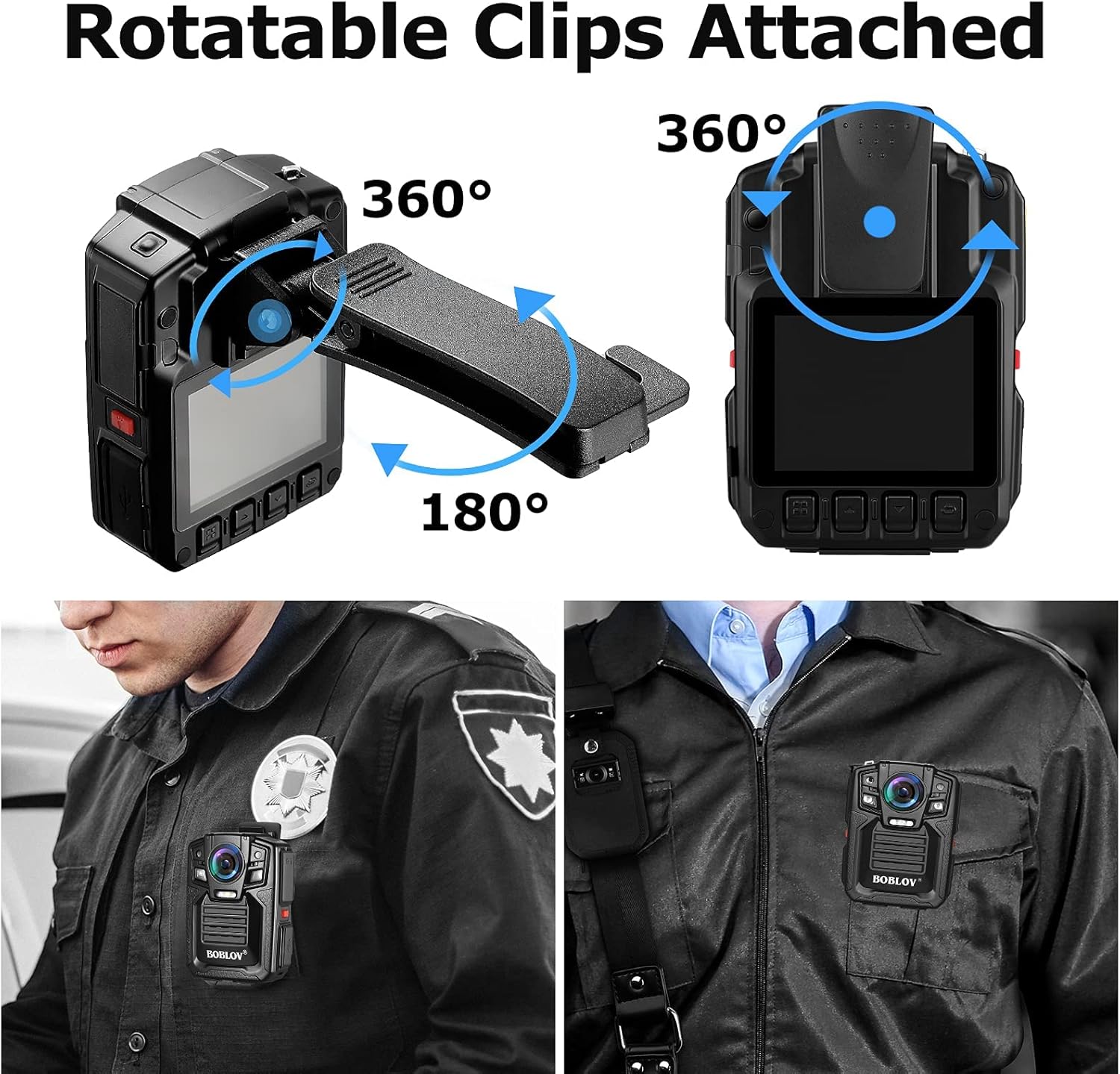
Image: The body camera is shown with rotatable clips, allowing for 360-degree rotation and 180-degree tilt for optimal positioning.

Image: A person in uniform wears the BOBLOV body camera clipped to their shirt pocket, demonstrating a typical use case.
4. メンテナンス
4.1 クリーニング
Wipe the camera body and lens with a soft, dry cloth. Avoid using harsh chemicals or abrasive materials.
4.2データ転送
Connect the camera to a computer using the provided USB cable to transfer recorded files. The camera will appear as a removable disk drive.
4.3ファームウェアアップデート
メーカーの web最適なパフォーマンスと新機能へのアクセスを確保するために、ファームウェアのアップデートを定期的にサイトで確認してください。
5。 トラブルシューティング
| 問題 | 考えられる原因 | 解決 |
|---|---|---|
| Machine cannot boot | バッテリーの消耗 | バッテリーをフル充電してください。 |
| Machine cannot boot | 機械保護 | Press reset button or reboot. |
| Machine working time is short | アンダーチャージ | Full charge more than 4 hours. |
| Cannot copy data to computer | USB interface in front of computer power supply is insufficient | Connect the data line to the computer's back USB interface. |
6. 仕様
| 特徴 | 詳細 |
|---|---|
| ビデオ解像度 | 1296P (Effective 1296 Pixels) |
| ビデオキャプチャフォーマット | MPEG-4 |
| 分野 View | 170度 |
| ナイトビジョン | Yes (Low light technology: Night Color) |
| 耐水性レベル | 防水(IP67) |
| 内部ストレージ | 64GB |
| 外部ストレージ | 128GBまでのTFカードをサポート |
| 電池のタイプ | 2 Lithium Ion batteries (1950mAh each) |
| アイテム重量 | 1ポンド |
| 接続技術 | USB |
| モデル番号 | HLX077-I0411B1 |
7. 保証とサポート
For warranty information or technical assistance, please contact BOBLOV Customer Service. Refer to the user manual included in your package for specific contact details or visit the official BOBLOV webサイト。
General Customer Service Email: Support@Boblov.com
8. 公式製品ビデオ
Below are official product videos from the seller for additional guidance and demonstrations.
BOBLOV BODY CAM Real Video Visual effects
Video: This video demonstrates the real-world visual effects and video quality of the BOBLOV body camera.