
導入
Thank you for choosing the Aqualin Dual Outlet Irrigation Timer Controller. This device is designed to automate your garden watering, providing convenience and efficient water management. With two independently programmable outlets, you can customize watering schedules for different areas of your garden or lawn. Please read this manual carefully to ensure proper installation, operation, and maintenance of your irrigation timer.
製品終了view
The Aqualin YL21060 features a clear LCD display, intuitive controls, and robust construction for outdoor use. It offers flexible programming options, including a rain delay function to conserve water.

The Aqualin Dual Outlet Irrigation Timer Controller, shown attached to a faucet, featuring a digital display and two independent water outlets.
主な特徴:
- デュアル独立コンセント: Program two separate watering zones with unique schedules.
- 柔軟なプログラミング: Set desired frequency and duration for each zone.
- 雨天遅延機能: Skip watering sessions during and after rainy days (1-7 days).
- 手動散水: Initiate immediate watering without interrupting programmed cycles.
- IPX5防水性: Designed for outdoor durability.
- 簡単なインストール: Features a swivel joint for quick connection to standard faucets (3/4" or 1").
- LCDディスプレイ: Clear digital display for easy programming and monitoring.
- インレットフィルター: Helps prevent debris from entering the system.

オーバーview of the Aqualin timer's features, including manual watering, IPX5 waterproofing, two independent zones, an inlet filter, an LCD display, and a rain delay function.
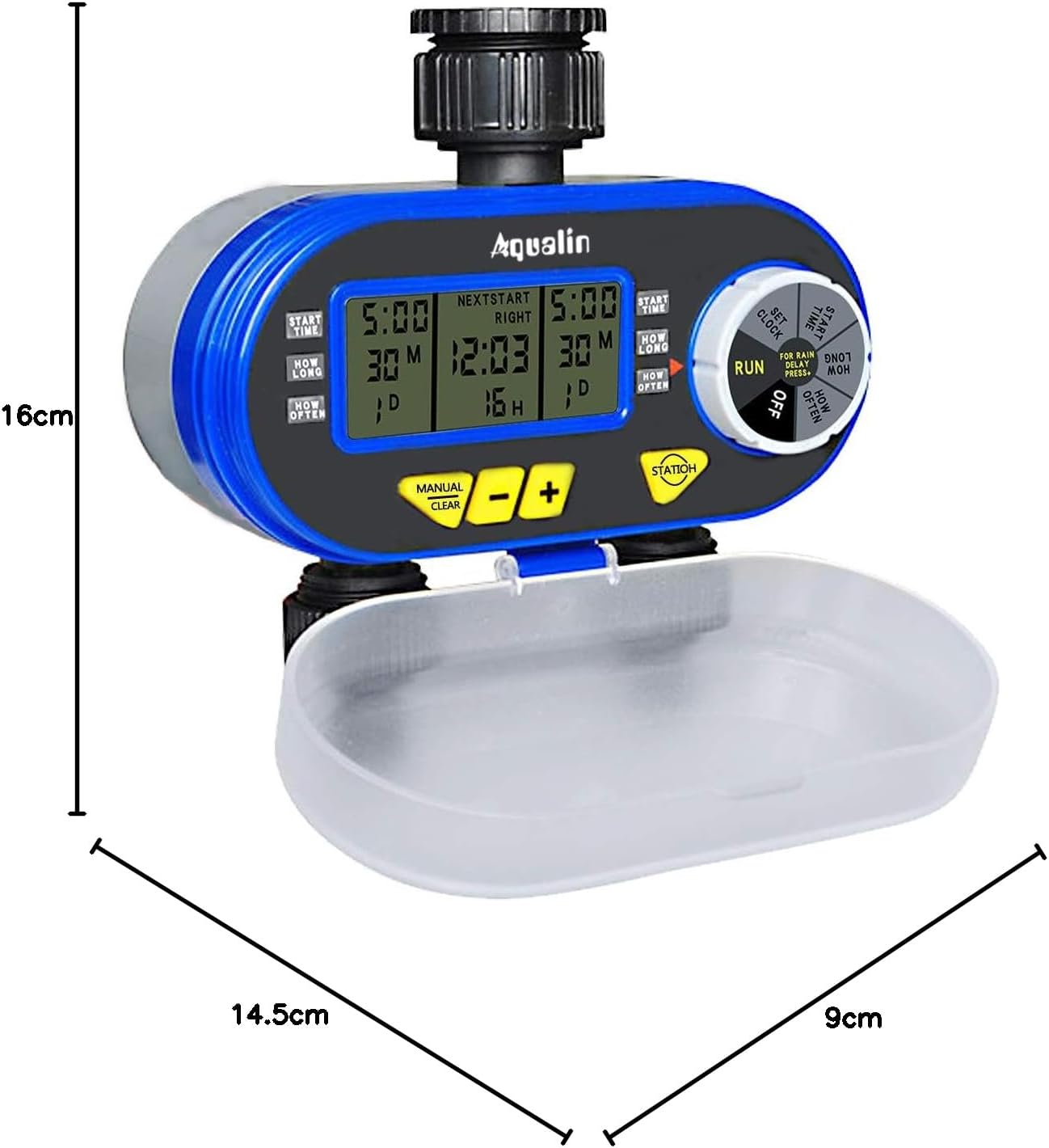
A diagram showing the physical dimensions of the Aqualin timer: 16cm height, 14.5cm length, and 9cm depth.
設定
- バッテリーの取り付け:
- Open the battery compartment cover located at the back of the unit.
- Insert two (2) AA alkaline batteries, ensuring correct polarity.
- 電池ケースをしっかりと閉じてください。
- 蛇口への接続:
- Attach the timer to a standard 3/4" (19mm) or 1" (25mm) outdoor faucet. The swivel joint allows for easy, tool-free connection.
- Ensure the connection is tight to prevent leaks. Do not overtighten.
- タイマーの下部にある 2 つの独立した出口に庭のホースを接続します。
- 初期時間設定:
- Rotate the main dial to the 'SET CLOCK' position.
- 「+」ボタンと「-」ボタンを使用して現在の時刻を調整します。
- Press 'ENTER' to confirm the setting.
- 雨センサー(オプション):
- If using an external rain sensor, connect it to the designated rain sensor hole.
- Ensure the internal contacts for the rain sensor are not bent if no sensor is connected, as this can prevent watering.

閉じる view highlighting the 360-degree anti-leak design, the rain sensor input hole, and the battery compartment cover of the Aqualin timer.
操作手順
The Aqualin timer offers both automatic and manual watering modes for maximum flexibility.
Video demonstrating the automatic and manual functions of the Aqualin Dual Outlet Irrigation Timer Controller, showing how to set watering schedules and activate manual irrigation.
1. Automatic Function Programming:
The timer allows independent programming for two zones (Zone 1 and Zone 2).

This image illustrates the independent programming capabilities of the Aqualin timer, with separate settings for start time, duration, and frequency for Zone 1 and Zone 2.
- 開始時刻の設定:
- Rotate the dial to 'START TIME'.
- Use '+' and '-' to set the desired start time for Zone 1. Press 'ENTER'.
- Repeat for Zone 2.
- Set How Long (Duration):
- Rotate the dial to 'HOW LONG'.
- Use '+' and '-' to set the watering duration for Zone 1 (1 minute to 240 minutes). Press 'ENTER'.
- Repeat for Zone 2.
- Set How Often (Frequency):
- Rotate the dial to 'HOW OFTEN'.
- Use '+' and '-' to set the watering frequency for Zone 1 (e.g., every 12 hours, every 3 days). Press 'ENTER'.
- Repeat for Zone 2.
- プログラムを実行:
- Once all settings are configured, rotate the dial to 'RUN'. The timer will now operate according to your programmed schedule.
2. 降雨遅延機能:
To prevent overwatering and save water, use the rain delay feature.

The timer's display showing the Rain Delay feature, which allows skipping irrigation for 1 to 7 days to conserve water.
- While in 'RUN' mode, press the 'RAIN DELAY' button.
- Use '+' or '-' to select the desired delay period (e.g., 24, 48, 72 hours, or up to 7 days).
- Press 'ENTER' to activate the rain delay. Watering will resume automatically after the selected period.
3. 手動散水:
プログラムされたスケジュールに影響を与えずにすぐに散水するには:

The Aqualin timer in manual watering mode, allowing for immediate irrigation without altering programmed schedules.
- While in 'RUN' mode, press the 'MANUAL/CLEAR' button.
- Use '+' or '-' to set the desired manual watering duration (1 to 360 minutes).
- Press 'ENTER' to start manual watering.
- To stop manual watering, press 'MANUAL/CLEAR' again.
メンテナンス
- バッテリー交換: Replace AA batteries every 1.5 to 3 months, or when the low battery indicator appears on the display, to ensure continuous operation.
- 入口フィルターのクリーニング: Periodically check and clean the inlet filter to prevent clogging and maintain optimal water flow. Remove the timer from the faucet, unscrew the inlet connection, and rinse the filter under running water.
- 冬季: Before the first frost, disconnect the timer from the faucet and hoses. Drain any remaining water from the unit and store it indoors in a dry, frost-free location.
- 一般的な清掃: 広告でタイマーを拭くamp 布で汚れやゴミを拭き取ってください。研磨剤入りの洗剤や溶剤は使用しないでください。
トラブルシューティング
| 問題 | 考えられる原因 | 解決 |
|---|---|---|
| 水の流れがない |
|
|
| 接続からの漏れ |
|
|
| Timer not programming correctly |
|
|
| バッテリーコンパートメントが動かなくなった | Battery compartment inserted incorrectly. | Ensure the battery compartment is inserted in the correct orientation. Forcing it can cause damage. |
仕様
| 特徴 | 詳細 |
|---|---|
| ブランド | Aqualin |
| モデル番号 | YL21060 |
| 材料 | アブソリュート |
| 寸法(長さ×幅×高さ) | 14.5 cm x 9 cm x 16 cm |
| 設定数 | 2 (Independent Zones) |
| 蛇口接続 | 3/4" (19mm) or 1" (25mm) |
| 散水時間 | 1分から240分 |
| 電源 | 単三電池2本 |
| GTIN | 613869410455 |
保証とサポート
The Aqualin Dual Outlet Irrigation Timer Controller comes with a standard manufacturer's warranty. For specific warranty details, technical assistance, or to download a detailed PDF instruction manual, please visit the official Aqualin webご購入の際は、ウェブサイトをご覧いただくか、カスタマーサービスまでお問い合わせください。保証請求の際は、購入証明としてレシートを保管してください。
使用シナリオ

This image illustrates the versatility of the Aqualin timer, suitable for various watering applications such as gardens, lawns, farms, and potted plants.