
1. はじめに
The ThermoPro TP50 is a compact and highly accurate digital indoor thermometer and hygrometer designed to help you monitor the temperature and humidity levels in your living spaces. This device provides essential information for maintaining a comfortable and healthy indoor environment, displaying current conditions, maximum and minimum records, and a comfort level indicator.
Its versatile design allows for easy placement in various locations, making it suitable for homes, offices, baby rooms, greenhouses, and more. Understanding the information provided by the TP50 can assist in managing conditions for personal comfort, plant care, and pet well-being.
2 製品の特徴
- コンパクトなデザイン: Approximately 8.0 cm (height) x 7.0 cm (width) x 2.2 cm (depth). Made from durable ABS resin.
- 大きくて鮮明なディスプレイ: Features a large LCD screen with clear digits for easy readability of current temperature and humidity.
- 最大/最小記録: Automatically records and displays the highest and lowest temperature and humidity values measured since the last reset. This feature is useful for tracking environmental changes over time.
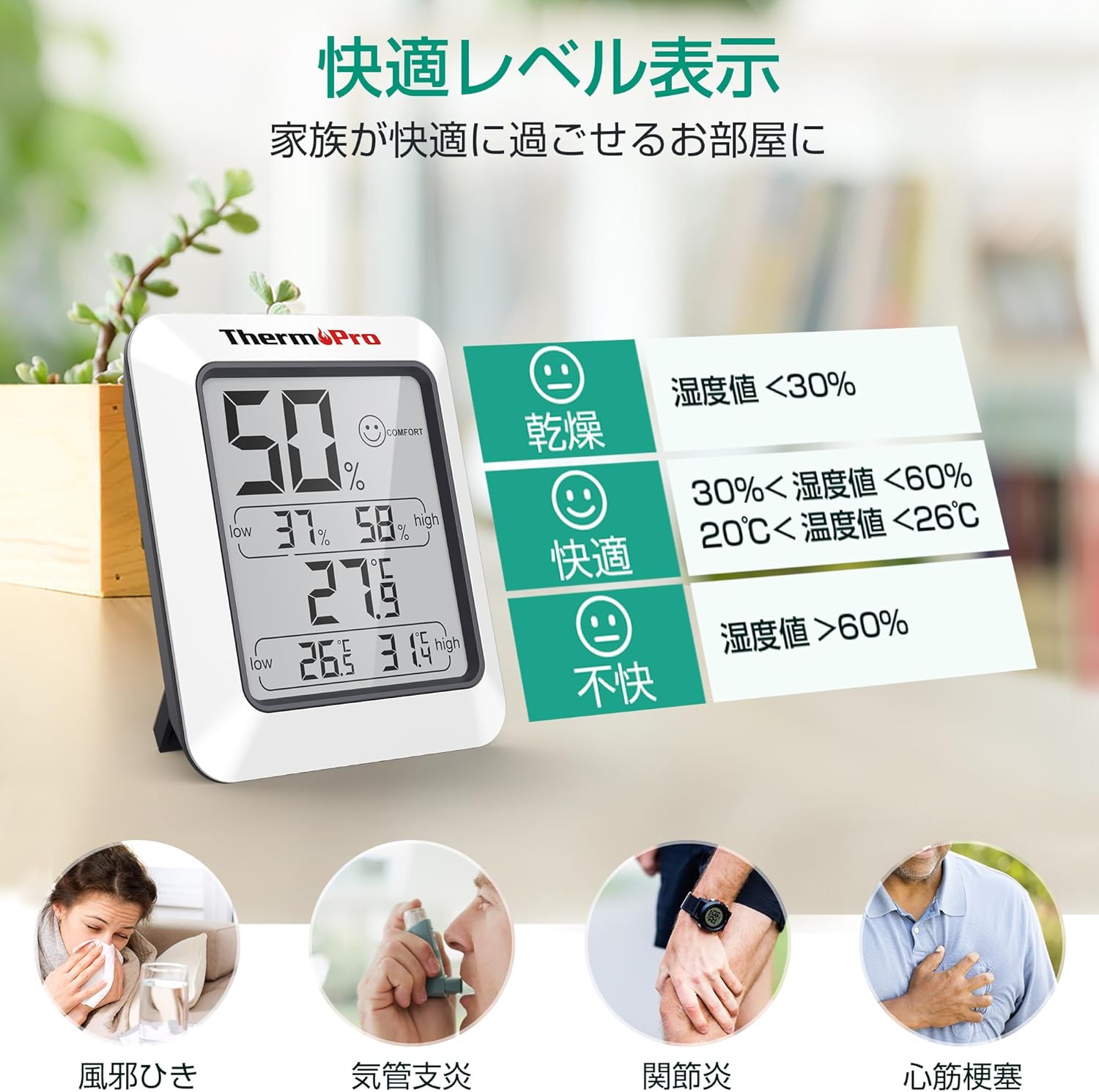
- 快適さレベルインジケーター: Utilizes a simple face icon to indicate one of three comfort levels: Dry, Comfort, or Uncomfortable, based on the current temperature and humidity.
- 多彩な配置: Equipped with a strong magnet for attachment to metallic surfaces like refrigerators, and a foldable stand for tabletop use.
- 高精度: Provides precise measurements for effective environmental monitoring.

3. セットアップ
3.1 バッテリーの取り付け
- ユニットの背面にある電池ボックスを見つけます。
- 電池ボックスのカバーを開きます。
- Insert one (1) AAA 1.5V battery, ensuring the correct polarity (+/-) as indicated inside the compartment.
- 電池カバーをしっかりと閉じてください。
3.2 初期安定化
Upon initial power-on or after battery replacement, the sensor requires time to stabilize and accurately reflect the surrounding environment. Due to the small air intake hole on the back of the unit, it may take approximately 30 minutes for the device to display stable and accurate readings. Please allow this period for the device to calibrate before relying on the measurements.
4. 操作手順
4.1 ディスプレイの読み方
大型 LCD 画面には次の情報が表示されます。
- 現在の湿度: パーセントで表示tage (%) at the top of the display.
- 現在の気温: Shown in degrees Celsius (°C) or Fahrenheit (°F) in the middle of the display.
- 最大/最小湿度: The highest and lowest humidity recorded since the last reset are displayed below the current humidity.
- 最高/最低温度: The highest and lowest temperature recorded since the last reset are displayed below the current temperature.
- 快適レベルアイコン: A face icon (Dry, Comfort, Uncomfortable) is displayed next to the current humidity reading.

4.2 温度単位の切り替え(°C/°F)
To switch between Celsius (°C) and Fahrenheit (°F), locate the '°F/°C' button on the back of the unit and press it. The display will instantly change the temperature unit.
4.3 Resetting Max/Min Records
The maximum and minimum temperature and humidity records are automatically updated every 10 seconds. To clear the recorded maximum and minimum values and start a new recording cycle, press and hold the 'CLEAR' button located on the back of the unit for approximately 3 seconds. The display will show the current readings as the new starting point for max/min tracking.

5. メンテナンス
5.1 クリーニング
ユニットを清掃するには、柔らかくて乾いた布で拭いてください。amp cloth. Do not use abrasive cleaners or immerse the unit in water. Ensure the device is dry before re-using.
5.2 電池の交換
When the display becomes dim or shows inaccurate readings, it may be time to replace the battery. Follow the battery installation steps in Section 3.1 to replace the AAA battery.
5.3 ストレージ
If storing the unit for an extended period, remove the battery to prevent leakage and damage to the device.
5.4 耐水性に関する重要な注意事項
このデバイスは 防水ではありません. Please avoid using it in wet environments such as bathrooms, washrooms, or near sinks, as exposure to water can damage the unit.
6。 トラブルシューティング
6.1 不正確な読み取り
- 初期設定: As mentioned in Section 3.2, allow 30 minutes for the device to stabilize after initial setup or battery replacement.
- 配置: Ensure the device is placed in a location with good air circulation, away from direct sunlight, heat sources, or drafts, which can affect readings.
- 障害: The small air intake hole on the back should not be obstructed.
6.2 ディスプレイが暗い、または何も表示されない
- バッテリーチェック: The battery may be low or depleted. Replace the AAA battery with a new one.
- バッテリーの取り付け: Ensure the battery is installed correctly with the proper polarity.
7. 仕様
| 仕様 | 詳細 |
|---|---|
| モデル | TP50 |
| 寸法 | 約8.0cm(高さ)×7.0cm(幅)×2.2cm(奥行き) |
| 重さ | 約60g |
| 材料 | ABS樹脂 |
| 電源 | 1 x AAA 1.5V Battery (included) |
| バッテリー寿命 | 約。 1年 |
| 温度範囲 | -50°C ~ 70°C (-58°F ~ 158°F) |
| 湿度範囲 | 10%~99% RH |
| 温度精度 | ±1°C (±1.8°F) |
| 湿度精度 | ±2% RH (30%-80% RH), ±3% RH (10%-30% & 80%-99% RH) |
| リフレッシュレート | 10秒ごとに |
| 表示タイプ | 液晶 |
| 耐水性 | いいえ(防水ではありません) |

8. 保証とサポート
ThermoPro products are designed for reliability and performance. This product comes with a 1-year warranty from the date of purchase, covering defects in materials and workmanship under normal use.
For technical assistance, troubleshooting, or warranty claims, please contact ThermoPro customer support. Our friendly customer support team is available to assist you with any questions or concerns regarding your device.
ThermoPro is committed to providing high-quality products and support to its community of over 20 million users worldwide.
For more information and support, please visit the official ThermoPro brand store: ThermoPro Brand Store