
導入
This manual provides detailed instructions for the use and maintenance of your Strong SRT 7404 HD remote control. This remote is designed as an original replacement for the Strong SRT 7404 HD FRANSAT receiver, ensuring full compatibility and functionality.
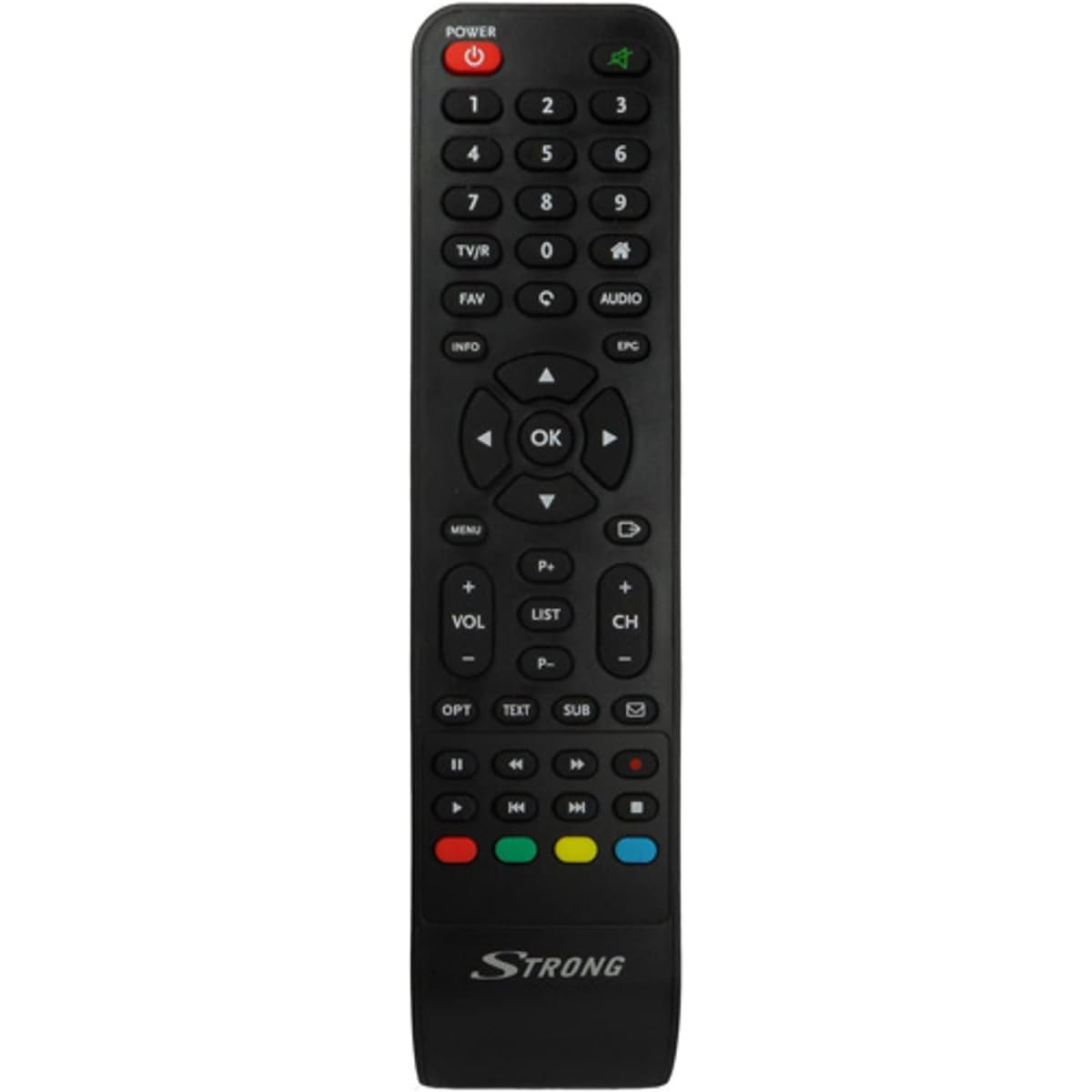
Image: The Strong SRT 7404 HD remote control, black in color, featuring various control buttons for television and receiver functions.
設定
1. バッテリーの取り付け
- リモコンの背面にある電池収納部を見つけます。
- 電池カバーを下方向または矢印の方向にスライドして開きます。
- 単 4 アルカリ電池 2 本 (別売) を挿入し、プラス (+) とマイナス (-) の端子がコンパートメント内のマークと正しく揃っていることを確認します。
- 電池カバーをカチッと音がするまで元の位置に戻して、しっかりと固定します。
注意:最適な性能を得るには、必ず新しいアルカリ電池をご使用ください。古い電池と新しい電池、または異なる種類の電池を混ぜて使用しないでください。
2.初期使用
The Strong SRT 7404 HD remote control is an original replacement and is pre-programmed for the Strong SRT 7404 HD FRANSAT receiver. No additional setup or pairing is typically required. Simply install the batteries and point the remote control towards your receiver to begin operation.
操作手順
This section outlines the basic functions of the remote control buttons.
- 電源ボタン: 受信機の電源をオンまたはオフにします。
- チャンネルアップ/ダウン: Navigates through television channels.
- 音量を上げる/下げる: オーディオの音量を調整します。
- 消音ボタン: オーディオを無音にしたり、復元したりします。
- 数字ボタン(0-9): Directly selects channels or enters numerical data.
- メニューボタン: 受信機のメイン メニューにアクセスします。
- ナビゲーション ボタン (上、下、左、右、OK): メニューを移動したり選択を確定したりするために使用します。
- 終了/戻るボタン: 前の画面に戻るか、メニューを終了します。
- 情報ボタン: プログラム情報を表示します。
- カラーボタン(赤、緑、黄、青): Functions vary depending on the on-screen menu or application.
Refer to your Strong SRT 7404 HD FRANSAT receiver's manual for specific functions related to its menu system and advanced features.
メンテナンス
クリーニング
リモコンを清掃するには、柔らかく乾いた布で表面を優しく拭いてください。頑固な汚れには、軽くampen the cloth with water. Avoid using abrasive cleaners, solvents, or alcohol, as these can damage the remote's finish or internal components.
バッテリー交換
Replace batteries when the remote control becomes unresponsive or its range decreases significantly. Follow the battery installation steps outlined in the "Setup" section. Dispose of used batteries according to local regulations.
ストレージ
長期間使用しない場合は、電池の液漏れを防ぐため、リモコンを取り外してください。液漏れはリモコンの故障の原因となります。リモコンは直射日光や極端な温度を避け、涼しく乾燥した場所に保管してください。
トラブルシューティング
- リモコンが応答しない:
- 電池が正しい極性 (+/-) で正しく挿入されているかどうかを確認します。
- Replace old batteries with new alkaline batteries.
- リモコンと受信機の赤外線センサーの間に障害物がないことを確認してください。
- 有効な動作範囲(最大 10 メートル)内にいることを確認してください。
- リモコンを受信機に直接向けます。
- 特定のボタンが機能しない:
- リモコンの表面、特に反応しないボタンの周りを清掃して、適切な接触を妨げる可能性のある汚れやゴミを取り除きます。
- If cleaning and battery replacement do not resolve the issue, the button or remote may be faulty.
仕様
| 特徴 | 詳細 |
|---|---|
| ブランド | 強い |
| モデル名 | 7404 |
| 特集 | 軽量 |
| 色 | 黒 |
| 最大サポートデバイス数 | 1 |
| 対応デバイス | TV Decoder (Strong SRT 7404 HD FRANSAT Receiver) |
| 接続技術 | 無線周波数 |
| ボタンの数 | 5 |
| コントローラータイプ | リモートコントロール |
| 最大範囲 | 10メートル |
| 電池のタイプ | アルカリ(単4電池、別売) |
| 原産国 | 中国 |
保証とサポート
保証情報
This Strong SRT 7404 HD remote control comes with a 2-year warranty from the date of purchase. This warranty covers manufacturing defects under normal use. Please retain your proof of purchase for warranty claims.
カスタマーサポート
For further assistance, technical support, or warranty inquiries, please contact Strong customer service. Contact details can typically be found on the official Strong webサイトまたは製品の販売店を通じてご購入いただけます。
You can visit the official Strong brand store for more information: Strong Brand Store