
導入
This manual provides essential instructions for the installation, operation, and maintenance of your RISCO RPKEL0WT000A Elegant Touch Keypad. This device features an ultra-flat design with a 7-inch touchscreen, adjustable contrast and backlight, and adjustable buzzer volume. It is compatible with all versions of ProSYS systems.
製品終了view
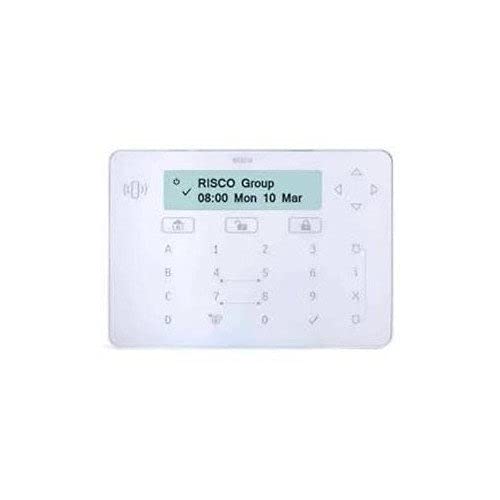
図1: 前面 view of the RISCO RPKEL0WT000A Elegant Touch Keypad, showcasin洗練されたデザインとタッチスクリーンインターフェースを備えています。
設定
1. 開梱とパッケージ内容
Carefully open the product packaging and ensure all components are present. The package should contain:
- RISCO RPKEL0WT000A Elegant Touch Keypad (Plastic material)
- USBケーブル
- このユーザーマニュアル
2. 物理的な設置
The keypad is designed for indoor use. Choose a suitable location for installation, ensuring it is easily accessible and protected from extreme temperatures or moisture. Mount the keypad securely using appropriate hardware (not included, unless specified in packaging). Connect the USB cable to the keypad and to your ProSYS system or designated connection point.
3. 初回電源投入
Connect the power cable to the keypad and a suitable power source. The keypad will initiate its startup sequence. Follow any on-screen prompts for initial configuration or system pairing with your ProSYS system.
操作手順
1.基本機能
- タッチスクリーンインターフェイス: Navigate through menus and input commands using the 7-inch touchscreen.
- 調整可能なバックライト: The keypad features a backlight. Adjust its intensity via the system settings for optimal visibility in various lighting conditions.
- 調整可能なブザー音量: The integrated buzzer provides audible feedback. Adjust its volume through the system settings to suit your preference.
2. システムの互換性
This keypad is compatible with all versions of RISCO ProSYS security systems. Ensure your ProSYS system is updated to the latest firmware for optimal performance and feature compatibility.
3. Keypad Layout and Input
The virtual keypad features a QWERTY layout with 104 keys, providing a familiar input experience for text and numerical entries. Use the touchscreen to select characters and functions.
メンテナンス
1. Cleaning the Keypad
To clean the touchscreen and plastic casing, use a soft, lint-free cloth slightly dampened with water or a mild, non-abrasive cleaning solution. Do not spray cleaners directly onto the keypad. Avoid using harsh chemicals, solvents, or abrasive materials, as these can damage the surface.
2. ソフトウェアの更新
Information regarding guaranteed software updates for this product is not available. Please refer to the official RISCO website or your system integrator for any available firmware updates for your ProSYS system, which may include updates relevant to the keypad's functionality.
トラブルシューティング
If you encounter issues with your RISCO RPKEL0WT000A keypad, please refer to the following common troubleshooting steps:
- キーパッドが反応しない: Ensure the USB cable is securely connected and the keypad is receiving power. Try restarting the ProSYS system.
- 表示の問題: Check the backlight settings in the system menu. If the screen remains blank, verify power connection.
- ブザーが動作しない: Check the buzzer volume settings in the system menu.
- 接続の問題: Ensure the keypad is properly paired or connected to your ProSYS system according to the system's installation guide.
For persistent issues, consult the comprehensive ProSYS system manual or contact RISCO technical support.
仕様
| 特徴 | 詳細 |
|---|---|
| モデル番号 | RPKEL0WT000A |
| ブランド | リスコ |
| メーカー | リスコ |
| ASIN | B01MTO9ECQ |
| GTIN/UPC | 712073720180 |
| 画面 | 7インチのタッチスクリーン |
| 特集 | Backlit, Adjustable Buzzer Volume |
| 接続技術 | USB |
| 対応デバイス | ProSYS Systems |
| キーパッドの説明 | Gaming (Note: This description might be a misclassification from the source data, as it's a security keypad.) |
| キーパッドレイアウト | QWERTY |
| キーの数 | 104 (virtual) |
| 材料 | プラスチック |
| 電源 | ケーブルエレクトリック |
| 含まれるコンポーネント | USBケーブル |
保証情報
Specific warranty details for the RISCO RPKEL0WT000A Elegant Touch Keypad are not provided in this manual. For comprehensive warranty information, please refer to the official RISCO website or contact your authorized RISCO dealer or installer.
サポート
For technical assistance, product inquiries, or further support, please visit the official RISCO website or contact your local RISCO support representative. Contact information can typically be found on the RISCO webサイトまたは製品サプライヤーを通じて入手できます。


