
1. はじめに
Thank you for choosing the iMuto SL200QC 20000mAh Quick Charge Power Bank. This manual provides essential information for the safe and efficient operation of your device. Please read it thoroughly before use and retain it for future reference.
2.製品オーバーview
The iMuto SL200QC is a high-capacity portable charger designed to provide fast and reliable power to your electronic devices. It features Qualcomm Quick Charge 3.0 technology and iM-Power auto-detection for optimized charging.
2.1 パッケージ内容
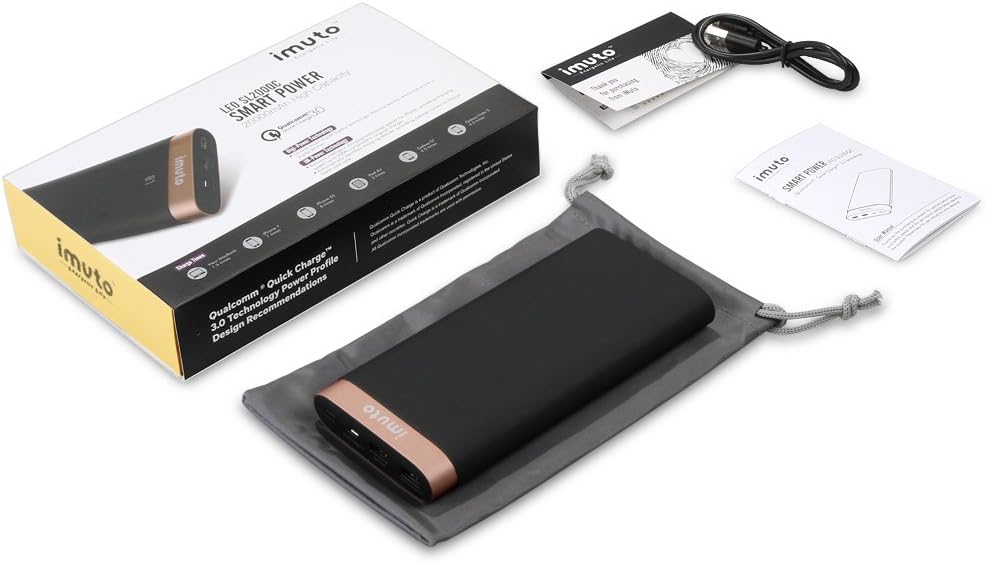
Image: The iMuto SL200QC Power Bank package contents, showing the power bank, a micro USB charging cable, a user manual, and a carrying pouch.
通常、パッケージには次のものが含まれます。
- iMuto SL200QC Power Bank
- マイクロUSB充電ケーブル
- ユーザーマニュアル
- キャリングポーチ
2.2デバイスの機能

Image: The iMuto SL200QC Power Bank, highlighting its two USB output ports (USB1 with Quick Charge 3.0, USB2 with iM-Power Technology), a Micro USB input port, and the digital power display.
- Digi-Power Technology: A smart digital screen displays the remaining power level in percentage.
- デュアル USB 出力ポート:
- USB1: Qualcomm Quick Charge 3.0 (5-6V/3A, 6-9V/2A, 9-12V/1.5A) for compatible devices.
- USB2: iM-Power Technology (5V/1A-2.4A) for intelligent device detection and optimized charging.
- マイクロUSB入力: Supports Quick Charge 3.0 (5V-9V/2A, 9V-12V/1.5A) for rapid recharging of the power bank.
- 大容量: 20000mAh Li-ion battery cells.
- スマートな安全保護: 過充電、過電圧に対する安全装置を内蔵tage、過電流、短絡。
3. セットアップ
Before first use, it is recommended to fully charge your iMuto SL200QC Power Bank.
3.1 パワーバンクの初期充電
- 付属のマイクロ USB ケーブルをパワーバンクのマイクロ USB 入力ポートに接続します。
- Connect the other end of the Micro USB cable to a USB wall charger (a Quick Charge 3.0/2.0 compatible charger is recommended for fastest recharging).
- デジタルディスプレイに充電の進行状況が表示されます。ディスプレイに「100」と表示されたら、パワーバンクは完全に充電されています。

Image: The iMuto SL200QC Power Bank connected to a wall charger via its Micro USB input, illustrating the recharging process. A full charge takes approximately 7 hours with a QC3.0/QC2.0 charger.
A full recharge using a Quick Charge 3.0/2.0 compatible charger typically takes about 7 hours. Using a standard 5V/2A charger will take longer.
4. 操作手順
4.1 Checking Remaining Power
Press the power button once to activate the digital display. The screen will show the remaining battery percentage. The display will turn off automatically after a few seconds to conserve power.
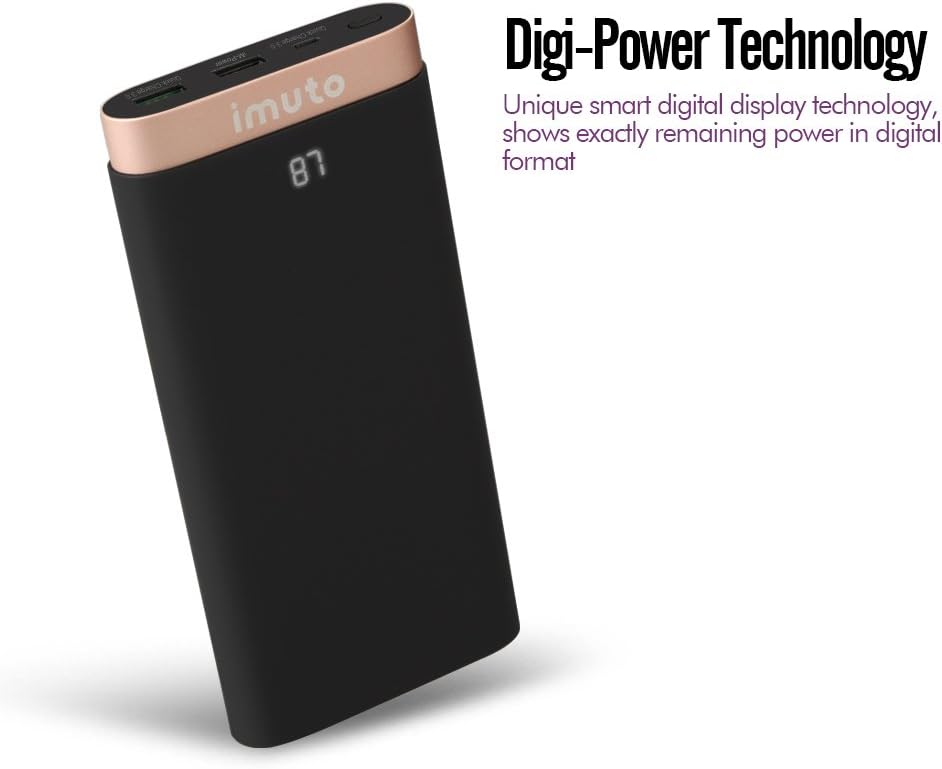
Image: The iMuto SL200QC Power Bank showing "87" on its digital display, indicating 87% remaining battery charge.
4.2 デバイスの充電
The iMuto SL200QC can charge up to two devices simultaneously.

Image: The iMuto SL200QC Power Bank connected to a smartphone and a tablet, demonstrating its ability to charge two devices concurrently.
- デバイスの充電ケーブルをパワーバンクの USB 出力ポートの 1 つに接続します。
- ケーブルのもう一方の端をデバイスに接続します。
- The power bank will automatically begin charging your device. The digital display will illuminate to show the remaining power.
- 充電を停止するには、デバイスの接続を解除するだけです。
Note on Ports:
- USB1 (Quick Charge 3.0): Use this port for devices compatible with Quick Charge technology to achieve the fastest charging speeds.
- USB2 (iM-Power Technology): This port intelligently detects your device's charging requirements and delivers the optimal current up to 2.4A.
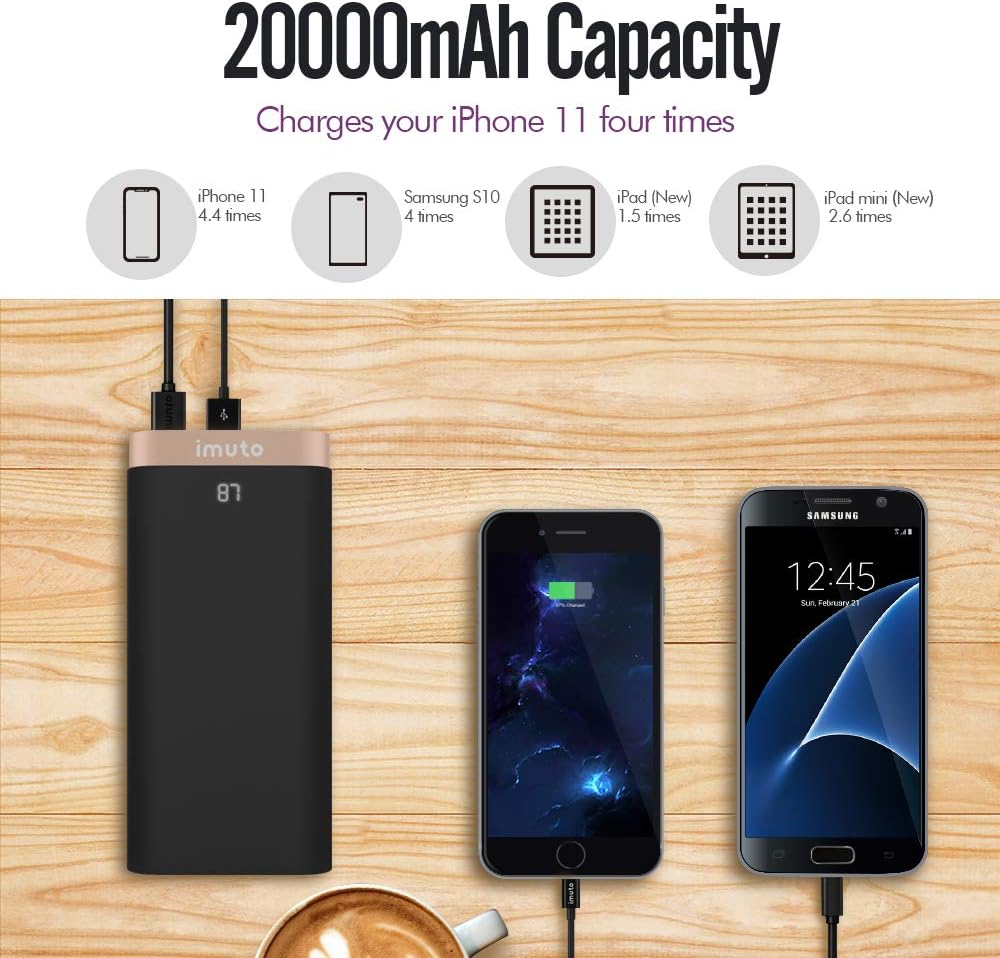
Image: The iMuto SL200QC Power Bank shown next to a smartphone and tablet being charged, with illustrations indicating its 20000mAh capacity can charge an iPhone 11 approximately 4.4 times, a Samsung S10 4 times, an iPad (New) 1.5 times, and an iPad mini (New) 2.6 times.
5. メンテナンス
- パワーバンクは、極端な温度、直射日光、湿気の多い環境から遠ざけてください。
- パワーバンクを水やその他の液体にさらさないでください。
- パワーバンクは乾いた柔らかい布で拭いてください。研磨剤入りの洗剤や溶剤は使用しないでください。
- Store the power bank in a cool, dry place when not in use. For prolonged storage, it is recommended to charge the power bank to about 50-75% every 3 months to maintain battery health.
- パワーバンクを落としたり、強い衝撃を与えたりしないでください。
6。 トラブルシューティング
| 問題 | 考えられる原因 | 解決 |
|---|---|---|
| パワーバンクがデバイスを充電しません。 |
|
|
| パワーバンクが充電されません。 |
|
|
| 充電速度が遅い。 |
|
|
| デジタル表示が機能しません。 |
|
|
7. 仕様
| 特徴 | 詳細 |
|---|---|
| モデル | SL200QC |
| バッテリー容量 | 20000mAh / 74Wh |
| 電池のタイプ | Li-ion (8 cells) |
| Micro USB Input (QC 3.0) | 5V-9V/2A, 9V-12V/1.5A |
| USB1 Output (QC 3.0) | 5-6V/3A, 6-9V/2A, 9-12V/1.5A |
| USB2 Output (iM-Power) | 5V / 1A-2.4A |
| 総出力 | 25ワット(最大) |
| 寸法 | 17.2 x 8.18 x 2.24 cm |
| 重さ | 650グラム |
| 対応デバイス | iPhone, iPad, Samsung Galaxy, Google Nexus/Pixel, Nintendo Switch, Xperia, LG, Lumia, and other USB-powered devices. |

画像: 爆発した view of the iMuto SL200QC Power Bank, illustrating its internal components including A-class Li-ion battery cells, Digi-Power technology circuit board, multiple smart protection system, power button, and aviation aluminum alloy shell.
8. 保証とサポート
8.1 保証情報
The iMuto SL200QC Power Bank comes with an 18ヶ月保証 ご購入日から1年間有効です。この保証は製造上の欠陥を保証し、通常の使用状況における信頼性の高い動作を保証します。保証請求の際は、購入証明書を保管してください。
保証は、誤用、事故、不正な改造、または自然災害によって生じた損傷には適用されません。
8.2 カスタマーサポート
For any questions, technical assistance, or warranty claims, please contact iMuto customer support. Refer to the contact information provided on the official iMuto webサイトまたは購入書類をご覧ください。