
1. はじめに
Thank you for choosing the Comelit Classic Monitor, Model 6101N. This manual provides essential information for the correct installation, operation, and maintenance of your video intercom monitor. Please read these instructions carefully before using the device to ensure safe and efficient operation.
The Comelit Classic Monitor is designed to provide reliable video and audio communication for door entry systems, enhancing security and convenience for your home or office.
2. 安全情報
- 電気安全: Installation and maintenance should only be performed by qualified personnel. Disconnect power before performing any wiring or service.
- 環境: Do not expose the monitor to extreme temperatures, humidity, direct sunlight, or corrosive substances.
- クリーニング: 清掃には柔らかく乾いた布を使用してください。研磨剤や溶剤は使用しないでください。
- 変更点: Do not attempt to modify or repair the device yourself. Unauthorized modifications may void the warranty and pose safety risks.
3. パッケージ内容
パッケージにすべてのコンポーネントが揃っていることを確認してください。
- Comelit Classic Monitor (Model 6101N)
- 取付金具
- 取り付けネジと壁プラグ
- 取扱説明書(本書)
4.製品オーバーview
The Comelit Classic Monitor features a sleek design and intuitive controls for managing your door entry system. Below is an image of the monitor, highlighting its key features.
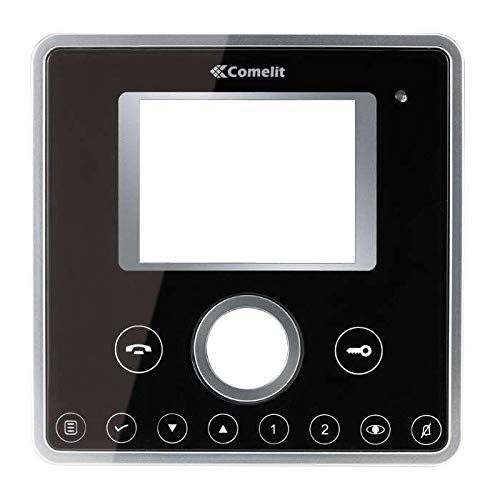
図1: 前面 view of the Comelit Classic Monitor (Model 6101N). This image shows the monitor's display screen, handset, and control buttons. The monitor is black with a minimalist design.
主なコンポーネントには通常、次のものが含まれます。
- 表示画面: Shows video feed from the outdoor unit.
- 携帯電話: 音声通信用。
- ドアリリースボタン: Activates the electric lock to open the door.
- 補助ボタン: May control additional functions (e.g., secondary door, stair light).
- 音量コントロール: Adjusts ringtone and communication volume.
5. セットアップとインストール
Installation of the Comelit Classic Monitor requires electrical wiring and should ideally be performed by a qualified technician. Incorrect installation can lead to device malfunction or safety hazards.
5.1 モニターの取り付け
- Choose a suitable location on an interior wall, away from direct heat sources or moisture.
- Secure the mounting bracket to the wall using the provided screws and wall plugs. Ensure the bracket is level.
- Refer to the system wiring diagram (provided with your outdoor unit or system documentation) for correct cable connections.
- Connect the system cables to the monitor's terminals as indicated in the wiring diagram. Ensure all connections are secure.
- モニターを取り付けブラケットに慎重に取り付け、カチッと音がしてしっかりと固定されていることを確認します。
5.2 初期電源投入
Once installed, restore power to the system. The monitor should power on and display a standby screen or indicator light. Perform a test call from the outdoor unit to verify proper operation.
6. 操作手順
6.1 電話に出る
- When someone calls from the outdoor unit, the monitor will ring and display the video feed.
- Lift the handset to answer the call and begin two-way audio communication.
- 通話を終了するには、受話器を戻します。
6.2 ドアを開ける
During a call, or when the monitor is active, press the ドアリリースボタン (often marked with a key symbol) to activate the electric lock and open the door.
6.3 設定の調整
- 音量: Use the volume control (usually a rotary dial or buttons on the side/bottom) to adjust the ringtone and communication volume.
- 輝度コントラスト: Some models may have controls for adjusting screen brightness or contrast. Refer to specific model features if available.
7. メンテナンス
- クリーニング: Regularly wipe the monitor's surface and screen with a soft, dry, anti-static cloth. Do not use liquid cleaners directly on the screen or device.
- 検査: 定期的に接続部の緩みや目に見える損傷がないか確認してください。問題が見つかった場合は、資格のある技術者にご連絡ください。
- ソフトウェアアップデート: If your system supports firmware updates, follow the manufacturer's instructions for applying them to ensure optimal performance and security.
8。 トラブルシューティング
| 問題 | 考えられる原因 | 解決 |
|---|---|---|
| 屋外ユニットからのビデオ/オーディオがありません。 | Loose wiring, power issue, outdoor unit malfunction. | Check all connections. Ensure system has power. Contact technician if problem persists. |
| モニターの電源が入らない。 | No power supply, faulty wiring, monitor malfunction. | Verify power supply to the system. Check wiring. Contact technician. |
| ドアのリリースが機能しません。 | Wiring issue to electric lock, faulty lock, monitor button malfunction. | Check wiring to the lock. Test the lock independently if possible. Contact technician. |
| ビデオ品質が低い。 | Dirty camera lens (outdoor unit), poor wiring, interference. | Clean outdoor camera lens. Check wiring for damage or interference. |
9. 仕様
Below are the technical specifications for the Comelit Classic Monitor, Model 6101N:
- モデル番号: 6101N
- メーカー: コメリット
- 製品タイプ: ビデオインターコムモニター
- ASIN: B01MSE76EO
- 製品数: 1
- 初回利用可能日: 2年2017月XNUMX日
- Note: Specific electrical and display specifications may vary by system configuration. Refer to your system's main documentation for full details.
10. 保証とサポート
Comelit products are covered by a manufacturer's warranty. For specific warranty terms and conditions, please refer to the warranty card included with your product or visit the official Comelit webサイトでご確認ください。保証請求に備えて購入証明書を保管してください。
For technical support, service, or further assistance, please contact your authorized Comelit dealer or visit the official Comelit support page:
Official Comelit Webサイト: www.comelitgroup.com
Please have your model number (6101N) and purchase details ready when contacting support.