
1. はじめに
This manual provides instructions for the proper installation, operation, maintenance, and troubleshooting of your Technical Precision Replacement Battery for the Scale-TRONIX, INC. Scale 4800. This product is designed to provide reliable power to your compatible scale.
Please read this manual thoroughly before attempting to install or use the battery to ensure safe and efficient operation.
2. 安全情報
Observe the following safety precautions to prevent injury or damage to the battery or scale:
- バッテリー端子をショートさせないでください。
- バッテリーを極端な温度(高温または低温)にさらさないでください。
- バッテリーを分解したり、穴を開けたり、改造したりしないでください。
- バッテリーを水や湿気から遠ざけてください。
- 使用済みバッテリーは、地域の規制に従って廃棄してください。
- お子様の手の届かない場所に保管してください。
3. セットアップとインストール
This section guides you through the process of replacing the existing battery in your Scale-TRONIX, INC. Scale 4800 with the Technical Precision replacement battery.
- 体重計の電源を切ります。 Ensure your Scale-TRONIX, INC. Scale 4800 is completely powered off and disconnected from any external power sources before proceeding.
- バッテリーコンパートメントの位置: Identify the battery compartment on your Scale-TRONIX, INC. Scale 4800. This is typically on the underside or rear of the device.
- オープンコンパートメント: Carefully open the battery compartment cover. This may require a screwdriver or simply unlatching a clip.
- 古いバッテリーを取り外す: Gently remove the old battery from the compartment. Note its orientation for correct installation of the new battery.
- 新しい電池を挿入します: Insert the Technical Precision Replacement Battery into the compartment, ensuring the polarity (+ and - terminals) matches the markings inside the compartment.
- コンパートメントを閉じる: バッテリーコンパートメントカバーをしっかりと閉じます。
- Test Scale: Power on your Scale-TRONIX, INC. Scale 4800 to confirm the new battery is functioning correctly.
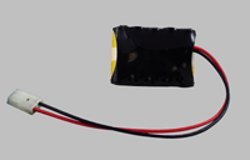
Image 1: Technical Precision Replacement Battery for Scale-TRONIX Scale 4800. This image shows the replacement battery, which is a single unit designed to power the compatible scale.
4. バッテリーの操作
Once installed, the Technical Precision Replacement Battery will power your Scale-TRONIX, INC. Scale 4800. The battery operates automatically to provide the necessary power for the scale's functions. There are no specific user operations required for the battery itself beyond proper installation.
Refer to your Scale-TRONIX, INC. Scale 4800 user manual for instructions on operating the scale itself.
5. メンテナンス
Proper maintenance can extend the life of your replacement battery:
- ストレージ: If the scale will not be used for an extended period, it is recommended to remove the battery and store it in a cool, dry place.
- クリーニング: Keep the battery terminals clean and free of corrosion. Use a dry cloth to wipe them if necessary.
- 廃棄: When the battery reaches the end of its life, dispose of it responsibly according to local environmental regulations. Do not dispose of batteries in household waste.
6。 トラブルシューティング
If your Scale-TRONIX, INC. Scale 4800 is not functioning correctly after battery installation, consider the following:
- スケールの電源が入らない:
- 電池が正しい極性で挿入されていることを確認してください。
- 電池ケースのカバーがしっかりと閉まっていることを確認してください。
- Verify the battery terminals are clean and making good contact.
- If the battery is new, it should be fully charged. If not, consider replacing it with another new battery to rule out a faulty unit.
- 断続的な電力:
- Check for loose connections within the battery compartment.
- Ensure the battery is seated firmly.
If issues persist, consult the original Scale-TRONIX, INC. Scale 4800 manual or contact Technical Precision customer support.
7. 仕様
| 特徴 | 詳細 |
|---|---|
| ブランド | 技術的精度 |
| 商品型番 | SCALE 4800 BATTERY |
| ASIN | B01MAXVSB8 |
| バッテリーセルの構成 | アルカリ |
| ユニット数 | 1.0 カウント |
| メーカー | 技術的精度 |
| 初回利用可能日 | 17年2016月XNUMX日 |
8. 保証とサポート
For warranty information or technical support regarding your Technical Precision Replacement Battery, please contact the manufacturer directly. Details can typically be found on the product packaging or the Technical Precision official webサイト。
Please have your product model number (SCALE 4800 BATTERY) and ASIN (B01MAXVSB8) available when contacting support.