
1. はじめに
This manual provides instructions for the Norifon CGA-S002 USB Charger. This compact and lightweight charger is designed for convenient charging of compatible camera batteries via a USB power source. Please read this manual thoroughly before use to ensure proper operation and safety.

Image: Norifon CGA-S002 USB Charger. This image shows the compact design of the charger.
2. 互換性
The Norifon CGA-S002 USB Charger is compatible with a range of Panasonic camera batteries. To ensure correct usage, verify that your battery model is listed below. The battery model number is typically found on the battery's label, not the camera itself.
Compatible Battery Models:
- BP-DC5 J, BP-DC5 U
- CGA-S002, CGA-S002A, CGA-S002A/1B, CGA-S002E, CGA-S002E/1B
- CGA-S006, CGA-S006A, CGA-S006E, CGA-S006E/1B
- CGR-S002, CGR-S002E
- CGR-S006, CGR-S006A/1B, CGR-S006E, CGR-S006E/1B, CGR-S006GK
- DMW-BM7, DMW-BMA7
対応カメラモデル:
- Panasonic Lumix DMC-FZ1, DMC-FZ2, DMC-FZ3, DMC-FZ4, DMC-FZ5, DMC-FZ7, DMC-FZ8, DMC-FZ10, DMC-FZ15, DMC-FZ18, DMC-FZ20, DMC-FZ28, DMC-FZ30, DMC-FZ35, DMC-FZ38, DMC-FZ50

Image: Guide on how to identify the battery code on your battery to ensure compatibility with the charger.
Video: This video demonstrates how to select the correct charger for a CGA-S002 battery and provides a visual guide for compatibility.
3. セットアップ
The Norifon USB Charger is designed for versatile power input, allowing you to charge your batteries from various USB sources.
充電器の接続:
- Ensure the battery and charger contacts are aligned correctly (+ to + and - to -).
- Insert the battery into the charger slot.
- Connect the charger to a USB power source using a compatible USB cable. The charger features a Type-C USB port for input.

画像: クローズアップ view of the USB Type-C port on the charger, indicating the connection point.

Image: Illustration showing the charger being powered by a PC, AC charger, car charger, or power bank.
4. 操作
Once the battery is correctly inserted and the charger is connected to a power source, the charging process will begin automatically. The charger features an LED indicator to display the charging status.
充電ステータスインジケーター:
- 赤信号: バッテリーが現在充電中であることを示します。
- 青色光: Indicates that the battery is fully charged or no battery is inserted (no load).

Image: The charger's LED indicator showing a red light when charging and a blue light when charging is complete or no battery is present.
Video: This video demonstrates the process of inserting a battery into the charger and observing the LED indicator change from red (charging) to blue (fully charged).
5. メンテナンス
To ensure the longevity and optimal performance of your Norifon USB Charger, follow these simple maintenance guidelines:
- 充電器は清潔に保ち、ほこりやゴミが付かないようにしてください。清掃には柔らかく乾いた布をご使用ください。
- 充電器は使用しないときは乾燥した場所に保管してください。
- 充電器を極端な温度や直射日光にさらさないでください。
- 充電器を水やその他の液体に浸さないでください。
6。 トラブルシューティング
充電器に問題が発生した場合は、次の一般的なトラブルシューティング手順を検討してください。
- Charger not lighting up: USBケーブルが充電器と電源の両方にしっかりと接続されていることを確認してください。別のUSBケーブルまたは電源をお試しください。
- Battery not charging (blue light immediately): Verify that the battery is correctly inserted and its contacts are clean. Confirm that the battery model is compatible with the charger.
- 充電が遅い: Ensure your USB power source provides sufficient current (e.g., a wall adapter rather than a low-power USB port on an older computer).
If problems persist, please refer to the support information provided with your purchase.
7. 仕様
Technical details for the Norifon CGA-S002 USB Charger:
| ブランド | Norifon |
| モデル | CGA-S002 |
| 入力ボリュームtage | DC5V |
| 出力巻tage | DC 4.2V / 8.4V (500mA) |
| コネクタタイプ | USBタイプC |
| ポート数 | 1 |
| 製品重量 | 20グラム |
| コンプライアンス | UL準拠 |

Image: The back label of the Norifon USB Charger, displaying input and output specifications.
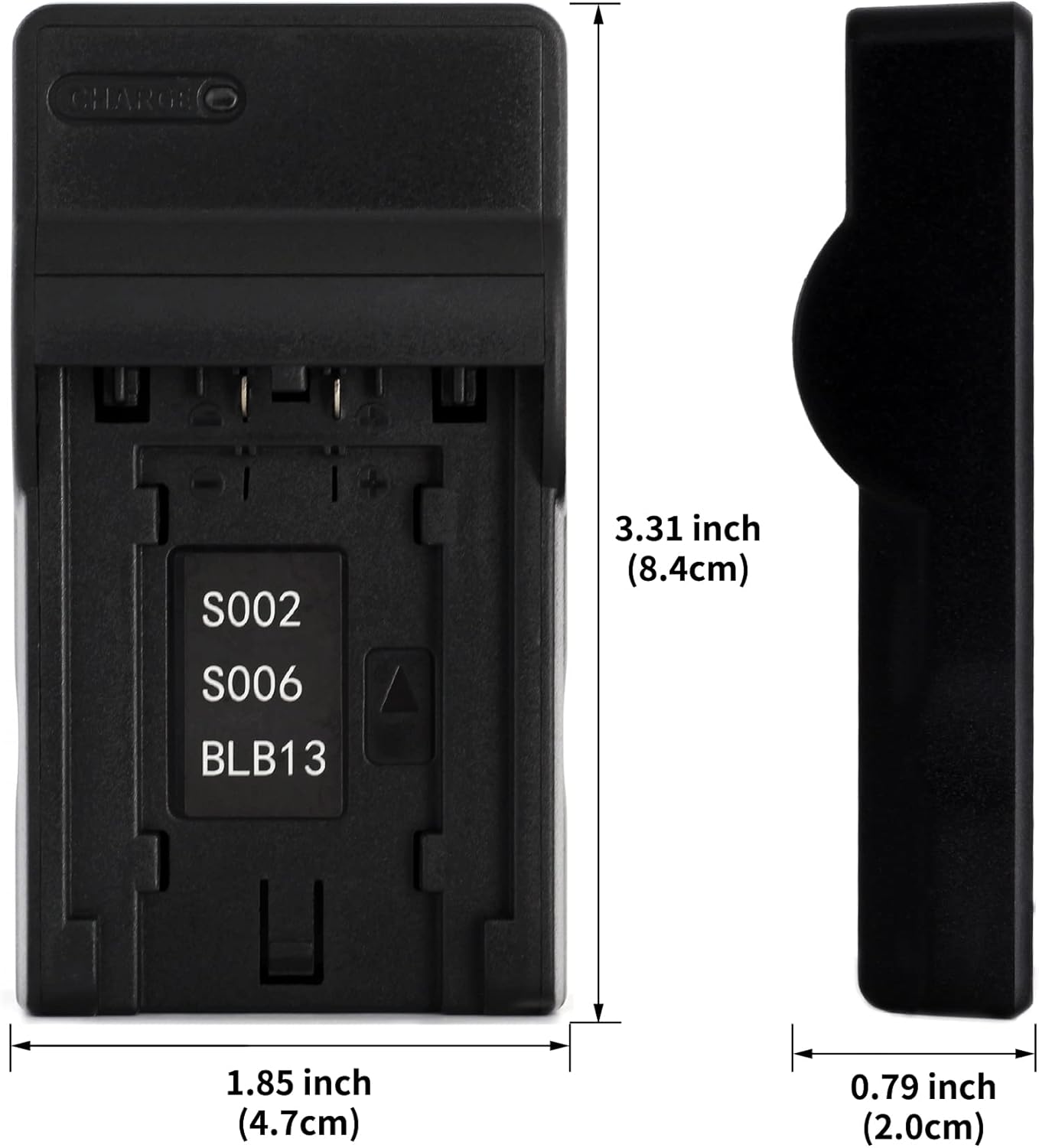
Image: Dimensions of the Norifon USB Charger, showing its compact size (3.31 inches height, 1.85 inches width, 0.79 inches thickness).
8. 安全情報
Please observe the following safety precautions to prevent damage to the charger, battery, or personal injury:
- 充電器を開けたり、改造したりしないでください。
- Do not immerse the charger in water or expose it to rain or moisture.
- Use the charger only in dry locations.
- この充電器には互換性のあるバッテリーのみを使用してください。
- お子様の手の届かない場所に保管してください。
- 使用しないときは、充電器を電源から抜いてください。
9. 保証とサポート
Norifon products are designed for reliability and performance. For warranty information or technical support, please refer to the documentation included with your purchase or contact Norifon customer service through the retailer where the product was purchased.