
導入
Thank you for choosing the KINGONE K5 Portable Wireless Bluetooth Speaker. This manual provides essential information for the proper setup, operation, and maintenance of your device. Please read it thoroughly before use to ensure optimal performance and longevity of your speaker.
安全情報
- スピーカーを極端な温度、直射日光、高湿度にさらさないでください。
- スピーカーを落としたり、強い衝撃を与えたりしないでください。
- スピーカーをご自身で分解したり修理したりしないでください。保証が無効になります。
- Keep the speaker away from water and liquids. While it is waterproof, prolonged submersion or exposure to high-pressure water jets should be avoided.
- 指定された充電容量のみを使用してくださいtag(DC 5V)。
パッケージ内容
- KINGONE K5 Portable Wireless Bluetooth Speaker
- USB充電ケーブル
- ユーザーマニュアル
製品終了view
スピーカーのコントロールとポートについて理解しておきましょう。
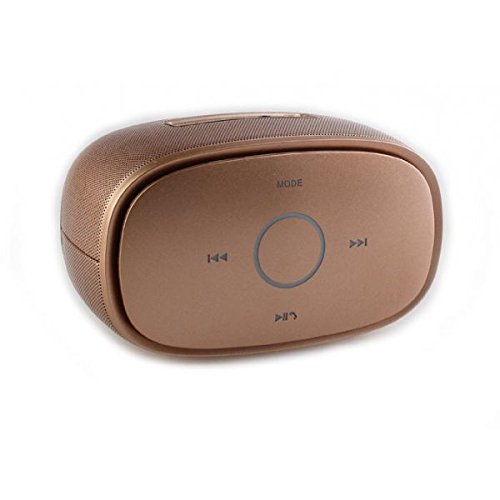
画像: トップ view of the KINGONE K5 Portable Wireless Bluetooth Speaker. The image displays the speaker's top panel, which features a central circular play/pause button, surrounded by four other buttons: 'MODE' at the top, 'previous track' (left), 'next track' (right), and 'volume down/call answer' (bottom). The speaker has a metallic brown finish with a textured grille on the sides.
コントロールボタン:
- モード: Press to switch between Bluetooth, AUX, and other available modes.
- 前のトラック (<<): 短く押すと前のトラックに戻ります。
- 次のトラック (>>): 短く押すと次のトラックに進みます。
- 再生/一時停止 (►▮▮): Press to play or pause music. Long press for power on/off.
- Volume Down/Call Answer (▼): Short press to decrease volume. During an incoming call, press to answer.
- Volume Up/Call End (▲): Short press to increase volume. During a call, press to end. (Note: Volume Up button is not explicitly visible in the provided image but is a standard function for such devices, assuming it's paired with Volume Down or integrated.)
ポート:
- マイクロUSB充電ポート: スピーカーの充電用。
- AUX入力ポート: 有線オーディオ接続用。
設定
1.スピーカーの充電
- Connect the small end of the USB charging cable to the Micro USB port on the speaker.
- Connect the larger end of the USB cable to a USB power adapter (DC 5V, not included) or a computer's USB port.
- 充電インジケーターライトが点灯します。充電が完了すると消灯するか、色が変わります。
- A full charge typically takes approximately 3-4 hours and provides up to 7 hours of playback.
2.電源のオン/オフ
- 電源を入れるには: Long press the Play/Pause button until you hear an audible prompt or see an indicator light.
- 電源を切るには: Long press the Play/Pause button again until you hear an audible prompt or the indicator light turns off.
3.Bluetoothペアリング
- Ensure the speaker is powered on and in Bluetooth mode. If not, press the 'MODE' button to switch to Bluetooth mode. The indicator light will flash, indicating it's ready for pairing.
- スマートフォン、タブレット、その他の Bluetooth 対応デバイスで Bluetooth を有効にします。
- 検索する available Bluetooth devices. You should see "KINGONE K5" in the list.
- Select "KINGONE K5" to connect. Once paired, you will hear a confirmation sound, and the indicator light will stop flashing and remain solid.
- スピーカーは、電源を入れると、最後にペアリングしたデバイスに自動的に再接続しようとします。
4. Connecting via AUX (Audio Input)
- 3.5mm オーディオ ケーブル (付属していません) の一方の端をスピーカーの AUX 入力ポートに接続します。
- オーディオ ケーブルのもう一方の端をオーディオ デバイスのヘッドフォン ジャックに接続します。
- The speaker will automatically switch to AUX mode, or you may need to press the 'MODE' button to select AUX.
オペレーティング
音楽を演奏する
- 再生/一時停止: 再生を開始または一時停止するには、再生/一時停止ボタンを押します。
- 次のトラック: Press the Next Track (>>) button to skip to the next song.
- 前のトラック: Press the Previous Track (<<) button to go back to the beginning of the current song or to the previous song.
- 音量コントロール: Use the Volume Down (▼) and Volume Up (▲) buttons on the speaker to adjust the volume. You can also control the volume from your connected device.
ハンズフリー通話
Bluetooth接続すると、スピーカーをハンズフリー通話に使用できます。
- 通話に応答: Press the Volume Down (▼) button once to answer an incoming call.
- 通話終了: Press the Volume Up (▲) button once to end an ongoing call.
- 通話を拒否: Long press the Volume Down (▼) button to reject an incoming call.
メンテナンス
クリーニング
- スピーカーを柔らかく乾いた布、または軽く湿らせた布で拭いてください。amp 布。
- 研磨剤入りの洗剤、アルコール、化学溶剤は使用しないでください。
ストレージ
- スピーカーは直射日光や極端な温度を避け、涼しく乾燥した場所に保管してください。
- 長期間保管する場合は、バッテリーの状態を維持するために、定期的に(たとえば、3 か月ごと)バッテリーを充電してください。
バッテリーケア
- バッテリーを頻繁に完全に放電することは避けてください。
- Do not leave the speaker connected to a charger for excessively long periods after it is fully charged.
トラブルシューティング
| 問題 | 考えられる原因 | 解決 |
|---|---|---|
| スピーカーの電源が入りません。 | バッテリー残量が少ないか、消耗しています。 | スピーカーを少なくとも30分間充電してください。 |
| Bluetooth デバイスとペアリングできません。 | Speaker is not in pairing mode. Bluetooth is off on your device. Speaker is already connected to another device. | Ensure speaker is in Bluetooth pairing mode (flashing indicator). Turn on Bluetooth on your device. Disconnect from other devices or restart the speaker. |
| 音が出ない、または音量が低い。 | Volume is too low on speaker or device. Incorrect mode selected. | Increase volume on both the speaker and your connected device. Press the 'MODE' button to select the correct input (Bluetooth/AUX). |
| 音の歪み。 | Volume too high. Device too far from speaker. | Reduce volume on speaker and/or device. Move the device closer to the speaker (within 10 meters). |
仕様
- モデル名: KINGONE K5
- 商品モデル番号: KNG006
- ワイヤレス通信技術: ブルートゥース
- Bluetoothバージョン: V2.0 (as per product title)
- スピーカータイプ: 本棚(ポータブル)
- スピーカーサイズ: 2インチ
- オーディオ出力モード: ステレオ(2.0チャンネル)
- 電源: Battery Powered (Built-in Li-ion battery)
- 定格巻tage: DC5V
- 周波数応答: 3デシベル
- Frequency Scope: 170-15KHz
- 制御方法: 触る
- 防水: はい
- バッテリー寿命: 最大7時間(約)
- 対応デバイス: スマートフォン、タブレット
保証とサポート
保証情報やテクニカルサポートについては、ご購入時に付属のマニュアルをご参照いただくか、販売店にお問い合わせください。保証請求の際に必要となるため、購入証明書は保管してください。