
Denso BHT-825Q
Denso BHT-825Q ハンディターミナル モバイルコンピュータ ユーザーマニュアル
Model: BHT-825Q
導入
This manual provides essential information for the safe and efficient operation of your Denso BHT-825Q Handy Terminal Mobile Computer. Please read this manual thoroughly before using the device and keep it for future reference. The BHT-825Q is a robust mobile computer designed for data capture, featuring a 2D imager, a 2.6-inch color screen, and a 27-key keypad, running on a basic operating system.
製品終了view
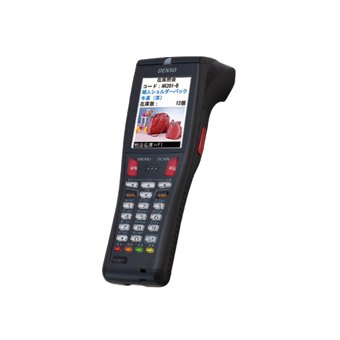
図1: Denso BHT-825Q Handy Terminal Mobile Computer. This image displays the front view of the device, showing its ergonomic design, the 2.6-inch color screen, and the 27-key alphanumeric keypad. The device is black with red accents on some keys.
The Denso BHT-825Q is engineered for reliable performance in various data collection environments. Its key features include:
- Basic OS: Optimized for efficient data processing.
- Batch/IrDA Communication: データ転送用。
- 2Dイメージャ: Capable of reading various 1D and 2D barcodes.
- 27 キー: A comprehensive keypad for data entry and navigation.
- 2.6インチカラースクリーン: 情報を明確に表示します。
設定
1. バッテリーの充電
Before initial use, fully charge the device's battery. Connect the charging cable to the charging port on the device and plug the adapter into a power outlet. The charging indicator light will typically show the charging status.
2.電源のオン/オフ
- 電源を入れるには: 画面が点灯するまで、電源ボタン (通常は側面または上部にあります) を押し続けます。
- 電源を切るには: Press and hold the Power button until a power-off menu appears, then select "Power Off" or "Shut Down".
3. 初期設定
Upon first power-on, you may be prompted to set basic configurations such as date, time, and language. Follow the on-screen instructions to complete these settings.
デバイスの操作
1. インターフェースの操作
Use the directional keys (up, down, left, right) and the Enter key to navigate through menus and select options on the 2.6-inch color screen. The keypad allows for alphanumeric input.
2. バーコードスキャン
- Point the 2D imager at the barcode you wish to scan.
- スキャントリガーボタン(通常はデバイスの側面にあります)を押します。
- Ensure the barcode is within the imager's field of view. A successful scan will usually be indicated by an audible beep or a visual confirmation on the screen.
3. データ入力
Utilize the 27-key keypad for manual data input. The keys include numbers, letters, and function keys. Refer to the on-screen prompts for specific data entry requirements within applications.
4. Data Transfer (Batch/IrDA)
The BHT-825Q supports batch data transfer and IrDA (Infrared Data Association) communication. Consult your system administrator or application guide for specific instructions on how to transfer collected data to a host system.
メンテナンス
1.デバイスのクリーニング
- 柔らかく糸くずの出ない布で軽く拭き取ってください。ampened with water or a mild, non-abrasive cleaning solution to wipe the exterior of the device.
- 強力な化学薬品、溶剤、研磨剤入りの洗剤は使用しないでください。
- デバイスのポートや開口部に液体が入らないようにしてください。
- For the imager window, use a lens cleaning cloth to avoid scratches.
2. バッテリーのお手入れ
- バッテリーを頻繁に完全に放電することは避けてください。
- 長期間使用しない場合は、デバイスを涼しく乾燥した場所に保管してください。
- Use only Denso-approved charging accessories.
3. ソフトウェアの更新
Periodically check with your system administrator or Denso support for available software or firmware updates to ensure optimal performance and security.
トラブルシューティング
| 問題 | 考えられる原因 | 解決 |
|---|---|---|
| デバイスの電源が入りません。 | バッテリー残量が少ない、または消耗しています。 | Charge the battery for at least 30 minutes. Ensure the charger is properly connected. |
| バーコードがスキャンされません。 | Barcode damaged or poor quality; Imager lens dirty; Incorrect scanning angle. | Try scanning a different barcode. Clean the imager lens. Adjust the scanning angle and distance. Ensure the barcode symbology is enabled. |
| 画面が空白またはフリーズします。 | Software error; Device crash. | Perform a soft reset (refer to device documentation for specific key combination, often holding power button for 10+ seconds). If issue persists, contact support. |
| データ転送の問題。 | Incorrect settings; Connection problem. | Verify communication settings (e.g., IrDA alignment). Check cables if using a cradle. Consult your system administrator. |
If the problem persists after attempting these solutions, please contact Denso customer support.
仕様
| 特徴 | 詳細 |
|---|---|
| モデル番号 | BHT-825Q |
| オペレーティング·システム | Basic OS |
| イメージャータイプ | 2Dイメージャー |
| キーパッド | 27つのキー |
| 画面 | 2.6インチカラースクリーン |
| コミュニケーション | Batch/IrDA |
| パッケージ寸法 | 12 x 6 x 4インチ |
| アイテム重量 | 1ポンド |
| メーカー | デンソー |
| 初回利用可能日 | 14年2016月XNUMX日 |
保証とサポート
保証情報
The Denso BHT-825Q Handy Terminal Mobile Computer is covered by Denso's standard limited warranty. Please refer to the warranty card included with your product or visit the official Denso web保証範囲、期間、請求手続きに関する詳細な利用規約については、こちらのサイトをご覧ください。
カスタマーサポート
For technical assistance, troubleshooting beyond this manual, or service inquiries, please contact Denso customer support:
- Webサイト: デンソーの公式ウェブサイトをご覧ください webサポート リソース、FAQ、お問い合わせフォームのサイト。
- 電話: Refer to the Denso web地域サポートの電話番号のサイト。
- メールアドレス: Specific email contacts may be available on the Denso support page.
When contacting support, please have your product model number (BHT-825Q) and serial number ready.