
1.製品オーバーview
The ADATA HM900 (model AHM900-6TU3-CEUBK) is a 6TB external hard disk drive designed for high-capacity data storage and transfer. This mechanical hard disk drive offers ample space for extensive data needs and supports simultaneous operations without compromising performance. It connects via USB, making it compatible with various devices, including personal computers and televisions.

図1: 前面 view of the ADATA HM900 External Hard Drive.
2. セットアップ手順
2.1 パッケージ内容
続行する前に、パッケージにすべてのアイテムが揃っていることを確認してください。
- ADATA HM900 External Hard Disk Drive
- USBデータケーブル
- 電源アダプター
- クイックスタートガイド(付属している場合)
2.2 ハードドライブの接続
- 電源アダプタを接続します: Plug the power adapter into the DC IN port on the back of the ADATA HM900. Connect the other end of the power adapter to a wall outlet. The device requires 12 Watts of power.
- USB ケーブルを接続します。 Insert one end of the provided USB data cable into the USB port (marked 'SS' for SuperSpeed USB) on the back of the hard drive.
- デバイスに接続します: Plug the other end of the USB cable into an available USB port on your computer, television, or other compatible device.
- 電源オン: The drive should power on automatically. A status indicator light will typically illuminate to show it is active.
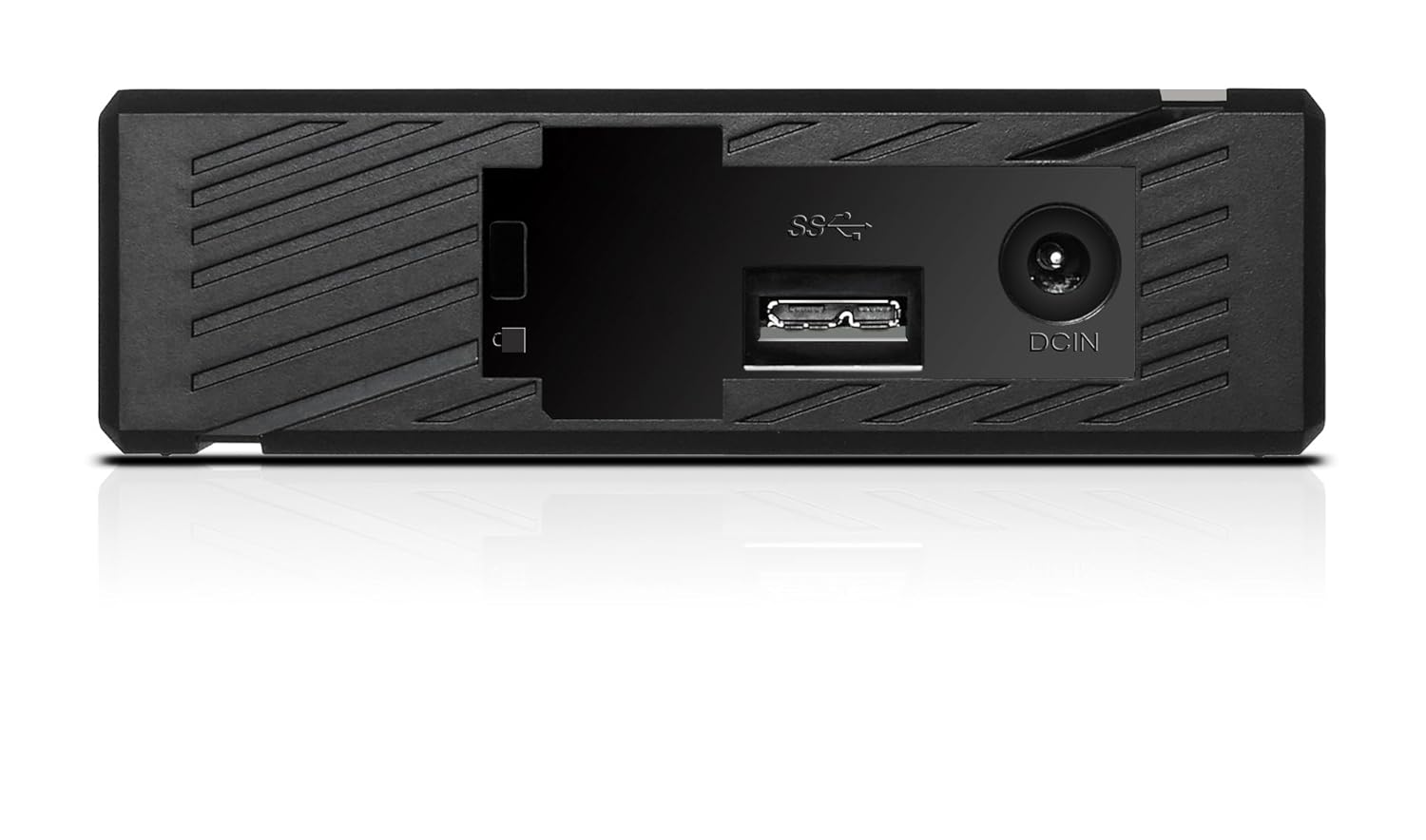
図2:背面 view of the ADATA HM900, highlighting the USB and DC IN ports for connection.
3. ハードドライブの操作
3.1 初期認識
Upon first connection, your operating system (Windows, macOS, Linux) or compatible device (e.g., smart TV) should automatically detect the ADATA HM900. For computers, it may appear as a new drive letter or volume in 'My Computer'/'This PC' or 'Finder'.
3.2データ転送
転送するには files, simply drag and drop them to and from the HM900 drive icon. For larger transfers, it is recommended to use your operating system's copy/paste functions or dedicated backup software.
3.3 Using with a Television
The ADATA HM900 is compatible with televisions that support external storage devices. Connect the drive as described in Section 2.2. Refer to your television's user manual for specific instructions on how to access and play media files from an external USB drive.
4. メンテナンスとケア
Proper care ensures the longevity and reliability of your ADATA HM900 external hard drive:
- 安全な切断: Always safely eject or unmount the hard drive from your operating system before physically disconnecting the USB cable or power. This prevents data corruption.
- 物理的保護: Avoid dropping or subjecting the drive to strong impacts, as it contains a mechanical hard disk that can be damaged.
- 環境条件: Store and operate the drive in a cool, dry environment, away from direct sunlight, extreme temperatures, and high humidity.
- クリーニング: ドライブの外側を清掃する際は、柔らかく乾いた布を使用してください。液体クリーナーや溶剤は使用しないでください。
5。 トラブルシューティング
5.1 ドライブが検出されない
- 接続を確認してください: Ensure both the power adapter and USB cable are securely connected to the drive and your device.
- 別の USB ポートを試してください: Connect the drive to a different USB port on your computer or device.
- 電源の確認: Confirm the power adapter is plugged into a working electrical outlet and the drive's indicator light is on.
- デバイスを再起動します: Restart your computer or television and try connecting the drive again.
- ディスク管理 (Windows) / ディスクユーティリティ (macOS) を確認します。 For computers, check if the drive appears in disk management tools, even if it doesn't have a drive letter assigned.
5.2 データ転送速度が遅い
- USB 3.0 ポートを使用する: Ensure the drive is connected to a USB 3.0 (or higher) port on your device for optimal speeds. USB 2.0 ports will result in slower transfers.
- 他のUSBデバイスを避ける: 大規模な転送中は、他の高帯域幅 USB デバイスを切断します。
- ドライブの状態を確認する: Run a disk check utility on your computer to ensure the drive is healthy.
6. 仕様
| 特徴 | 仕様 |
|---|---|
| ブランド | アデータ |
| モデル番号 | AHM900-6TU3-CEUBK |
| デジタルストレージ容量 | 6TB |
| ハードディスクの説明 | 機械式ハードディスク |
| ハードディスクのフォームファクタ | 2.5インチ |
| 接続技術 | USB |
| アイテムの寸法(LxWxH) | 19 x 12.1 x 3.65 センチメートル |
| アイテム重量 | 998グラム |
| ワットtage | 12ワット |
| 対応デバイス | Television, Personal Computers |
| 初回利用可能日 | 11年2016月XNUMX日 |
7. 保証とサポート
For detailed warranty information, please refer to the warranty card included with your product or visit the official ADATA website. Support resources, including drivers and firmware updates, may also be available on the ADATA support portal.