
1.製品オーバーview
The Simrad S2009 Fishfinder is a dedicated marine electronics device designed for precise fish detection. It integrates a Broadband Sounder module and CHIRP technology to provide detailed underwater imaging. The unit features a 9-inch portrait display for enhanced vertical detail and is operated via a user-friendly keypad.
主な機能は次のとおりです。
- Integrated Broadband Sounder module and CHIRP technology for advanced fish detection.
- Deep penetration and swift ping speed for efficient underwater scanning.
- Vertical heave compensation for stable and accurate readings in varying sea conditions.
- 9-inch 480x800-pixel portrait LCD for clear viewing。
- High-brightness display suitable for outdoor use, even in direct sunlight.
- Enhanced visibility features: White Line, White Marker, and Color Erase.
- User-friendly operation with 8 direct-access menu keys.
- Versatile mounting options: bracket and flush mount (bracket included).
- Full-sized SD card slot for data logging and software updates.
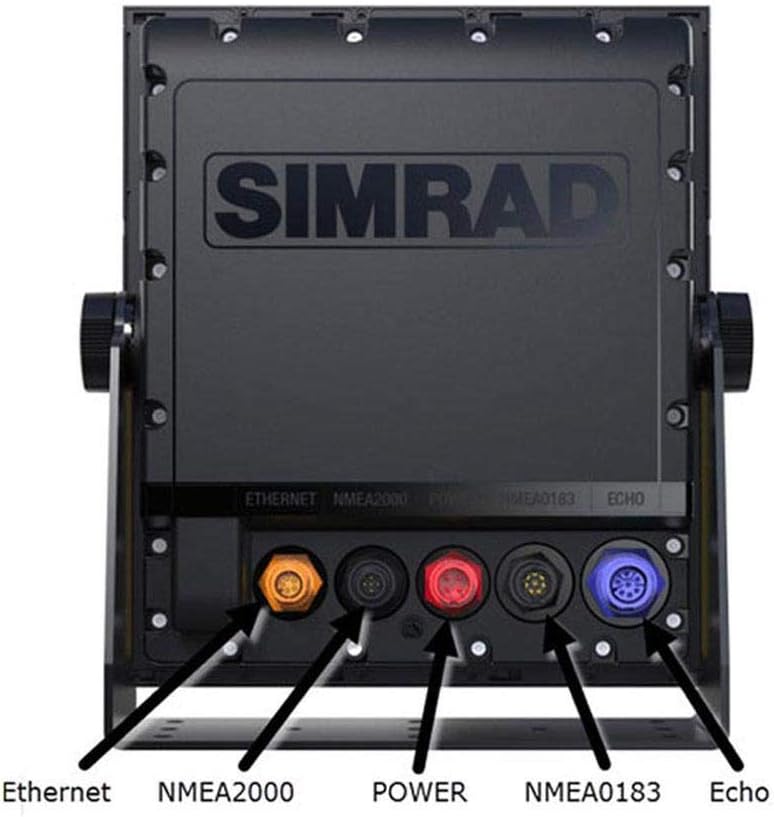
- Connectivity options: Ethernet, NMEA0183, and NMEA2000.

2. セットアップとインストール
2.1取り付けオプション
The Simrad S2009 offers two primary mounting methods:
- ブラケットマウント: The included bracket allows for adjustable tilt and swivel, providing flexibility in viewing angles. This is suitable for surface mounting on a dashboard or overhead console.
- フラッシュマウント: For a more integrated and streamlined appearance, the unit can be flush-mounted into a panel. Refer to the detailed installation guide for template and cutting instructions.
2.2電源接続
The unit requires a direct DC power source. Ensure the power supply meets the specifications outlined in the 'Specifications' section of this manual. Connect the power cable securely to the designated power port on the rear of the unit.
2.3 トランスデューサの接続
Connect your compatible Broadband Sounder or CHIRP transducer to the ECHO port on the rear of the S2009. Ensure the connection is tight and waterproof.
2.4ネットワーク接続
The S2009 supports various network connections for integration with other marine electronics:
- イーサネット: Use the Ethernet port to connect to other Simrad devices or a network switch for sharing sonar data.
- NMEA2000: Connect to an NMEA2000 network for sharing data such as GPS position, speed, and water temperature from compatible sensors.
- NMEA0183: Utilize the NMEA0183 ports for connecting to older or specific NMEA0183 compatible devices.
3. 基本操作
3.1 電源のオン/オフ
を押し続けます 力 button (typically marked with a circle and vertical line symbol) located on the keypad to turn the unit on or off. A brief press may access power options or backlight settings.
3.2 キーパッドナビゲーション
The S2009 features 8 direct-access menu keys and a rotary dial for intuitive control. Use the arrow keys to navigate menus and adjust settings. The rotary dial can be used for fine-tuning parameters like gain or zoom, and often includes a push-to-select function.
3.3 ソナー表示の解釈
The 9-inch portrait display is optimized for vertical detail, showing a longer history of the water column. Fish arches, bait schools, and bottom structure will appear as colored representations. The color palette indicates signal strength, with warmer colors (red, orange) typically representing stronger returns.
- 白線: A feature that helps distinguish fish or structure directly on the bottom by drawing a white line at the bottom contour.
- White Marker: Used to highlight specific returns on the screen.
- Color Erase: Allows for filtering out weaker returns to focus on stronger targets.
3.4 ソナー設定の調整
Access the sonar menu to adjust settings such as:
- ゲイン/感度: Controls how sensitive the sonar is to echoes. Increase for weaker returns, decrease to reduce clutter.
- 頻度: Select between different CHIRP frequencies or traditional broadband frequencies for optimal performance in various depths and conditions.
- 範囲: Adjust the depth range displayed on the screen.
- スクロール速度: Controls how quickly the sonar history scrolls across the screen.
3.5 SD Card Functions
The full-sized SD card slot allows for:
- データロギング: Record sonar logs for later review または分析。
- ソフトウェアアップデート: Download the latest software from the Simrad website and load it onto the unit via the SD card.
4. メンテナンス
4.1 ユニットのクリーニング
定期的にディスプレイを清掃し、asingを柔らかく、damp cloth. Avoid abrasive cleaners or solvents that could damage the screen or plastic components. For stubborn dirt, a mild soap solution can be used, followed by rinsing with fresh water and drying.
4.2ソフトウェアアップデート
Periodically check the official Simrad website for software updates. Updates often include performance enhancements, new features, and bug fixes. Follow the instructions provided with the update files for installation via the SD card slot.
4.3 接続チェック
Ensure all cable connections (power, transducer, network) are secure and free from corrosion. Inspect cables for any signs of wear or damage, especially after prolonged exposure to marine environments.
5。 トラブルシューティング
This section provides basic troubleshooting steps for common issues. For more complex problems, refer to the comprehensive Simrad S2009 installation and operation manuals available on the official Simrad webサイトをご覧いただくか、カスタマー サポートにお問い合わせください。
5.1 ユニットの電源が入らない
- Check the power cable connection at both the unit and the power source.
- Verify that the vessel's battery has sufficient charge and that the circuit breaker or fuse for the unit is not tripped or blown.
- 電源ボタンを必要な時間押し続けます。
5.2 ソナー画像なし
- Confirm the transducer is correctly connected to the ECHO port on the S2009.
- Check that the transducer is properly installed and submerged in water.
- Verify that the correct transducer type is selected in the unit's sonar settings.
- Adjust the gain/sensitivity settings; it may be too low.
5.3 Poor Sonar Image Quality / Clutter
- Reduce the gain/sensitivity to minimize clutter.
- Ensure the transducer face is clean and free from marine growth or obstructions.
- Check for sources of electrical interference from other onboard electronics.
- Adjust frequency settings; a higher frequency may provide better detail in shallower water, while lower frequencies offer better deep-water penetration.
6. 仕様
| 特徴 | 詳細 |
|---|---|
| ブランド | シムラド |
| モデル名 | S2009 |
| 部品番号 | 000-12185-001 |
| 画面サイズ | 9インチ |
| 表示タイプ | 液晶 |
| ディスプレイ解像度 | 480x800 pixels (Portrait) |
| ソナー技術 | Broadband Sounder, CHIRP |
| 電源 | 直接DC電源 |
| 取り付けタイプ | Bracket Mount, Flush Mount |
| 接続性 | Ethernet, NMEA0183, NMEA2000 |
| SDカードスロット | Full-sized (for data logging, software updates) |
| アイテム重量 | 2キログラム |
| アイテムの寸法(LxWxH) | 8.82 x 2.4 x 10.24インチ |
7. 保証とサポート
7.1 保証情報
For detailed warranty information, please refer to the official Simrad website or the warranty card included with your product packaging. Warranty terms typically cover manufacturing defects for a specified period from the date of purchase.
7.2 カスタマーサポート
If you encounter issues not covered in this manual or require further assistance, please contact Simrad customer support. Support contact details, including phone numbers and online resources, can be found on the official Simrad website. When contacting support, please have your product model (S2009) and serial number ready.
また、 AmazonのSimradストア 追加の製品情報とリソースについては、こちらをご覧ください。