
導入
The ThermoPro TP22 Digital Wireless Meat Thermometer is an advanced tool designed to help you achieve perfect cooking results for various meats and dishes. With its dual probe system and wireless receiver, you can monitor temperatures from a distance, ensuring convenience and precision whether you're grilling, smoking, or baking. This manual provides comprehensive instructions for setting up, operating, and maintaining your device.
パッケージ内容
- 1 xワイヤレスレシーバー
- 1 xワイヤレストランスミッタ
- 2xステンレス鋼プローブ
- 4 x AAA Batteries (2 sets)
- 取扱説明書 x 1
設定
Follow these steps to set up your ThermoPro TP22 thermometer for the first time:
- バッテリーの取り付け: Open the battery compartments on both the wireless receiver and the wireless transmitter. Insert two AAA batteries into each unit, ensuring correct polarity (+/-). The devices will automatically power on once batteries are inserted.
- Automatic Syncing: The receiver and transmitter are pre-synchronized at the factory. Once both units are powered on, they should automatically sync. The receiver display will show temperature readings from the probes.
- プローブ接続: Remove the protective covers from the probe ports on the transmitter. Firmly insert the stainless steel probes into the designated ports (Probe 1 and Probe 2) until you hear a click and feel a snap. The current temperature from the probes will immediately transmit to the receiver.
Official ThermoPro TP22 Meat Thermometer Setup Video. This video demonstrates the unboxing, battery installation, syncing process, and initial probe connection for the device.
操作手順
Familiarize yourself with the functions of your ThermoPro TP22:
- 電源オン/オフ: Simply tap the power button on both the receiver and transmitter to turn them on or off.
- 温度単位の選択(°F/°C): On the remote transmitter, press and hold the power button to switch between Fahrenheit (°F) and Celsius (°C) temperature readings. The receiver will update accordingly.
- バックライトの有効化: On the wireless receiver, tap the backlight button (light bulb icon) to activate the display backlight for improved visibility in low-light conditions.
- Probe/Timer Mode Toggle: Use the 'MODE' button on the receiver to toggle between Probe 1, Probe 2, and the Timer mode.
- Meat Presets: While in Probe 1 or Probe 2 mode, use the 'MEAT' button to cycle through various USDA-recommended preset meat temperatures. Options include Ground Beef, Ground Poultry, Beef, Veal, Chicken, Pork, Lamb, Fish, Ham, and an ambient Oven temperature setting (without an alarm).
- Taste Settings: For certain meat presets (e.g., Beef), you can adjust the desired doneness (taste) using the 'TASTE' button. Options typically include Rare, Medium Rare, Medium, Medium Well, and Well Done.
- タイマー機能:
- カウントアップタイマー: In Timer mode, if the timer is set to 00:00, press the 'START/STOP' button once to begin a count-up timer.
- カウントダウンタイマー: Use the arrow buttons (up/down) to set your desired minutes and seconds (or hours and minutes, see below). Press 'START/STOP' to begin the countdown.
- Switching Timer Units: While in Timer mode, press the 'MEAT' button to switch the timer display between minutes:seconds and hours:minutes. Two dots between the numbers indicate hours:minutes.
- Stopping/Clearing Timer: Press 'START/STOP' to pause/stop the timer. Press and hold 'STOP/CLEAR' to reset the timer to 00:00.
使用シナリオ
The ThermoPro TP22 is versatile for various cooking environments:
- Meat Probe Placement: Insert the probe into the thickest part of the meat, avoiding bones or gristle, as these can affect temperature accuracy.
- 周囲温度監視: Use the second probe to monitor the ambient temperature inside your oven, grill, or smoker. Place the probe on the grill rack, ensuring the probe tip does not touch the rack itself.
- ワイヤレスモニタリング: Place the transmitter unit near your cooking appliance and carry the receiver with you. The wireless range allows you to monitor your food from up to 300 feet away, providing freedom to attend to other tasks without constantly checking the cook.
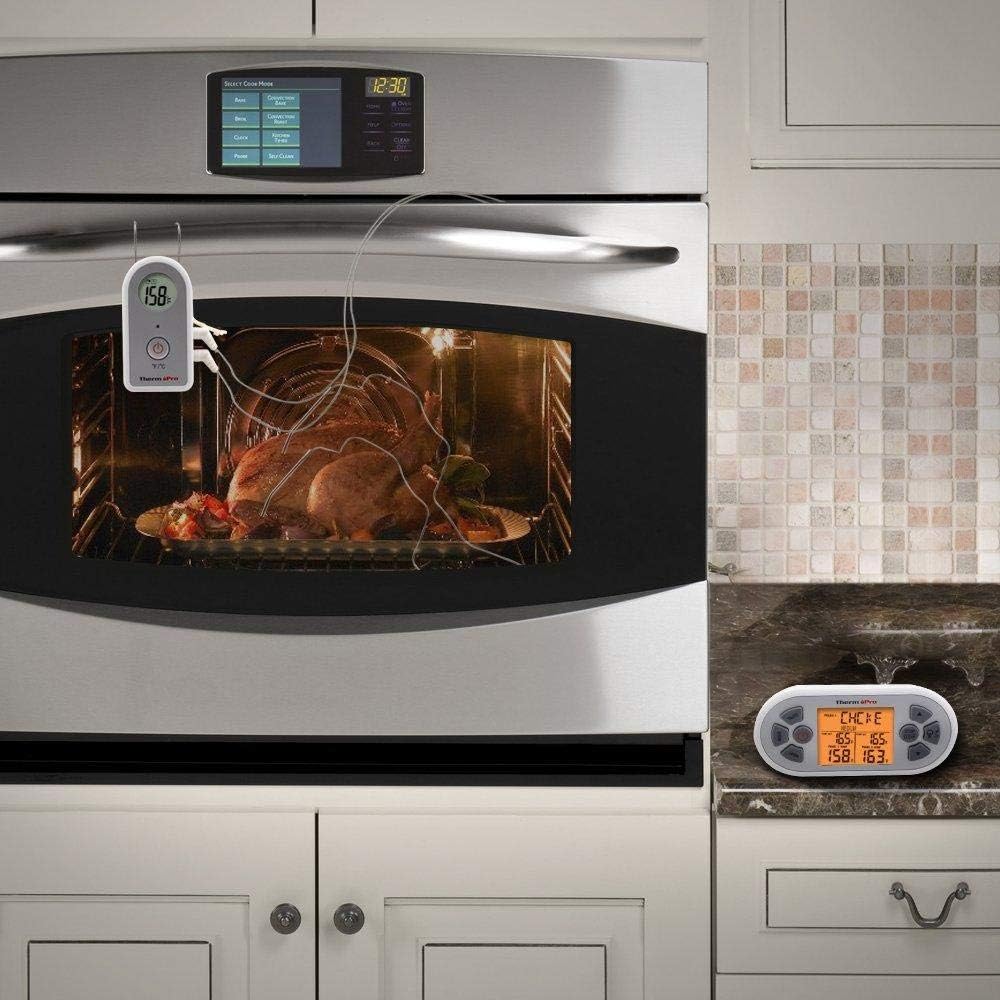
The ThermoPro TP22 thermometer in use, showing the probe inserted into a turkey inside an oven, with the wireless receiver placed on the countertop for remote monitoring.
メンテナンス
適切な手入れにより、体温計の寿命と精度が保証されます。
- クリーニングプローブ: Always clean the stainless steel probes thoroughly after each use with hot soapy water. Do not immerse the probe connectors or the main units in water.
- Unit Care: 受信機と送信機ユニットを広告で拭きますamp cloth. Do not submerge them in water or place them in a dishwasher.
- ストレージ: 使用していないときは、温度計とプローブを乾燥した場所に保管してください。
- バッテリー交換: 連続動作を確保するために、ディスプレイに電池残量低下インジケーターが表示されたら電池を交換してください。
トラブルシューティング
If you encounter issues with your ThermoPro TP22, try these solutions:
- No Temperature Reading / Dashes on Display: Ensure probes are fully inserted into the transmitter ports. Check that both the transmitter and receiver are powered on and within range. Replace batteries if they are low.
- 同期の問題: If units do not sync automatically, try turning both units off and then back on. Ensure they are close to each other during the syncing process.
- 不正確な読み取り: Verify that the probe is inserted correctly into the thickest part of the meat and not touching bone or the cooking surface. Ensure the probe cable is not damaged.
- アラームが鳴らない: Check the volume settings on the receiver. Ensure the target temperature has been set correctly and the current temperature has reached or exceeded it.
- Probe Malfunction: If a specific probe port consistently shows no reading or incorrect readings, try swapping probes between ports to determine if the issue is with the probe or the unit itself. Damaged probes may need replacement.
仕様
- モデル: TP-22
- 温度範囲: 最大572°F(300°C)
- プローブタイプ: Dual Stainless Steel Probes
- 無線範囲: 最大300フィート
- 電源: 4 x AAA電池(付属)
- 表示タイプ: バックライト付きデジタルLCD
- 寸法: 5.7 x 2.4 x 5インチ
- 商品の重量: 9.9オンス
保証とサポート
For warranty information or technical assistance, please refer to the product packaging or contact ThermoPro Customer Service directly.
顧客サービス: 1-877-515-7797
営業時間: 月曜日~金曜日、午前8時~午後6時(EST)