
Coby CVG-02-RC
Coby CVG-02-RC Virtual Reality Goggles User Manual
Model: CVG-02-RC
導入
This manual provides essential instructions for the safe and effective use of your Coby CVG-02-RC Virtual Reality Goggles. Please read this manual thoroughly before using the device and retain it for future reference.
The Coby CVG-02-RC transforms your smartphone into a 3D virtual reality headset, offering an immersive experience for compatible VR applications and content. It features adjustable optics and comes with a wireless remote control for enhanced interaction.
安全情報
- Do not use the VR goggles while operating a vehicle or machinery, or in situations requiring full attention to your surroundings.
- Take frequent breaks during use to prevent eye strain, dizziness, or discomfort. If you experience any discomfort, discontinue use immediately.
- Ensure your surroundings are clear of obstacles to avoid injury while immersed in virtual reality.
- デバイスを直射日光、高温、湿気から遠ざけてください。
- 本製品を分解または改造しないでください。保証が無効になり、損傷の原因となる可能性があります。
- This device is not suitable for children under 13 years of age. Adult supervision is recommended for younger users.
パッケージ内容
パッケージにすべてのアイテムが揃っていることを確認します。
- Coby CVG-02-RC Virtual Reality Goggles
- ワイヤレスリモコン
- ユーザーマニュアル(このドキュメント)
製品終了view
Familiarize yourself with the components of your Coby VR Goggles.
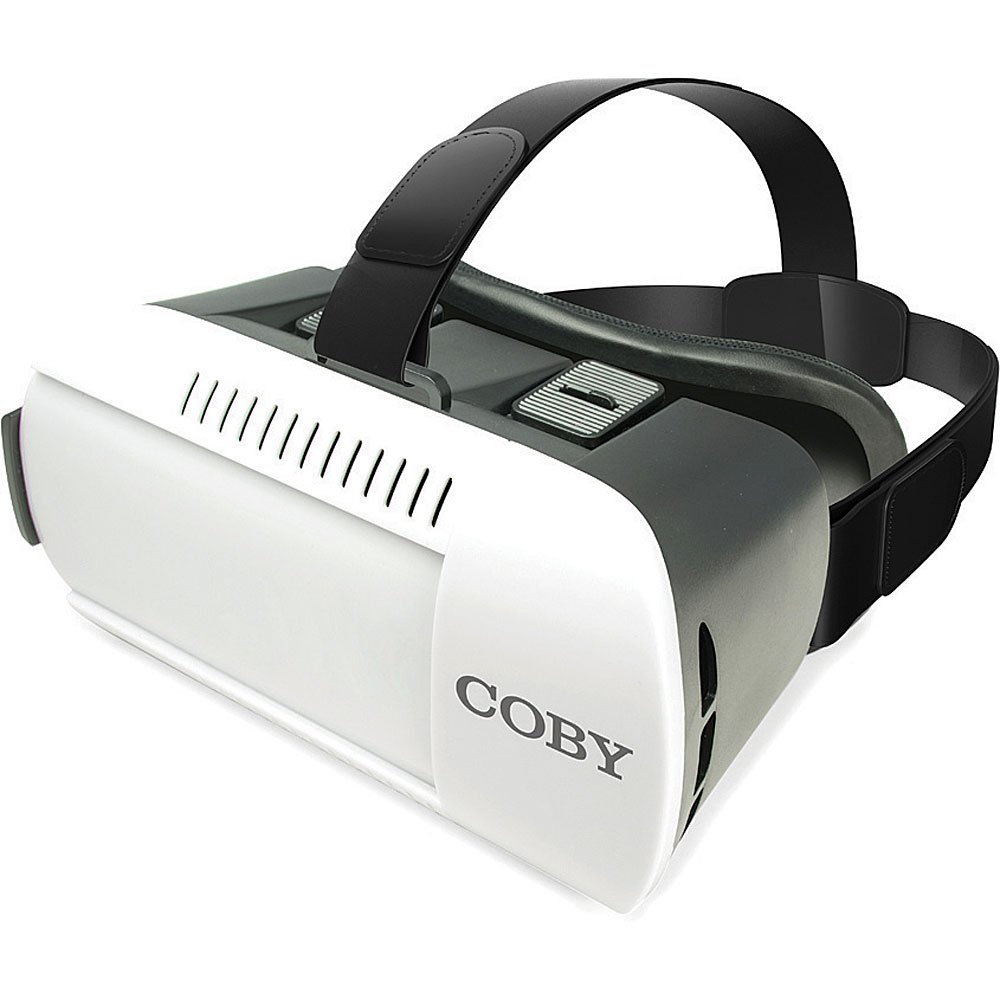
図1: フロント view of the Coby CVG-02-RC Virtual Reality Goggles. This image shows the main body of the goggles, including the adjustable head strap, the padded face cushion, and the lenses visible from the user's perspective. The top features adjustment sliders for lens positioning.
Goggles Components:
- 調節可能なヘッドストラップ: Secures the goggles to your head.
- Padded Face Cushion: Provides comfort and blocks external light.
- Spherical Lenses: Provide the 3D virtual reality view.
- Lens Adjustment Dials/Sliders: Located on top, these allow for focus and interpupillary distance (IPD) adjustments.
- Smartphone Tray/Compartment: Front section where the smartphone is inserted.
ワイヤレスリモコン:
The remote control typically includes buttons for navigation, selection, and volume, enhancing interaction within VR applications. Refer to the remote's specific instructions for detailed button functions.
設定
1. スマートフォンを挿入する
- Open the front cover of the VR goggles. This usually involves unlatching or sliding the front panel.
- Place your smartphone into the designated tray or holder. Ensure the phone is centered and securely held. The screen should face the lenses.
- 前面カバーをしっかりと閉じてください。
- 注記: The goggles are compatible with smartphones up to 6 inches in screen size.
2. ヘッドストラップの調整
- Place the goggles on your head.
- Adjust the side and top straps to achieve a comfortable and secure fit. The goggles should feel snug but not overly tight, and the image should be centered in your vision.
3. ワイヤレスリモコンのペアリング
- スマートフォンの Bluetooth が有効になっていることを確認してください。
- Turn on the wireless remote control (refer to the remote's specific instructions for power on/off).
- スマートフォンで、利用可能な Bluetooth デバイスを検索します。
- Select the remote control from the list (e.g., "VR-Remote" or similar) to pair.
- Once paired, the remote can be used to navigate within VR applications.
4. Downloading VR Applications
For the best experience, download virtual reality applications from your smartphone's app store:
- iOSデバイスの場合: 訪問する Apple Appストア and search for "VR games," "3D split screen," or "virtual reality."
- Androidデバイスの場合: 訪問する Google Playストア and search for "VR games," "3D split screen," or "virtual reality."
Many VR apps are designed for split-screen viewing, which is necessary for these goggles.
オペレーティング
Using the VR Goggles
- Launch a VR application on your smartphone. The screen should display a split-screen view.
- Insert your smartphone into the goggles as described in the "Setup" section.
- Put on the goggles and adjust the head straps for comfort.
- Use the lens adjustment dials/sliders on the top of the goggles to achieve a clear and focused image. Adjust both the focus (distance from lenses to screen) and the interpupillary distance (IPD - distance between the centers of the lenses) until the image is sharp and comfortable for both eyes.
- Use the wireless remote control to interact with the VR application.
Adjusting Lenses
The Coby CVG-02-RC features adjustable dual optics to optimize your view経験:
- フォーカス調整: Slide the dials on the top of the goggles forward or backward to adjust the clarity of the image. This compensates for different vision needs.
- IPD(瞳孔間距離)調整: Slide the dials left or right to adjust the distance between the lenses. This aligns the lenses with your eyes for a single, clear 3D image.

図2: トップ view of the Coby CVG-02-RC Virtual Reality Goggles, highlighting the lens adjustment sliders. These sliders allow users to fine-tune the focus and interpupillary distance for optimal view快適さと明瞭さを実現します。
メンテナンス
- レンズのクリーニング: Use a soft, dry microfiber cloth specifically designed for optical lenses. Do not use abrasive cleaners or paper towels.
- Cleaning Goggles Body: 外側は柔らかく、少し硬めの布で拭いてください。amp 布で拭いてください。開口部に水分が入らないようにしてください。
- ストレージ: Store the goggles in a cool, dry place away from direct sunlight and dust. Use the original packaging or a protective case if available.
- パッド入りクッション: The foam padding can be gently wiped with a damp 必要に応じて布と中性洗剤を使用してください。使用前に完全に乾いていることを確認してください。
トラブルシューティング
| 問題 | 考えられる原因 | 解決 |
|---|---|---|
| 画像がぼやけているか、焦点が合っていない。 | Incorrect lens adjustment. | Adjust the focus and IPD dials/sliders on top of the goggles until the image is clear. |
| 複視または眼精疲労。 | Incorrect IPD adjustment; phone not centered. | Adjust the IPD dials to match your eye distance. Ensure your smartphone is perfectly centered in the tray. Take a break. |
| リモコンが接続されません。 | Bluetooth not enabled; remote not powered on; remote not paired. | Ensure Bluetooth is on your phone. Power on the remote. Re-pair the remote via your phone's Bluetooth settings. Check remote battery. |
| No 3D effect or distorted image. | App not designed for VR; phone not properly seated. | Ensure the app displays a split-screen VR view. Re-seat your smartphone securely and centered in the goggles. |
| スマートフォンの過熱。 | Extended use of demanding VR apps. | Remove the phone from the goggles and allow it to cool down. Reduce usage time for demanding applications. |
仕様
- モデル: CVG-02-RC
- 分野 View (FOV): 98~99度
- レンズタイプ: High Transparency Spherical Lens
- スマートフォンの互換性: Up to 6 inches screen size (iOS/Android)
- Connectivity (Remote): ブルートゥース
- 製品寸法: 13 x 14 x 20インチ(製品データによる概算)
- 商品の重量: 1.2ポンド(製品データによる概算)
- メーカー: コビー
保証とサポート
For warranty information and technical support, please refer to the warranty card included with your product or visit the official Coby webサイトでご確認ください。購入証明として購入レシートを保管してください。
For further assistance, you may contact Coby customer service through their official channels.
Ask a question about this manual
Ask about setup, troubleshooting, compatibility, parts, safety, or missing instructions. Manuals+ will review the question and use this page’s manual context to help answer it.