
1. はじめに
ご購入ありがとうございますasing the Metronic Gulli 477148 CD-MP3 Player with USB Port. This portable audio device is designed for ease of use, allowing you to enjoy your favorite music from various sources including CDs, CD-R/RW, MP3 discs, and USB flash drives. This manual provides detailed instructions to help you set up, operate, and maintain your device for optimal performance.

図1: 前面 view of the Metronic Gulli 477148 CD-MP3 Player.
2. 安全情報
本製品をご使用になる前に、すべての安全に関する注意事項をよくお読みください。このマニュアルは、今後の参考のために保管してください。
- 電源: 指定された電源アダプターまたは電池のみを使用してください。tageはデバイスの要件を満たしています。
- 水と湿気: デバイスを雨や湿気にさらしたり、水に浸したりしないでください。
- 熱: 本製品をラジエーター、暖房口、ストーブ、その他の機器(電気製品を含む)などの熱源から遠ざけてください。 amp熱を発生する装置。
- 換気: 通気口を塞がないでください。メーカーの指示に従って設置してください。
- クリーニング: 乾いた布でのみ清掃してください。
- サービス: この製品を自分で修理しようとしないでください。 すべてのサービスを資格のあるサービス担当者に依頼してください。
- ヘッドフォン: 聴覚障害を防ぐため、長時間大音量で聞くことは避けてください。
3.製品オーバーview
Familiarize yourself with the various parts and controls of your CD-MP3 player.
3.1 フロントパネルのコントロールとポート

Figure 2: Front panel with controls and ports.
- Volume Up/Down Buttons (V+/V-): 再生音量を調整します。
- LCDディスプレイ: Shows track number, time, mode, and ID3 tag 情報。
- モードボタン: Switches between CD, USB, and other available modes.
- 再生/一時停止ボタン: 再生を開始または一時停止します。
- 停止ボタン: 再生を停止します。
- 前へ/巻き戻しボタン: 前のトラックにスキップするか、現在のトラックを巻き戻します。
- 次へ/早送りボタン: 次のトラックにスキップするか、現在のトラックを早送りします。
- ヘッドホンジャック(3.5mm): プライベートリスニング用にヘッドフォンを接続します。
- AUX入力: 外部オーディオデバイスを接続します。
- USBポート: Connect a USB flash drive for MP3 playback.
3.2 背面パネル

図 3: 電源入力のある背面パネル。
- AC電源入力: Connect the provided AC power adapter.
- バッテリーコンパートメント: (Located on the bottom, not visible in this image) Insert batteries for portable use.
4. セットアップ
4.1 デバイスへの電源供給
The Metronic Gulli 477148 can be powered by either an AC adapter or batteries.
- AC電源: Connect the supplied AC power adapter to the AC power input on the rear of the unit and plug the other end into a standard wall outlet.
- バッテリー電源: Open the battery compartment (usually on the bottom of the unit). Insert 6 x 1.5V C-type batteries (not included), ensuring correct polarity (+/-). Close the battery compartment securely.
4.2初期電源オン
を押す 電源オン/オフ button (if available, otherwise the Mode button usually powers it on) to turn on the device. The LCD display will illuminate.
5. 操作手順
5.1 CDを再生する
- CDコンパートメントの蓋を開けます。
- Place a CD (CD, CD-R/RW, or MP3 CD) onto the spindle with the label side facing up.
- CDコンパートメントの蓋をしっかりと閉じてください。
- を押す モード ボタンをクリックしてCDモードを選択します。
- を押す 再生/一時停止 ボタンをクリックして再生を開始します。
- 使用 前へ/巻き戻し そして 次へ/早送り トラックをナビゲートするためのボタン。
- を使用して音量を調整します V + / V- ボタン。
5.2 USBポートの使用
- MP3が入ったUSBフラッシュドライブを挿入します filesUSBポートに接続します。
- を押す モード button to select USB mode. The device will automatically scan and begin playing MP3 files.
- 使用 前へ/巻き戻し そして 次へ/早送り トラックをナビゲートするためのボタン。
- を使用して音量を調整します V + / V- ボタン。
5.3 ヘッドホンの使用
Connect any standard 3.5mm headphones to the headphone jack for private listening. When headphones are connected, sound will typically be muted from the built-in speakers.
5.4 AUX入力
Connect an external audio device (e.g., smartphone, tablet) to the AUX input using a 3.5mm audio cable (not included). Press the モード button to select AUX mode. Audio from the external device will play through the CD-MP3 player's speakers.
5.5 Special Playback Functions
- ID3 Function: MP3再生時 files from a CD or USB, the LCD display will show information such as album name, artist, and track title.
- 繰り返し機能: を押す 繰り返す button (if available, often combined with Mode or a dedicated button) to repeat the current track or all tracks.
- プログラム機能: Allows you to program a specific order of tracks for playback. Refer to the device's specific button for programming.
- ランダム関数: トラックをランダムな順序で再生します。
- Intro Function: Plays the first 10 seconds of each track on a CD or USB, allowing for quick song preview.
6. メンテナンス
6.1 クリーニング
- 本体の外側は、乾いた柔らかい布で拭いてください。
- 仕上げを傷める恐れがあるため、研磨剤入りの洗剤、ワックス、溶剤は使用しないでください。
- CD レンズには専用の CD レンズクリーナー ディスクを使用してください。
6.2 ストレージ
When not in use for extended periods, store the device in a cool, dry place. Remove batteries if storing for a long time to prevent leakage.
7。 トラブルシューティング
| 問題 | 考えられる原因 | 解決 |
|---|---|---|
| 電源なし | AC adapter not connected properly; Batteries depleted or incorrectly inserted. | AC アダプターの接続を確認してください。電池を交換するか、極性が正しいことを確認してください。 |
| 音が出ない | 音量が低すぎます。ヘッドフォンが接続されています。間違ったモードが選択されています。 | Increase volume; Disconnect headphones; Select correct mode (CD, USB, AUX). |
| CDが再生されない | CD inserted incorrectly; CD dirty or scratched; CD compartment not closed; Incorrect mode. | Insert CD with label side up; Clean or replace CD; Close lid firmly; Select CD mode. |
| USBが再生されない | USB drive not inserted correctly; USB drive not formatted correctly; No MP3 files on USB; Incorrect mode. | Reinsert USB drive; Ensure USB is FAT32 formatted; Transfer MP3 files to USB; Select USB mode. |
| ディスプレイが機能しない | Device off; Faulty unit. | Turn on device; If problem persists, contact support. |
8. 仕様
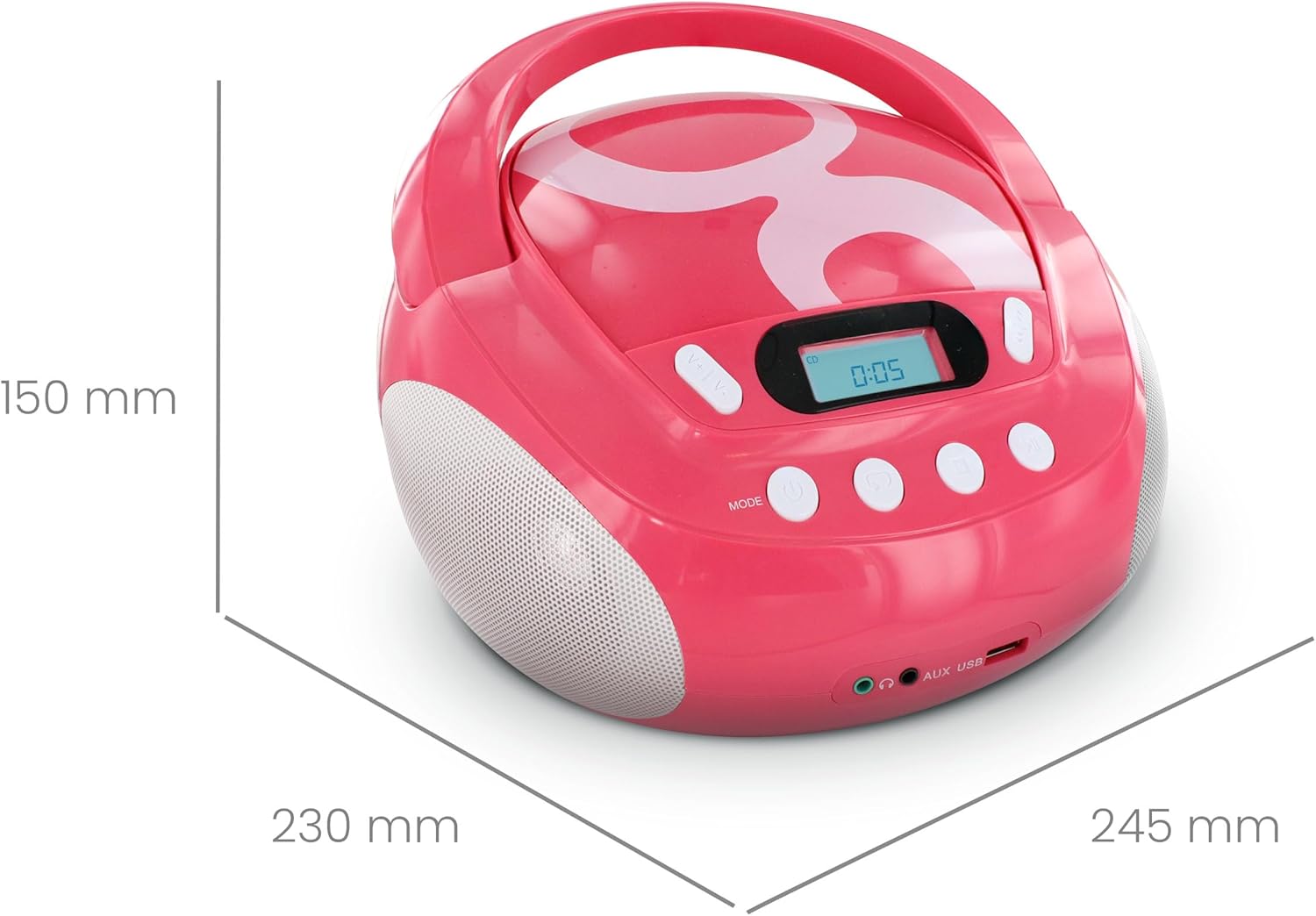
図4: 製品の寸法。
| ブランド | メトロニック |
| モデル番号 | 477148 |
| 色 | Gulli Rose |
| 互換性のあるメディア | CD, CD-R/RW, MP3-CD, USB (MP3 files) |
| 接続技術 | 補助、USB |
| ヘッドホンジャック | 3.5ミリメートル |
| スピーカータイプ | ステレオ |
| 出力電力 | 2ワット |
| 電源 | AC Powered, Battery Powered (6 x 1.5V C-type batteries) |
| 寸法(長さ×幅×高さ) | 28 x 24 x 16 cm(約11 x 9.4 x 6.3インチ) |
| アイテム重量 | 1900グラム(1.9 kg / 4.19ポンド) |
| 画面 | バックライト付きLCD |
9. 保証とサポート
9.1 製造元の保証
この製品には、 2年間のメーカー保証 ご購入日から1年間有効です。保証請求の際は、購入証明書を保管してください。保証は、通常の使用における材料および製造上の欠陥を対象とします。
9.2 カスタマーサポート
For assistance with installation or use of this product, please contact the manufacturer's support line:
電話: 0892 350 315
(Note: This number may incur charges depending on your service provider and location.)