
1. はじめに
The Zmodo Outdoor Security Camera Wireless (2 Pack) provides a comprehensive monitoring solution for your home or business. This system features 1080p Full HD video, night vision, and motion detection capabilities. Designed for both indoor and outdoor use, it offers remote viewing via the Zmodo app and is compatible with Amazon Alexa and Google Assistant for voice control.
主な機能は次のとおりです。
- 簡単なセットアップ: Connect cameras within minutes using the Zmodo app.
- True 1080p HD Live Video: 昼と夜 viewing up to 65ft in the dark.
- Alexaで動作します: 音声コマンドでカメラを制御します。
- Smartz Eaze Cloud Recording: Receive video clips upon motion detection (14-day free trial included).
- Wall-mount Design: Flexible installation for optimal view角度を変える。
2. 箱の中身
The Zmodo Outdoor Security Camera Wireless (2 Pack) package includes the following items:
- 2 x Zmodo Outdoor Cameras

3. セットアップ
Setting up your Zmodo Outdoor Security Camera is a straightforward process. Follow these steps for quick installation and configuration.
3.1物理的な設置
- 場所を選択: カメラを設置する適切な場所を選び、 view of the area you wish to monitor and is within range of your Wi-Fi network. The camera is designed for wall mounting.
- カメラを取り付ける: Use the provided mounting bracket and screws to securely attach the camera to a wall or desired surface.
- 接続電源: Plug the camera's power adapter into a nearby electrical outlet.
- Wi-Fiアンテナを取り付ける: Screw the Wi-Fi antenna into the designated port on the back of the camera.


3.2アプリの構成
- Zmodoアプリをダウンロードしてください: Download the free Zmodo app from your smartphone's app store (iOS or Android).
- アカウントを作成する: Open the app and follow the on-screen instructions to create a new Zmodo account or log in if you already have one.
- デバイスを追加: In the app, select the option to add a new device. Follow the prompts to connect your camera to your Wi-Fi network. This typically involves scanning a QR code on the camera or following guided steps.
- カメラに名前を付ける: Assign a descriptive name to your camera (e.g., "Front Door Camera," "Backyard Camera") for easy identification.
3.3 セットアップビデオ
For visual guidance on the setup process, refer to the following videos:
4. 操作手順
Once your Zmodo camera is set up, you can begin monitoring your property and utilizing its smart features.
4.1 ライブ View と再生
- ライブフィードにアクセス: Open the Zmodo app on your smartphone or tablet. Select the desired camera from your device list to view its live 1080p Full HD video feed.
- ナイトビジョン: The camera automatically switches to night vision mode in low-light conditions, providing clear black and white video up to 65 feet.
- クラウドストレージ: With the optional Smartz Eaze cloud recording plan, motion-triggered video clips are saved to the cloud. You can review, save, and share footage at any time. A 14-day free trial is available.


4.2 動きの検出とアラート
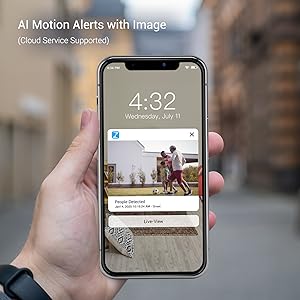
- アラートを受信する: The camera sends intelligent mobile alerts to your smartphone when motion is detected.
- AIモーション検出: Advanced AI helps detect and identify humans, pets, and vehicles accurately, reducing false alerts.
4.3 Alexa統合
The Zmodo camera is compatible with Amazon Alexa, allowing for convenient voice control.
- 音声コマンド: Use commands like "Alexa, show me the front door" to view a live stream from your camera on compatible Alexa devices such as Echo Show or Fire TV.
- ファームウェアの更新: Ensure your Zmodo product is updated to the latest device version for optimal interaction with Amazon Alexa.

4.4 Alexa Integration Video
Watch this video for detailed instructions on how to integrate your Zmodo camera with Amazon Alexa and Fire TV:
5. メンテナンス
To ensure optimal performance and longevity of your Zmodo Outdoor Security Camera, follow these maintenance guidelines:
- 定期清掃: カメラのレンズは定期的に柔らかくてきれいな布で拭いてください。amp 画像の鮮明さに影響を与える可能性のあるほこり、汚れ、または汚れを布で取り除いてください。研磨剤入りの洗剤は使用しないでください。
- 接続を確認してください: Ensure all cables (power, antenna) are securely connected and free from damage.
- ファームウェアの更新: Regularly check for and install firmware updates through the Zmodo app to benefit from new features, improvements, and security enhancements.
- 天候保護: While the camera is IP65 waterproof, ensure it is installed in a location that minimizes direct exposure to extreme weather conditions if possible, to prolong its lifespan.

6。 トラブルシューティング
If you encounter issues with your Zmodo camera, refer to the following common problems and solutions:
| 問題 | 考えられる解決策 |
|---|---|
| カメラがオフライン/Wi-Fiに接続できない | Ensure the camera is powered on. Check your Wi-Fi signal strength at the camera's location. Restart your router and the camera. Re-add the camera through the Zmodo app. |
| ビデオ品質が悪い | Clean the camera lens. Ensure adequate lighting for day vision. Check Wi-Fi signal strength; a weak signal can degrade video quality. |
| モーションアラートを受信できませんでした | Verify motion detection is enabled in the app settings. Check app notification settings on your phone. Ensure the camera has a clear view 検出エリアの。 |
| Alexa integration not working | Ensure the Zmodo skill is enabled in the Alexa app and your Zmodo account is linked. Verify your Alexa device (Echo Show/Fire TV) is connected to the same network. Update camera firmware. |
7. 仕様
Detailed technical specifications for the Zmodo Outdoor Security Camera (Model ZM-W0002-2):
| 特徴 | 詳細 |
|---|---|
| ブランド | ズモード |
| モデル名 | ZM-W0002-2 |
| 接続技術 | Cloud, Wi-Fi, 2.4GHz |
| 特集 | HD Resolution, Motion Sensor, Night Vision |
| 屋内/屋外での使用 | 屋内、屋外 |
| 対応デバイス | Alexa、Googleアシスタント |
| マウントタイプ | 壁掛け |
| 色 | 白 |
| フォームファクター | 弾丸 |
| 防水等級 | IP65 |
| フォトセンサー解像度 | 1080 ピクセル |
| ビデオキャプチャ解像度 | 1080p |
| フレームレート | 25fps |
| View角度 | 90度 |
| 光学ズーム | 4倍 |
| 暗視範囲 | 65フィート |
| 電源 | コード式電気 |
| 巻tage | 12ボルト |
| ワットtage | 5ワット |
| アイテムの寸法 | 2.2 x 2.1 x 3.4インチ |
8.保証とサポート
保証: The Zmodo Outdoor Security Camera comes with a 3-year manufacturer's warranty.
カスタマーサポート: For technical assistance, troubleshooting, or warranty claims, please visit the official Zmodo website or contact their customer support team. Refer to the Zmodo app or packaging for the most up-to-date contact information.