
UNIC UC46 IDSP-011
UNIC UC46 ミニプロジェクター ユーザーマニュアル
Model: UC46 IDSP-011
1. はじめに
This user manual provides detailed instructions for the operation, setup, and maintenance of your UNIC UC46 Mini Projector. Please read this manual thoroughly before using the product to ensure proper and safe operation. Keep this manual for future reference.
安全情報
- プロジェクターレンズを直接見ないでください。amp オンです。
- Ensure proper ventilation around the projector to prevent overheating. It is recommended to rest the projector after 4-5 hours of continuous operation.
- プロジェクターを水や液体から遠ざけてください。
- プロジェクターに付属の電源アダプターのみを使用してください。
- プロジェクターをご自身で分解したり修理したりしないでください。資格のあるサービス担当者にご相談ください。
- This projector is designed for home entertainment and is not suitable for professional teaching, meetings, or business presentations.
2 製品の特徴
- ポータブルデザイン: Compact and lightweight, ideal for home use, camping, and outdoor parties.
- 高輝度: 1200 lumens LED lamp for clear and vibrant images.
- ネイティブ解像度: 800x480 pixels, supporting up to 1920x1080 (Full HD) via input.
- 大きな投影サイズ: 34〜130インチの映像を投影します。
- 複数の接続オプション: HDMI, VGA, USB, AV, SD Card, and IR.
- ワイヤレス接続: Supports WiFi, Miracast, and DLNA for seamless smartphone integration (iOS, Android, Windows).
- LEDの長寿命: Lamp 寿命は約20,000時間です。
3. パッケージ内容
以下の項目のボックスにチェックを入れてください。
- UNIC UC46 Mini Projector
- 電源ケーブル
- 3-in-1AVケーブル
- リモートコントロール
- ユーザーマニュアル(このドキュメント)
4.製品オーバーview
Familiarize yourself with the different parts and controls of your UNIC UC46 Mini Projector.
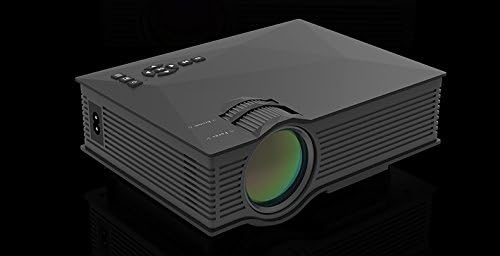
図4.1: 前面と側面 View of the UNIC UC46 Mini Projector. Shows the main lens, focus wheel, and ventilation grilles.

図4.2:背面 View of the Projector. Displays various input ports including HDMI, USB, AV, SD card slot, and audio output.

図4.3:上 View of the Projector. Shows the control panel buttons for navigation, power, and input selection.

Figure 4.4: Lens Focus and Keystone Adjustment Diagram. Illustrates the location of the lens focus and keystone correction wheels, along with a diagram of the remote control functions.
5. セットアップ
5.1 配置
Place the projector on a stable, flat surface. Ensure there is adequate space around the projector for ventilation. The projection distance will determine the screen size. Refer to the specifications for recommended distances.
5.2電源接続
- Connect the power cable to the projector's AC power input port.
- 電源ケーブルのもう一方の端を標準電源コンセント (100 ~ 240 V、50/60 Hz) に差し込みます。
- プロジェクターの電源インジケータ ライトが点灯します。
5.3初期電源オン
- プロジェクターまたはリモコンの電源ボタンを押して、デバイスの電源をオンにします。
- プロジェクターに起動画面が表示されます。
5.4 画像調整
- 集中: Rotate the focus wheel (located near the lens) until the projected image is clear and sharp.
- キーストーン補正: If the image appears trapezoidal, adjust the keystone correction wheel (usually next to the focus wheel) to square the image.
6. 操作手順
6.1 デバイスの接続
The UNIC UC46 projector supports various input sources:
- HDMI: Connect a PC, laptop, DVD player, game console (PS3, PS4), or Smart TV box using an HDMI cable. Select "HDMI" as the input source.
- VGA: Connect a PC or laptop using a VGA cable. Select "VGA" as the input source.
- USB: メディアを再生するにはUSBフラッシュドライブを挿入します files (videos, photos, music, text). Select "USB" as the input source and navigate through the files.
- AV: Use the included 3-in-1 AV cable to connect devices with AV output (e.g., older DVD players, VCRs). Select "AV" as the input source.
- SDカード: Insert an SD card into the slot to play media files. Select "SD" as the input source.
6.2 ワイヤレス接続(WiFi)
The projector supports WiFi connectivity for screen mirroring from smartphones (iOS, Android, Windows) and DLNA.
- Go to the "WiFi" or "Wireless" menu on the projector.
- Select your WiFi network and enter the password to connect the projector to your home network.
- For screen mirroring (Miracast/AirPlay):
- スマートフォンとプロジェクターが同じ WiFi ネットワークに接続されていることを確認してください。
- On your smartphone, enable screen mirroring (e.g., "Screen Mirroring," "Smart View," "AirPlay," "Wireless Display").
- 利用可能なデバイスのリストからプロジェクターを選択します。
- For DLNA:
- スマートフォンとプロジェクターが同じ WiFi ネットワークに接続されていることを確認してください。
- Use a DLNA-compatible app on your smartphone to stream media to the projector.
6.3オーディオ出力
The projector has a built-in speaker. For enhanced audio, you can connect external speakers or a sound system via the 3.5mm audio output port.
7. メンテナンス
7.1 レンズのクリーニング
プロジェクターレンズを拭く際は、光学レンズ専用の柔らかく糸くずの出ない布をご使用ください。研磨剤入りのクリーナーや溶剤は使用しないでください。
7.2 プロジェクター本体のクリーニング
プロジェクターの外側は、柔らかく乾いた布で拭いてください。頑固な汚れには、軽く湿らせた布で拭いてください。amp 布で拭いた後、乾いた布で拭いてください。
7.3換気
Regularly check that the ventilation grilles are not blocked by dust or debris. Use a soft brush or compressed air to clean them if necessary. Proper airflow is crucial for preventing overheating and extending the projector's lifespan.
7.4リットルamp 人生
LED lamp has an estimated life of 20,000 hours. To maximize lamp life, avoid frequent on/off cycles and allow the projector to cool down properly after use.
8。 トラブルシューティング
| 問題 | 考えられる原因 | 解決 |
|---|---|---|
| 画像が投影されない | Power cable not connected; Projector not turned on; Incorrect input source selected; Input device not connected or powered on. | Check power connection; Press power button; Select correct input source (HDMI, VGA, USB, AV, SD); Ensure input device is connected and powered on. |
| 画像がぼやけている | Lens out of focus; Incorrect projection distance. | Adjust the focus wheel; Adjust the projection distance. |
| 画像は台形です | プロジェクターがスクリーンに対して垂直ではありません。 | キーストーン補正ホイールを調整します。 |
| 音が出ない | Volume too low; Muted; External audio device not connected or powered on; Audio format not supported. | Increase volume; Unmute; Check external audio connection; Ensure audio format is supported. |
| リモコンが動作しない | Batteries dead or incorrectly inserted; Obstruction between remote and IR receiver. | 電池を交換してください。プロジェクターの IR 受信機までの見通しが確保されていることを確認してください。 |
| Overheating / Shuts down automatically | 換気が妨げられる。長時間使用する。 | Ensure ventilation grilles are clear; Allow projector to rest after 4-5 hours of use. |
9. 仕様

Figure 9.1: Detailed Specifications of the UNIC UC46 Mini Projector.
| 特徴 | 詳細 |
|---|---|
| 画像システム | 液晶 |
| Lamp | 導かれた |
| ネイティブ解像度 | 800 x 480 ピクセル |
| サポートされる最大解像度 | 1920×1080ピクセル(フルHD) |
| 輝度 | 1200ルーメン |
| コントラスト比 | 800:1 |
| 消費電力 | 50-55ワット |
| 電源 | 100-240V、50/60Hz |
| 騒音レベル | <25dB |
| 投影サイズ | 34~130インチ |
| 投射距離 | 1.07 ~ 3.8 メートル (3.51 ~ 12.47 フィート) |
| アスペクト比 | 4:3 / 16:9 |
| 正味重量 | 1キロ |
| レンズ | Multi-layer coated glass lens |
| 入力端子 | USB, SD, HDMI, AV, VGA, IR |
| 出力端子 | ヘッドホン、スピーカー |
| 無線 | WiFi 2.4G |
| 製品寸法 | 201mm x 153mm x 67.5mm |
10. 保証とサポート
For warranty information and technical support, please refer to the product packaging or contact your retailer. Keep your purchase receipt as proof of purchase.
Ask a question about this manual
Ask about setup, troubleshooting, compatibility, parts, safety, or missing instructions. Manuals+ will review the question and use this page’s manual context to help answer it.