
1. はじめに
Thank you for choosing the UNIC UC18 Mini Projector. This compact and portable projector is designed to provide a versatile viewing experience for home entertainment, presentations, and more. Featuring an LED lighting system, built-in speaker, and multiple input options, the UC18 offers convenience and functionality. Please read this manual thoroughly to ensure proper setup, operation, and maintenance of your device.
2. 安全情報
- 電源: 指定された電源アダプタのみを使用してください。tageはプロジェクターの要件に適合します。
- 換気: 通気口を塞がないでください。プロジェクターの周囲に十分なスペースを確保し、適切な空気の流れを確保して過熱を防いでください。
- 水分: プロジェクターは水、雨、過度の湿気を避けて保管してください。濡れた手で操作しないでください。
- クリーニング: 清掃する前に電源を切ってください。柔らかく乾いた布を使用してください。液体やエアゾールクリーナーは使用しないでください。
- 取り扱い: プロジェクターは丁寧に取り扱ってください。落としたり、強い衝撃を与えたりしないでください。
- 目の保護: プロジェクターレンズを直接見ないでください。amp 明るい光により目の疲れや損傷を引き起こす可能性があるため、電源をオンにしないでください。
- 分解: プロジェクターをご自身で分解したり修理したりしないでください。修理はすべて資格のある専門家にご依頼ください。
3. パッケージ内容
開梱後、パッケージの内容をご確認ください。不足品や破損品がございましたら、販売店までご連絡ください。
- UNIC UC18 Mini Projector
- 電源ケーブル
- 3-in-1AVケーブル
- Remote Control (requires lithium battery, not included)
- ユーザーマニュアル
4.製品オーバーview
プロジェクターレイアウト
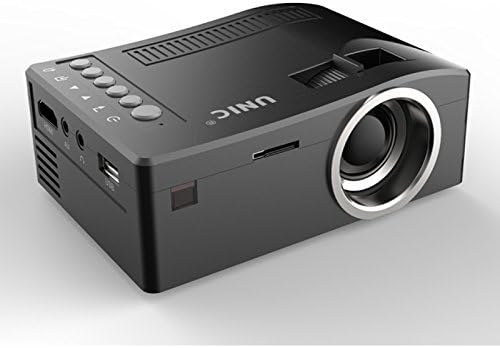
前面と側面 view of the UNIC UC18 Mini Projector, showing the lens, ventilation, and various ports.
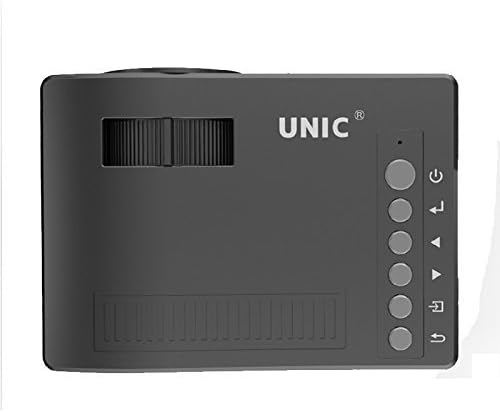
トップ view of the UNIC UC18 Mini Projector, highlighting the control buttons and focus wheel.
ポートとコントロール
The UNIC UC18 Mini Projector features a range of ports and controls for easy connectivity and operation:
- レンズ: 画像をスクリーンに投影します。
- フォーカスホイール: 画像の鮮明さを手動で調整します。
- 電源ボタン: プロジェクターの電源をオンまたはオフにします。
- メニューボタン: プロジェクターの設定メニューにアクセスします。
- ナビゲーション ボタン (上/下/左/右): メニューを移動したり設定を調整したりするために使用します。
- OKボタン: メニューの選択を確定します。
- ソースボタン: Selects the input source (HDMI, USB, AV, TF).
- USBポート: メディア再生用に USB ストレージ デバイスを接続します。
- HDMIポート: Connects to HDMI-enabled devices like laptops, gaming consoles, or media players.
- AVポート: 付属の3-in-1 AV ケーブルを使用してデバイスに接続します。
- TFカードスロット: Inserts a TF (Micro SD) card for media playback.
- 3.5mmヘッドフォンジャック: Connects external headphones or speakers.
- IRレシーバー: リモコンから信号を受信します。
5. セットアップ
5.1電源接続
- 電源ケーブルをプロジェクターの電源入力ポートに接続します。
- 電源ケーブルのもう一方の端を適切な電源コンセントに差し込みます。
- プロジェクターの電源インジケータ ライトが点灯します。
5.2 入力デバイスの接続
- HDMI: Connect an HDMI cable from your source device (e.g., laptop, DVD player) to the projector's HDMI port.
- USB: USB フラッシュドライブを USB ポートに挿入します。
- AV: Use the provided 3-in-1 AV cable to connect to devices with AV output. Match the yellow, white, and red connectors.
- TFカード: TF (Micro SD) カードを TF カード スロットに挿入します。
5.3 プロジェクターの配置
Place the projector on a stable, flat surface. For optimal image quality, position the projector perpendicular to the projection surface (wall or screen). The throw distance can range from 0.48 to 2.43 meters, producing a picture size from 12 to 66 inches.
6. 操作手順
6.1 電源のオン/オフ
Press the Power button on the projector or the remote control to turn the device on or off.
6.2 フォーカスの調整
After powering on, if the image appears blurry, rotate the manual focus wheel located near the lens until the image becomes clear and sharp.

Close-up of the manual focus wheel on the UNIC UC18 Mini Projector, located near the lens.
6.3 入力ソースの選択
Press the 'Source' button on the projector or remote control. Use the navigation buttons to select your desired input source (HDMI, USB, AV, TF) and press 'OK' to confirm.
6.4メニューナビゲーション
Press the 'Menu' button to access the projector's settings. Use the navigation buttons to browse options and 'OK' to select. Press 'Menu' again to exit.
6.5オーディオ出力
The projector has a built-in speaker. For private listening or connecting to external audio systems, plug headphones or external speakers into the 3.5mm headphone jack.
7. メンテナンス
7.1 レンズのクリーニング
光学レンズ専用の柔らかく糸くずの出ない布を使用してください。レンズを優しく拭いて、ほこりや汚れを取り除きます。研磨剤や刺激の強い化学薬品の使用は避けてください。
7.2 プロジェクター本体のクリーニング
プロジェクターの外装は、柔らかく乾いた布で拭いてください。液体クリーナーや溶剤は使用しないでください。
7.3 ストレージ
長期間使用しない場合は、直射日光や極端な温度を避け、涼しく乾燥した場所にプロジェクターを保管してください。レンズをカバーしてほこりから保護してください。
8。 トラブルシューティング
| 問題 | 考えられる原因 | 解決 |
|---|---|---|
| 画像が表示されない | 電源が接続されていない、入力ソースが正しくない、ケーブルの接続が緩んでいる | Check power cable; Select correct input source; Reconnect cables securely |
| 画像がぼやけている | フォーカスが調整されていない、プロジェクターが近すぎる/遠すぎる | Adjust the focus wheel; Reposition the projector within recommended throw distance |
| 音が出ない | Volume too low; Muted; Audio cable not connected; Source device audio issue | Increase volume; Unmute; Check audio cable connection; Verify audio output on source device |
| リモコンが動作しない | Batteries low/incorrectly inserted; Obstruction between remote and projector | Replace batteries (lithium battery required); Ensure clear line of sight to IR receiver |
| プロジェクターが過熱する | 換気が妨げられる;高温環境での長時間使用 | Ensure ventilation openings are clear; Operate in a well-ventilated area; Allow to cool down |
9. 仕様
技術仕様
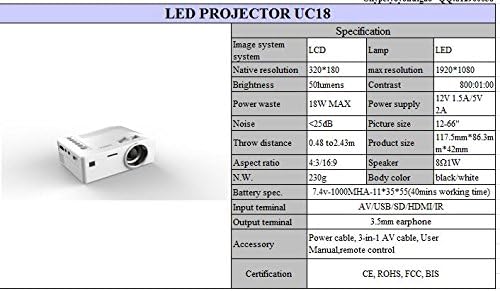
Detailed technical specifications for the UNIC UC18 Mini Projector, including resolution, contrast, and dimensions.
| 特徴 | 仕様 |
|---|---|
| ブランド | ユニック |
| モデル名 | UC18 |
| ディスプレイ技術 | QVGA (LCD) |
| ネイティブ解像度 | 320 x 240 ピクセル |
| 最大サポート解像度 | 1920×1080ピクセル(1080P) |
| 輝度 | 50ルーメン |
| コントラスト比 | 500:1 |
| アスペクト比 | 16:9(4:3もサポート) |
| 投射距離 | 0.48m~2.43m(1.57フィート~7.97フィート) |
| 画像サイズ | 12~66インチ |
| 入力端子 | AV, USB, SD (TF), HDMI, IR |
| 出力端子 | 3.5mmイヤホンジャック |
| 特集 | 内蔵スピーカー、ポータブル |
| 消費電力 | 24ワット(最大18W) |
| 電源 | 12V 1.5A / 5V 2A |
| 騒音レベル | <25dB |
| 製品寸法(長さ x 幅 x 高さ) | 117.5mm x 86.3mm x 42mm |
| 正味重量 | 230グラム |
| 取り付けタイプ | 壁掛け |
| リモートコントロール | Yes (battery not included) |
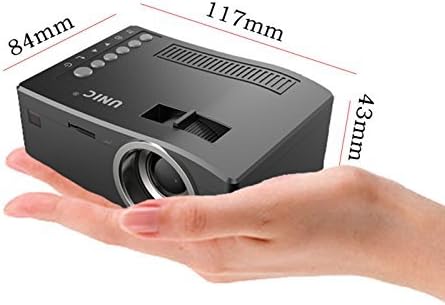
The UNIC UC18 Mini Projector held in a hand, illustrating its compact size and dimensions (117mm x 84mm x 43mm).
10. 保証とサポート
保証情報やテクニカルサポートについては、ご購入時に付属のマニュアルをご参照いただくか、販売店にお問い合わせください。保証請求の際に必要となるため、購入証明書は保管してください。