
UNIC UC30 (IDSP-004)
UNIC UC30 LEDミニプロジェクター ユーザーマニュアル
Model: UC30 (IDSP-004)
1. はじめに
The UNIC UC30 LED Mini Projector is a compact and versatile multimedia device designed for home theater projection. It supports a wide range of input sources and file formats, making it suitable for various entertainment and presentation needs.
主な機能は次のとおりです。
- Multiple Input Interfaces: AV, VGA, HDMI, USB, SD, and TV input.
- 広範囲にわたる File Format Support: Compatible with various video, audio, image, and e-book formats.
- Keystone Correction: Adjusts image distortion for optimal viewing。
- Integrated Speaker: Built-in 2.0W *2 stereo speakers for audio output.
- Flexible Projection: Supports front and rear projection models.

図1: 前面 view of the UNIC UC30 LED Mini Projector, showcasinコンパクトなデザインとレンズが魅力です。
2. セットアップ
2.1開梱と配置
Carefully remove the projector and all accessories from the packaging. Place the projector on a stable, flat surface. Ensure adequate ventilation around the unit to prevent overheating.
2.2電源接続
- 電源アダプタをプロジェクターの電源入力ポートに接続します。
- 電源アダプターを適切なコンセントに差し込みます。
2.3 入力デバイスの接続
The UC30 projector offers multiple input options. Connect your desired source device (e.g., laptop, DVD player, game console, USB drive) to the corresponding port on the projector.

図2:背面 view of the white UNIC UC30 projector, showing various input ports including AV, VGA, HDMI, and USB.
- HDMI: 高解像度のデジタルビデオとオーディオ用。
- VGA: コンピューターまたはラップトップを接続します。
- AV: For standard definition video and stereo audio (using the included 3-in-1 AV cable).
- USB: メディアを再生する場合 fileUSB フラッシュドライブから直接。
- SDカード: メディアを再生する場合 fileSD メモリ カードから直接保存できます。
- テレビ: For connecting to a TV signal source (if applicable to your region/model).
2.4 フォーカスとキーストーン補正
After powering on the projector, adjust the focus ring around the lens until the projected image is clear. Use the keystone correction feature (usually a dial or button on the projector) to correct any trapezoidal distortion in the image, ensuring a rectangular projection.
3. 操作手順
3.1 電源オン/オフ
プロジェクター本体またはリモコンの電源ボタンを押して、電源のオン/オフを切り替えます。プロジェクターが温まるまで、または冷めるまで数秒お待ちください。
3.2 入力ソースの選択
Use the "Source" button on the projector or remote control to cycle through the available input options (HDMI, VGA, AV, USB, SD, TV) until your desired source is displayed.
3.3 メディア再生(USB/SD)
When a USB drive or SD card is inserted, the projector's media player interface will typically appear. Navigate through the menus using the directional buttons on the projector or remote to select and play your desired files.
- サポートされているビデオ形式: AVI, MOV, VOB, DAT, MPEG, MPG, RM, RMVB (encoding: MPEG1/MPEG2/MPEG4/DivX/Xvid).
- サポートされているオーディオ形式: MP3、WMA、WAV。
- サポートされている画像形式: JPEG, BMP, GIF, PNG.
- サポートされている電子書籍形式: TXT。

Figure 3: The UNIC UC30 projector displaying a video of a man in a soccer jersey, demonstrating its video playback capability.
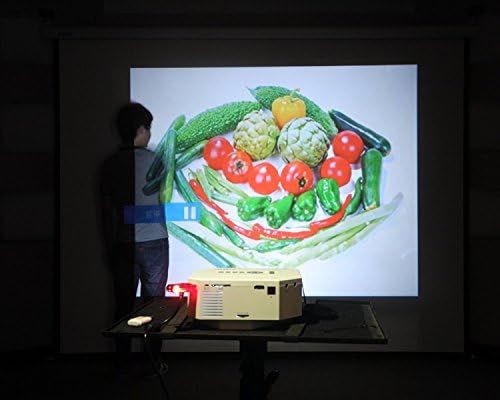
Figure 4: The UNIC UC30 projector displaying a vibrant image of vegetables, showcasing its image display quality.
3.4オーディオ出力
The projector has built-in stereo speakers. For private listening or connecting to external audio systems, use the stereo earphone output terminal.
3.5 Projection Model
The projector supports both front and rear projection. This setting can typically be adjusted in the projector's menu to suit your setup (e.g., projecting from behind a translucent screen).
4. メンテナンス
4.1 レンズのクリーニング
光学レンズ専用の柔らかく糸くずの出ない布を使用して、プロジェクターレンズを優しく拭いてください。研磨剤入りのクリーナーを使用したり、無理な力で拭いたりするとレンズに傷がつく可能性があるため、使用は避けてください。
4.2 プロジェクター本体のクリーニング
プロジェクターの外側は、柔らかく乾いた布で拭いてください。頑固な汚れには、軽く湿らせた布で拭いてください。amp cloth can be used, but ensure no liquid enters the ventilation openings.
4.3換気
Ensure the projector's ventilation ports are clear of dust and obstructions. Proper airflow is crucial for maintaining optimal operating temperature and extending the lifespan of the LED lamp.
5。 トラブルシューティング
5.1 画像が表示されない、または「信号なし」のメッセージが表示される
- Check if the projector is powered on and the power indicator light is active.
- Verify that the input cable (HDMI, VGA, AV) is securely connected to both the projector and the source device.
- Ensure the correct input source is selected on the projector (use the "Source" button).
- If using a computer, ensure its display output is enabled (e.g., press Fn + F8 or similar key combination).
5.2 ぼやけた画像
- 画像が鮮明になるまでプロジェクター レンズの周囲のフォーカス リングを調整します。
- 投影距離が推奨範囲(1 ~ 3.5 メートル)内であることを確認します。
- プロジェクターのレンズが汚れている場合は、清掃してください。
5.3 音が出ない
- プロジェクターとソースデバイスの両方の音量レベルを確認します。
- HDMI を使用する場合は、ソース デバイスが HDMI 経由でオーディオを送信していることを確認します。
- If using AV, ensure the red and white audio cables are correctly connected.
- 外部スピーカーが接続されている場合は、電源がオンになっていて正しく機能していることを確認してください。
5.4 Image Distortion (Trapezoid Shape)
- Adjust the keystone correction feature on the projector to square the image.
- Ensure the projector is placed on a level surface and is as perpendicular to the screen as possible.
6. 仕様
Below are the detailed technical specifications for the UNIC UC30 LED Mini Projector:
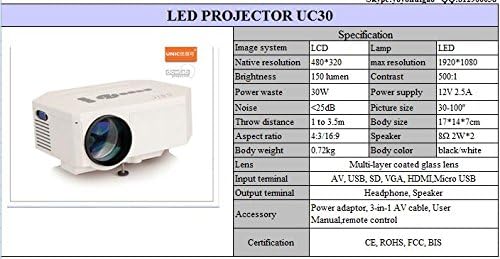
Figure 5: Official specification table for the UNIC UC30 LED Mini Projector, detailing its technical characteristics.
| 特徴 | 詳細 |
|---|---|
| 画像システム | 液晶 |
| ネイティブ解像度 | 480 x 320 ピクセル |
| 最大解像度のサポート | 1920 x 1080 (フルHD) |
| 輝度 | 150 LUX (150 lumen) |
| コントラスト比 | 500:1 |
| 消費電力 | 30W |
| 電源 | 12V 2.5A |
| 騒音レベル | <25dB |
| 投射距離 | 1~3.5メートル |
| 画像サイズ | 30~120インチ |
| アスペクト比 | 4:3 / 16:9 |
| 体重 | 0.72キロ |
| ボディサイズ | 17 x 14 x 7 cm |
| スピーカー | 2.0W *2 Stereo |
| レンズ | Multi-layer coated glass lens |
| 入力端子 | AV, USB, SD, VGA, HDMI, Micro USB |
| 出力端子 | Stereo Earphone, Speaker |
| 付属アクセサリ | Power adapter, 3-in-1 AV cable, User Manual, Remote control |
| 認定資格 | CE, ROHS, FCC, BIS |
7. 保証とサポート
For information regarding warranty coverage, technical support, or service, please refer to the warranty card included with your product or contact the retailer or manufacturer directly. Keep your purchase receipt as proof of purchase.
Ask a question about this manual
Ask about setup, troubleshooting, compatibility, parts, safety, or missing instructions. Manuals+ will review the question and use this page’s manual context to help answer it.