
導入
Thank you for choosing the Divoom Onbeat 500 Portable Wireless Bluetooth Speaker. This device is designed to deliver powerful sound with convenient wireless connectivity. This manual will guide you through the setup, operation, and maintenance of your speaker to ensure optimal performance and longevity.
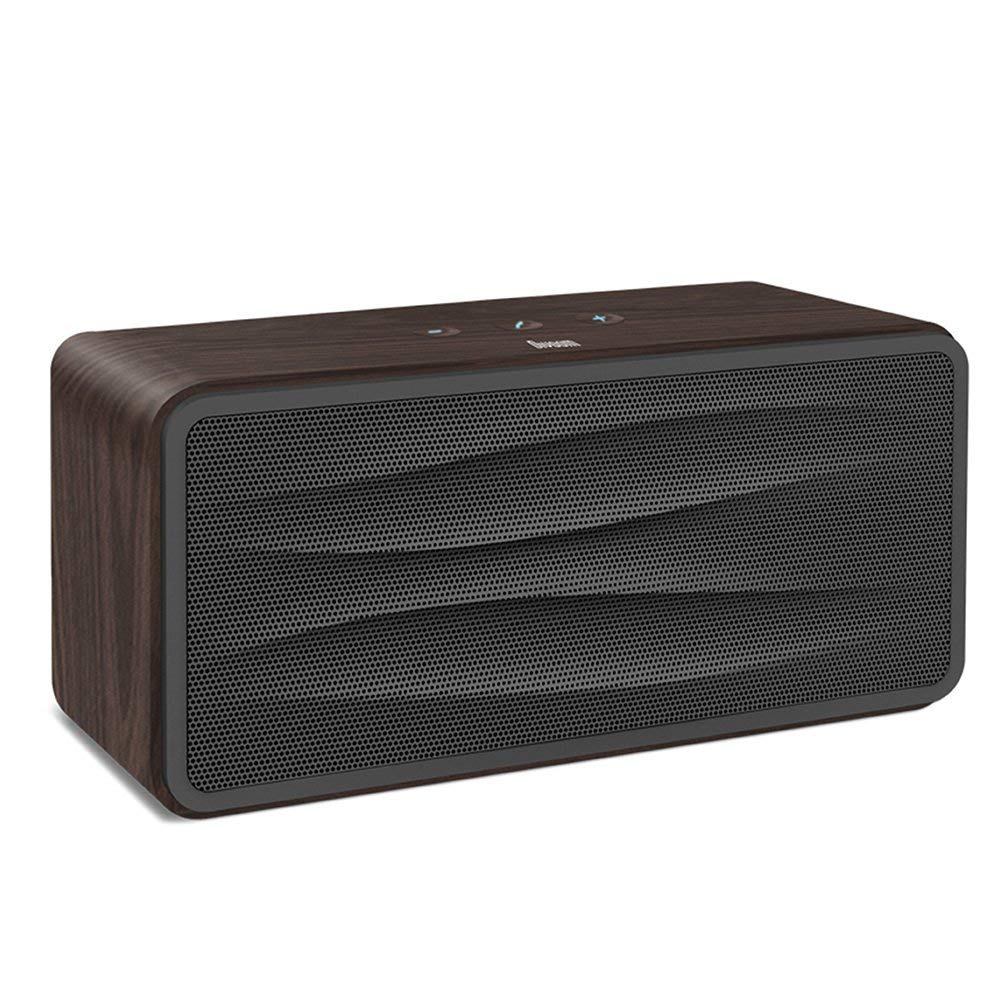
図1: フロント view of the Divoom Onbeat 500 speaker. This image displays the speaker's main grille and overall design.
パッケージ内容
パッケージに以下の項目が含まれているか確認してください。
- Divoom Onbeat 500 Speaker
- マイクロUSB充電ケーブル
- 補助ケーブル
- ユーザーマニュアル(このドキュメント)
- 保証書
製品の特徴
The Divoom Onbeat 500 speaker offers a range of features for an enhanced audio experience:
- パワフルなサウンド: 2.1 channel design with a proprietary passive bass radiator for rich audio.
- NFCテクノロジー: Tap-to-pair functionality for quick and easy Bluetooth connection.
- Bluetooth接続: Wirelessly play and control music from up to 33 feet (10 meters) away.
- 内蔵スピーカーフォン: Allows you to make and take calls directly from the speaker.
- 長持ちバッテリー: Integrated 5000mAh battery provides extended playback time.
- 補助入力: Bluetooth 非対応デバイスへの有線接続用。
設定
1.スピーカーの充電
Before initial use, fully charge your Divoom Onbeat 500 speaker. Use the provided Micro USB charging cable to connect the speaker to a USB power source (e.g., computer USB port, USB wall adapter). The charging indicator light will illuminate during charging and turn off or change color when fully charged. A full charge typically provides 8-10 hours of playback.
2.電源のオン/オフ
- 電源を入れるには: 音声プロンプトが聞こえるか、インジケーター ライトが点灯するまで、電源ボタンを数秒間押し続けます。
- 電源を切るには: スピーカーの電源が切れるまで、もう一度電源ボタンを数秒間押し続けます。
3.Bluetoothペアリング
The Onbeat 500 offers two methods for wireless connection:
NFC (Near Field Communication) Pairing:
If your device supports NFC, you can pair quickly:
- スマートフォンまたはタブレットで NFC が有効になっていることを確認してください。
- With the Onbeat 500 powered on, gently tap your NFC-enabled device against the NFC area on the speaker.
- Confirm the pairing request on your device. The speaker will indicate a successful connection.
標準 Bluetooth ペアリング:
For devices without NFC or for manual pairing:
- Power on the Divoom Onbeat 500 speaker. It will automatically enter Bluetooth pairing mode if no device is connected, or you may need to press a dedicated Bluetooth button (refer to speaker controls).
- On your audio device (smartphone, tablet, computer), go to the Bluetooth settings and enable Bluetooth.
- 検索する available devices. You should see "Divoom Onbeat 500" in the list.
- Select "Divoom Onbeat 500" to connect. The speaker will confirm the connection with an audible prompt.
4. AUX接続
To connect a device using the auxiliary cable:
- Connect one end of the provided auxiliary cable to the AUX-in port on the Divoom Onbeat 500.
- Connect the other end of the auxiliary cable to the headphone jack or audio output of your device.
- The speaker will automatically switch to AUX mode, or you may need to select it manually (refer to speaker controls).

図2: 側 view of the Divoom Onbeat 500, illustrating the location of the charging port, AUX input, and control buttons.
スピーカーを操作する
1.音楽の再生
Once connected via Bluetooth or AUX, you can control music playback from your connected device. The speaker may also have integrated controls for volume adjustment, play/pause, and track skipping. Refer to the speaker's physical buttons for these functions.
2. スピーカーフォン機能
When connected to a smartphone via Bluetooth, the Divoom Onbeat 500 can be used as a speakerphone:
- 電話に出る: Press the Call button (often indicated by a phone icon) on the speaker.
- 通話を終了する: もう一度通話ボタンを押してください。
- 通話の拒否: 通話ボタンを長押しします。

図3: 後方 view of the Divoom Onbeat 500, highlighting the passive bass radiator for enhanced low-frequency sound.
メンテナンス
1. 清掃
スピーカーの外観と機能を維持するには:
- 柔らかく、乾いた、糸くずの出ない布で外側を拭いてください。
- 研磨剤入りの洗剤、アルコール、ベンゼン、その他の化学溶剤は仕上げを傷める恐れがあるので使用しないでください。
- 開口部に湿気が入らないようにしてください。
2. バッテリーのお手入れ
内蔵リチウムイオン電池の寿命を延ばすには:
- バッテリーを頻繁に完全に放電することは避けてください。
- 長期間使用しない場合は、スピーカーを涼しく乾燥した場所に保管してください。
- Charge the speaker at least once every three months if stored for a long time to prevent deep discharge.
トラブルシューティング
If you encounter issues with your Divoom Onbeat 500, please refer to the following common solutions:
| 問題 | 考えられる解決策 |
|---|---|
| スピーカーの電源が入らない | Ensure the battery is charged. Connect the speaker to a power source using the Micro USB cable and try again. |
| スピーカーから音が出ない | Check the volume level on both the speaker and your connected device. Ensure the speaker is correctly paired via Bluetooth or connected via AUX. Try re-pairing the Bluetooth device. |
| Bluetoothペアリングが失敗する | Ensure the speaker is in pairing mode. Turn off and on Bluetooth on your device. Move your device closer to the speaker. Clear previous Bluetooth connections on your device and try again. |
| 音質が悪い | Ensure the speaker and connected device are within range (for Bluetooth). Check for interference from other wireless devices. Try a different audio source or cable. |
仕様
Detailed technical specifications for the Divoom Onbeat 500 speaker:
- モデル名: Divoom Onbeat 500
- スピーカータイプ: コンピュータスピーカー
- 接続技術: ブルートゥース
- ワイヤレス通信技術: ブルートゥース
- 制御方法: 触る
- 電源: 電池駆動
- バッテリー: リチウムイオン電池 1 個 (5000mAh)
- オーディオワットtage: 20ワット
- スピーカーの最大出力: 100ワット
- サラウンド サウンド チャネル構成: 2.1
- 対応デバイス: Android, Windows, iPhone (iOS)
- コネクタタイプ: USB(充電用)
- 製品寸法: 22.5 x 7.49 x 10.49 cm(LxWxH)
- 商品の重量: 1.55キロ
- 色: 木炭
- 特別な機能: NFC, Built-in Speakerphone, Passive Bass Radiator
保証とサポート
Your Divoom Onbeat 500 speaker comes with a limited warranty. Please refer to the included Warranty Card for detailed terms and conditions, including warranty period and coverage.
For technical support, service inquiries, or further assistance, please visit the official Divoom website or contact their customer service department using the information provided on your Warranty Card or product packaging. Please have your model number (Onbeat 500) and purchase details ready when contacting support.