
1. はじめに
This manual provides essential instructions for the safe and efficient installation, operation, and maintenance of your COTEK SP-3000-148 High Frequency Pure Sine Wave Inverter. Please read this manual thoroughly before attempting any installation or operation to ensure proper use and to prevent potential hazards. Keep this manual for future reference.
2. 安全に関する注意事項
感電、火災、または怪我のリスクを軽減するために、常に次の安全上の注意事項を守ってください。
- すべての指示をお読みください: インバータを操作する前に、インバータ、バッテリー、およびこのマニュアルの該当するセクションに記載されているすべての指示と注意書きをお読みください。
- 有資格者: All electrical work should be performed by qualified personnel familiar with battery and inverter systems and their installation.
- 換気: インバータの周囲に十分な換気を確保してください。ゼロクリアランスコンパートメントには設置しないでください。
- 湿気を避ける: Do not expose the inverter to rain, snow, spray, or bilge water.
- Proper grounding: インバータは適切に接地する必要があります。
- バッテリーの安全性: Work in a well-ventilated area when working with batteries. Wear eye protection and protective clothing. Avoid touching eyes while working near batteries.
- 電源を切る: Before performing any maintenance or cleaning, disconnect all power to the inverter.

Image: Always use appropriate safety equipment when working with electrical systems.
3 製品の特徴
The COTEK SP-3000-148 inverter offers the following key features:
- 敏感な電子機器用の純粋な正弦波出力。
- Power ON / OFF remote control capability via green terminal.
- 安全性を高めるために入力と出力が完全に分離されています。
- Temperature & load controlled cooling fan for optimal performance and longevity.
- User-friendly interface for ease of operation.
- Type 1 Indoor Aluminum Enclosure for durability and protection.
4.製品オーバーview
The COTEK SP-3000-148 is a high-frequency pure sine wave inverter designed to convert 48VDC battery power into stable 120VAC electricity, suitable for a wide range of applications.

画像: 全体 view of the COTEK SP-3000-148 Pure Sine Wave Inverter.
4.1 背面パネル
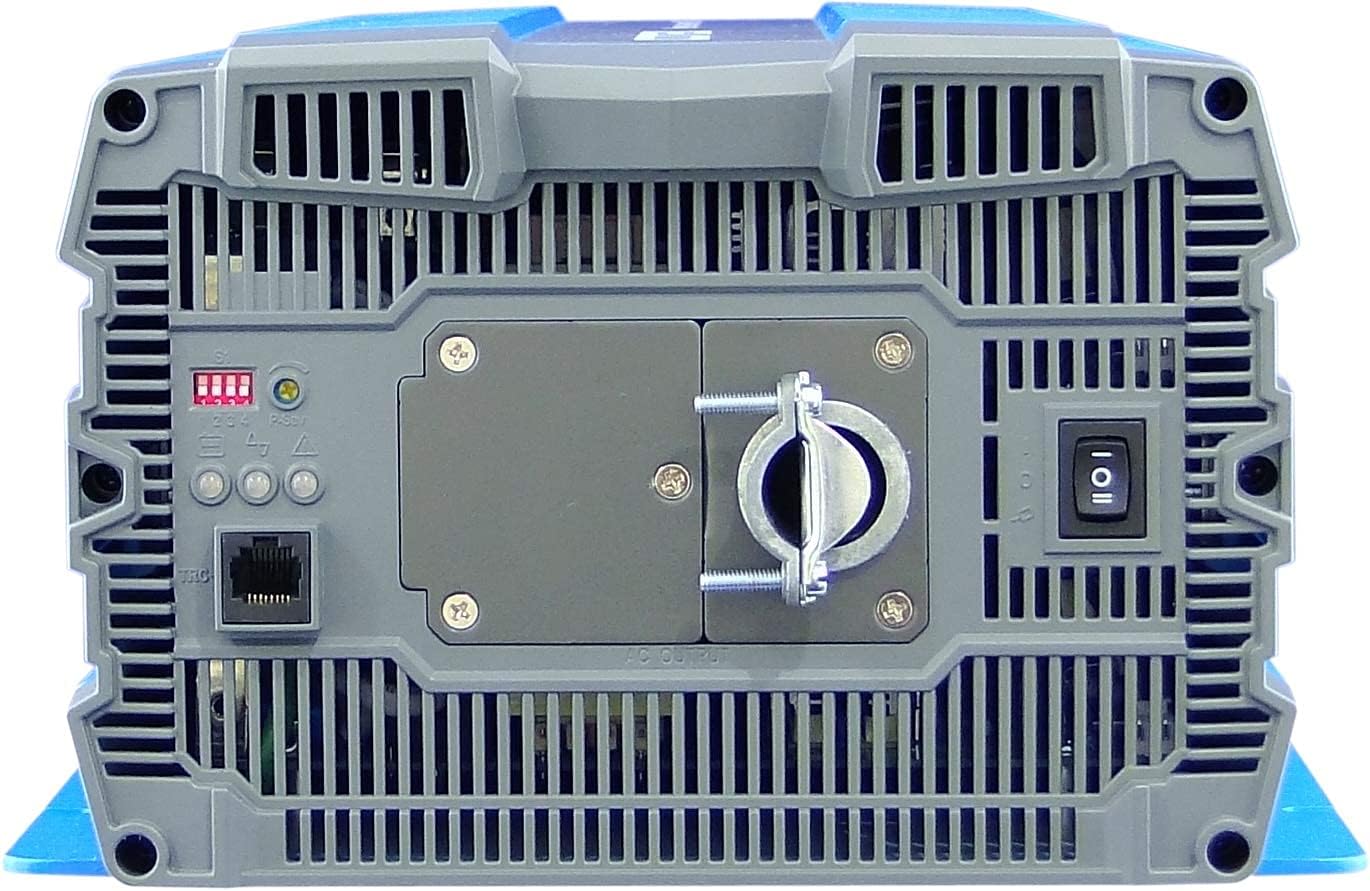
Image: Rear panel of the COTEK SP-3000-148 inverter.
- AC出力端子: Hardwire connection for 120VAC output.
- DIPスイッチ: Used for configuring output voltage と周波数。
- Remote Control Port (Green Terminal): オプションのリモートON/OFFスイッチを接続します。
- 電源スイッチ: インバータのメインオン/オフスイッチ。
- LEDインジケーター: Display operational status and fault conditions.
4.2フロントパネル
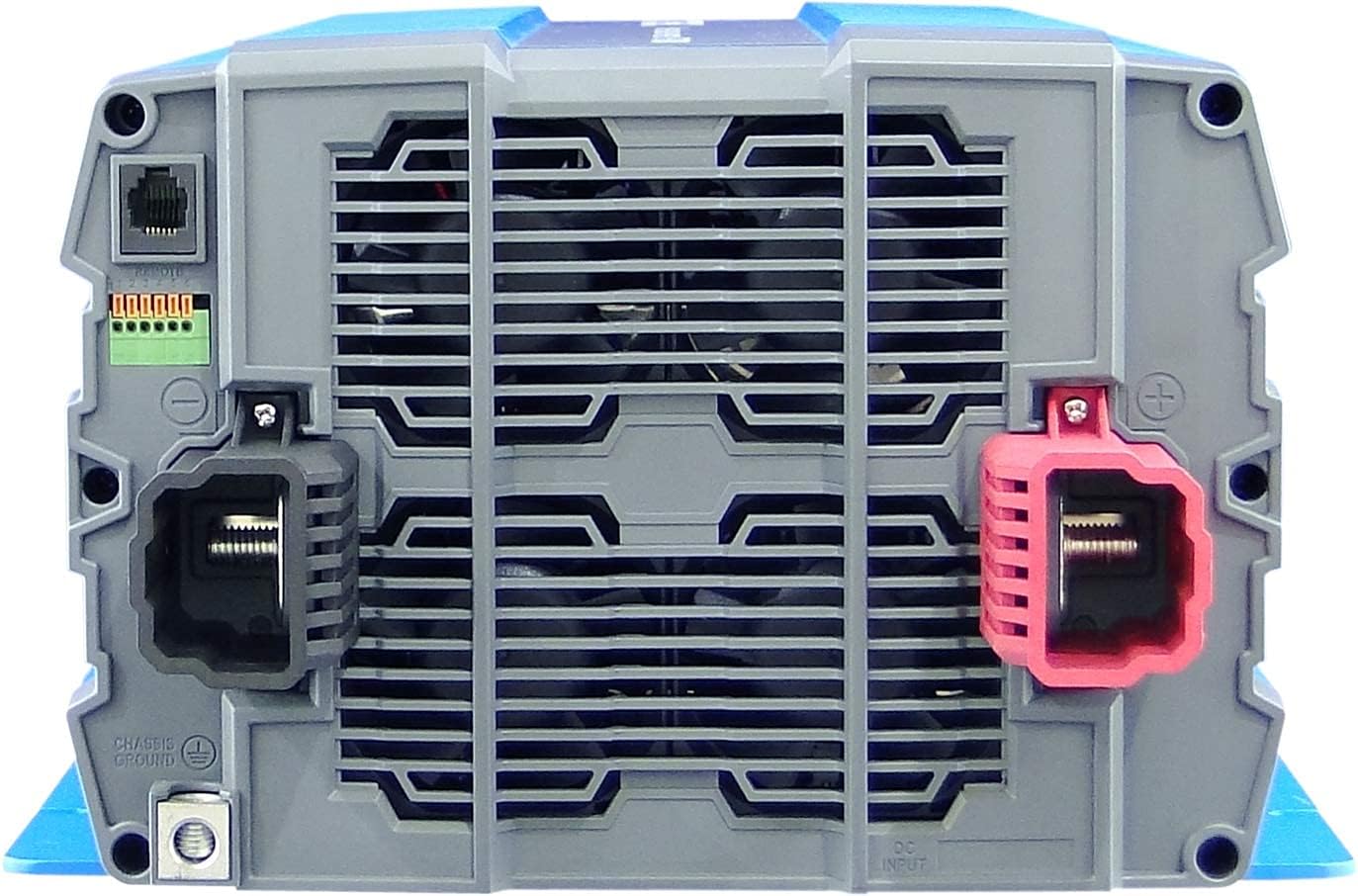
Image: Front panel of the COTEK SP-3000-148 inverter.
- DC入力端子: 48VDC バッテリー接続用の正極 (+) および負極 (-) 端子。
- Chassis Ground Terminal: For connecting the inverter to earth ground.
5. インストール
インバーターを安全かつ効率的に動作させるには、適切な設置が不可欠です。
5.1 取り付け
- 位置: Choose a dry, well-ventilated area, away from direct sunlight, heat sources, and flammable materials.
- オリエンテーション: Mount the inverter horizontally on a flat, stable surface. Ensure adequate clearance around the unit for proper airflow.
- 安全な取り付け: Use appropriate fasteners to securely mount the inverter to prevent movement or vibration.

Image: Mechanical drawings with dimensions for mounting the SP-3000 series inverter.
5.2配線
すべての配線は地域および国の電気規格に準拠する必要があります。
5.2.1 DC Input Connection (48VDC)
- Connect the positive (+) terminal of the inverter to the positive terminal of your 48VDC battery bank.
- Connect the negative (-) terminal of the inverter to the negative terminal of your 48VDC battery bank.
- Use appropriately sized cables and fuses/breakers for the DC input circuit to prevent overcurrent.
5.2.2 AC Output Connection (120VAC Hardwire)
- Connect your AC loads to the hardwire AC output terminal block on the rear panel.
- Ensure proper polarity (Line, Neutral, Ground) for all AC connections.
- Consult a qualified electrician for hardwiring AC circuits.
5.2.3 接地
- Connect the chassis ground terminal on the inverter's front panel to a reliable earth ground.
- This connection is essential for safety and to minimize electrical noise.
5.2.4 リモートコントロール接続
- Connect an optional remote ON/OFF switch to the green terminal block on the rear panel.
- Refer to the remote control's specific instructions for wiring details.
6. 操作
6.1 電源のオン/オフ
- 電源を入れるには: Ensure all connections are secure. Flip the main power switch on the rear panel to the 'ON' position. The LED indicators will illuminate to show operational status.
- 電源を切るには: Flip the main power switch to the 'OFF' position. If using a remote switch, ensure it is also in the 'OFF' position.
6.2 DIPスイッチの設定
The DIP switches on the rear panel allow configuration of the inverter's output voltage and frequency. Refer to the diagram below for specific settings. Always power off the inverter before changing DIP switch settings.

Image: COTEK SP-3000 series specifications and DIP switch settings.
6.2.1出力Voltage 選択
The inverter supports various output voltages (100V, 110V, 115V, 120V AC). Adjust DIP switches according to the desired output voltage as indicated in the specifications diagram.
6.2.2 出力周波数の選択
The inverter can operate at 50Hz or 60Hz. Set the DIP switches to match the required frequency for your region or application.
6.2.3 省電力モード
The inverter features a power saving mode (High Efficiency). Refer to the diagram for enabling or disabling this feature via DIP switches.
6.3 LEDインジケーター
The inverter is equipped with LED indicators to display its operational status and alert you to potential issues. Consult the specifications diagram for a detailed explanation of each LED's meaning.
7. メンテナンス
定期的なメンテナンスにより、インバーターの寿命が長くなり、信頼性の高い動作が保証されます。
- クリーニング: インバーターの外装は定期的に乾いた布で拭いてください。通気口に埃やゴミが詰まっていないことを確認してください。液体洗剤は使用しないでください。
- 接続: Regularly check all DC and AC connections for tightness. Loose connections can cause overheating and poor performance.
- バッテリーの検査: Inspect your battery bank regularly for corrosion, damage, or signs of leakage.
8。 トラブルシューティング
The SP-3000-148 inverter includes several protection features. If the inverter stops operating or indicates a fault, refer to the table below for common issues and solutions.
| 問題 | 考えられる原因 | 解決 |
|---|---|---|
| AC出力なし/インバーターオフ | Main switch off, low battery voltage, overload, internal fuse. | Check power switch, charge batteries, reduce load, check DC input fuse. |
| 入力アンダーボリュームtageアラーム | バッテリーvoltag低すぎます。 | バッテリーを充電または交換します。 |
| 入力過容量tageアラーム | バッテリーvoltag高すぎます。 | Check charging system, ensure correct battery voltage. |
| 出力オーバーロード | 接続された負荷がインバータの容量を超えています。 | インバータに接続されている負荷の合計を減らします。 |
| 過熱 | 換気不良または過負荷によりインバータが過熱します。 | Ensure adequate ventilation, reduce load, allow inverter to cool. |
| 短絡 | Short circuit detected on AC output. | Identify and clear the short circuit on the AC output wiring or load. |
9. 仕様
The following table details the technical specifications for the COTEK SP-3000-148 Pure Sine Wave Inverter:
| 特徴 | 仕様 |
|---|---|
| モデル | SP-3000-148 |
| ACVol。tage | 120VAC (Selectable via DIP switch) |
| AC規制 | ±5% |
| 定格出力 | 3000W |
| Surge Power (1 Sec) | 6000W |
| 最大出力電力 (1 分) | 3450W |
| 出力波形 | Pure Sine Wave (THD<3% at nominal load) |
| 頻度 | 60Hz (Selectable via DIP switch) |
| DCVol。tage | 48VDC |
| 巻tage範囲 | 42.0〜66.0VDC |
| 無負荷電流 | <1.0A @48VDC |
| 省電力モード | <0.4A @48VDC |
| 効率(最大) | 92% |
| 入力アンダーボリュームtag保護 | 42.0±0.5VDC |
| 入力アンダーボリュームtageアラーム | 44.0±0.5VDC |
| 入力アンダーボリュームtage回復 | 50.0±0.5VDC |
| 入力過容量tag保護 | 66.0±1.0VDC |
| 入力過容量tage回復 | 64.0±1.0VDC |
| 出力オーバーロード | Shutdown output, restart to recover. |
| 出力ショート | Shutdown output, restart to recover. |
| 過熱 | Shutdown output, auto-recovery after cooling. |
| DC 入力逆極性 | ヒューズによって |
| 動作温度。 | -20°C ~ +40°C |
| 保管温度&湿度 | -30°C ~ +70°C, 10 ~ 95% RH |
| 寸法(幅×高さ×奥行き) | 442 x 239 x 102.5 mm (17.4 x 9.4 x 4.0 インチ) |
| 重さ | 8.2kg(18.08ポンド) |
| 保証 | 2年メーカー |
10. 保証情報
The COTEK SP-3000-148 Pure Sine Wave Inverter comes with a 2年間のメーカー保証. This warranty covers defects in materials and workmanship under normal use. Please retain your proof of purchase for warranty claims. For detailed warranty terms and conditions, refer to the official COTEK warranty statement or contact customer support.
11. カスタマーサポート
If you encounter any issues not covered in this manual or require technical assistance, please contact COTEK customer support. Have your product model number (SP-3000-148) and purchase information ready when contacting support.


