
1. はじめに
The Rain Bird XC-801I-E is an advanced indoor electric irrigation programmer designed for efficient residential watering systems. This unit provides simple, reliable control for up to 8 irrigation stations. It features three independent programs, each capable of four daily start times, offering flexible scheduling options. The XC-801I-E is engineered for compatibility with the intelligent Solar Sync sensor, allowing for automatic adjustments to irrigation schedules based on local climate conditions, thereby optimizing water usage. Additionally, it supports connection with other sensors for enhanced control. This manual provides essential information for the installation, operation, and maintenance of your irrigation programmer.
2. 安全情報
Please read all safety instructions before installing or operating the Rain Bird XC-801I-E irrigation programmer. Failure to follow these instructions may result in electric shock, fire, or damage to the product.
- 電気安全: This device operates on 24 Volts. Ensure the power supply is disconnected before performing any wiring or maintenance. Only use the provided external transformer. Do not expose the unit to water or extreme moisture.
- インストール: Install the programmer indoors, away from direct sunlight, rain, or excessive humidity. Ensure proper ventilation around the unit.
- 子供たち: デバイスを子供の手の届かない場所に保管してください。
- メンテナンス: Refer to the maintenance section for cleaning and care instructions. Do not attempt to repair the unit yourself; contact qualified service personnel.
3. パッケージ内容
パッケージにすべてのコンポーネントが含まれていることを確認します。
- Rain Bird XC-801I-E Indoor Irrigation Programmer
- External Transformer (Power Supply)
- ユーザーマニュアル(このドキュメント)
- 取り付け金具(ネジ、アンカー)
4. セットアップとインストール
Follow these steps for proper installation of your irrigation programmer.
4.1コントローラーの取り付け
- Choose an indoor location near a standard electrical outlet, protected from extreme temperatures and moisture.
- Use the provided mounting hardware to securely attach the controller to a wall. Ensure it is at a convenient height for programming and viewing。
4.2 バルブの配線
The XC-801I-E supports up to 8 irrigation zones and operates with 24V solenoid valves.
- 電源を切る: Ensure the external transformer is unplugged from the electrical outlet.
- Connect Common Wire: Connect one common wire from all your solenoid valves to the 'COMMON' terminal on the controller.
- Connect Zone Wires: Connect the individual control wire from each solenoid valve to its corresponding station terminal (e.g., Station 1, Station 2, etc.) on the controller.
4.3 センサー接続(オプション)
The controller allows for the installation of a sensor, such as the Rain Bird Solar Sync or other compatible sensors.
- Refer to your sensor's instruction manual for specific wiring details.
- Connect the sensor wires to the designated sensor terminals on the XC-801I-E controller.
4.4電源接続
- Plug the external transformer into a standard 230V AC electrical outlet.
- Connect the transformer's output cable to the power input port on the XC-801I-E controller.
- The controller display should illuminate, indicating power is supplied.
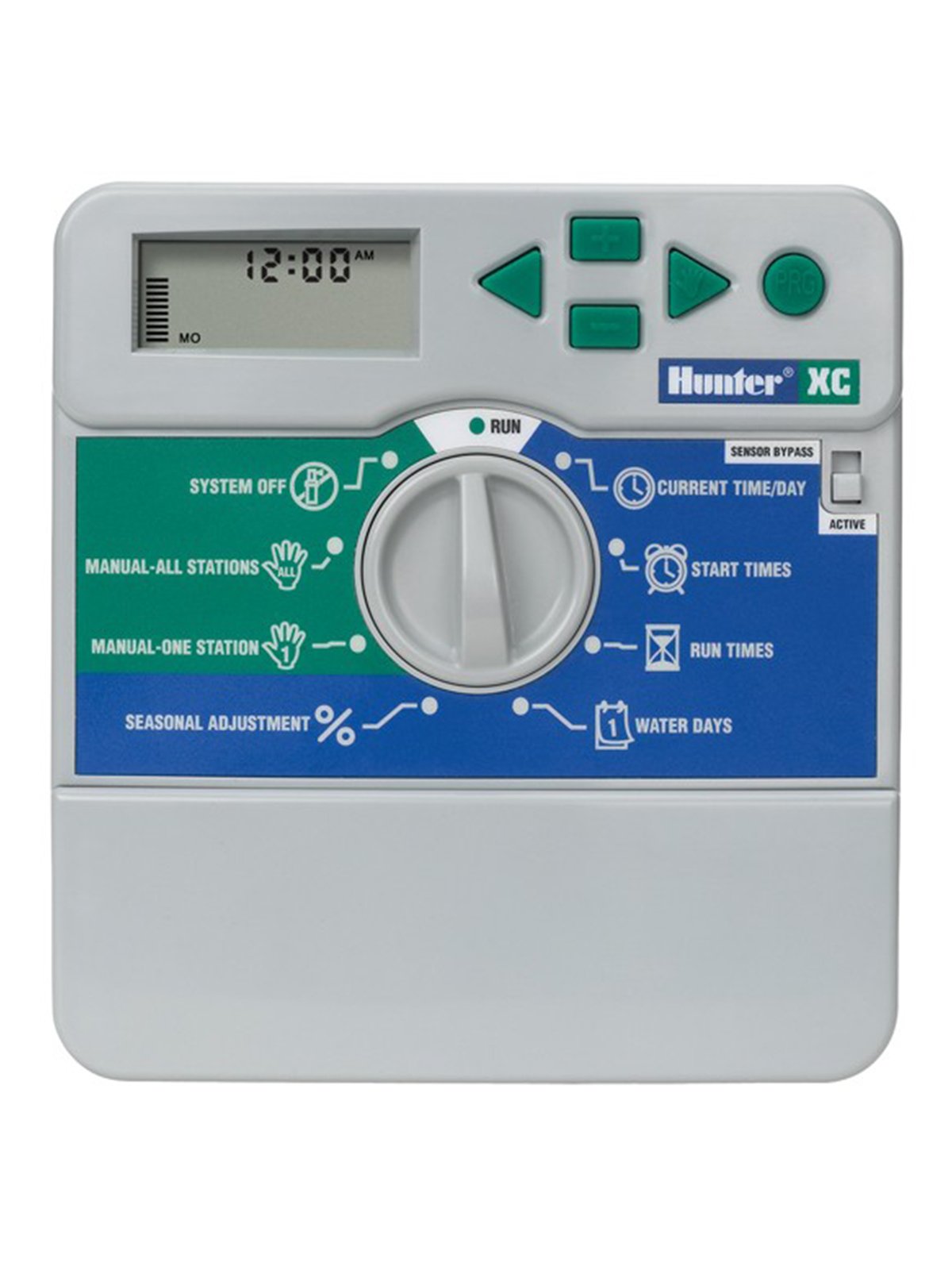
図1: フロント view of the Rain Bird XC-801I-E Indoor Electric Irrigation Programmer. This image shows the display, programming buttons, and the dial for mode selection.
5. 操作手順
The XC-801I-E features a user-friendly interface for programming your irrigation schedules.
5.1 現在の時刻と日付の設定
- Turn the dial to the 'SET TIME/DATE' position.
- Use the arrow buttons to adjust the current time and date.
- Press the 'NEXT' button to move between settings (hour, minute, day, month, year).
5.2 灌漑スケジュールのプログラミング
The controller offers three independent programs (A, B, C) and four start times per program.
- プログラムを選択してください: Turn the dial to 'PROGRAMS'. Use the 'PROGRAM' button to select Program A, B, or C.
- 開始時間の設定: For the selected program, use the arrow buttons to set up to four start times. Each start time initiates the watering sequence for all zones assigned to that program.
- ゾーン実行時間を設定する: Turn the dial to 'RUN TIMES'. Select the desired program and then use the arrow buttons to set the watering duration for each individual station (zone).
- 水やり日を設定する: Turn the dial to 'WATER DAYS'. Select the desired program and then choose the specific days of the week for irrigation, or select an interval schedule (e.g., every 2 days).
5.3手動操作
To manually operate a single station or all stations:
- Single Station: Turn the dial to 'MANUAL SINGLE STATION'. Use the arrow buttons to select the station and set its run time. Press 'START'.
- 全駅: Turn the dial to 'MANUAL ALL STATIONS'. Set the run time for each station sequentially. Press 'START'.
5.4 System Off / Rain Delay
To temporarily suspend irrigation:
- システムオフ: Turn the dial to 'SYSTEM OFF' to halt all automatic irrigation.
- 雨による遅れ: Turn the dial to 'RAIN DELAY'. Use the arrow buttons to set the number of days for the delay. Irrigation will resume automatically after the set period.
6. メンテナンス
Regular maintenance ensures the longevity and optimal performance of your irrigation programmer.
- クリーニング: Wipe the controller's exterior with a soft, damp 布で拭いてください。研磨剤や溶剤は使用しないでください。
- 接続: すべての配線接続が安全で腐食がないことを定期的に確認してください。
- 冬季: In regions with freezing temperatures, it is recommended to disconnect the controller and store it indoors during winter months to prevent damage. Drain all water from the irrigation system.
- バッテリー(該当する場合): If your model includes a backup battery for settings retention during power outages, check and replace it as recommended by the manufacturer (typically every 1-2 years).
7。 トラブルシューティング
If you encounter issues with your Rain Bird XC-801I-E, refer to the following common problems and solutions:
| 問題 | 考えられる原因 | 解決 |
|---|---|---|
| コントローラーのディスプレイが空白です | No power; faulty transformer; internal fuse (if applicable) | Check power outlet; ensure transformer is securely connected; test transformer output; consult a technician if fuse is suspected. |
| Zones not watering | Rain delay active; system off; faulty wiring; valve issues; low water pressure | Check rain delay/system off settings; inspect wiring connections; manually test valves; check water supply. |
| Incorrect watering times | Incorrect programming; sensor interference | Review program start times, run times, and water days; check sensor operation and settings. |
| エラーメッセージ表示 | Wiring fault; sensor fault; internal error | Note the error code and refer to the full product manual or contact support. Check wiring for shorts. |
これらの解決策を試しても問題が解決しない場合は、カスタマー サポートにお問い合わせください。
8. 仕様
| 特徴 | 仕様 |
|---|---|
| モデル | XC-801I-E |
| ブランド | ハンター |
| メーカー | レインバード |
| ゾーン数 | 8 |
| プログラム | 3 (A、B、C) |
| プログラムごとの開始時間 | 4 |
| 営業巻tage | 24ボルトAC |
| 材料 | プラスチック |
| 色 | グレー |
| アイテム重量 | 1.57キログラム |
| 動作温度 | 摂氏20度 |
| スマートホームの互換性 | Compatible with smart home systems (via sensor integration) |
9. 保証とサポート
For warranty information, technical support, or service inquiries, please contact your authorized dealer or the manufacturer directly. Keep your purchase receipt as proof of purchase.
メーカー: レインバード
ブランド: ハンター
For further assistance, visit the official Rain Bird webサイトをご覧いただくか、お近くの販売店にお問い合わせください。