
PRO 12 Pro12 (Model CT9223W97 DK)
PRO 12 Pro12 (Model CT9223W97 DK) User Manual
2-in-1 Touchscreen Tablet PC Featuring Android 6.0 (Marshmallow)
1. はじめに
This user manual provides comprehensive instructions for the operation, maintenance, and troubleshooting of your PRO 12 Pro12 2-in-1 Touchscreen Tablet PC. The Pro12 is designed to offer a versatile computing experience, combining the portability of a tablet with the functionality of a laptop through its detachable keyboard. Featuring a 12.2-inch Full HD IPS display and powered by Android 6.0 (Marshmallow), this device is equipped with a quad-core processor and 64GB of expandable flash storage. Please read this manual thoroughly to ensure proper use and to maximize the lifespan of your device.
2.製品オーバーview および機能
The PRO 12 Pro12 offers a range of features designed for productivity and entertainment:
- 画面: 12.2-inch Full HD IPS touchscreen with a resolution of 1920 x 1200 pixels.
- プロセッサ: 1.3 GHz Quad Core CPU for efficient performance.
- メモリとストレージ: 2GB RAM and 64GB internal flash storage, expandable via microSD card up to 128GB (card not included).
- オペレーティング·システム: Android 6.0 (Marshmallow).
- カメラ: Front-facing 2MP webcam and rear-facing 8MP webカム。
- 接続性: Wi-Fi, Bluetooth 4.0, USB 2.0 port, miniHDMI output, and 3.5mm headphone jack.
- キーボード: Full-width detachable keyboard with a proprietary Magnalink connection for secure docking and an enhanced typing experience.
- バッテリー寿命: 最大 8 時間のバッテリー寿命。
- 重さ: Approximately 2.78 lbs (tablet with keyboard).

Figure 2.1: Key features of the PRO 12 Pro12 Tablet PC.
3. コンポーネントとポート
Familiarize yourself with the physical components and connection ports of your Pro12 tablet.

Figure 3.1: PRO 12 Pro12 Tablet PC with Keyboard.

Figure 3.2: PRO 12 Pro12 Tablet (without keyboard).
3.1. ポートレイアウト
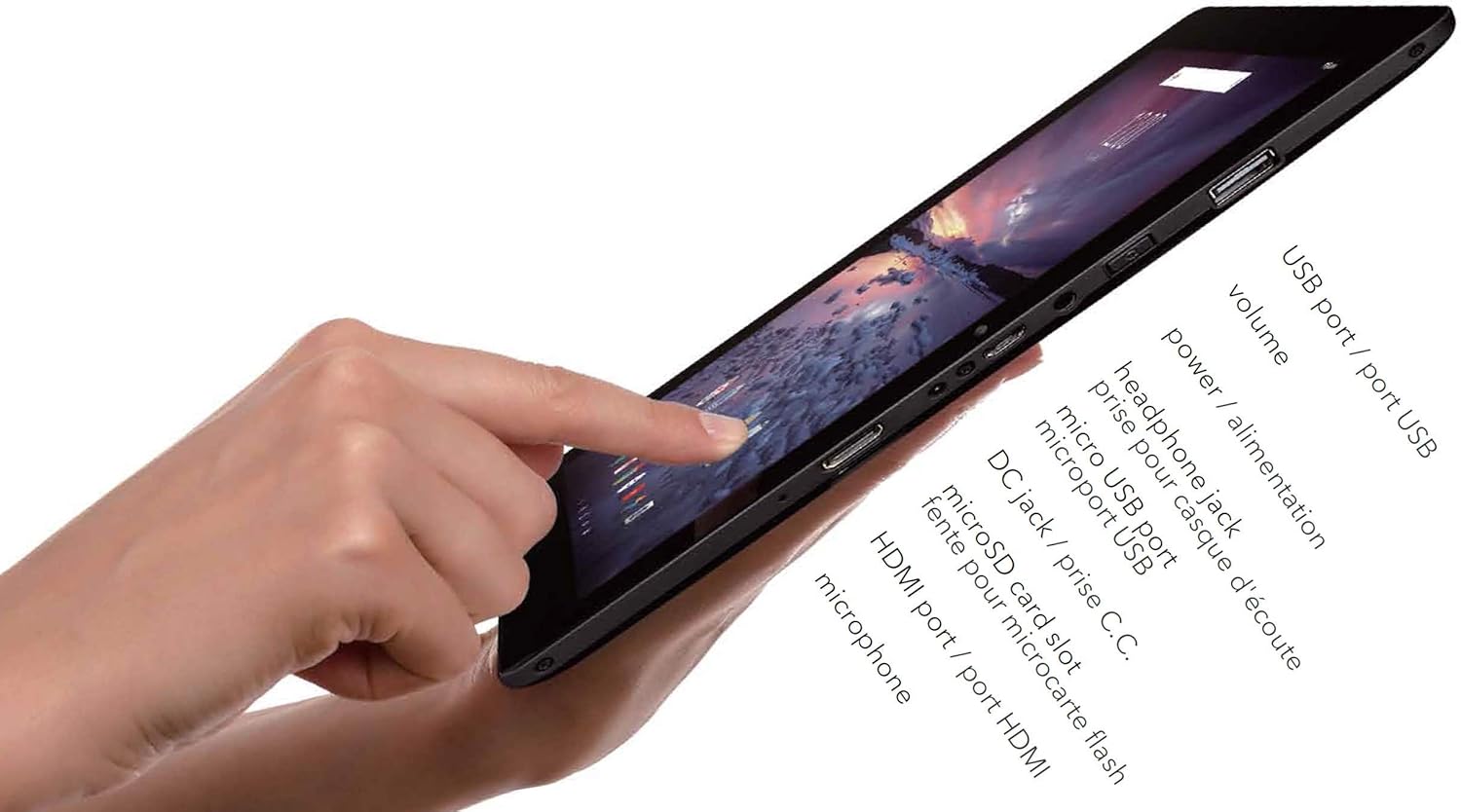
図3.3:側面 view of the Pro12 Tablet showing ports.
- USBポート(USB 2.0): 外部USBデバイスを接続します。
- 音量ボタン: オーディオ出力レベルを調整します。
- 電源ボタン: デバイスの電源をオン/オフにしたり、スリープ状態にしたり、起動したりします。
- ヘッドホンジャック(3.5mm): ヘッドホンや外部スピーカーを接続します。
- マイクロUSBポート: Alternative charging port and for data transfer.
- DC充電ポート: Primary charging port for faster charging.
- MicroSDカードスロット: ストレージ容量を拡張するため。
- MiniHDMI Out: 外部ディスプレイに接続します。
- マイクロフォン: 音声入力用。
4. セットアップ
4.1. 初期充電
Before first use, fully charge your Pro12 tablet. Connect the provided power adapter to the DC Charging Port on the tablet and plug it into a wall outlet. The charging indicator light will illuminate. A full charge may take several hours. You can also use the Micro USB port for charging, though it may be slower.
4.2. キーボードの取り付けと取り外し
The Pro12 features a proprietary Magnalink connection for its detachable keyboard.
- 添付: Align the tablet's bottom edge with the keyboard's docking connector. The magnetic connection will guide the tablet into place, securing it firmly.
- 取り外し: Gently pull the tablet upwards from the keyboard. Avoid excessive force to prevent damage to the connectors.

Figure 4.1: Pro12 Tablet with keyboard attached.
4.3.電源のオン/オフ
- 電源を入れるには: 画面が点灯するまで電源ボタンを押し続けます。
- 電源を切るには: Press and hold the Power Button until a power-off menu appears on the screen. Select "Power off" and confirm.
- スリープ/ウェイク: 電源ボタンを短く押すと、タブレットがスリープ状態になったり、起動したりします。
4.4. Androidの初期設定
Upon first power-on, you will be guided through the Android 6.0 (Marshmallow) setup wizard. Follow the on-screen prompts to:
- 言語を選択します。
- Wi-Fi ネットワークに接続します。
- Sign in with your Google Account or create a new one. This is essential for accessing the Google Play Store and other Google services.
- 画面ロックのオプション(PIN、パターン、パスワード)を設定します。
- Review 利用規約に同意します。
5. 操作手順
5.1. タッチスクリーンナビゲーション
The 12.2-inch touchscreen supports standard Android gestures:
- タップ: 項目を選択したり、アプリケーションを開いたりします。
- タップ&ホールド: コンテキスト メニューにアクセスしたり、アイコンを移動したりします。
- スワイプ: リストをスクロールしたり、ホーム画面を切り替えたりします。
- ピンチしてズーム: 画像を拡大または縮小するには web ページ。
5.2.Wi-Fiへの接続
ワイヤレスネットワークに接続するには:
- へ移動 設定 > Wi-Fi.
- Ensure Wi-Fi is turned On.
- リストから希望のネットワークを選択します。
- プロンプトが表示されたら、ネットワークパスワードを入力してタップします。 接続する.
5.3. カメラの使用
The Pro12 is equipped with a 2MP front camera and an 8MP rear camera. Open the Camera application to take photos or record videos. You can switch between front and rear cameras within the app interface.
5.4. ストレージ管理
Your tablet has 64GB of internal storage. To expand storage:
- Insert a microSD card (up to 128GB, not included) into the microSD card slot.
- The tablet will recognize the card, and you can use it for storing photos, videos, and other files.
- Manage storage by going to 設定 > ストレージとUSB.
5.5. 周辺機器の接続
- USB デバイス: Connect USB flash drives, external hard drives, or other USB peripherals to the full-size USB 2.0 port.
- Bluetoothデバイス: Pair Bluetooth headphones, speakers, or other accessories via 設定 > ブルートゥース.
- External Display (miniHDMI): Use a miniHDMI to HDMI cable (not included) to connect your tablet to a TV or monitor. The tablet screen content will be mirrored on the external display.
6. メンテナンス
6.1. 清掃
柔らかく糸くずの出ない布を使用して、タブレットの画面と本体を拭いてください。頑固な汚れには、軽く拭いてください。amp布に水またはスクリーンクリーナー液を含ませてください。刺激の強い化学薬品や研磨剤の使用は避けてください。
6.2. バッテリーのお手入れ
- バッテリーを頻繁に完全に放電することは避けてください。
- タブレットを極端な温度にさらさないでください。
- Use only the provided charger or a compatible micro USB charger.
6.3. ソフトウェアの更新
最適なパフォーマンスとセキュリティを確保するために、定期的にシステムアップデートを確認してください。 設定 > タブレットについて > システムアップデート.
7。 トラブルシューティング
This section addresses common issues you might encounter with your Pro12 tablet.
| 問題 | 考えられる原因 / 解決策 |
|---|---|
| タブレットの電源が入りません。 | Battery may be completely drained. Connect to charger and wait a few minutes before attempting to power on. |
| パフォーマンスが低下したり、アプリがフリーズしたりします。 | Too many applications running in the background. Close unused apps. Clear cache from 設定 > ストレージとUSBタブレットを再起動します。 |
| Wi-Fiに接続できません。 | Ensure Wi-Fi is enabled. Check Wi-Fi password. Restart your router. Move closer to the Wi-Fi router as the tablet's Wi-Fi antenna may have limited range. |
| バッテリーの消耗が早いです。 | Screen brightness too high. Too many apps running. Background sync enabled. Adjust settings to conserve battery. Note that charging time can be long, and battery life may vary with usage. |
| タッチスクリーンが反応しない、または不正確です。 | Clean the screen. Restart the tablet. If issues persist, a mouse can be connected via the USB port for navigation. |
| Keyboard not recognized. | Ensure the Magnalink connection is clean and securely docked. Detach and reattach the keyboard. Restart the tablet. |
7.1. 工場出荷時設定にリセット
If you experience persistent software issues, a factory reset can resolve them by restoring the tablet to its original settings. 警告: タブレット上のすべてのデータが消去されます。重要なデータはバックアップしてください。 files先に進む前に。
- へ移動 設定 > バックアップとリセット.
- タップ 工場出荷時のデータリセット.
- タップ タブレットをリセット、 それから すべてを消去 確認します。
8. 仕様
| 特徴 | 詳細 |
|---|---|
| モデル名 | Pro12 (CT9223W97 DK) |
| ブランド | プロ12 |
| オペレーティング·システム | Android 6.0(マシュマロ) |
| 画面サイズ | 12.2インチ |
| 画面解像度 | 1920 x 1200(フルHD IPS) |
| プロセッサ | 1.3 GHz Quad Core (VIA Chipset) |
| ラム | 2 GB (DDR3 SDRAM) |
| 内部ストレージ | 64GBフラッシュメモリ |
| 拡張可能なストレージ | MicroSD カードスロット (最大 128GB) |
| フロントカメラ | 2 MP |
| リアカメラ | 8 MP |
| ワイヤレス接続 | Wi-Fi、Bluetooth 4.0 |
| ポート | USB 2.0, Micro USB, 3.5mm Headphone Jack, MiniHDMI Out, DC Charging Port |
| バッテリー寿命 | 最大8時間(平均) |
| アイテム重量 | 3.08ポンド |
| 製品寸法 | 17 x 3 x 11インチ |
| 色 | 黒 |
9. 安全情報
- デバイスを極端な温度、直射日光、高湿度にさらさないでください。
- 落としたり、強い衝撃を与えないでください。
- デバイスを水やその他の液体から遠ざけてください。
- ご自身でデバイスの分解や修理を試みないでください。資格のあるサービス担当者にご相談ください。
- メーカー承認のアクセサリのみを使用してください。
- デバイスとそのバッテリーは、地域の規制に従って責任を持って廃棄してください。
10. 保証とサポート
Specific warranty details are not provided in the product information. For warranty claims or technical support, please refer to the documentation included with your purchase or contact the PRO 12 customer service directly. You may also visit the official PRO 12 webサポート リソースのサイト。