
重要な安全上の注意事項
ご使用前にすべての説明書をよくお読みください。
- 清掃、修理、または移動を行う前に、必ずファンを電源コンセントから抜いてください。
- ファンが作動しているときは、グリルに指やその他の物を入れないでください。
- コードやプラグが損傷しているファンは使用しないでください。ファンを廃棄するか、検査や修理のために認定サービス施設に返却してください。
- コードをカーペットの下に敷かないでください。コードをラグやランナーなどのカバーで覆わないでください。コードは通行エリアから離れた場所、つまずくことのない場所に設置してください。
- ファンを濡れた状態で使用しないでください。amp バスルームや洗濯エリアなどの場所。
- このファンは屋内専用です。屋外では使用しないでください。
- Keep the fan away from curtains, drapes, or any objects that may get caught in the fan blades.
- ファンを使用するときは、子供から目を離さないでください。
製品終了view
The Optimus 18-inch High Velocity Industrial Floor Fan is designed to provide powerful air circulation in various indoor environments. Its robust construction and high-velocity motor make it suitable for workshops, garages, and large rooms.
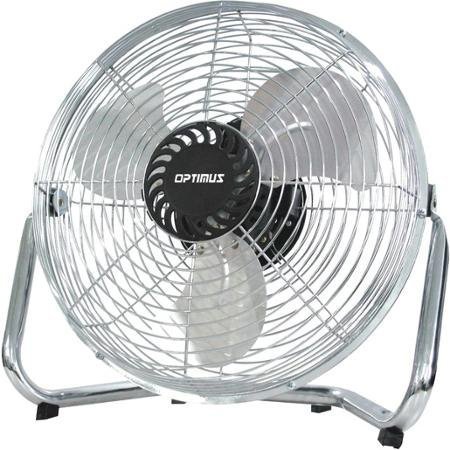
Image: Optimus 18-inch High Velocity Industrial Floor Fan. This image shows the fan with its silver metallic finish and sturdy floor stand.
主な特徴:
- 直径18インチで広範囲に空気を分散します。
- Industrial-grade high velocity airflow.
- Durable metallic finish.
- Floor standing design for stable placement.
- Multiple power levels for adjustable airflow.
セットアップ手順
- ファンを開梱する: ファンとすべての部品をパッケージから慎重に取り出します。パッケージは保管または輸送のために保管してください。
- Assemble the Floor Stand:
- Attach the fan head to the floor stand using the provided screws and tools. Ensure all connections are secure.
- Verify the fan head can pivot smoothly on the stand.
- 配置: Place the fan on a firm, level surface. Ensure there is adequate space around the fan for proper air circulation and to prevent obstruction of the air intake/output. Keep the fan at least 3 feet away from walls or furniture.
- 電源接続: Ensure the fan is in the "OFF" position before plugging it into a standard 120V AC electrical outlet.
操作手順
This fan features push-button controls for easy operation. A remote control may also be included for convenience.
- 電源オン/オフ: Locate the power button on the control panel. Press the button once to turn the fan ON. Press it again to turn the fan OFF.
- ファン速度の調整: The fan has 4 power levels. After turning the fan ON, repeatedly press the speed control button to cycle through the available speed settings (Low, Medium, High, Max). The fan will operate at the selected speed.
- 気流方向の調整: The fan head can be tilted manually to direct airflow upwards or downwards. Gently tilt the fan head to the desired angle. Do not force the fan head beyond its intended range of motion.
メンテナンス
Regular cleaning and maintenance will ensure optimal performance and extend the life of your fan.
- ファンの清掃:
- 清掃する前に必ずファンを電源から抜いてください。
- 柔らかくてamp ファンの外側の表面を布で拭いてください。研磨剤入りの洗剤や刺激の強い化学薬品は、仕上げを傷める可能性があるため、使用しないでください。
- To clean the fan blades, carefully remove the front grille (if detachable, refer to assembly instructions for details). Wipe the blades with a soft cloth. Ensure the grille is securely reattached before operating the fan.
- ファンを再び差し込む前に、すべての部品が完全に乾いていることを確認してください。
- ストレージ: 長期間使用しない場合は、ファンを涼しく乾燥した場所に保管してください。ほこりや損傷を防ぐため、元の梱包に入れて保管することをお勧めします。
トラブルシューティング
| 問題 | 考えられる原因 | 解決 |
|---|---|---|
| ファンが作動しません。 | プラグが差し込まれていない、電源コンセントが機能していない、ファンスイッチがオフになっている。 | Ensure fan is securely plugged into a working outlet. Check household fuse/circuit breaker. Press the power button to turn the fan on. |
| エアフローが少ない。 | Fan speed set too low; obstructed intake/output; dirty blades. | Increase fan speed. Clear any obstructions. Clean fan blades and grilles as per maintenance instructions. |
| 異常な音やガタガタ音。 | Loose parts; fan not on a level surface; foreign object in blades. | Unplug the fan and check for any loose screws or components. Place the fan on a stable, level surface. Carefully inspect for and remove any foreign objects. |
仕様
| 特徴 | 詳細 |
|---|---|
| ブランド | オプティマス |
| モデル名 | 高速 |
| 商品型番 | 306c1b92-f36b-4ccc-ac62-2ad33d5c9efb |
| 直径 | 18インチ |
| 色 | 銀 |
| スタイル | 産業 |
| 電源 | コード式電気 |
| パワーレベルの数 | 4 |
| 制御方法 | ボタンコントロール |
| 屋内/屋外での使用 | 屋内 |
| 含まれるコンポーネント | Floor Stand, Remote Control |
| 仕様が満たされました | OSHA |
保証とサポート
Optimus products are manufactured to high-quality standards. This product is covered by a limited warranty against defects in materials and workmanship from the date of purchase. Please refer to the warranty card included with your product for specific terms and conditions.
For technical support, troubleshooting assistance, or warranty claims, please contact Optimus customer service. Contact information can typically be found on the product packaging or the official Optimus webサイト。
保証のために購入証明書を保管してください。