
1. はじめに
The Protmex MS6208A is a compact, portable handheld digital tachometer designed for precise contact measurement of rotational and linear speeds. It is equipped with a high-speed integrated chip for stable and reliable performance. This device is ideal for a wide range of applications, including measuring the speed of motors, fans, conveyor belts, and various industrial and automotive equipment.
This manual provides detailed instructions on the proper setup, operation, maintenance, and troubleshooting of your MS6208A tachometer to ensure accurate measurements and extend the product's lifespan.
2. 安全情報
機器を操作する前に、すべての安全に関する指示をよく読んで理解してください。これらの指示に従わない場合、怪我をしたり機器が損傷したりする可能性があります。
- Always wear appropriate personal protective equipment (PPE) when taking measurements, especially when working with moving machinery.
- Do not attempt to measure rotating objects that are unstable or could pose a hazard.
- Ensure the device is clean and dry before use. Do not operate in wet or explosive environments.
- デバイスを強い電磁場から遠ざけてください。
- 本機器を分解または改造しないでください。修理は必ず資格のある担当者にご依頼ください。
- 正確な測定を保証するために、電池残量低下インジケータが表示されたら、すぐに電池を交換してください。
3. パッケージ内容
開梱時にすべての品目が揃っており、良好な状態であることを確認してください。
- 1 x Protmex MS6208A Digital Tachometer
- 1 x 6-inch Idler Wheel
- 1 x 0.1m Idler Wheel
- 2 x Touch Tips (Protruding and Concave)
- 1 x拡張バー
- 4V AAA電池1.5本
- ユーザーマニュアル (本書) x 1
- メーターバッグ1個
4.製品オーバーview
The MS6208A tachometer is designed for versatility and ease of use, featuring a robust build and intuitive controls.

Figure 4.1: Labeled diagram of the Protmex MS6208A Digital Tachometer, showing the LCD screen, transmission shaft, power button, mode switch, data storage (MEM), data storage read (READ), and plus/minus buttons.
主な特徴:
- Highly Reliable Digital Tachometer: Features a 16-bit high-speed integrated chip for stable and reliable performance. The double-layer ABS casing, produced by secondary injection molding, offers an ergonomic design for easy operation and maintenance.
- 接触測定: Measures rotational speeds from 50 RPM to 19999 RPM and surface speeds. Includes 5 different contact accessories (idler wheels, touch tips) to suit various measurement needs.
- 複数の機能: Offers 5 unit selections (m/min, m/sec, ft/min, ft/sec, in/min). Features include 100 groups of data recording, data hold, and average value functions.
- LCDバックライト: Equipped with an LCD backlight display for easy data reading in dark environments.
- 節電: Includes a low battery indicator and automatically powers off after 30 seconds of inactivity to conserve energy.
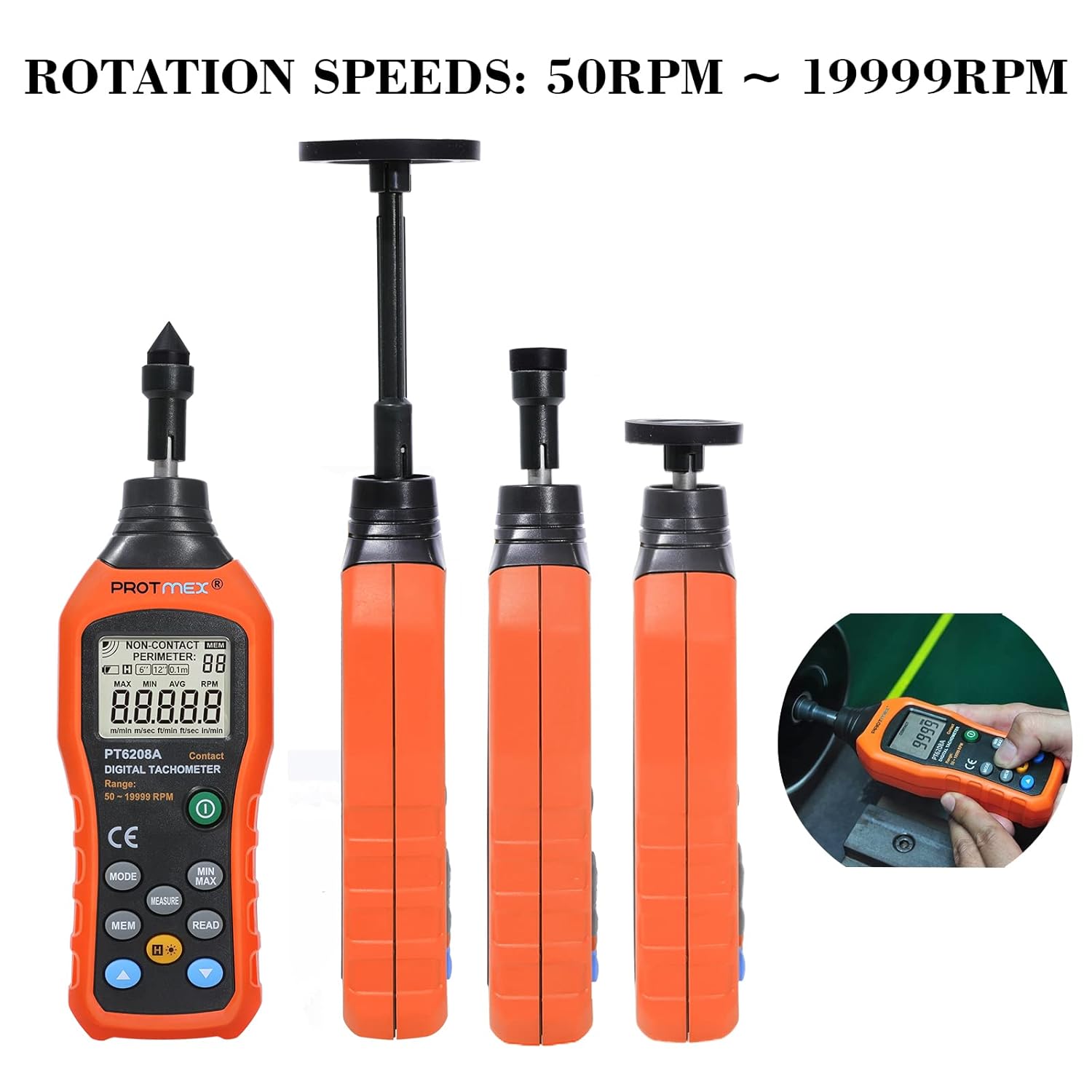
Figure 4.2: The Protmex MS6208A tachometer shown with different contact attachments, illustrating its capability to measure rotation speeds from 50 RPM to 19999 RPM.
5. セットアップ
5.1 バッテリーの取り付け
- Locate the battery compartment on the back of the tachometer.
- Open the battery cover by sliding it off or unscrewing it, depending on the model.
- Insert four (4) 1.5V AAA batteries, ensuring correct polarity (+ and -).
- 電池ケースをしっかりと閉めてください。

図5.1: View of the Protmex MS6208A's battery compartment, showing the placement for four AAA batteries and the internal 16-bit low-power MCU chip.
5.2 Attaching Measurement Accessories
The tachometer comes with various accessories for different measurement scenarios.
- Select the appropriate contact accessory (idler wheel or touch tip) for your measurement task.
- Attach the chosen accessory firmly to the transmission shaft at the top of the tachometer. For extended reach, use the extension bar between the shaft and the accessory.

Figure 5.2: The Protmex MS6208A tachometer demonstrating its adaptability with a 0.1m/6in. idler wheel, protruding touch tip, and concave touch tip, along with an extension bar.
6. 操作手順
6.1 電源オン/オフ
- を押す 力 ボタン ()を押してデバイスの電源をオンにします。
- The device will automatically power off after 30 seconds of inactivity. To manually turn off, press and hold the 力 ボタン。
6.2 測定モードと単位の選択
- After powering on, the device defaults to RPM measurement.
- を押す モード button to cycle through different measurement units: RPM, m/min, m/sec, ft/min, ft/sec, in/min.
- Ensure the selected unit matches your measurement requirement.
6.3測定を行う
- Attach the appropriate contact accessory to the tachometer.
- Gently press the contact accessory against the center of the rotating object or surface you wish to measure.
- Ensure stable contact. The LCD will display the real-time measurement.
- For surface speed measurements, use an idler wheel and press it against the moving surface.
6.4 Data Hold, MAX/MIN/AVG Functions
- を押す 測定 button to hold the current reading on the display. Press again to release.
- を押す MIN / MAX button to cycle through Maximum, Minimum, and Average readings during a measurement session.
6.5 Data Storage (MEM) and Recall (READ)
The device can store up to 100 groups of data.

Figure 6.1: The Protmex MS6208A tachometer in use, demonstrating its ability to store up to 100 sets of measurement data.
- 読み取り値を保存するには、 メム button while a measurement is displayed. The display will show the storage location number.
- 保存したデータを呼び出すには、 読む ボタンをクリックしてください。 プラス(+) そして マイナス(-) buttons to navigate through the stored data groups.
6.6バックライト
- を押す バックライト ボタン () to turn the LCD backlight on or off for improved visibility in low-light conditions.

図 6.2: 拡大図 view of the Protmex MS6208A's backlit LCD display, showing clear readability of contact RPM measurements.
7. メンテナンス
7.1 クリーニング
- 柔らかく乾いた布で拭いてください。頑固な汚れには、軽く湿らせた布を使用してください。amp cloth with mild detergent, then dry thoroughly.
- 研磨剤入りの洗剤や溶剤は、cを損傷する恐れがあるので使用しないでください。asing またはディスプレイ。
- Keep the transmission shaft and contact accessories free from dust and debris to ensure smooth operation and accurate readings.
7.2 ストレージ
- 長期間使用しない場合は、液漏れや機器の損傷を防ぐため、電池を取り外してください。
- Store the tachometer and its accessories in the provided meter bag in a cool, dry place, away from direct sunlight and extreme temperatures.
7.3 電池の交換
- When the low battery indicator appears on the display, replace all four AAA batteries promptly.
- セクション 5.1 に記載されているバッテリーの取り付け手順に従ってください。
8。 トラブルシューティング
If you encounter issues with your Protmex MS6208A, refer to the following common problems and solutions:
| 問題 | 考えられる原因 | 解決 |
|---|---|---|
| デバイスの電源が入りません。 | 電池が切れているか、正しく取り付けられていない。 | 電池の極性を確認してください。新しい単4電池と交換してください。 |
| 不正確な測定値。 | Poor contact with the rotating object; incorrect accessory used; low battery. | Ensure firm and stable contact. Use the correct accessory for the surface. Replace batteries. |
| ディスプレイが暗くなったり、ちらついたりします。 | バッテリー残量が少なくなりました。 | 新しい単4電池と交換してください。 |
| Cannot store data. | メモリがいっぱいです。操作が正しくありません。 | Ensure you are pressing MEM during a live measurement. If memory is full, consider clearing data (refer to advanced functions in full manual if available). |
| Auto-off too quickly. | Normal operation (30 seconds inactivity). | これは省電力機能です。デバイスをアクティブな状態に保つには、いずれかのボタンを押してください。 |
9. 仕様
| パラメータ | 価値 |
|---|---|
| モデル | MS6208A (PT6208A Contact Tachometer) |
| 測定タイプ | 接触 |
| RPM測定範囲 | 50〜19999 RPM |
| 正確さ | ±(0.03%+ 2桁) |
| 測定距離 | N/A (Contact Measurement) |
| ユニット選択 | m/min, m/sec, ft/min, ft/sec, in/min |
| データ記録 | 100グループ |
| 機能 | MAX/MIN/AVG, Data Hold, Display Backlight, Low Battery Indication |
| 自動シャットダウン | 30 秒間の非アクティブ状態 |
| 電源 | 4V AAA電池1.5本 |
| 製品寸法(長さ x 幅 x 高さ) | 19.3 x 6 x 2.9 cm(7.6 x 2.4 x 1.1インチ) |
| 製品重量 | 120 g (0.26 ポンド) |
| 材料 | ABSプラスチック |
| 認定資格 | CE (LVE, EMC, RoHS) |
10. 保証とサポート
Protmex is committed to providing quality products and customer satisfaction. This product is CE (LVE, EMC, RoHS) certified.
For any questions, technical assistance, or support needs, please contact Protmex customer service. We provide friendly 24/7 online support to assist you with any inquiries regarding your MS6208A Digital Tachometer.
Please refer to your purchase documentation or the official Protmex web具体的な保証条件および連絡先情報については、サイトをご覧ください。