
導入
ご購入ありがとうございますasing the Andoer AD-980II i-TTL GN58 Flash Speedlite. This powerful and versatile flash unit is designed to provide enhanced lighting for your photography, compatible with Nikon cameras. It features a high guide number of 58 (ISO 100, 180mm), multiple operating modes including i-TTL, Manual, Multi, Master, and Slave, as well as High-Speed Sync (HSS) up to 1/8000s. Please read this manual thoroughly to understand the product's functions and ensure safe and optimal operation.
安全上の注意
- フラッシュユニットを分解したり改造したりしないでください。高電圧tag内部にeコンポーネントが存在します。
- フラッシュユニットは乾燥した状態に保ってください。雨、湿気、高湿度にさらさないでください。
- 視力に影響を及ぼす可能性があるため、特に近距離ではフラッシュ光を直接目に当てないようにしてください。
- お子様の手の届かない場所に保管してください。
- Use only recommended batteries. Do not mix old and new batteries or different types of batteries.
- If the flash unit overheats, allow it to cool down before further use.
製品終了view
コンポーネント

図1: 前面 view of the Andoer AD-980II Flash Speedlite, showing the flash head and infrared sensor.

図2:背面 view of the flash, highlighting the LCD display and control buttons (Mode, Fn, Clear, Zoom, On/Off, Directional Pad, Lock).
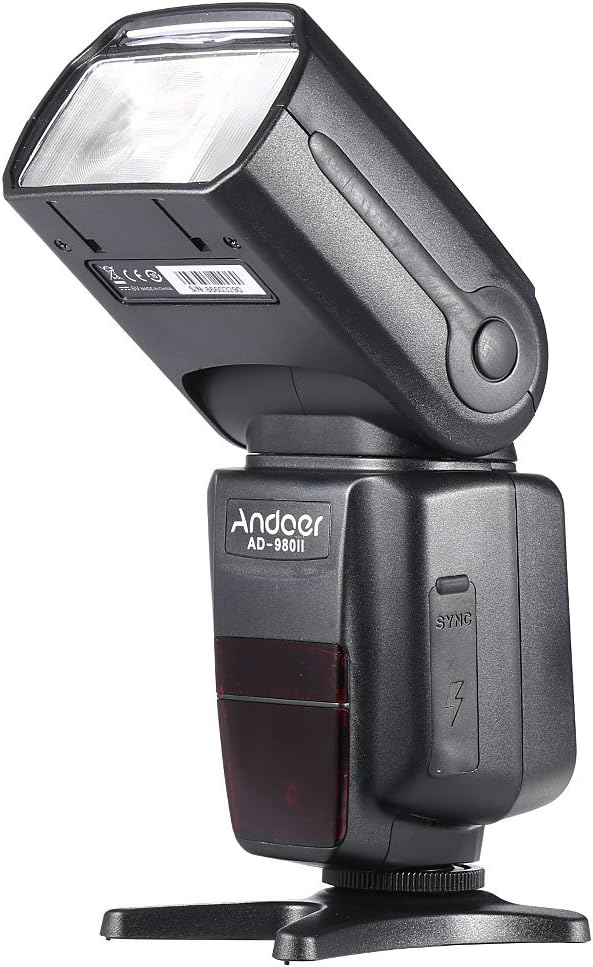
図3:側面 view of the flash, illustrating the PC sync port and external power interface cover.

図 4: 分解 view showing key components: built-in diffuser and reflector, PC port & external power interface, battery compartment, and fast transmission contacts on the hot shoe.
コントロールパネルとディスプレイ
The rear of the flash unit features an LCD display and several control buttons for adjusting settings and selecting modes.
- モードボタン: Cycles through i-TTL, Manual (M), Multi, and Slave modes.
- Fnボタン: Accesses function settings.
- クリアボタン: Used to clear settings or confirm selections.
- ズームボタン: Adjusts the flash head's zoom position (Auto/Manual).
- オン/オフボタン: ユニットの電源をオンまたはオフにします。
- 方向パッド: メニューを移動し、値を調整します。
- ロックスイッチ: フラッシュをカメラのホットシューに固定します。
設定
1. バッテリーの取り付け
- Open the battery compartment cover located on the side of the flash unit (refer to Figure 4).
- 電池ボックス内の指示に従って、極性 (+/-) が正しいことを確認して、単 3 電池 4 本を挿入します。
- 電池カバーをしっかりと閉じてください。
注記: For optimal performance and recycle times, use high-quality alkaline or Ni-MH rechargeable batteries.
2. カメラへのフラッシュの取り付け
- フラッシュユニットのホットシューをカメラのホットシューマウントに差し込みます。
- Rotate the LOCK switch clockwise until it is firmly secured. Do not overtighten.
- To remove the flash, rotate the LOCK switch counter-clockwise and slide the flash off the hot shoe.
動作モード
を押す モード ボタンを押して、使用可能なフラッシュ モードを切り替えます。
1. i-TTL Mode (Automatic Flash)
In i-TTL mode, the flash automatically determines the optimal flash output based on the camera's metering system. This mode is ideal for quick and convenient shooting.
- Attach the flash to your Nikon camera's hot shoe.
- Turn on the flash and the camera.
- Select i-TTL mode using the MODE button.
- The flash will communicate with the camera to set the appropriate exposure.
2. マニュアル(M)モード
Manual mode allows you to set the flash output power manually, from 1/1 (full power) to 1/128 power, in 1/3 stop increments. This provides precise control over lighting.
- Select M mode using the MODE button.
- Use the directional pad to adjust the flash output power.
- Take a test shot and adjust power as needed.
3. マルチ(ストロボ)モード
Multi mode fires the flash repeatedly during a single exposure, creating a stroboscopic effect. You can set the flash frequency (Hz), number of flashes, and flash output.
- Select Multi mode using the MODE button.
- Use the directional pad and Fn button to set the frequency, number of flashes, and power.
4. Master/Slave Modes (Wireless Flash)
The AD-980II can function as a master unit to control other slave flashes or as a slave unit triggered by a master flash or camera's built-in flash. It supports 4 channels in 3 groups.
- マスターモード: Set the flash to Master mode (often indicated by a specific icon or 'M' with wireless symbol). Use the Fn button to set channels and groups.
- Slave Mode (C/N, S1, S2):
- C/N Slave Mode: Optical slave mode compatible with Nikon's wireless flash system.
- S1モード: Optical slave mode that triggers the flash upon detecting the first flash from a master unit. Suitable for manual flash.
- S2モード: Optical slave mode that ignores the pre-flash from a master unit and triggers on the main flash. Suitable for i-TTL flash.
To use slave modes, ensure the flash's optical sensor is facing the master flash or camera's built-in flash.
高度な機能
1. ハイスピードシンクロ(HSS)
The AD-980II supports High-Speed Sync (HSS) up to 1/8000s, allowing you to use flash at shutter speeds faster than your camera's maximum flash sync speed. This is useful for freezing fast motion or using wide apertures in bright conditions.
- カメラが HSS をサポートしていることを確認してください。
- Activate HSS on the flash unit (usually via the Fn button or a dedicated HSS icon on the display).
- Set your camera's shutter speed above its normal sync speed.
2. Rear-Curtain Sync
Rear-curtain sync fires the flash just before the second curtain closes, creating a natural-looking trail of light behind moving subjects when using slow shutter speeds.
- Activate Rear-curtain sync through the flash's custom functions or camera settings.
3. Auto/Manual Zoom
The flash head's zoom position can be adjusted automatically to match the lens focal length or manually set from 18mm to 180mm.
- を押す ズーム button to cycle between Auto and Manual zoom settings.
- In Manual zoom, use the directional pad to adjust the focal length.
4. Sound Prompt
The flash unit includes a sound prompt feature to indicate when the flash is fully recycled and ready to fire. This can be enabled or disabled via the function settings.
5. Over-Heat Protection
To prevent damage from continuous high-power firing, the flash unit has an over-heat protection system. If the unit becomes too hot, it will temporarily disable firing until it cools down.
メンテナンス
- クリーニング: フラッシュユニットのクリーニングには、柔らかく乾いた布を使用してください。頑固な汚れには、軽く湿らせた布を使用してください。amp cloth and then dry thoroughly. Do not use organic solvents or strong cleaning agents.
- ストレージ: 長期間使用しない場合は、液漏れを防ぐため電池を取り外してください。フラッシュは直射日光や極端な温度を避け、涼しく乾燥した場所に保管してください。
- バッテリーのケア: Replace all batteries at the same time. Do not mix battery types.
トラブルシューティング
| 問題 | 考えられる原因 | 解決 |
|---|---|---|
| フラッシュが電源オンになりません。 | 電池が切れているか、正しく挿入されていません。 | 電池を交換するか、極性を確認してください。 |
| フラッシュは発光しません。 | Flash not securely mounted; camera settings incorrect; flash in sleep mode; flash overheated. | Ensure flash is locked onto hot shoe; check camera flash settings; press shutter button halfway to wake flash; allow flash to cool down. |
| フラッシュ出力が弱すぎる/強すぎる。 | フラッシュ露出補正 (FEC) または手動電力設定が正しくありません。 | Adjust FEC on camera or flash; adjust manual power setting in M mode. |
| Wireless slave mode not working. | Optical sensor blocked; incorrect channel/group settings; master flash not firing. | Ensure clear line of sight to optical sensor; verify channel/group settings match master; check master flash operation. |
仕様
| モデル番号 | AD-980II |
| ガイドナンバー | GN58(ISO100、180mm) |
| フラッシュカバレッジ | 18-180mm(自動/手動ズーム) |
| フラッシュモード | i-TTL, M, Multi, Master, Slave (C/N, S1, S2) |
| ハイスピードシンクロ(HSS) | 1/8000秒まで |
| リサイクル時間 | 約2.9秒(フルパワー) |
| 垂直回転角 | -7 ~ 90 度 |
| 水平回転角 | 0~360度 |
| 無線通信 | Optical Pulse (4 channels, 3 groups) |
| 電源 | 単3電池4本 |
| 寸法 | 19.56 x 5.08 x 7.62 cm |
| 重さ | 616.89グラム |
| 欧州連合 | 743022313320 |
保証とサポート
保証情報およびテクニカルサポートについては、ご購入時に付属の説明書をご参照いただくか、販売店にお問い合わせください。保証請求の際に必要となるため、購入証明書は保管してください。
You can also visit the official Andoer webさらなるサポートと製品の更新については、サイトをご覧ください。