
1. はじめに
This manual provides detailed instructions for the assembly, installation, operation, and maintenance of your BONTEC Table Top Desk Pedestal TV Stand Mount. Please read this manual thoroughly before installation to ensure correct setup and safe operation. Keep this manual for future reference.
2. 安全情報
- 重量容量: Do not exceed the maximum weight capacity of 50kg (110 lbs). This stand is designed for TVs between 32 and 60 inches.
- VESAの互換性: Ensure your TV's VESA mounting pattern is compatible with this stand (refer to specifications).
- 安全なインストール: Always ensure all screws and bolts are securely tightened before placing the TV on the stand.
- 表面安定性: Place the stand on a stable, level, and sturdy surface that can support the combined weight of the stand and your television.
- 子供とペット: 組み立てエリアに子供やペットを近づけないでください。小さな部品は窒息の危険があります。
- 専門家によるサポート: インストールプロセスのいずれかの部分について不明な点がある場合は、資格のある専門家にご相談ください。
3. パッケージ内容
Please verify that all components are present and undamaged before assembly. If any parts are missing or damaged, contact BONTEC customer support.
- ベースプレート(Base Plate)
- Upright Support Column
- テレビ取付金具(2個)
- Hardware Kit (various screws, washers, spacers, Allen wrench, spanner)
- 滑り止めパッド
4. セットアップと組み立て
テレビスタンドを組み立てるには、次の手順に従ってください。
Step 4.1: Attach Anti-slip Pads to the Base
Peel and stick the provided anti-slip pads to the bottom of the base plate. This prevents scratching your furniture and provides stability.
Step 4.2: Assemble the Upright Support Column to the Base
Secure the upright support column to the base plate using the designated screws and tools from the hardware kit. Ensure it is firmly attached and stable.
Step 4.3: Attach TV Mounting Brackets to Your TV
Identify the VESA mounting holes on the back of your television. Select the appropriate screws, washers, and spacers from the hardware kit that fit your TV's specific VESA pattern. Attach the two TV mounting brackets to the back of your TV. Ensure they are level and securely fastened.

図4.3.1: This image illustrates the VESA compatibility (50x50mm to 800x400mm) and screen size range (22-65 inches) supported by the stand, with a maximum capacity of 50kg. It helps in selecting the correct mounting hardware for your TV.

図4.3.2: This image displays two installation options for the TV mounting brackets: one for larger TVs (Max VESA: 800x400mm) and another for smaller TVs (Max VESA: 400x200mm). It also provides detailed dimensions of the stand, including height and width, to aid in proper setup.
ステップ4.4: テレビをスタンドに取り付ける
Carefully lift your TV with the attached brackets and hook them onto the upright support column. Ensure the brackets are properly seated and secured. The stand offers multiple height adjustment levels.

図4.4.1: This image demonstrates the three adjustable height levels of the TV stand: Maximum (700mm), Mid (640mm), and Minimum (580mm). This allows users to customize the TV's view高さ。
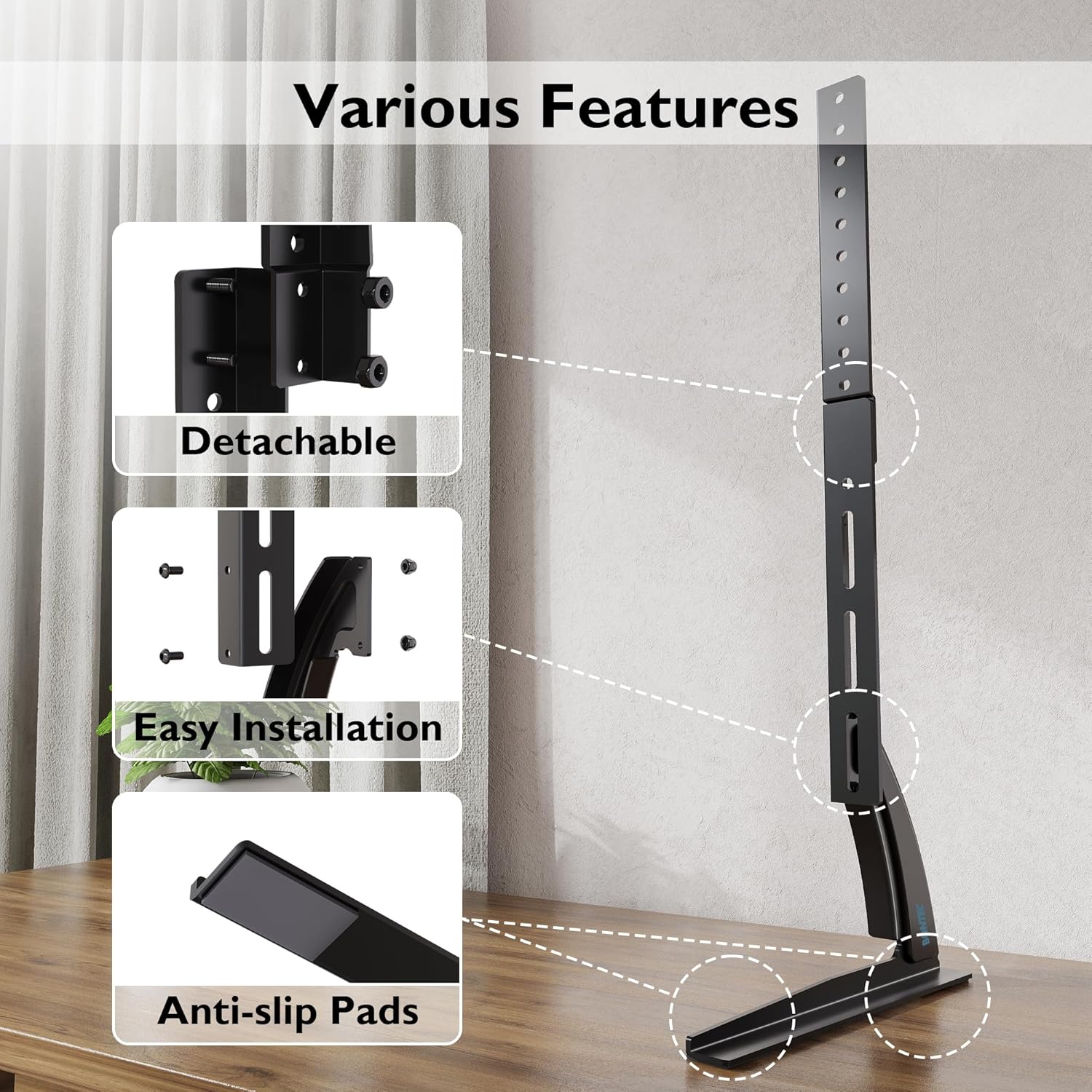
図4.4.2: This image compares the stability of the BONTEC stand, showing a TV securely upright, against another stand that appears unstable. It highlights the design's focus on keeping your TV safely in position.

図4.4.3: This image details key features of the stand, including its detachable components for easier assembly, the straightforward installation process, and the inclusion of anti-slip pads on the base for enhanced stability and surface protection.
5. 操作手順
Once assembled, the BONTEC TV stand is designed for fixed placement. The primary operation involves adjusting the TV's height during initial setup.
5.1 高さ調整
The stand offers three distinct height levels. To adjust the height:
- Carefully remove the TV from the mounting brackets.
- Adjust the position of the mounting brackets on the upright support column to your desired height level (Max, Mid, or Min).
- Re-mount the TV onto the adjusted brackets, ensuring it is securely locked in place.
Always ensure the TV is balanced and stable after any height adjustment.
6. メンテナンス
定期的なメンテナンスにより、テレビスタンドの寿命と安全性が確保されます。
- クリーニング: スタンドは柔らかく乾いた布で拭いてください。仕上げを傷める可能性のある研磨剤入りの洗剤や溶剤は使用しないでください。
- 接続を確認してください: すべてのネジとボルトがしっかりと締まっているか定期的に点検してください。必要に応じて締め直してください。
- 損傷の検査: Regularly inspect the stand for any signs of wear, damage, or instability. If damage is found, discontinue use and contact customer support.
7。 トラブルシューティング
テレビスタンドに問題が発生した場合は、次の一般的な問題と解決策を参照してください。
| 問題 | 考えられる原因 | 解決 |
|---|---|---|
| TV is unstable or wobbles | Loose screws; uneven surface; TV too heavy; incorrect assembly | Ensure all screws are tightened. Place stand on a level surface. Verify TV weight is within limits. Review 組み立て手順。 |
| テレビがスタンドに合わない | Incorrect VESA pattern; TV size outside range | Check your TV's VESA pattern against the stand's specifications. Confirm TV size is between 32-60 inches. |
| 不足している部品 | 梱包エラー | Contact BONTEC customer support with your purchase details. |
8. 仕様
- ブランド: ボンテック
- モデル: B01ESPNXJW
- 取り付けタイプ: 卓上マウント
- 移動タイプ: Fixed (Height adjustable during assembly)
- 対応デバイス: テレビ
- Minimum Supported Screen Size: 32インチ
- Maximum Supported Screen Size: 60 Inches (Note: Some users report compatibility with up to 65 inches, but official specification is 60 inches)
- 最大積載量: 50 kg (110 ポンド)
- 商品の重量: 1.9キログラム
- VESAの互換性: 50x50mm, 75x75mm, 100x100mm, 200x100mm, 200x200mm, 300x200mm, 300x300mm, 400x200mm, 400x300mm, 400x400mm, 600x400mm, 800x400mm
- 高さ調節レベル: 3 levels (Max 700mm, Mid 640mm, Min 580mm from base to top of bracket)
9. 保証とサポート
BONTEC products are manufactured to high-quality standards. For warranty information, technical support, or to report missing/damaged parts, please contact BONTEC customer service through the retailer where the product was purchased or visit the official BONTEC website. Please have your model number (B01ESPNXJW) and purchase date ready.