
Garrett ACE 400i 金属探知機 ユーザーマニュアル
Model: ACE 400i
1. はじめに
The Garrett ACE 400i is an advanced metal detector designed for hobbyists and enthusiasts. It builds upon the success of previous ACE models, offering enhanced features for improved target identification and detection depth. This manual provides comprehensive instructions for assembling, operating, and maintaining your ACE 400i to ensure optimal performance and longevity.
主な機能は次のとおりです。
- Target Conductivity Indication: A numerical display (1-100) helps identify the probable nature of the target.
- アイアンオーディオ: Allows users to hear discriminated ferrous targets, aiding in distinguishing valuable items from trash.
- Increased Frequency (10 kHz): Provides enhanced detection depth and sensitivity to smaller targets.
- 周波数調整: Helps eliminate interference when detecting near other metal detectors or electrical sources.
- ノッチ識別: Customize discrimination patterns to ignore unwanted metals.
- ピンポイント機能: Precisely locate targets for easier recovery.
- 軽量設計: Weighing approximately 1.32 kg, it is comfortable for extended use.

Figure 1: The Garrett ACE 400i Metal Detector, fully assembled. This image shows the main components including the search coil, shaft, control box, and arm cuff.
2. 安全情報
Always exercise caution when operating the metal detector to prevent injury or damage to the device. Adhere to the following safety guidelines:
- Avoid using the detector near active electrical lines or in adverse weather conditions.
- Be aware of your surroundings, especially when digging.
- 操作中は子供から目を離さないでください。
- Do not attempt to detect in areas where digging is prohibited or dangerous.
- 私有地で探知作業を行う場合は必ず許可を得てください。
3. 含まれるコンポーネント
Your Garrett ACE 400i package typically includes the following components:
- Garrett ACE 400i Control Box with Shaft
- 18 x 26 cm (7" x 10") PROformance™ DD Search Coil
- Search Coil Cover
- Garrett ClearSound Easy Stow Headphones
- Garrett ACE Environmental Cover-Up (Rain Cover for Control Box)
- AA Batteries (4 required, may or may not be included depending on region/seller)
- ユーザーマニュアル(このドキュメント)

Figure 2: Garrett ClearSound Easy Stow Headphones, included with the detector for clear audio signals.

Figure 3: The protective cover for the search coil, designed to prevent scratches and wear during use.
4. 組み立てとセットアップ
Follow these steps to assemble your Garrett ACE 400i metal detector:
- サーチコイルを取り付けます。
Align the search coil with the lower stem. Insert the plastic bolt through the holes on the coil and stem, then secure it with the wing nut. Ensure the coil cable is wrapped snugly around the lower and middle stems.

Figure 4: The DD search coil, which attaches to the lower shaft of the detector.
- コントロールボックスを接続します。
Slide the control box onto the upper shaft. Secure it using the provided cam-locks. The new cam-lock rings prevent movement and play over time.

Figure 5: The control box attached to the upper shaft, showing the arm cuff and handle.
- バッテリーの挿入:
Open the battery compartment on the control box. Insert four (4) AA batteries, ensuring correct polarity. Close the compartment securely.
- Adjust Length and Arm Cuff:
Adjust the length of the shaft to a comfortable height, allowing the search coil to be parallel to the ground when you are standing upright. Adjust the arm cuff for a snug but comfortable fit on your forearm.
- コイルケーブルを接続します:
Plug the search coil cable connector into the corresponding port on the control box. Ensure a secure connection.
5. 操作手順
Familiarize yourself with the control panel and its functions before beginning your search.
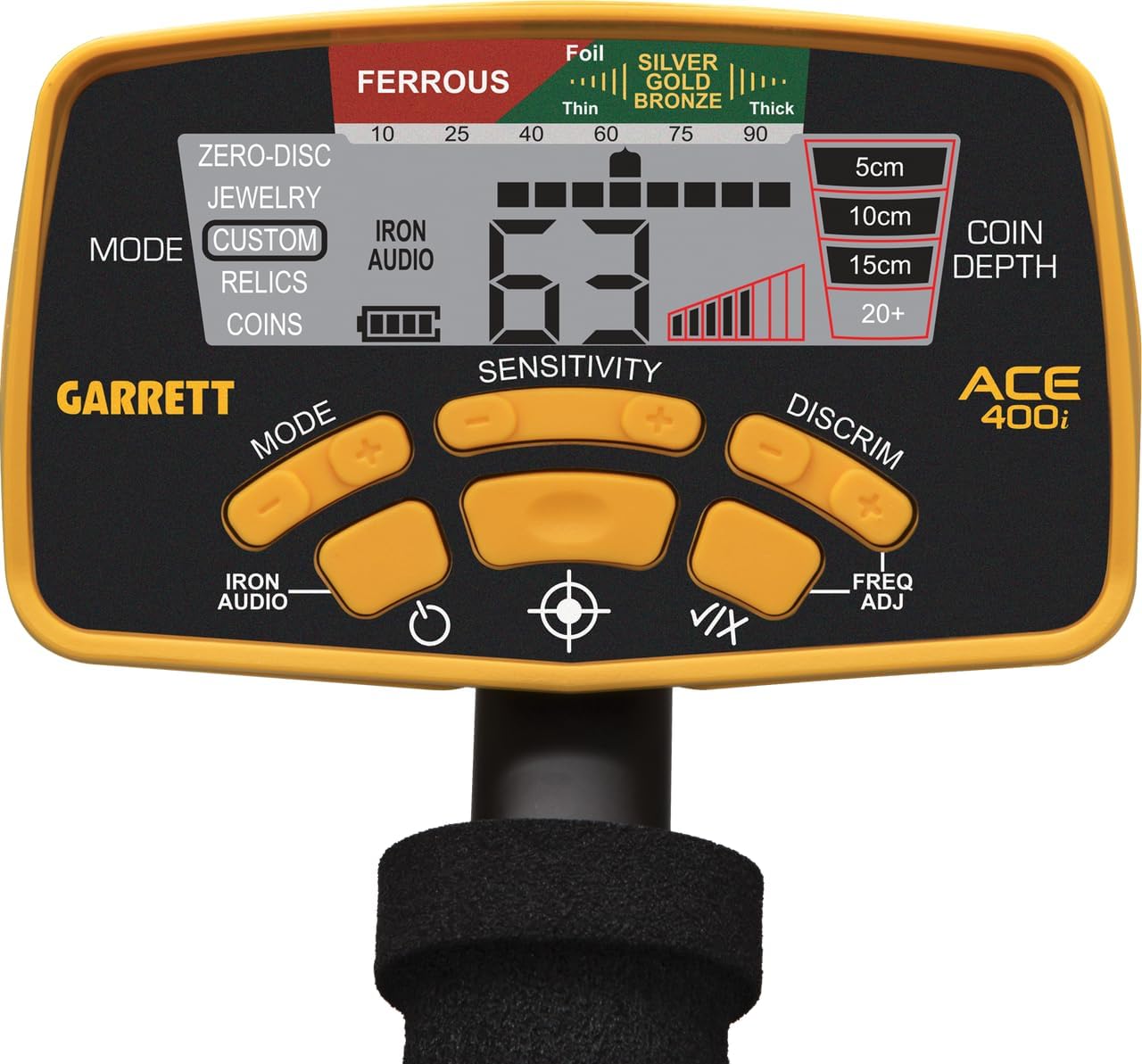
Figure 6: Close-up of the Garrett ACE 400i control panel, showing the LCD screen and various buttons.
5.1.電源のオン/オフ
を押し続けます 力 button to turn the detector on or off. The detector will power on in the last used search mode.
5.2. Understanding the Display (LCD)
The large LCD screen provides crucial information:
- Target ID Cursor: Indicates the probable target type (e.g., Iron, Foil, Nickel, Zinc, Copper, Silver).
- Digital Target ID (1-100): A numerical value representing the target's conductivity. Higher numbers indicate more conductive targets (e.g., silver coins), while lower numbers indicate less conductive targets (e.g., iron).
- 深さインジケーター: Estimates the depth of the target in centimeters (5cm, 10cm, 15cm, 20+cm).
- バッテリレベルインジケータ: 残りのバッテリー寿命を表示します。
- 感度インジケーター: 現在の感度設定を表示します。
5.3. 検索モード
The ACE 400i features five pre-programmed search modes. Press the モード ボタンをクリックして、これらを循環表示します。
- Zero-Disc: All-metal mode. Detects all types of metal without discrimination.
- ジュエリー: Designed to ignore iron and small trash items, focusing on jewelry.
- カスタム: Allows you to create and save your own discrimination pattern. Use the 差別する そして V/X buttons to adjust the NOTCH segments.
- コイン: Optimized for coin hunting, typically discriminating against iron and some foil.
- Relics: Designed to find relics, often with minimal iron discrimination, as many historical artifacts contain iron.
5.4.感度調整
使用 感度 ボタン(+ そして -) to adjust the detector's sensitivity. Higher sensitivity increases detection depth but can also lead to more false signals in mineralized ground or areas with electrical interference. Adjust as needed for stable operation.
5.5. Discrimination (NOTCH and Iron Audio)
- NOTCH Discrimination: In Custom mode, you can eliminate specific target segments from detection. Use the 差別する button to move the cursor and V/X to toggle segments on/off.
- アイアンオーディオ: を押す アイアンオーディオ button to activate this feature. It allows you to hear discriminated iron targets at a low tone, even when they are notched out. This helps in identifying complex targets (e.g., a valuable non-ferrous target next to iron) and avoiding large iron objects.
5.6. 周波数調整
The ACE 400i operates at 10 kHz. If you experience interference from other detectors or electrical sources, press the FREQ ADJ button to slightly shift the operating frequency, which can help mitigate interference.
5.7. Pinpoint Function
Once a target is detected, press and hold the ピンポイント button (target icon). Keep the coil steady over the target. The detector will emit a continuous tone, and the signal strength indicator on the LCD will help you center the coil directly over the target for precise location.
6. メンテナンス
- クリーニング: 検出器を広告で拭き取るamp cloth after each use. Do not use abrasive cleaners or solvents. The control box is rain-resistant but not submersible.
- コイルケア: Always use the search coil cover to protect the coil from scratches and impacts.
- バッテリー交換: Replace batteries when the low battery indicator appears. Remove batteries if storing the detector for extended periods to prevent leakage.
- ストレージ: 検出器は涼しく乾燥した場所に保管してください。極端な温度を避けてください。
7。 トラブルシューティング
| 問題 | 考えられる原因 | 解決 |
|---|---|---|
| 電源なし | 電池切れまたは電池の取り付け間違い | 電池を交換する際は、極性が正しいことを確認してください。 |
| Erratic signals / False signals | High sensitivity, electrical interference, highly mineralized ground, loose coil cable | Reduce sensitivity, use Frequency Adjustment, tighten coil cable, try a different search mode. |
| 深度検出が不十分 | Low sensitivity, highly mineralized ground, small target | Increase sensitivity (if stable), sweep slower, ensure coil is parallel to ground. |
| Pinpoint not accurate | Sweeping too fast, not holding coil steady | Slow down sweep, hold coil motionless over target when pinpointing. |
8. 仕様
| 特徴 | 詳細 |
|---|---|
| モデル | エース400i |
| メーカー | ギャレット |
| 動作周波数 | 10kHz |
| 検索モード | 5 (Zero-Disc, Jewelry, Custom, Coin, Relics) |
| Target ID Segments | 12 (including Iron) |
| Iron Discrimination Segments | 6 |
| デジタルターゲットID | 0から99 |
| Sensitivity/Depth Adjustments | 8レベル |
| ピンポイント | はい |
| サーチコイル | 18 x 26 cm (7" x 10") PROformance™ DD |
| 調整可能な長さ | Yes (approx. 1.06 m - 1.29 m / 42" - 51") |
| 重さ | 1.32 kg (2.9 ポンド) |
| 電源 | 単三電池4本 |
| オーディオトーン | 3 (低、中、高) |
| IP 定格 | IP67 (Control box is rain-resistant, coil is submersible) |
9. 保証とサポート
For detailed warranty information, please refer to the official Garrett Metal Detectors website or contact your authorized dealer. Warranty terms and conditions may vary by region.
For technical support, troubleshooting assistance, or spare parts, please contact Garrett Customer Service through their official channels. Always provide your product model (ACE 400i) and serial number when seeking support.
公式製品ビデオ: このマニュアルに埋め込むための、販売者からの公式製品ビデオはありませんでした。