
1. はじめに
This manual provides detailed instructions for the setup, operation, and maintenance of your Enover TS18 7-Day Programmable Digital Timer. This device is designed to automate the control of electrical appliances by setting specific ON/OFF times throughout the week, offering convenience and energy management.
2 製品の特徴
- 柔軟なスケジュール: Program up to 10 distinct ON/OFF cycles within a 7-day period. Each program repeats weekly.
- エネルギー管理: Automatically controls lamps, holiday lights, humidifiers, and other electrical devices. Includes a feature to protect devices from overcharge.
- Security Function: Features a random ON/OFF option to vary lighting times, simulating occupancy when away from home.
- ユーザーフレンドリーなインターフェース: Equipped with a large LCD display for clear visibility and a manual override switch for immediate control adjustments.
- バッテリーバックアップ: An integrated battery retains programmed settings during power outages、再プログラミングの必要がなくなります。

Image: Enover TS18 Digital Timer highlighting key features for easy home automation.
3. パッケージ内容
パッケージには以下のアイテムが含まれています:
- 1 x Enover Digital Timer Switch (Model TS18)
- ユーザーマニュアル x 1

Image: Contents of the Enover TS18 Digital Timer package, including the timer and manual.
4.製品オーバーview
The Enover TS18 Digital Timer features a clear LCD display and intuitive buttons for easy programming. It plugs directly into a standard electrical outlet.

画像: 正面 view of the Enover TS18 Digital Timer, displaying the time and control buttons.
ボタンの機能:
- 週: Sets the day(s) for programs.
- 時間: Adjusts the hour for time and program settings.
- 分: Adjusts the minute for time and program settings.
- RES/RCL: Resets or recalls settings.
- クロック: 時計設定モードを開始または終了します。
- タイマー: Cycles through program settings (P1 ON, P1 OFF, P2 ON, etc.).
- オン/自動/オフ: 動作モード(常時オン、自動、常時オフ)を選択します。
- ランダム: Activates or deactivates the random ON/OFF function.
- リセット: Small button (requires a pointed object) to clear all settings and reset the device.
Video: A brief demonstration of the Enover Digital Timer's basic functions and display.
5. セットアップ
5.1 初期充電
Before first use, plug the timer into an electrical outlet for approximately 5-10 minutes to charge the internal battery. This ensures the display is active and settings can be retained.
5.2 現在の時刻と日付の設定
- を押し続けます クロック ボタン。
- 保持しながら クロック、 週 ボタンを繰り返し押して、現在の曜日を設定します。
- 保持しながら クロック、 時間 button repeatedly to set the current hour (AM/PM will display).
- 保持しながら クロック、 分 ボタンを繰り返し押して現在の分を設定します。
- リリース クロック ボタンを押して設定を保存します。
6. 操作手順
6.1 オン/オフサイクルのプログラミング
The timer allows for up to 10 ON/OFF programs. Follow these steps to set a program:
- を押す タイマー ボタンを1回押します。ディスプレイに「1 ON」と表示されます。
- プレス 週 to select the day(s) for this program (e.g., MO, TU, WE, TH, FR, SA, SU, MO TU WE TH FR, SA SU, MO TU WE TH FR SA SU, etc.).
- プレス 時間 希望するオン時間を設定します。
- プレス 分 希望するオンの分を設定します。
- を押す タイマー もう一度ボタンを押します。ディスプレイに「1 OFF」と表示されます。
- Repeat steps 2-4 to set the desired OFF time for Program 1. Ensure the correct day(s) are selected for the OFF time.
- 押し続ける タイマー to cycle through and set additional programs (2 ON, 2 OFF, up to 10 ON, 10 OFF).
- 必要なプログラムをすべて設定したら、 クロック ボタンを押すと現在の時刻表示に戻ります。
- タイマーがオンになっていることを確認してください オート mode for programs to execute. Press オン/オート/オフ サイクリングする オート.
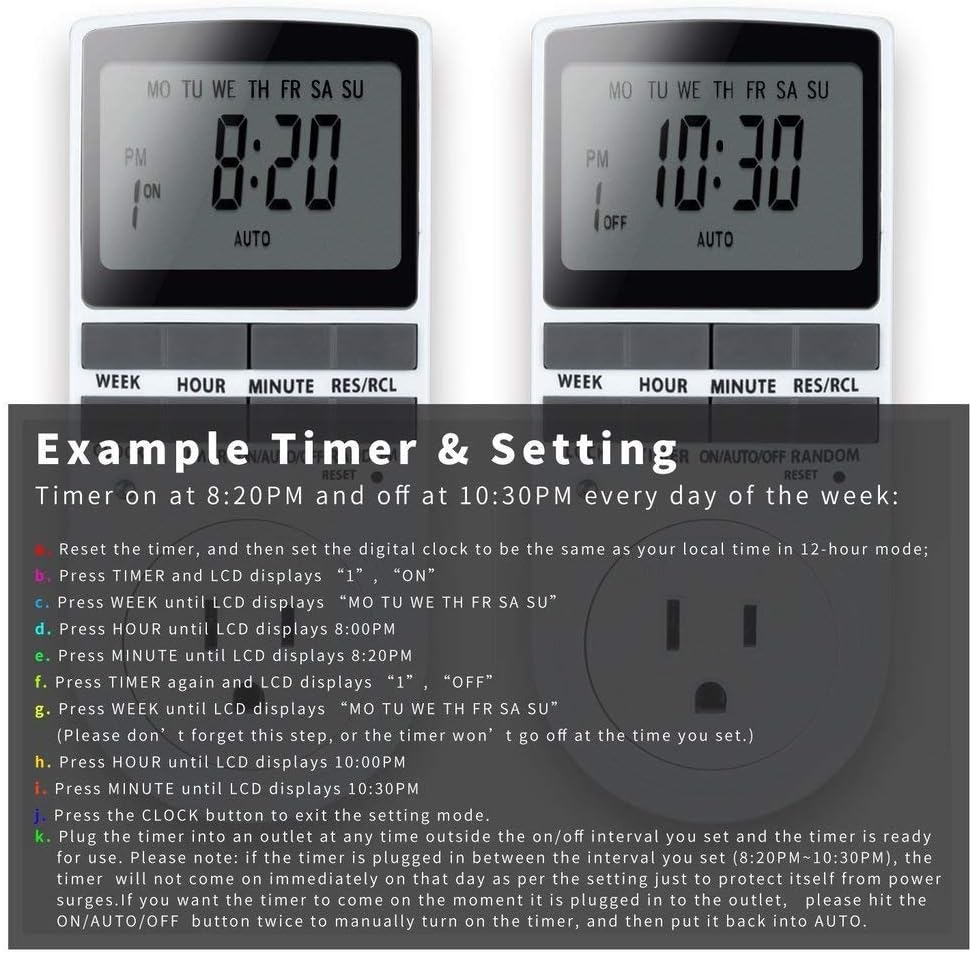
Image: Visual guide for setting an example timer program (ON at 8:20 PM, OFF at 10:30 PM daily).
6.2 Random Function (Anti-theft)
To activate the random ON/OFF feature:
- を押す ランダム button. The word "RANDOM" will appear on the display.
- In random mode, the timer will turn ON and OFF at varying times within a set period, typically around the programmed ON/OFF times, to simulate occupancy.
- 無効にするには、 ランダム もう一度ボタンを押します。

Image: The anti-theft random feature of the Enover TS18 Digital Timer, designed to deter intruders.
6.3手動オーバーライド
To manually switch the timer's output without affecting programmed settings:
- を押す オン/オート/オフ ボタンを押してモードを切り替えます: ON (常時オン)、 オート (follows programs), オフ (always off).
- Select the desired temporary mode. The timer will revert to オート mode at the next programmed ON/OFF event.
Video: A detailed demonstration of setting programs and using the manual override function on the Enover Digital Timer.
7. アプリケーション
The Enover TS18 Digital Timer can be used to automate various household devices, enhancing convenience and energy efficiency.
- Coffee Makers: Program your coffee maker to start brewing before you wake up.
- Aquarium Lights/Pumps: Automate the lighting and filtration cycles for your aquarium.
- Indoor Grow Lights: Maintain consistent light schedules for plants.
- ホリデーデコレーション: Set festive lights to turn on and off automatically.
- Fans/Humidifiers: Control environmental devices to operate only when needed.
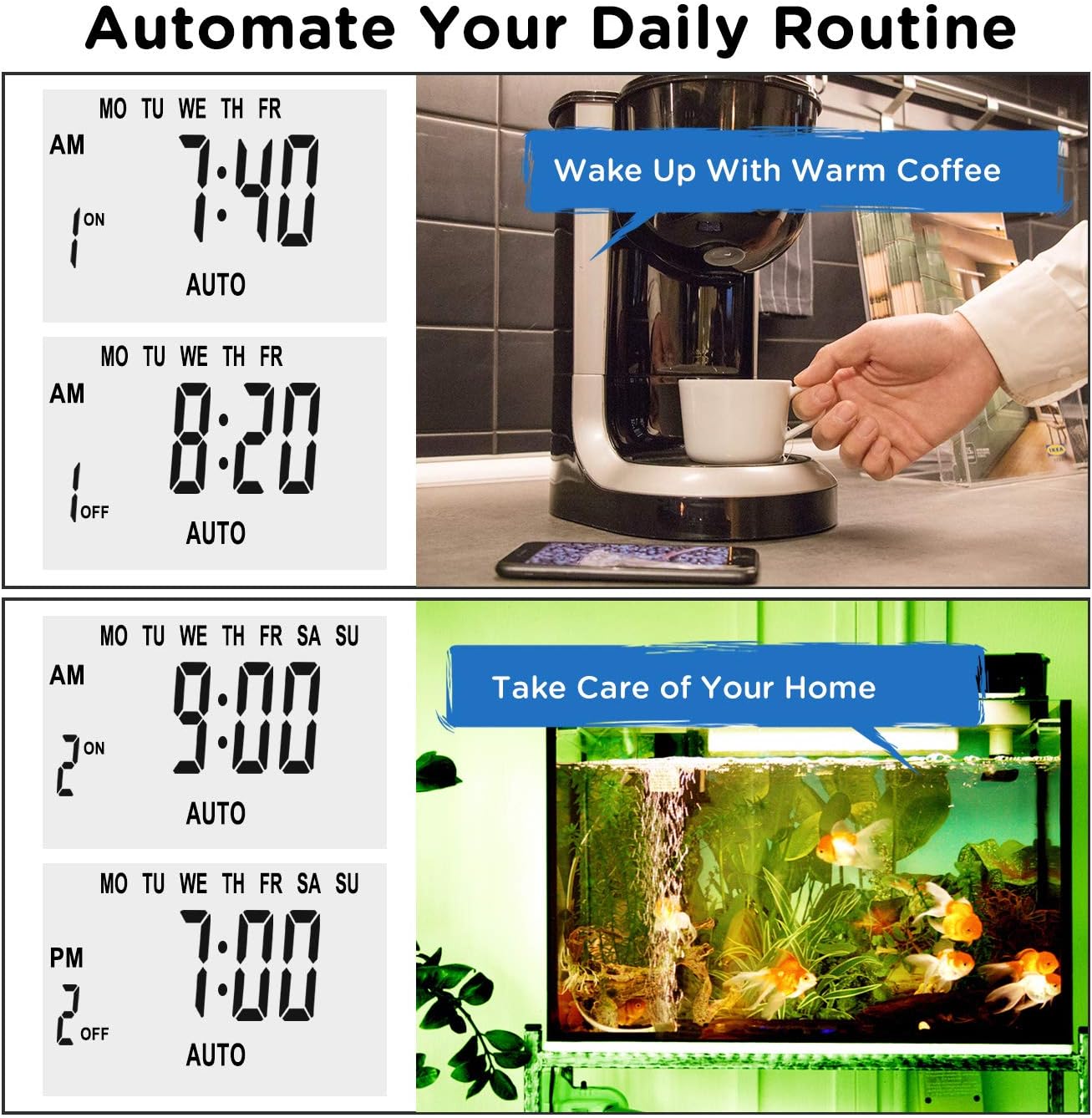
画像: Examples of automating daily routines with the Enover TS18 Digital Timer, such as a coffee maker and aquarium.
8. 仕様
| モデル番号 | TS18 |
| ブランド | エノーバー |
| 色 | 白 |
| 材料 | プラスチック |
| 設定数 | 10(オン/オフプログラム) |
| 巻tage | 120ボルト |
| ワットtage | 1800ワット |
| Amp容量を消去する | 15 Amps |
| インストール方法 | プラグイン |
| 取り付けタイプ | プラグインマウント |
| プラグフォーマット | B - 米国式(アースプラグ付き) |
| 特集 | 3-wire grounded plug and 3-prong grounded outlet |
| 使用法 | 屋内使用のみ |
| アイテム重量 | 6.4オンス |
| パッケージ寸法 | 5.67 x 3.31 x 2.6インチ |
| バッテリーセルタイプ | ニッケル水素 |
| バッテリー寿命 | 100 days (backup) |
9。 トラブルシューティング
- タイマーがプログラムどおりにオン/オフにならない:
- タイマーがオンになっていることを確認してください オート モード。
- 現在の時刻と日付が正しく設定されていることを確認します。
- Check that the ON and OFF times for the specific program are correctly entered and assigned to the desired days.
- Confirm the appliance connected to the timer is switched ON.
- ディスプレイが空白または暗い場合:
- Plug the timer into an active electrical outlet for 5-10 minutes to charge the internal battery.
- 電源を切るとすべての設定が失われますtage:
- The internal battery may not be sufficiently charged. Ensure the timer is regularly plugged in to maintain battery charge.
- To clear all settings:
- 先の尖ったもの(ペン先など)を使って リセット button. This will clear all programs and reset the clock. You will need to re-enter all settings.
10. 保証とサポート
For warranty information or technical support, please refer to the contact details provided on the product packaging or the official Enover webサイト。 保証請求に備えて購入時のレシートを保管しておいてください。