
Vogel's MA4000
Vogel's MA4000 Flat Screen Wall Mount Instruction Manual
Model: MA4000 (8554000)
導入
This manual provides comprehensive instructions for the safe and proper installation, operation, and maintenance of your Vogel's MA4000 Flat Screen Wall Mount. Please read all instructions carefully before installation and retain this manual for future reference.
The Vogel's MA4000 is designed to securely mount flat screen televisions ranging from 40 to 80 inches (102-203 cm) with a maximum weight capacity of 80 kg (176 lbs). It features a slim profile and a tilt function to optimize view角度を調整してグレアを軽減します。
安全情報
警告:
- 取り付け面がマウントおよびテレビの合計重量を安全に支えられることを確認してください。
- Always use appropriate tools and follow all installation steps precisely.
- 最大重量容量 80 kg (176 ポンド) を超えないでください。
- Verify VESA compatibility with your television before installation.
- インストールのいずれかの部分について不明な点がある場合は、資格のある専門家にご相談ください。
パッケージ内容
Before beginning installation, please verify that all components are present and undamaged. Refer to the included parts list in your product packaging for a complete inventory.

画像の説明: オーバーヘッド view of the Vogel's MA4000 Flat Screen Wall Mount, showing the main wall plate and the two vertical TV brackets. The mount is black and designed for flat panel televisions.
The image above displays the primary components of the Vogel's MA4000 wall mount: the wall plate and the two TV interface bars. Additional hardware such as screws, washers, and spacers are included in the retail package.
仕様
| モデル番号 | MA4000 (8554000) |
| ブランド | フォーゲル |
| 取り付けタイプ | Flat, Tilting |
| 材料 | ステンレス鋼 |
| 色 | 黒 |
| 対応テレビサイズ | 40~80インチ(102~203cm) |
| 最大重量容量 | 80 kg (176 ポンド) |
| VESA互換性 | Min 100x100 mm, Max 600x400 mm |
| 最大傾斜角度 | 12度 |
| 壁の距離 | 約30 mm(1.2インチ) |
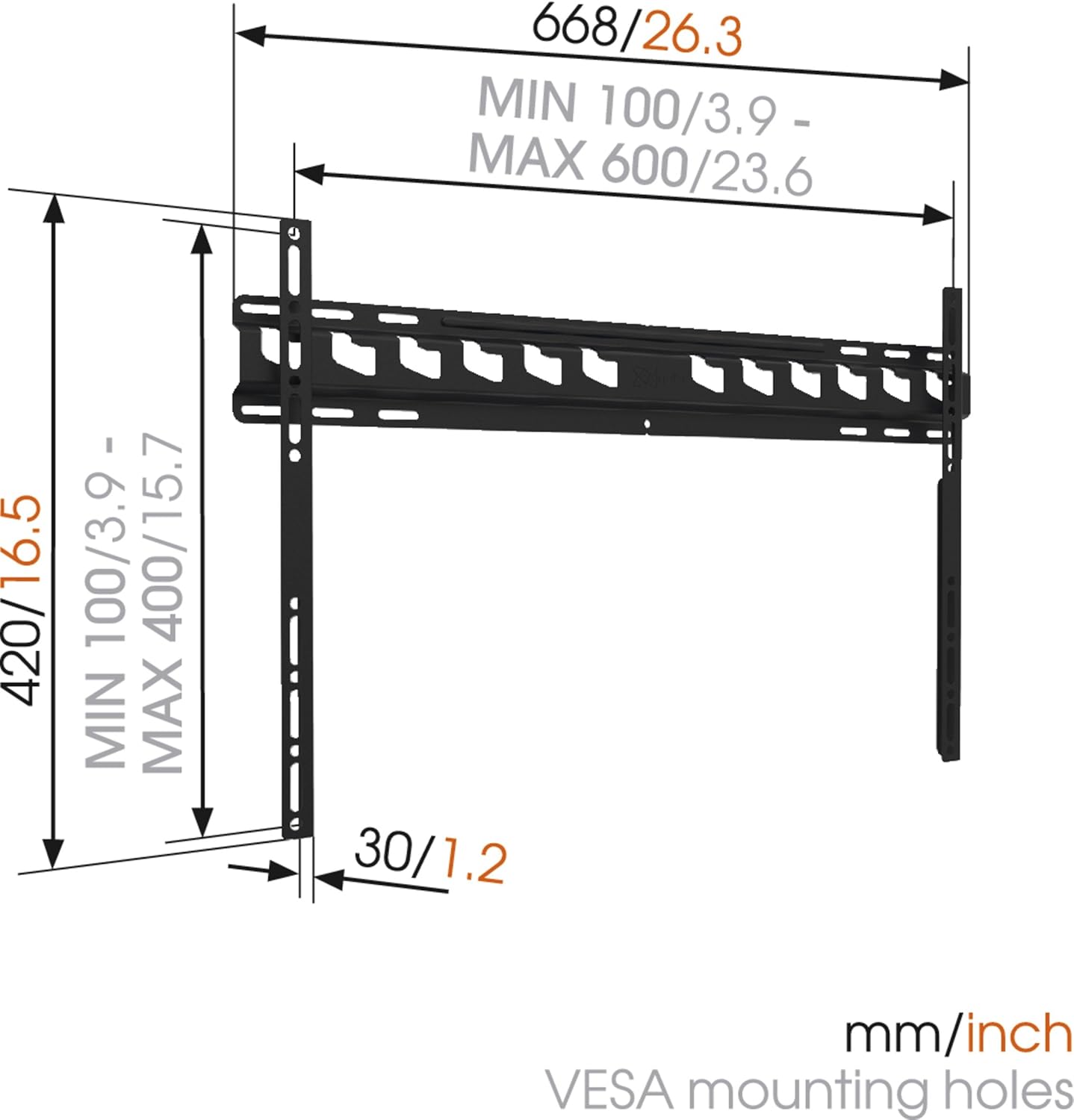
画像の説明: A technical diagram illustrating the dimensions of the Vogel's MA4000 wall mount. It shows the overall width (668mm / 26.3 inches), height (420mm / 16.5 inches), and the minimum and maximum VESA mounting hole patterns (100-600mm horizontally, 100-400mm vertically). The distance from the wall is indicated as 30mm (1.2 inches).
セットアップとインストール
This section outlines the general steps for installing your Vogel's MA4000 wall mount. Always refer to the detailed graphical instructions included with your product for specific drilling templates and hardware usage.
必要なツール(付属していません):
- ドリル
- Drill bits appropriate for your wall type (wood, concrete, brick, etc.)
- スタッドファインダー(木製スタッド壁用)
- レベル
- 鉛筆
- 巻尺
- ドライバーまたはレンチ
インストール手順:
- 取り付け場所を決定します。 Choose a suitable location on your wall, ensuring it is structurally sound and free from electrical wires or plumbing. Use a stud finder if mounting to wood studs.
- 掘削穴をマークする: Hold the wall plate against the wall at the desired height and use a level to ensure it is straight. Mark the drilling holes with a pencil.
- ドリル穴: Drill pilot holes according to the marked positions and your wall type. Insert wall anchors if required.
- 壁プレートを取り付ける: 付属のネジとワッシャーを使用して、壁プレートを壁に固定します。しっかりと固定され、水平になっていることを確認してください。
- テレビブラケットをテレビに取り付けます。 Attach the two vertical TV interface bars to the back of your television using the appropriate screws, washers, and spacers from the hardware kit. Ensure the brackets are centered and securely fastened to the VESA mounting points.
- テレビを壁プレートに取り付ける: Carefully lift the television and hook the TV brackets onto the wall plate. Ensure both brackets are properly seated.
- セキュアテレビ: Engage the safety locking mechanism (if applicable) to prevent the TV from accidentally dislodging from the wall plate.

画像の説明: 副業file view of a flat screen television mounted flush against a white wall, demonstrating the slim design and minimal wall distance achieved with the Vogel's MA4000 wall mount. The mount itself is barely visible behind the television.
Operating Instructions (Tilting Function)
The Vogel's MA4000 wall mount allows for a slight tilt to optimize your view体験を向上させ、グレアを軽減します。
- 傾きの調整: Gently push or pull the bottom edge of the television to achieve the desired tilt angle. The mount supports a maximum tilt of 12 degrees.
- Securing Tilt: Some models may have a locking mechanism for the tilt. Refer to your product's specific instructions for details on securing the tilt position if available.
メンテナンス
The Vogel's MA4000 wall mount requires minimal maintenance to ensure long-term performance and safety.
- 定期点検: すべてのネジと接続部がしっかりと締まっているか定期的に点検してください。必要に応じて締め直してください。
- クリーニング: マウント部分は柔らかく乾いた布で拭いてください。研磨剤入りの洗剤や溶剤は、仕上げを傷める可能性があるため、使用しないでください。
- 重量制限: 最大重量容量 80 kg (176 ポンド) を超えないようにしてください。
トラブルシューティング
| 問題 | 考えられる原因 | 解決 |
|---|---|---|
| テレビを取り付けた後、水平になりません。 | 壁プレートが水平に設置されていません。 | Remove TV, adjust wall plate, and remount. Ensure a level is used during installation. |
| テレビをマウントに取り付けると不安定に感じます。 | Screws are loose; TV not properly seated; safety lock not engaged. | Ensure all screws are tightened. Verify TV brackets are fully engaged with the wall plate. Engage safety lock. Do not exceed weight capacity. |
| 希望の傾斜角度を実現できません。 | Obstruction; maximum tilt angle reached. | Check for cables or other obstructions. The mount has a maximum tilt of 12 degrees. |
保証とサポート
For warranty information and customer support, please refer to the documentation included with your product or visit the official Vogel's webサイトでご確認ください。保証請求に備えて購入証明書を保管してください。
Vogel's Official Webサイト: www.vogels.com
Ask a question about this manual
Ask about setup, troubleshooting, compatibility, parts, safety, or missing instructions. Manuals+ will review the question and use this page’s manual context to help answer it.