
1. はじめに
Thank you for choosing the BLACK+DECKER Vitessa Advanced Steam Iron, Model ICR2020. This manual provides essential information for the safe and efficient operation, maintenance, and care of your new steam iron. Please read all instructions carefully before use and retain this manual for future reference.
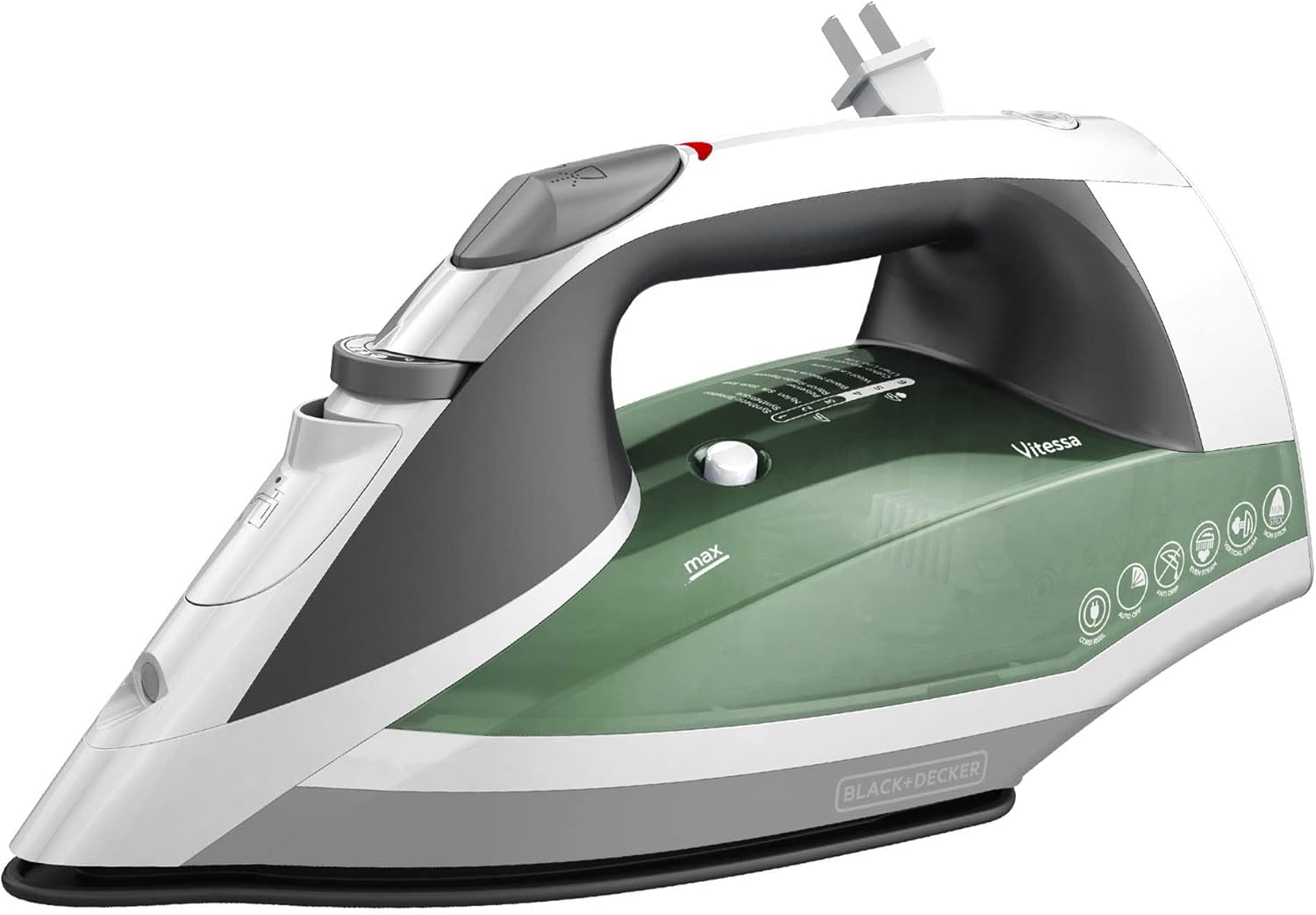
Figure 1: The BLACK+DECKER Vitessa Advanced Steam Iron, Model ICR2020, in green and white.
2. 重要な安全上の注意事項
- アイロンを使用する前に、すべての指示をお読みください。
- アイロンは家庭用としてのみ使用してください。
- 感電の危険を防ぐため、アイロンを水やその他の液体に浸さないでください。
- The iron should always be turned to 'Min' before plugging or unplugging from the outlet. Never yank cord to disconnect from the outlet; instead, grasp plug and pull to disconnect.
- Do not allow cord to touch hot surfaces. Let iron cool completely before putting away. Loop cord loosely around the iron when storing.
- 水を入れたり空にしたりするとき、および使用しないときは、必ずコンセントからアイロンを外してください。
- コードが破損している場合、またはアイロンを落としたり破損した場合は、アイロンを使用しないでください。感電の危険を避けるため、アイロンを分解しないでください。資格のあるサービス担当者に点検と修理を依頼してください。不適切な組み立ては、アイロンの使用時に感電の危険を引き起こす可能性があります。
- 子供が使用している、または子供が近くで使用している器具には、綿密な監視が必要です。 接続中またはアイロン台の上にアイロンを放置しないでください。
- やけどは、高温の金属部品、熱湯、蒸気に触れると発生する可能性があります。 スチームアイロンを逆さまにするときは注意してください。リザーバーに熱湯がある場合があります。
- アイロンは安定した表面に置いて使用する必要があります。
- When placing the iron on its heel rest, ensure that the surface on which it is placed is stable.
3.製品オーバーview および機能
The BLACK+DECKER Vitessa Advanced Steam Iron is designed for efficient and convenient garment care. It incorporates several features to enhance your ironing experience.
主な特徴:
- TrueGlide Nonstick Soleplate: The enhanced nonstick soleplate is engineered to glide smoothly across all types of fabrics, preventing snags and sticking.
- SmartSteam テクノロジー: This intelligent system automatically optimizes the amount of steam based on the temperature you select, eliminating guesswork and ensuring optimal results for various fabrics.
- 縦型蒸し: Use the iron as a steamer for quick touch-ups on hanging garments, drapes, or curtains, providing versatility beyond traditional ironing.
- 自動シャットオフ: For added peace of mind, the iron features a motion-sensitive automatic shutoff. It turns off when left unattended for 30 seconds on its side or soleplate, and after 8 minutes on the heel rest.
- Tangle-Free Retractable Cord: The spring-loaded cord unwinds and retracts quickly with a push button, ensuring easy use and clutter-free storage.

Figure 2: Close-up of the Even Steam Soleplate Design, showing the distribution of steam vents for consistent steam flow.

Figure 3: The TrueGlide Nonstick Soleplate, designed for smooth gliding over fabrics.

Figure 4: The iron highlighting its Anti-Drip and Automatic Shutoff features for safety and convenience.
4. セットアップ
初めて使用する前に:
- Remove any labels, tags, or stickers from the iron body and soleplate.
- Wash the water tank before first use.
- It is recommended to iron an old piece of fabric (cotton towel or sheet) for a few minutes to ensure any manufacturing residue is removed from the soleplate.
水タンクへの給水:
- アイロンが電源コンセントから抜かれていることを確認してください。
- アイロンの上部にある給水カバーを開きます。
- Using a clean measuring cup, slowly pour tap water into the opening until the water level reaches the 'MAX' line indicated on the water tank. Do not overfill.
- 注水カバーをしっかりと閉めてください。

図5:上 view of the iron, indicating the water fill opening and controls.
5. Operating Your Iron
Selecting Temperature and Steam Settings (SmartSteam):
- アイロンを標準のコンセントに差し込みます。インジケーターライトが点灯します。
- Turn the temperature dial to the desired fabric setting. The SmartSteam Technology will automatically adjust the steam output based on your selected temperature. Refer to the fabric guide on the iron for appropriate settings (e.g., 1 for Synthetics, 6 for Cotton/Linen).
- アイロンが温まるまでお待ちください。選択した温度に達すると、インジケーターライトが消灯します。

Figure 6: The iron demonstrating SmartSteam Technology, which automatically regulates and optimizes steam based on the fabric setting.
ドライアイロン:
For dry ironing, ensure the steam selector is set to the 'Dry' position (no steam icon). Select the desired temperature and wait for the iron to heat up.
Steam Ironing (Continuous Steam, Burst of Steam, Vertical Steam):
- 連続スチーム: For continuous steam, select a temperature setting within the steam range (typically 4-6 on the dial). The SmartSteam feature will automatically provide the appropriate steam level.
- 蒸気のバースト: For an extra burst of steam to tackle stubborn wrinkles, press the 'Burst of Steam' button located on the handle. Wait a few seconds between bursts to allow steam to regenerate.
- 垂直スチーム: Hold the iron in a vertical position, about 1 inch from the fabric. Press the 'Burst of Steam' button to release steam for vertical steaming of hanging garments or drapes.
Using the Spray Mist:
dへampen fabrics, press the 'Spray Mist' button located on the handle. This is useful for removing tough wrinkles or for fabrics that require moisture before ironing.
自動シャットオフ機能:
The iron is equipped with a 3-way automatic shutoff for safety:
- If left motionless on its soleplate or side, the iron will shut off after 30 seconds.
- If left motionless on its heel rest, the iron will shut off after 8 minutes.
To reset the iron after an automatic shutoff, simply move the iron. The indicator light will turn on, and the iron will begin reheating to the selected temperature.
6. お手入れとメンテナンス
空にして保管する:
- アイロンのプラグを抜いて完全に冷まします。
- Open the water fill cover and invert the iron over a sink to empty any remaining water.
- 給水カバーを閉じます。
- To store, press the retractable cord button to retract the cord fully into the iron. Store the iron upright on its heel rest to prevent damage to the soleplate.

Figure 7: The iron's base showing the push-button retractable cord for easy storage.
セルフクリーニング機能:
To maintain optimal performance and prevent mineral buildup, use the self-cleaning function regularly (e.g., once a month or as needed).
- 水タンクを「MAX」の線まで満たします。
- アイロンを差し込み、温度ダイヤルを「MAX」に設定します。
- アイロンが温まったら(インジケーターライトが消えたら)、プラグを抜いてください。
- Hold the iron horizontally over a sink. Press and hold the 'Self-Clean' button. Hot water and steam will flush out minerals.
- 水タンクが空になるまでアイロンをゆっくりと前後に揺らします。
- Release the 'Self-Clean' button and place the iron on its heel rest to cool.
ソールプレートのクリーニング:
- ソールプレートを掃除するには、広告を使用してくださいamp 布と中性の非研磨クリーナーを使用してください。
- Never use abrasive scouring pads or metal cleaners, as these can scratch the nonstick coating.
外部洗浄:
アイロンの外側を柔らかくて乾いた布で拭いてください。amp 布で拭いてください。強力な化学薬品や研磨剤入りの洗剤は使用しないでください。
7。 トラブルシューティング
| 問題 | 考えられる原因 | 解決 |
|---|---|---|
| 鉄は熱くなりません。 | Iron is unplugged or power outlet is not working. Automatic shutoff activated. | Check power connection. Move iron to reset automatic shutoff. |
| 蒸気が出ない、または蒸気が不足しています。 | Water tank is empty. Temperature setting is too low for steam. Steam vents are clogged. | Fill water tank. Set temperature to steam range (4-6). Perform self-clean cycle. |
| 底板から水が漏れます。 | Temperature is too low for steam. Water tank is overfilled. | Increase temperature to steam range. Do not fill past 'MAX' line. |
| アイロンは布地にくっつきます。 | Soleplate is dirty or damaged. Temperature setting is too high for fabric. | 底板をきれいにしてください。生地の種類に応じて温度を調整してください。 |
8. 仕様
| 特徴 | 詳細 |
|---|---|
| ブランド | ブラック+デッカー |
| モデル名 | スチームアイロン |
| モデル番号 | ICR2020 |
| 色 | 緑 |
| 特集 | Auto Shutoff, Lightweight, SmartSteam Technology, Vertical Steaming, Retractable Cord |
| 製品寸法 | 長さ12.3インチ x 幅5.8インチ |
| アイテム重量 | 2ポンド |
| ベース素材 | Stainless Steel (TrueGlide Nonstick Soleplate) |
| ワットtage | 1200ワット |
| 欧州連合 | 050875816305 |
| GTIN | 00050875816305 |

Figure 8: Visual representation of the iron's dimensions.
9. 保証と顧客サポート
保証情報:
This BLACK+DECKER Vitessa Advanced Steam Iron (Model ICR2020) comes with a 2年間の限定保証. This warranty covers any defects in material or workmanship under normal household use from the date of original purchase. Please retain your receipt as proof of purchase to validate your warranty.
The warranty does not cover damage resulting from misuse, abuse, neglect, commercial use, or any use not in conformity with the instructions provided in this manual. It also does not cover normal wear and tear.
カスタマーサポート:
For warranty service, technical assistance, or product information, please contact BLACK+DECKER customer support. Refer to the contact information provided on the product packaging or visit the official BLACK+DECKER web最新のサポート詳細については、サイトをご覧ください。
Please have your model number (ICR2020) and proof of purchase available when contacting customer support.